
A student uploads a video project to an online drive. A small business launches a web store. A development team deploys a new application that suddenly becomes popular. In each case, someone eventually sees a cloud bill and asks a deceptively simple question: why does this cost what it costs?
Cloud computing feels intangible because no server arrives at the door. Yet every file is stored on physical drives, every request is processed by hardware, and every byte travels through networks that must be built, powered, secured, and maintained.
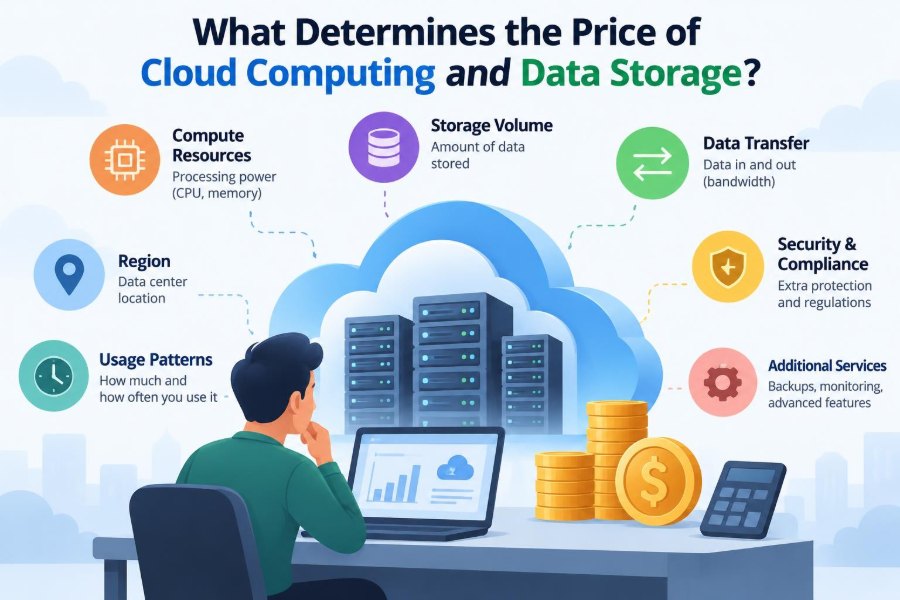
The confusing part is that cloud services rarely have one single price. A bill may include storage, processing time, data transfers, backup copies, requests, software licenses, support, and taxes. A cheap-looking rate can become expensive if it is attached to the wrong usage pattern.
Understanding the cost model does not require running a data center. It requires recognizing which resources an application consumes, when it consumes them, and which design choices turn small activities into recurring charges.
☁️ Cloud Pricing Is Usage-Based Infrastructure
Cloud computing is commonly described as renting computing resources over the internet. Instead of buying servers, installing them in a room, and operating them for years, an organization can rent processing power, storage, databases, and other services for as long as they are needed.
This usually changes spending from a large upfront capital expense into an operating expense that varies with use. That flexibility is valuable, but it also means costs can rise without anyone placing a new hardware order.
The fundamental idea is simple: cloud providers charge for resources consumed, reserved, or made available for you. The exact unit differs by service.
🧾 Why a Cloud Bill Has Many Line Items
A virtual machine might be priced by the second or hour it runs. Object storage may be priced by gigabyte-month, meaning both the amount stored and the length of time matter. A managed database can charge for compute capacity, storage, backups, and input/output operations separately.
Cloud bills therefore resemble utility bills more than a single product receipt. Electricity, water, and phone service all have different meters; cloud platforms have meters for different technical activities.
- Compute: processor, memory, and sometimes accelerator use.
- Storage: capacity occupied by files, disks, databases, and backups.
- Network: data moved between users, regions, or external networks.
- Operations: requests, reads, writes, scans, and API calls.
- Service features: monitoring, security tools, support plans, and licenses.
🏢 The Physical Systems Behind the “Cloud”
Although cloud services are accessed through software, their price reflects physical infrastructure. Providers operate data centers with server racks, storage devices, networking equipment, cooling systems, power distribution, spare parts, and skilled operations staff.
They also build redundancy. Hardware fails, power equipment needs maintenance, and network links can be interrupted. Making a service reliably available often means operating duplicate systems in separate rooms, buildings, or geographic locations.
Users do not pay a direct invoice for each fan or network switch. Instead, the provider spreads those costs across services. Features that require more hardware, more duplication, or stricter operating procedures generally cost more.
⚙️ Compute Capacity: CPU, Memory, and Runtime
Compute charges pay for work done by processors and memory. A web application that handles a few visitors may need a small amount of capacity; a data-analysis job that scans large datasets or trains a model may need far more.
Memory matters because applications need working space while they run. A machine with many CPU cores but too little memory can perform poorly or fail. Conversely, reserving a large-memory machine for a lightweight task wastes capacity and increases the bill.
Runtime is equally important. A server left running around the clock costs more than one started only for a scheduled task. Some serverless services charge only while code is executing, but frequent invocations and longer execution times still add up.
🧠 Specialized Hardware Changes the Cost Curve
Not every workload runs efficiently on ordinary CPUs. Graphics processing units, AI accelerators, high-memory machines, and fast local storage can greatly reduce processing time for certain tasks. They are also scarcer and more expensive resources.
A short job on an accelerator may cost less overall than a long job on a CPU if it completes much faster. But using specialized hardware for work that does not benefit from it is an expensive mismatch.
The useful comparison is not simply hourly price. Compare the cost to complete the actual task, including setup time, data movement, and the chance of needing to rerun it.
💾 Storage Capacity Is Only the Starting Point
Storage pricing usually begins with the amount of data kept over time. One gigabyte stored for a portion of a month costs less than one gigabyte stored all month; many platforms aggregate these measurements into gigabyte-months or similar units.
Capacity is not the entire story. Storage systems vary in speed, durability, availability, and access behavior. A file that must be retrieved instantly and frequently needs a different service from an archive that may sit untouched for years.
A familiar analogy is housing. A climate-controlled apartment near transit costs differently from a distant storage locker. Both hold belongings, but accessibility and service level are not the same.
🗂️ Storage Classes Match Access Patterns
Cloud providers commonly offer several storage tiers. Names differ, but the pattern is consistent: frequent-access storage costs more to keep, while archive tiers cost less to hold but can charge more or take longer when data is retrieved.
| Storage pattern | Typical characteristics | Good fit |
|---|---|---|
| Frequent access | Quick retrieval, higher ongoing storage price | Website assets, active documents, application data |
| Infrequent access | Lower storage price, possible retrieval charges | Older reports, occasional backups |
| Archive | Lowest holding cost, slower or costlier retrieval | Long-term records and rarely used media |
The lowest storage rate is not automatically the lowest total cost. Restoring a large archive after an incident may create retrieval and network charges precisely when access is most urgent.
🛡️ Durability and Availability Are Different Promises
Durability describes the likelihood that stored data will remain intact over time. Availability describes whether users can access a service when they need it. A system can be highly durable yet temporarily unavailable, or highly available in one place without protection against a regional event.
Higher durability often requires redundant copies, error checking, and repair processes. Higher availability may require multiple active systems and automated failover. Those measures consume additional capacity and operational effort.
When choosing a service, ask what failure matters most: losing the data, being unable to access it briefly, or both. Paying for the wrong protection level is just as wasteful as paying for too little.
🔁 Replication Multiplies Storage Footprints
Replication means maintaining copies of data in more than one physical location or failure domain. It protects against equipment and facility failures, and it can improve local access for users in different places.
However, copies are not free. A dataset replicated across regions may use several times the raw capacity of a single copy, and keeping copies synchronized can generate network and write activity.
Replication is often justified for critical production systems. It may be unnecessary for data that can be recreated easily, such as temporary processing outputs. Classification is the key: not every file deserves the same protection.
📦 Backups, Snapshots, and Versions Add Hidden Volume
Backups allow restoration after deletion, corruption, ransomware, or software errors. Snapshots capture the state of a disk or dataset at a point in time. Versioning retains earlier copies when an object is replaced or deleted.
These features are valuable because many real problems are logical mistakes, not hardware failures. Yet they can quietly grow storage use. A large file changed repeatedly may leave many versions, while an unexpired snapshot can preserve blocks that users assumed were gone.
Set retention periods deliberately. Keep enough history to meet recovery needs, but review whether old copies are still required and whether automated policies remove them on schedule.
🌐 Data Transfer Often Creates the Surprise
Moving data is frequently more complicated than storing it. Providers may charge differently for data entering a cloud platform, leaving it for the public internet, moving between regions, or crossing service boundaries.
For example, a video service can have modest storage costs but substantial outbound transfer costs when many viewers stream its files. A database copied to another region may also incur network charges during replication.
Cloud architectures should map data flows, not merely count servers. Ask where data originates, where it is processed, where it is stored, and where users retrieve it.
🗺️ Region Choice Affects Both Price and Performance
Cloud providers operate in geographic regions, and prices can vary among them. Local infrastructure costs, energy markets, capacity, taxes, service availability, and demand all influence regional pricing.
Choosing the nearest region can reduce network latency, the delay between a request and a response. It can also simplify data residency requirements, which may matter for organizations subject to contractual or legal obligations.
But the nearest location is not always the only consideration. A less expensive region may be suitable for noninteractive batch processing, while a customer-facing application may justify a region closer to its users.
🚦 Requests and Operations Are Metered Too
Many storage and serverless services charge for operations: listing objects, reading data, writing records, invoking functions, or scanning tables. Each action may cost very little, but automated systems can perform millions of actions.
A poorly designed application might repeatedly fetch the same configuration file, query a database for data that rarely changes, or list an entire storage bucket to find one object. The issue is not that requests are inherently bad; it is that unnecessary requests scale with traffic.
Caching, indexes, batching, and pagination can reduce needless operations while also making software feel faster.
🗃️ Database Pricing Reflects Several Resources
Managed databases remove much of the work of installing, patching, backing up, and operating database software. Their bills can still include multiple dimensions: running capacity, stored data, backup retention, read and write activity, and network use.
Different database designs charge differently because they solve different problems. A relational database is useful for structured data and transactions. A key-value or document database may scale request patterns differently. An analytical warehouse is designed for large queries across many records.
Choosing a database merely because it looks inexpensive per hour can lead to higher operational or query costs later. Match the data model and access pattern to the service.
🔍 Queries Can Cost More Than the Data They Return
Analytical services often charge according to the amount of data scanned by a query. A query that returns ten rows may still scan a huge table if it is written broadly or the data is not organized efficiently.
Partitioning divides data into manageable groups, often by date or category, so that a query can read only the relevant portion. Columnar formats store values by column, allowing analytical systems to skip columns that are not requested.
Selecting only needed fields and filtering early are practical habits. They reduce cost because the system does less reading, and they often improve response times as well.
📈 Demand Spikes and Autoscaling
Autoscaling adds or removes capacity as demand changes. It can keep an application responsive during a traffic surge and avoid paying for peak capacity at quiet times.
Its trade-off is variability. A coding error, malicious traffic, or unexpectedly popular campaign can trigger more activity and therefore more cost. Autoscaling does not decide whether demand is legitimate; it responds to measured conditions.
Set sensible limits, monitor behavior, and test how the system responds under load. Cost controls should not stop a useful service from scaling, but they should make abnormal growth visible quickly.
📅 On-Demand, Committed, and Interruptible Capacity
Cloud providers commonly offer several ways to pay for compute. On-demand capacity is flexible: run it when needed and stop when finished. Committed or reserved plans offer lower rates in exchange for a longer commitment to a predictable level of use.
Interruptible or spare-capacity options can be cheaper but may be reclaimed by the provider. They are best for fault-tolerant workloads, such as batch processing, rendering, or jobs that can restart safely.
- On-demand: suitable for uncertain, temporary, or changing workloads.
- Committed capacity: suitable for stable baseline use that is well understood.
- Interruptible capacity: suitable for flexible jobs designed to tolerate interruption.
A discount is useful only if the commitment matches real use. Paying for unused reserved capacity is still waste.
📜 Software Licenses and Managed Features
Some cloud costs come from software rather than raw infrastructure. Commercial operating systems, databases, security products, and enterprise applications may include license charges. A managed service may also charge for the operational work it performs on the customer’s behalf.
Managed services can cost more per unit than self-managed virtual machines, yet be cheaper in total when they reduce staffing time, outages, patching work, and operational risk. The comparison should include people and reliability, not only instance rates.
Check whether a price includes licenses, support, backups, encryption features, or monitoring. Two apparently similar products may package very different responsibilities.
🔐 Security Controls Have Real Resource Costs
Encryption, key management, logging, threat detection, identity controls, and security monitoring are essential parts of many cloud environments. Some are included in a base service; others create charges based on requests, stored logs, analyzed events, or managed keys.
Turning off security tooling solely to reduce a bill is usually a poor trade. A better approach is to collect the logs needed for investigation and compliance, then apply retention policies and filtering so that duplicate or low-value data does not accumulate indefinitely.
Security spending should be intentional. Understand what each control protects, how it is metered, and who reviews the resulting information.
📊 Monitoring Prevents Cost Problems From Staying Invisible
Cost monitoring is the practice of tracking usage and spending as services run. Most cloud platforms offer budgets, alerts, usage reports, tags, and dashboards. These tools do not eliminate charges, but they reveal trends before month-end.
Useful signals include a sudden rise in outbound data, a storage bucket growing faster than expected, idle instances running overnight, or a database consuming more capacity after a release.
Alerts should go to people who can investigate them. An unread budget email is not a control. Teams also need enough context to distinguish an expected product launch from a malfunction.
🏷️ Tags Make Spending Understandable
Tags are labels attached to cloud resources, such as project, environment, department, owner, or application. They turn a large account-wide bill into a clearer view of who uses which resources.
Without consistent tags, an unused disk or forgotten test database may be difficult to identify. With them, a team can see whether a cost belongs to production, development, a temporary experiment, or a specific customer-facing feature.
Tagging works only when it is enforced. Define a small common set of labels, apply it through deployment tools where possible, and periodically find resources missing an owner.
🧹 Idle Resources Are a Common Source of Waste
Unused resources are easy to create because cloud services are quick to provision. A developer may launch a test machine, attach a disk, create a load balancer, or keep an old public IP address, then move on after the experiment ends.
Some resources continue billing even after the main server is stopped. Storage volumes, snapshots, reserved addresses, and managed services often have independent charges.
Regular cleanup is not merely housekeeping. It is a way to verify that each resource has a current purpose, an owner, and an expected lifetime.
🧪 Development and Test Environments Need Different Rules
Production systems may need continuous operation and strong resilience. Development, demonstration, and training environments often do not. Applying production-sized configurations everywhere can multiply spending without improving the customer experience.
Teams can schedule nonproduction systems to shut down outside working hours, use smaller datasets, set expiration dates for experiments, and use lower-cost environments where appropriate.
These choices should be made carefully. A test environment that is too unrealistic can miss performance problems, while one that is identical to production may be unnecessarily expensive. The right level depends on what is being tested.
🧭 Architecture Choices Shape Long-Term Bills
Architecture is the overall arrangement of an application’s components. A design with many tightly connected services across regions may be resilient, but frequent cross-network communication can be costly. A design that centralizes everything may be cheaper initially but create latency or reliability constraints.
There is no universal lowest-cost architecture. The right design balances performance, resilience, security, maintenance effort, and budget for a particular workload.
Before adding a component, identify the problem it solves and its ongoing meters. Simplicity can reduce cost, but simplicity should not mean ignoring necessary backup, security, or availability requirements.
📉 Unit Economics Connect Technology to Value
Unit economics asks what it costs to deliver one meaningful unit of a product: one active user, one order, one report, one hour of video, or one processed document. This is more informative than looking only at the total monthly cloud bill.
For a hypothetical photo-sharing application, storage cost per user might stay stable while outbound transfer cost rises when users view more high-resolution images. That pattern suggests optimizing image delivery, not necessarily deleting stored photos.
Tracking cost alongside usage helps teams distinguish healthy growth from inefficient growth. A larger bill is not automatically bad if the product is serving proportionally more value.
⚠️ Common Pricing Mistakes to Avoid
Several mistakes repeatedly produce unpleasant surprises. They are usually planning and visibility problems, not proof that cloud services are inherently unpredictable.
- Comparing only compute prices while ignoring storage, transfers, and operations.
- Choosing archive storage without estimating retrieval needs.
- Buying commitments before usage has stabilized.
- Leaving backups and versions without retention policies.
- Ignoring data movement between regions and services.
- Allowing resources without tags or owners.
- Treating the monthly invoice as the first cost report.
Each has a practical remedy: model expected use, instrument the environment, and revisit assumptions when the application changes.
🧮 Estimate Costs Before Deployment
Pricing calculators can help estimate a planned system, but their output is only as reliable as the assumptions entered. Start with expected request volume, stored data, retention periods, compute runtime, locations, and likely data transfer paths.
Use scenarios rather than one optimistic forecast. Consider a normal month, a busy month, a restore event, and a growth case. For variable workloads, include the effect of caching failures or unexpected traffic.
After launch, compare estimates with actual usage. The goal is not perfect prediction; it is learning which assumptions matter most and improving the next estimate.
🤝 Cost Optimization Is a Shared Responsibility
Finance teams understand budgets and forecasting. Engineers understand architecture and usage patterns. Security teams understand control requirements. Product teams understand which experiences create customer value. Good cloud cost management needs these perspectives together.
This approach is often called financial operations, or FinOps. It is not simply a mandate to spend less. It is a discipline of making timely trade-offs between cost, speed, quality, and accountability.
A cheaper design that causes outages may be a poor outcome. An expensive feature that customers never use is also a poor outcome. Shared visibility makes both cases easier to recognize.
🎯 The Core Principle: Pay for Resources, Design for Intent
Cloud computing and data storage prices are determined by more than a number of servers or terabytes. They reflect capacity, duration, location, access frequency, data movement, redundancy, operational activity, software, and service level.
The most effective response is not chasing the lowest published rate. It is matching resources to a clearly understood need: use fast storage for active data, archive data that is genuinely cold, protect critical information appropriately, and stop paying for resources with no purpose.
When teams can explain what each major resource does, who owns it, and what activity drives it, cloud bills become manageable engineering information rather than a monthly mystery.
Cloud cost is ultimately the price of the technical choices an organization makes over time. Understand the meters, measure real behavior, and let the value of the workload guide the design. ☁️💾📊