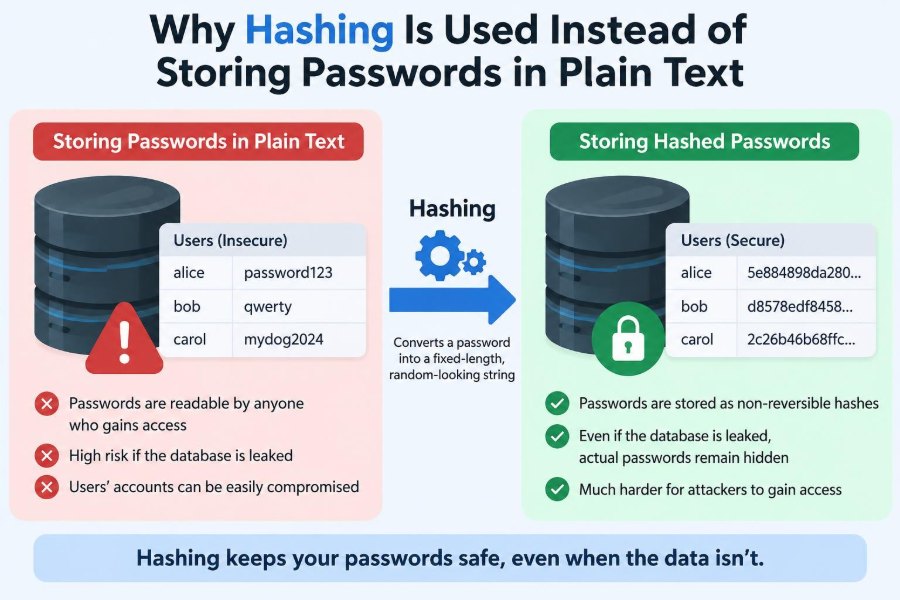

You create an account for a shopping site, a streaming service, or a work tool. You choose a password, type it twice, and reasonably expect the service to check that password only when you sign in.
Behind that small interaction is a serious design decision: what should the service keep in its database? The simplest answer would be the password itself. But simple storage creates a dangerous secret collection—one that can harm every user if it is exposed.
Password hashing changes the model. Instead of retaining the secret you typed, a well-designed system stores a derived value that helps verify a future login without normally revealing the original password.
This distinction matters to students building their first applications and to professionals responsible for real systems. It explains why password security involves more than hiding a database field or adding an encryption label.
🔑 The Password Is a Shared Secret
A password is meant to be known by a very small group: ideally, only the account holder. A website needs a way to test whether a login attempt comes from someone who knows that secret, but it does not need to know the password during ordinary day-to-day operation.
This is a useful principle called data minimization: retain only what is necessary for the job. If an application can verify a password without keeping its readable form, storing readable passwords creates unnecessary risk.
📄 What Plain-Text Storage Means
A password is stored in plain text when the database contains the exact characters a person entered, such as Sunset!River42. Anyone with sufficient access to that database, backup, export, or log can read it directly.
Plain text is not made safe merely because a database is behind a firewall or because an administration screen does not display the password. Access mistakes, software flaws, stolen backups, and insider misuse can all expose stored data.
🚨 Why a Plain-Text Database Is So Harmful
A data breach is bad whenever personal information is exposed. Plain-text passwords make the impact worse because the stolen values are immediately usable; no additional technical work is required to interpret them.
Attackers may try the passwords on the original service, email providers, social networks, financial services, or workplace systems. This is especially damaging because many people reuse passwords, even though each important account should have its own unique one.
🧠 Hashing Changes the Verification Problem
A hash function takes input data and produces a fixed-looking output called a hash or digest. For passwords, the system stores the result of a password-hashing process rather than the password itself.
At login, the application processes the entered password again and checks whether the new result matches the stored result. It is testing knowledge of the password, not retrieving the password from storage.
🔄 A Simple Login Flow
Consider a hypothetical account with the password Maple-Train-87. During registration, the server creates a random value called a salt, runs the password through a password-hashing algorithm with that salt, and saves the resulting record.
- The person enters a password when creating the account.
- The server generates a fresh, random salt.
- The server derives a password hash using the password, salt, and chosen settings.
- The database stores the hash, salt, and settings—not the readable password.
- At login, the server repeats the derivation with the submitted password and compares the result safely.
If the results correspond, the user is authenticated. If not, access is denied without the server needing to display or recover the original password.
➡️ Hashing Is Designed to Be One-Way
Encryption is intended to be reversible with the right key. Hashing, in contrast, is designed to be one-way: given the output, it should be impractical to reconstruct the original input.
That word “impractical” matters. A hash is not magic and does not make weak passwords strong. An attacker can still guess candidate passwords, hash those guesses, and look for a match. Strong password storage makes this guessing expensive and less effective.
🧩 The Hash Is Not a Password Copy
A common misconception is that a hash is simply a scrambled password waiting to be unscrambled. A properly selected password hash is not a reversible encoding and does not contain a hidden copy of the password in the way encrypted data does.
Different inputs normally lead to different outputs, but the verification process only needs a consistent result: the same password, used with the same salt and settings, should produce the same derived value for comparison.
🧂 Salts Prevent Easy Reuse of Attack Work
A salt is a unique random value added to the password-hashing process. It is stored alongside the hash and does not need to be secret. Its purpose is to make each stored password record distinct.
Without salts, two people with the same password would have the same hash. An attacker could recognize reused passwords inside the database and prepare lookup tables for common passwords once, then apply them broadly.
With unique salts, identical passwords produce different stored results. An attacker must attack each record separately, which removes a major shortcut.
🗂️ What a Password Record Usually Contains
A secure password record often includes more than one opaque string. It needs enough information to verify a later login and, eventually, to upgrade the protection method.
| Stored item | Purpose |
|---|---|
| Password hash | The derived value compared during login. |
| Salt | Unique random input that prevents identical hashes for identical passwords. |
| Algorithm identifier | Indicates which password-hashing method created the record. |
| Work settings | Records cost, memory, or parallelism settings needed for verification. |
These values can be stored together in a standard encoded format. They are not equivalent to storing the password itself.
🐢 Slow Hashing Is a Security Feature
Many familiar hash functions are deliberately fast because they are useful for checksums, file identification, and data structures. Fast calculation is valuable in those jobs but harmful for password storage.
Password-hashing algorithms are designed to consume noticeable computation time, and some also consume substantial memory. A legitimate user experiences a small delay at login; an attacker attempting billions of guesses faces that cost repeatedly.
The goal is not to make login frustrating. The goal is to make high-volume guessing far more costly than a single normal authentication attempt.
⚙️ Work Factors Must Be Chosen Deliberately
Password-hashing systems commonly expose settings that control their cost. Depending on the algorithm, these may affect processing time, memory use, or the amount of parallel work permitted.
There is no universal setting that remains correct forever. Organizations should test their hardware, expected login volume, and acceptable response time, then review settings as equipment and attack capabilities change.
Making the setting absurdly high can cause outages or invite denial-of-service problems. Making it too low gives attackers cheaper guesses. Security engineering requires a measured trade-off.
🧮 Why General-Purpose Hashes Are Not Enough
Algorithms such as SHA-256 are useful cryptographic primitives, but using a fast general-purpose hash directly for passwords is usually a poor choice. Their speed helps attackers evaluate guesses rapidly, including on specialized hardware.
Modern password storage should use a purpose-built, adaptive password-hashing function. Common examples include Argon2id, bcrypt, scrypt, and PBKDF2, selected and configured according to the application’s platform and security requirements.
Older systems may have constraints, but “we used a hash” is not by itself evidence of sound password storage.
🧱 Memory Hardness Adds Another Barrier
Some password-hashing methods are described as memory-hard. They require significant memory for each attempted password guess, not merely processor cycles.
This matters because attackers often seek hardware that performs huge numbers of simple calculations efficiently. Requiring memory makes large-scale guessing more resource-intensive and can reduce the advantage of highly parallel cracking setups.
Memory hardness is not a substitute for salts, strong passwords, or sensible settings. It is another layer that changes the economics of an offline attack.
🔍 Verification Requires Careful Comparison
A login system should use its library’s recommended verification function instead of manually rebuilding comparisons. Well-designed functions handle the record format and compare derived values in a way that avoids avoidable implementation errors.
One concern is timing leakage: a naïve comparison might stop at the first different character, revealing tiny timing differences. Constant-time comparison techniques reduce the chance that such differences disclose useful information.
This detail is rarely the largest password risk, but secure systems are built by addressing many small avoidable weaknesses.
🔐 Hashing Is Different From Encryption
Both hashing and encryption protect data in different situations, which can make the terms easy to confuse. The deciding question is simple: does the application need to recover the original value later?
| Technique | Can the original normally be recovered? | Typical use |
|---|---|---|
| Hashing | No; it supports verification. | Password verification, integrity-related checks. |
| Encryption | Yes, using a key. | Data that must later be read, such as protected documents. |
| Encoding | Yes, without a secret key. | Changing representation for transport or storage. |
Encrypting passwords is generally less desirable than password hashing because the decryption key becomes an additional high-value secret. If it is compromised, the stored passwords may become readable.
📬 Encoding and Obfuscation Do Not Protect Passwords
Base64, hexadecimal, URL encoding, and similar transformations make data look different, but they are not security controls. Anyone can reverse them using ordinary tools.
Likewise, renaming a database column, hiding a form field, or applying a homemade “scrambling” method does not replace established password-hashing algorithms. Security depends on the strength of the method, not on making its format unfamiliar.
🧪 A Hash Can Still Be Attacked by Guessing
If attackers obtain password hashes, they can perform an offline attack: try likely passwords locally, derive hashes with the known salt and settings, and compare the results. They do not have to keep asking the website for permission to try.
This is why password quality still matters. A short, common, or predictable password may be discovered quickly even when stored with a modern algorithm. Hashing reduces exposure; it does not erase the weakness of easy guesses.
📚 Dictionaries, Rules, and Password Patterns
Password guessing is not limited to randomly trying every possible character sequence. Attackers often start with common words, leaked passwords, predictable substitutions, keyboard patterns, names, and likely variations.
For example, changing password to P@ssw0rd! looks more complex to a person but follows a well-known pattern. Longer, unique passphrases made from unrelated words are generally easier to remember and harder to guess than a short, decorated common word.
♻️ Password Reuse Turns One Breach Into Many Risks
The most serious consequence of a disclosed password is often not access to the breached site. It is the possibility that the same password works elsewhere, especially on an email account that can reset other accounts.
This practice is called credential stuffing when attackers try known username-and-password combinations across many services. Password hashing protects a service’s stored records, but it cannot prevent users from reusing a password that was exposed somewhere else.
A password manager helps by generating and remembering a distinct password for every account.
🛡️ Multi-Factor Authentication Changes the Outcome
Multi-factor authentication (MFA) requires an additional proof beyond the password, such as an authenticator-app code, a security key, or a device-based approval. It can reduce the chance that a stolen password alone leads to account access.
MFA is valuable, but it does not justify weak password storage. Users may still face phishing, account recovery abuse, malware, or lost access, and the service still has a duty to handle its password database responsibly.
The strongest approach combines unique passwords, secure hashing, rate limits, careful recovery procedures, and phishing-resistant factors where appropriate.
🚧 Rate Limiting Protects Online Logins
Online guessing differs from offline cracking because the application can control the interaction. Rate limiting slows repeated attempts from an account, device, network source, or other signal; monitoring can also identify suspicious patterns.
Useful responses may include progressive delays, temporary challenges, or carefully designed lockouts. Overly aggressive lockouts can be abused to deny legitimate users access, so defenses should be designed with both security and usability in mind.
Rate limiting complements hashing. It is mainly for attacks against a live login endpoint, while slow salted password hashes help if records are stolen.
🕵️ Secure Storage Does Not Stop Phishing
A perfectly hashed password can still be entered into a convincing fake website. In that case, the attacker receives the password before the real service has a chance to protect it.
Users should check domains, be cautious with unexpected sign-in prompts, and rely on password managers, which can help reveal when a saved credential does not match the current site. Organizations can reduce risk with clear sign-in flows and stronger authentication options.
🏗️ Password Handling Begins Before the Database
Passwords should be protected while they travel from the user’s browser or app to the server. Transport encryption, normally HTTPS using TLS, helps prevent interception in transit. It does not replace hashing at rest; both controls address different points of exposure.
Applications should also avoid placing passwords in URLs, analytics events, error reports, debug output, or ordinary application logs. A carefully hashed database is undermined if a raw password appears somewhere else in the system.
🧹 Logs, Backups, and Support Tools Are Often Overlooked
Security failures do not always come from the primary production database. Backups, test environments, database snapshots, support tickets, and monitoring tools may copy sensitive information into places with different access controls.
Good operational practice includes restricting access, protecting backups, using sanitized test data, and reviewing logs for accidental secret collection. Password fields should be treated as sensitive from the moment a user submits them.
🔁 Reset Flows Need Their Own Protection
A password reset system should not email the existing password, because a properly designed service cannot retrieve it. Instead, it sends or displays a time-limited, single-use reset mechanism that lets the account holder choose a new password.
Reset tokens are powerful credentials. They should be generated securely, expire promptly, be invalidated after use, and be handled carefully in logs and browser history. Account recovery can otherwise become the weakest route into an account.
📈 Password Hashes Should Be Upgraded Over Time
Algorithms and cost settings that were reasonable years ago may no longer offer the same resistance. A sound design records enough metadata to recognize older password records and replace them gradually.
A common approach is rehashing on successful login. After verifying an old record, the server derives a new hash using the current recommended algorithm or stronger settings, then replaces the previous record. This avoids requiring every user to reset immediately.
If a serious weakness or exposure occurs, a forced reset may still be appropriate. The response should match the specific risk and operational circumstances.
🧑💻 Developers Should Use Trusted Libraries
Implementing password cryptography from scratch is unnecessary and risky. Mature platform libraries and reputable security packages provide vetted password-hashing and verification functions, safe record formats, and guidance for configuration.
Developers should use high-level APIs where available, generate salts through the library or a cryptographically secure random generator, and keep secrets out of source code and logs. Custom cryptographic schemes often fail at details that established tools already handle.
❌ Common Password Storage Mistakes
- Saving passwords directly: A database leak becomes immediate password disclosure.
- Using unsalted fast hashes: Identical passwords match and large-scale guessing becomes cheaper.
- Using a single shared salt: This is better than none in limited ways but loses the protection of unique per-password salts.
- Inventing a secret algorithm: Unreviewed designs are difficult to assess and maintain.
- Logging submitted credentials: Security can fail outside the password table.
- Using reversible encryption by default: It retains a path to recover passwords that verification does not need.
These mistakes often come from treating passwords as ordinary application data. They are authentication secrets and deserve a specialized storage process.
🏢 What Organizations Owe Their Users
Users cannot inspect a service’s password database or choose its hashing settings. That imbalance creates a responsibility for organizations to adopt current practices, limit employee access, test systems, and prepare an incident response plan.
Clear communication also matters. If a security event affects authentication data, users need practical instructions such as changing affected passwords, avoiding reuse, and reviewing important accounts. The exact response depends on what was exposed and how the credentials were protected.
🧭 Practical Advice for Account Holders
Individuals cannot control a site’s internal hashing design, but they can reduce the damage from failures elsewhere. Prioritize the accounts that can unlock many others, especially your primary email and workplace identity.
- Use a password manager to create unique, long passwords.
- Enable MFA, preferably with methods appropriate to the account’s importance.
- Change passwords promptly when a credible exposure affects an account you use.
- Be wary of messages demanding immediate sign-in or password resets.
- Keep recovery email addresses and phone numbers accurate and protected.
These habits create separation: one service’s failure is less likely to become a chain of account takeovers.
⚖️ Hashing Has Limits, Not Failures
Password hashing is sometimes described as if it solves password security completely. It does not protect against every threat, including phishing, malware on a user’s device, stolen session cookies, weak recovery processes, or a compromised server actively capturing passwords.
Its specific job is narrower and essential: if stored password records are exposed, attackers should not simply read everyone’s secrets. Strong hashing turns a direct disclosure problem into a harder guessing problem and gives users and defenders more protection.
🎯 The Core Principle: Verify Without Keeping the Secret
The central idea is straightforward: a service should retain evidence that a person knows a password, not a readable archive of passwords. Unique salts ensure records differ, adaptive password hashing raises the cost of guessing, and careful implementation prevents secrets from leaking through other paths.
Plain-text storage fails because it preserves exactly what attackers want. Reversible storage has a similar weakness when decryption keys are available. Purpose-built password hashing is the practical design that aligns storage with the limited task the system actually needs to perform: verification.
Passwords should be stored as salted, slow, purpose-built hashes because a system can verify a password without retaining the password itself. That single design choice reduces the harm of database exposure and supports a broader, layered approach to account security. 🔐🛡️💻