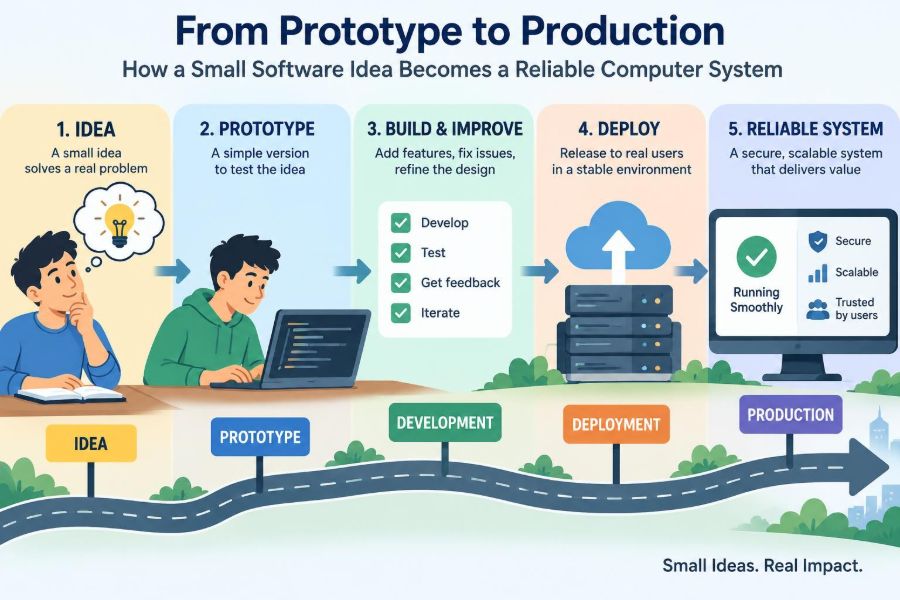

A developer builds a simple app over a weekend. It accepts a form, saves a record, and displays the result. On a laptop, with familiar test data, it feels complete.
Then real people arrive. They use slow networks, enter unexpected values, forget passwords, refresh pages midway through an action, and try the service at the same time. A small feature can suddenly become a system that must protect information, recover from failure, and remain understandable to the people who operate it.
This is the gap between a prototype and production. A prototype answers, “Can this idea work?” A production system must answer a harder question: “Can this keep working safely and usefully under ordinary, messy conditions?”
Understanding that transition helps students see why professional software contains more than application code. It also helps working professionals make better trade-offs when turning a promising idea into something people can rely on.
🧪 A Prototype Is a Question, Not a Finished Product
A prototype is an early version built to test an assumption. It may test whether users understand a workflow, whether an algorithm is feasible, or whether two technical components can communicate.
Its value comes from speed of learning. A prototype can contain shortcuts because its purpose is to reduce uncertainty, not necessarily to support a large and long-lived user base.
The danger begins when a prototype is treated as a finished system simply because it appears to work. A demonstration usually exercises the happy path: the expected sequence with valid data and no unusual conditions.
🏭 Production Means Operating in the Real World
Production is the environment where software performs a real job for real users or business processes. It includes the application, its data, infrastructure, configuration, monitoring, access controls, support practices, and recovery procedures.
A production system does not need to be enormous. A scheduling tool used by one clinic or an internal report used by a small team is still production software if people depend on it.
Its defining property is consequence. If it fails, shows incorrect information, or leaks data, someone’s work is interrupted or harmed.
🎯 Start With the Problem and the User Outcome
Reliable systems begin with a precise problem statement. “Build a dashboard” is vague; “help warehouse staff identify orders waiting longer than one day” describes an observable outcome.
Clarify who uses the system, what they need to accomplish, and what happens when the system is unavailable. These answers guide later decisions about performance, security, and acceptable complexity.
- What decision or task will the software support?
- Which users have different permissions or needs?
- What information enters, changes, and leaves the system?
- What is the cost of a wrong result versus a delayed result?
Requirements are not a promise that nothing will change. They are a shared starting point for making deliberate trade-offs.
🧭 Define Success Before Building Features
A feature list says what might be built. Success criteria explain what useful behavior looks like. For a booking service, success might include preventing double bookings, confirming completed reservations, and allowing staff to correct errors.
Good criteria are testable in plain language. They keep a team from optimizing an attractive interface while missing the underlying job.
They also expose disagreements early. One person may assume “fast” means immediate screen feedback, while another means a report is ready before the morning meeting.
🧱 Turn a Large Idea into Small Slices
Large plans are difficult to validate because they delay feedback. A better approach is to divide the work into vertical slices: small end-to-end pieces that deliver a limited user outcome.
For a hypothetical expense-tracking application, the first slice might let an authenticated user add one expense and view it in a personal list. It touches the interface, server logic, and data storage without pretending to solve every future need.
Small slices reveal integration problems sooner and make it easier to change direction when assumptions prove wrong.
🏗️ Choose an Architecture That Fits the Current Need
Software architecture is the high-level arrangement of components and their responsibilities. It determines where data is stored, how parts communicate, and where important rules are enforced.
A single application with a database is often a sensible first production architecture. Splitting it into many independent services can be useful at larger scale, but it also introduces network failures, deployment coordination, and harder debugging.
Simple does not mean careless. It means choosing the least complicated design that can meet the known requirements while leaving understandable paths for change.
🧩 Separate Responsibilities Without Overengineering
Even a small codebase benefits when presentation, business rules, and data access are not tangled together. A screen should not quietly decide financial rules, and database queries should not be scattered through every interface component.
Clear boundaries make changes safer. If the tax calculation changes, a developer should be able to find one meaningful area of the code rather than search through unrelated screens.
Abstractions should earn their place. Creating several layers for a rule that will never vary can make a small system harder, not easier, to understand.
🗃️ Model Data as Long-Term Memory
Data often outlives the code that first created it. A database schema, the structure used to organize stored information, deserves careful thought because later changes must preserve existing records.
Identify the core entities and their relationships. In a course platform, these might include students, courses, enrollments, and submissions. Define which facts are required, which can change, and which relationships must remain valid.
Constraints in the database can provide a valuable final line of defense. For example, a unique constraint can prevent two records from using the same identifier even if an application bug tries to create duplicates.
✅ Validate Input at Every Boundary
Users are not the only source of input. Data can arrive from browsers, mobile apps, imported files, scheduled jobs, and external services. Each boundary is a place where assumptions should be checked.
Validation asks whether data is present, correctly shaped, within allowed ranges, and consistent with the current state. A date may have a valid format but still be unacceptable if it occurs before a required start date.
Client-side validation improves the user experience by giving quick feedback. Server-side validation remains necessary because clients can be modified, bypassed, or simply fail.
🔐 Build Security Into the Design
Security is not a final checklist item. It begins by identifying assets worth protecting: account credentials, private records, payment-related actions, operational settings, and system availability.
Authentication verifies who someone is. Authorization decides what that authenticated person is allowed to do. Confusing the two can lead to a system where a signed-in user can access another person’s data.
Use established libraries and platform features for password storage, session management, encryption, and permissions where possible. Homemade security mechanisms are difficult to evaluate and easy to get subtly wrong.
🔑 Apply Least Privilege
The principle of least privilege means giving people and software components only the permissions they need for their current job. A reporting account should not be able to delete records; a background worker should not automatically have administrator access.
This limits damage when a credential is misused or a component has a defect. It also makes access reviews more understandable because each permission has a clear purpose.
Secrets such as database passwords and service tokens should not be embedded directly in source code or copied into public logs. They need controlled storage, limited access, and a way to replace them when necessary.
🧷 Handle Errors Without Hiding Them
Every dependency can fail: a database may be temporarily unavailable, a file may be malformed, or a network request may time out. Reliable software expects these possibilities rather than treating them as impossible.
Users need clear, safe messages such as “We could not save your changes; please try again.” Developers and operators need more detailed internal records that explain what happened without exposing private data.
A common mistake is catching every error and continuing as though nothing went wrong. This can turn a visible failure into silent data loss or inconsistent state.
🧪 Test Behavior at More Than One Level
Testing is evidence that selected behavior works under selected conditions. It cannot prove a system has no defects, but it can catch regressions and document intended behavior.
| Test level | Primary focus | Example |
|---|---|---|
| Unit test | A small function or rule | Discount calculation handles thresholds correctly |
| Integration test | Components working together | API saves a valid order to the database |
| End-to-end test | A user-facing workflow | User signs in, submits a form, and sees confirmation |
A balanced test suite favors quick, focused tests for rules and a smaller number of full workflow tests for the paths that matter most.
🧠 Test the Uncomfortable Cases
Production problems often live outside the happy path. Test empty fields, duplicate submissions, expired sessions, unavailable dependencies, unusual characters, interrupted requests, and conflicting updates.
For example, two users might attempt to reserve the last available seat at almost the same moment. The system needs a defined outcome rather than relying on whichever request happens to arrive first.
These scenarios are not pessimism. They are a practical way of making hidden assumptions visible before users discover them.
⚙️ Make Builds Repeatable
A repeatable build means the same source code and declared dependencies can reliably produce the same application artifact, such as a package or container image. Manual local steps create uncertainty: one developer may have an unrecorded setting that another lacks.
Automated build pipelines can run formatting checks, tests, dependency installation, and packaging consistently. They reduce routine mistakes and create a trace of what was built.
Automation is especially useful when it makes the safe path easier than the risky one. A deployment process should not depend on someone remembering a long sequence of commands under pressure.
🚦 Use Version Control as a Shared History
Version control records changes to source code and related configuration over time. It allows teams to review work, compare versions, restore a known state, and understand why a decision was made.
Small, focused changes are easier to review than one enormous batch. A clear change description should explain intent, not merely repeat a file name.
Code review is not only for finding mistakes. It spreads knowledge, tests assumptions, and encourages code that another person can maintain.
📦 Keep Environments Consistent
Most systems move through several environments, such as development, testing, staging, and production. The names matter less than the purpose: each environment should reduce uncertainty before a change reaches real users.
Differences between environments can cause the familiar problem, “It worked on my machine.” Configuration, service versions, permissions, and data shape should be managed deliberately rather than left to accident.
Production data requires special care. Copying it casually into a test environment can expose personal or confidential information. Use synthetic or appropriately protected test data whenever practical.
🚀 Deploy Changes Gradually When Possible
Deployment is the act of making a new version available. A safe deployment is not merely successful installation; it also preserves correct behavior during and after the transition.
Teams may release a change to a limited set of users or servers first, then expand after observing its behavior. This approach can reduce the size of an incident if an unexpected problem appears.
Not every system needs sophisticated release machinery. Even a small service benefits from a documented release process, a clear owner, and a way to confirm that the new version is healthy.
↩️ Plan for Rollback and Safe Change
A rollback returns a system to an earlier version when a release causes unacceptable problems. It is easiest when planned before deployment, not invented during an outage.
Database changes need particular care. Removing a column immediately may break an older application version. A safer pattern is often to add a compatible change, update the application, migrate data, and remove obsolete parts later.
Feature flags can separate deployment from release. Code may be present but inactive until a team is ready to enable it. Flags also require cleanup; abandoned flags become confusing hidden branches in the system.
📈 Observe the System, Not Just the Server
Monitoring gathers signals about a running system. Useful signals include response time, error rate, resource use, queue length, failed jobs, and the number of successful business actions.
Infrastructure metrics alone can be misleading. A server may be healthy while users cannot complete checkout because a required third-party service is failing. Observability should connect technical behavior to user outcomes.
Logs record events, metrics show trends, and traces can follow one request across multiple components. Together, they help operators move from “something feels wrong” to a specific explanation.
🔔 Alert People About Actionable Problems
An alert should indicate that someone needs to investigate or act. Alerts for every minor fluctuation create noise, and noisy alerts are eventually ignored.
Choose signals tied to impact: sustained failed requests, a critical scheduled job not completing, or a major workflow becoming unavailable. Include enough context for a responder to begin diagnosis.
A dashboard answers “what is happening?” An alert answers “should someone respond now?” Keeping those roles distinct makes both more useful.
🛟 Design for Failure and Recovery
Failures are normal in distributed systems. Networks delay messages, dependencies restart, disks fill, and human changes introduce defects. Resilience is the ability to limit the impact and return to a correct state.
Retries can help with temporary faults, but careless retries can multiply load or repeat an action. An idempotent operation produces the same final result when safely repeated, such as marking a record as paid using a unique transaction reference.
Backups matter only if restoration is understood and periodically verified. A backup that cannot be restored within the needed time is not a complete recovery plan.
⏱️ Set Realistic Reliability Expectations
No system is available at every moment, and chasing extreme availability can be expensive and complex. The appropriate target depends on the consequences of interruption.
A personal note-taking tool may tolerate planned downtime. A service supporting time-sensitive operations may need redundancy, rapid recovery, and clearer operational coverage. Requirements should describe acceptable interruption and data loss in business terms.
This prevents a vague demand for “high availability” from becoming either needless complexity or insufficient preparation.
⚡ Treat Performance as a User Experience
Performance is more than raw speed. Users experience delays, unpredictable responses, frozen interfaces, and timeouts. A system can have a fast average response while still frustrating people during its slowest moments.
Measure before optimizing. A slow page may be caused by an inefficient database query, an unnecessary network call, an oversized file, or a blocked background task. Guessing can waste effort and introduce new problems.
Caching can reduce repeated work, but cached data may become stale. It is most appropriate when the system can define how old information may safely be.
📊 Manage Capacity Before Demand Becomes an Incident
Capacity planning asks whether a system has enough computing, storage, and database capability for expected usage. It is not limited to large internet services; a monthly reporting job can overload a small internal system too.
Understand demand patterns. A training platform may be quiet most of the year but busy near assignment deadlines. A batch process may create database pressure at night even when interactive traffic is low.
Load testing simulates planned demand to reveal bottlenecks. Its results are estimates, not guarantees, because real behavior and dependencies can differ, but they are far better than discovering limits during a critical event.
🧾 Document Decisions and Operational Knowledge
Documentation is most valuable when it helps someone act correctly without relying on one person’s memory. Useful examples include setup instructions, architecture diagrams, data ownership, deployment steps, and known limitations.
An operational runbook gives responders practical guidance for recurring situations: how to inspect a failed job, where to find logs, how to pause a process, and when to escalate.
Keep documentation close to the system and update it when behavior changes. A beautifully written but outdated document can be more dangerous than no document because it creates false confidence.
👥 Make Ownership Clear
A reliable system needs people who understand who owns decisions and response duties. Ownership does not mean one person must solve every issue; it means users know where responsibility begins.
Clarify who approves changes, who maintains dependencies, who handles access requests, and who responds to incidents. For shared systems, product, engineering, security, and operations responsibilities may overlap, but ambiguity should not.
Healthy ownership also includes time for maintenance. A team that can only add features will eventually accumulate risks in old libraries, fragile deployments, and neglected data.
🧹 Pay Down Technical Debt Deliberately
Technical debt is the future cost created by expedient choices today. It is not automatically bad: a shortcut may be rational when learning quickly matters more than polish.
Debt becomes harmful when it is invisible or never revisited. Examples include undocumented manual deployment steps, duplicated business rules, unsupported dependencies, and a database design that prevents needed reports.
Track important debt alongside feature work. Describe the consequence of leaving it unresolved, so it can be prioritized as a risk rather than dismissed as mere code cleanup.
🗣️ Learn From Incidents Without Blame
When a system fails, the immediate priority is restoring service and protecting data. Afterwards, a structured review can identify contributing conditions: unclear alerts, missing tests, unsafe defaults, confusing documentation, or an assumption that did not hold.
A useful review asks how the system and process allowed the outcome, not simply who made the last visible mistake. People working with incomplete information will sometimes choose an action that looks wrong only in hindsight.
The result should be concrete improvements, such as a new guardrail, a clearer runbook, or a revised release step. Learning only matters if it changes future practice.
🧭 Scale the Process, Not Just the Hardware
As use grows, systems need more than larger servers. They may need clearer interfaces, better data indexing, asynchronous background work, stronger access controls, and teams that can coordinate changes safely.
Scaling also has a human dimension. A process that works with two developers chatting across a desk may fail with several teams changing shared services. Standards, ownership boundaries, and automation become coordination tools.
Do not adopt complexity simply because successful companies use it. Add mechanisms when a recognizable problem requires them.
🌱 A Practical Path From Idea to Reliable System
The journey is iterative rather than a single handoff. Build the smallest meaningful slice, test it with realistic conditions, release carefully, observe its behavior, and improve the next slice using what you learn.
- State the user problem and the consequences of failure.
- Build a narrow end-to-end version that tests the most uncertain assumption.
- Add validation, access control, tests, and repeatable delivery as dependence grows.
- Observe real behavior, prepare recovery steps, and turn incidents into improvements.
- Increase complexity only when scale, risk, or product needs justify it.
The central principle is not that every project requires enterprise-scale tooling. It is that reliability comes from making risks visible and managing them deliberately as the system becomes more valuable.
🏁 The Core Takeaway: Reliability Is a Continuing Practice
A prototype demonstrates possibility. A production system earns trust through dependable behavior over time: correct handling of data, safe changes, meaningful monitoring, thoughtful recovery, and people who can understand its operation.
The software itself is only one part of that achievement. Processes, documentation, testing, security, and operational feedback turn a clever idea into a computer system that can support real work.
Moving from prototype to production means replacing hopeful assumptions with tested, observable, recoverable ways of working. That is how small ideas become systems people can depend on. 💻🛠️🌱