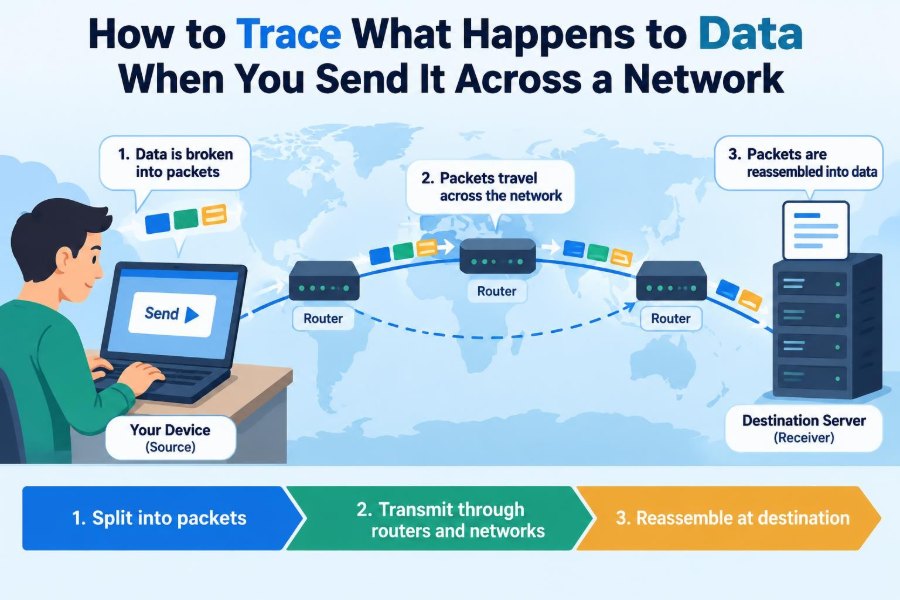

You tap Send on a chat message, upload a report to cloud storage, or open a website. The result often feels immediate: a reply appears, a page loads, or a file begins to download.
Behind that simple action, your data is broken into pieces, addressed, protected, forwarded through several devices, checked for errors, and rebuilt at its destination. The route may cross your home router, an internet provider, fiber links, data centers, and other networks in a fraction of a second.
Tracing that journey makes network problems less mysterious. It also explains why a secure-looking website can be slow, why a video call can stutter even when a speed test looks good, and why an address such as a domain name must be translated before anything can happen.
This is not one fixed path that every message follows. It is a useful model for following the data step by step, from an application on one device to an application on another.
🧭 Start with a specific data journey
Network tracing is easiest when you choose one concrete action. Suppose you enter example.com in a browser and press Enter. Your browser needs an IP address for that name, a way to reach the server, and rules for requesting the page.
The server’s response makes a separate journey back. It may use some of the same links, but the return route is not guaranteed to be identical. Networks make forwarding decisions independently at many points.
📦 Data begins as application information
At the top of the process is information meaningful to a person or program: text in a message, a browser request, a photo, or audio from a call. The application decides what it needs to send and how its peer should interpret it.
For a web page, the browser commonly creates an HTTP request such as “get this resource.” For a chat app, it may send a small event describing a new message. The network does not understand the human meaning; it carries encoded bytes.
🔢 Everything becomes bytes
Computers represent text, images, sound, and instructions as sequences of bits: zeros and ones. A character encoding, such as UTF-8, gives text characters a byte representation. Image and video formats use their own structured byte layouts.
Those bytes are not necessarily sent as one large object. A large file is normally divided so it can fit network limits, share capacity with other traffic, and be resent in smaller parts if something goes wrong.
🧅 Layers divide the networking job
Networking uses layers so that one concern does not need to solve every other concern. An application can request a web page without knowing whether the first local link is Wi-Fi or Ethernet.
A common teaching model includes application, transport, internet, and link layers. Real systems are more complicated, but this model gives a practical tracing order: application data, transport delivery, IP routing, then local-link delivery.
| Layer | Main question | Example |
|---|---|---|
| Application | What does the data mean? | HTTP request |
| Transport | Which program and delivery behavior? | TCP or UDP |
| Internet | Which network destination? | IP packet |
| Link | How does it cross this local connection? | Wi-Fi frame |
🎁 Encapsulation adds delivery information
As data moves downward through the layers, each layer adds a header: a small block of control information. This process is called encapsulation. A header can identify a protocol, a source or destination, a port, a sequence number, or an error-checking value.
Think of shipping an item. The item goes in a box, the box gets an address label, and the truck may use its own route paperwork. Each label serves a different part of the trip.
🚪 Ports identify the right application
An IP address identifies a network interface or host on a network. It does not, by itself, identify the program that should receive incoming data. Port numbers solve that problem.
A web server commonly listens on a port associated with HTTP or HTTPS, while another program on the same machine can listen on another port. A connection is commonly distinguished by source and destination IP addresses, ports, and the transport protocol.
🤝 TCP and UDP make different trade-offs
TCP is designed for a reliable, ordered byte stream. It tracks data, acknowledges received pieces, and can retransmit missing data. This is useful for tasks such as web pages, software updates, and file transfers, where missing or rearranged data would be troublesome.
UDP is lighter-weight: it sends datagrams without TCP’s built-in connection and delivery guarantees. It is useful when timely arrival matters more than waiting for an old packet, including many real-time media and game designs. Applications can add their own reliability when needed.
👋 A TCP conversation starts with a handshake
Before normal TCP data flows, endpoints usually establish shared connection state through a handshake. In simplified form, one side asks to start, the other responds, and the first confirms. This helps both sides agree that they are ready.
Newer protocols can organize setup differently, and encrypted web connections add their own negotiation. Still, the key tracing idea is simple: a browser may need preliminary exchanges before it can request the page itself.
🏷️ DNS turns names into addresses
People use names such as example.com; routers forward IP packets toward numerical IP addresses. The Domain Name System, or DNS, provides the translation between them.
Your device may first check a local cache. If it has no suitable answer, a configured DNS resolver may query other DNS servers as necessary. Caching often makes repeated visits faster, but cached records eventually expire or are refreshed.
📍 Routing needs a destination IP address
Once the browser has an address, it creates traffic directed to that destination. The IP layer adds source and destination IP addresses to an IP packet. The destination address remains relevant across the wider journey.
Routers do not need a complete map of every device. Their routing tables contain rules for reachable address ranges and next hops. A router chooses a next step that appears to move the packet toward its destination.
🏠 Your device first chooses a local exit
If the destination is not on the same local network, your device sends the packet to its default gateway, usually a home router or office network router. The device uses its own routing table to make this first decision.
For a same-network destination, the device may send directly to that local device instead. This distinction matters when troubleshooting: a printer can be reachable locally even if the internet connection is down.
🔎 Local delivery needs a hardware address
On an Ethernet or Wi-Fi local network, a device needs a link-layer address for the next device on that local link. It learns this relationship using mechanisms such as ARP on many IPv4 networks or Neighbor Discovery on IPv6 networks.
The important distinction is that an IP address identifies the intended network destination, while the local frame is addressed to the next hop. At home, that next hop is often the router, not the distant web server.
📶 Frames carry packets across Wi-Fi or Ethernet
The IP packet is placed inside a link-layer frame suitable for the current connection. On Wi-Fi, the frame is transmitted by radio; on Ethernet, it commonly travels as electrical or optical signals through cables and switches.
Wi-Fi is shared radio space. Distance, walls, interference, and competing devices can affect it. This is why a fast internet plan cannot fully compensate for a weak wireless connection between your laptop and router.
🔀 Switches and routers do different work
A switch mainly forwards local-network frames based on link-layer information. It helps devices on the same LAN communicate efficiently. A router connects separate IP networks and forwards IP packets between them.
In a home setup, one physical box may act as a Wi-Fi access point, switch, router, firewall, and network address translator. The combined product is convenient, but separating the roles helps you trace where a fault may exist.
🛣️ Each router makes a next-hop decision
When a router receives a frame, it removes the local framing, examines the IP packet, and consults its routing information. It then creates a new frame for the next local link. The packet can cross many such hops.
The path can involve an internet service provider, backbone networks, and the destination organization’s network. Routing policies, link failures, congestion, and business arrangements influence paths; geographic closeness alone does not determine them.
⏳ Time to travel is latency
Latency is the delay involved in getting data from one point to another. It includes signal travel time, device processing, and time spent waiting in queues. A round-trip time measures the journey there and back.
Bandwidth and latency are different. A connection can move large amounts of data per second yet still feel slow for interactive tasks if each request must wait for a long round trip. Video calls and remote desktop sessions are especially sensitive to delay.
🚦 Queues create congestion and jitter
Links and routers have finite capacity. When packets arrive faster than an outgoing link can transmit them, they wait in queues. Longer queues increase delay; if queues fill, devices may discard packets.
Delay that varies over time is called jitter. A download may tolerate it reasonably well, while live audio may sound uneven unless the application uses a small buffer to smooth arrival differences.
🧩 Packets can arrive late, missing, or reordered
Networks generally do not promise that every individual packet takes the same path or arrives in the same order. A device may drop a packet because of congestion, a damaged signal, a failed link, or a policy rule.
TCP sequence numbers allow the receiving side to place bytes in order and identify gaps. It can trigger retransmission. That improves correctness, but recovery costs time, so packet loss can make a connection feel much slower than its advertised speed suggests.
🔐 Encryption protects content, not every visible fact
HTTPS usually combines HTTP with TLS encryption. TLS helps protect the contents of the browser-server conversation from parties that can observe the network path, and it helps the browser verify the server identity through certificates.
Encryption does not make traffic invisible in every respect. Network equipment still needs enough addressing and protocol information to forward traffic, and observers may often infer timing, volume, and some connection metadata. The exact visibility depends on the protocol and network position.
🧱 Firewalls and policies can stop traffic
Firewalls apply rules to traffic, often considering addresses, ports, protocols, connection state, and sometimes additional context. They can block unwanted inbound access, restrict risky outbound destinations, or segment a business network.
A blocked request is not always a broken network. It may be an intentional policy. When diagnosing a problem, distinguish “no route,” “server unavailable,” “name lookup failed,” and “connection rejected or filtered.” They point to different layers.
🎭 NAT changes private addresses at the edge
Many home and small-office networks use private IP addresses that are not routed directly across the public internet. Network Address Translation, or NAT, commonly changes outgoing traffic so multiple internal devices can share a public-facing address.
The NAT device keeps temporary mappings, often including port information, so returning traffic can be sent to the correct internal device. NAT is not the same thing as a firewall, although one gateway often performs both roles.
🏢 The destination network receives the packet
Eventually, routing delivers the packet to the destination network. More routers and switches may forward it inside a cloud provider, company, university, or home network until it reaches the server’s network interface.
Large services often use load balancers that distribute incoming connections among several servers. From a visitor’s perspective, one domain name may represent many machines, and the machine that answers can vary over time.
📬 Decapsulation delivers data to the server process
At the destination, the receiving system removes headers in the reverse direction: link frame, IP packet, and transport information. The operating system uses the destination port and protocol to deliver the payload to the appropriate waiting application.
The server application then interprets the bytes according to its protocol. A web server may check the request path, permissions, and headers before generating or retrieving the requested response.
🪞 The response follows a new journey back
The response is encapsulated and sent back toward your device. It may include HTML, images, API data, or an error response. The server’s packets must find a route to your public or private device address just as your original packets found a route outward.
Your browser receives the response, checks and decrypts it where appropriate, and begins processing it. A web page may then request additional files, so one visible page load can involve many parallel or sequential network exchanges.
🧑💻 The browser still has work after download
Receiving bytes is not the same as seeing a usable page. The browser parses HTML, applies styles, runs permitted scripts, lays out the page, and renders pixels. A page can therefore appear slow because of client-side processing, not only network delay.
This is a useful debugging boundary. If a request finishes quickly in browser developer tools but the interface remains unresponsive, the bottleneck may be code execution, rendering, or a busy device rather than the network.
🧪 Trace the path with the right tools
Different tools reveal different parts of the journey. A ping test can measure reachability and round-trip behavior when allowed, but many systems limit or deprioritize its traffic. A failed ping does not automatically prove that a service is down.
traceroute or tracert attempts to reveal intermediary hops by using packets with limited lifetimes. Browser developer tools show DNS, connection, request, and response timing from the browser’s viewpoint. Packet capture tools can show detailed local traffic, but use them carefully and only on networks and systems you are authorized to inspect.
🩺 Diagnose from the nearest layer outward
A practical troubleshooting sequence avoids random fixes. Start close to the user, then move outward:
- Check power, cables, Wi-Fi connection, and local IP configuration.
- Test access to the local gateway and another local device if appropriate.
- Check whether DNS resolves the intended name.
- Test the specific service, port, and application behavior.
- Compare another device or network to isolate whether the issue is local or remote.
Record what fails and what still works. “The internet is down” is less helpful than “Wi-Fi works, the gateway responds, but this name does not resolve.”
⚠️ Avoid common tracing mistakes
One common mistake is treating an IP address as a permanent identity. Addresses can change, be shared through NAT, or represent a load-balanced service. Another is assuming every hop shown by a traceroute is part of the exact route taken by every application packet.
Also avoid equating a high bandwidth result with a healthy connection. Packet loss, jitter, DNS failures, overloaded servers, and application bugs can each produce a poor experience in different ways.
🗺️ Build a mental map, not a single fixed route
A reliable mental model is: application creates bytes; transport organizes delivery; IP directs packets between networks; link technologies cross one local hop at a time; the destination reverses the process and responds.
The details vary with IPv4 or IPv6, TCP or UDP, Wi-Fi or wired links, virtual private networks, content delivery networks, and modern encrypted protocols. The model remains useful because it tells you which question belongs at which layer.
✅ The core principle: follow the labels and boundaries
To trace data across a network, ask what information is being carried, what header was added, who the next hop is, and what device or program removes that information next. Each boundary changes the local delivery method while preserving the higher-level goal.
That perspective turns an invisible process into a sequence you can reason about: name resolution, connection setup, local forwarding, routing, protection, delivery, response, and application processing. It is the foundation for understanding both everyday network use and systematic troubleshooting.
Data reaches a network service because each layer adds just enough information for the next part of the journey, then the receiving side carefully removes and interprets it. Follow that sequence, and many network mysteries become manageable questions rather than guesses. 🌐📦🔍