
A phone edits a photo while keeping a video call smooth. A laptop runs several browser tabs, streams music, and compiles code without seeming to pause. In a data center, thousands of machines answer search requests, process payments, and train machine-learning models at the same time.
Those experiences depend on more than a processor having a higher clock speed. Modern computing is increasingly about designing the whole system so that data, instructions, memory, and specialized hardware spend less time waiting for one another.
This shift matters because the old, simple path to faster computers—making one general-purpose processor core run much faster—has become harder. Power use, heat, and the physical cost of moving data now shape performance as much as raw calculation ability.
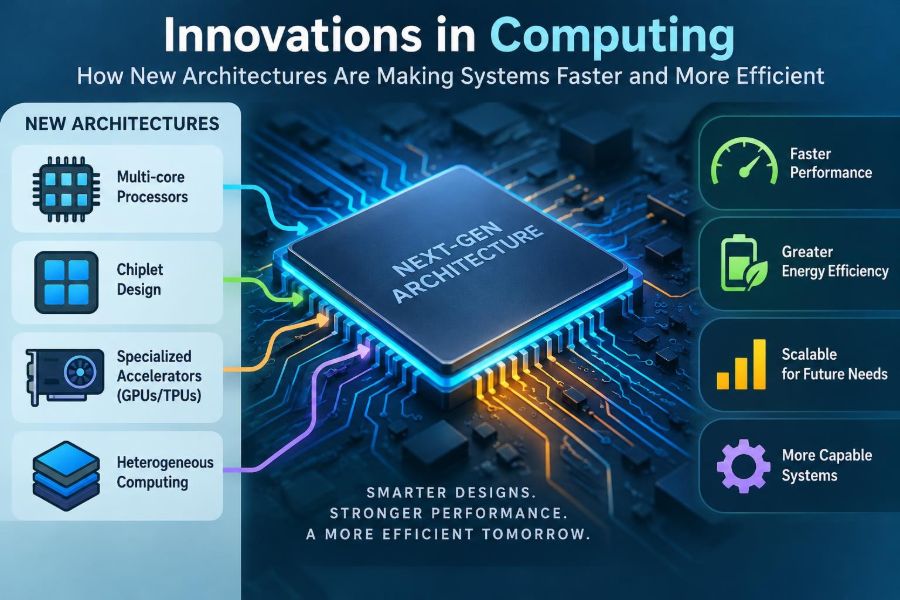
New computer architectures respond to those constraints in different ways: by dividing work across many cores, placing memory closer to processing, adding task-specific accelerators, and improving the connections between components. Understanding these ideas makes everyday technology feel less mysterious and helps us make better technical choices.
🧭 What “Computer Architecture” Actually Means
Computer architecture is the high-level design of a computing system: what its parts do, how they communicate, and what kinds of instructions software can request. It includes the processor, memory system, storage, input/output devices, and the connections among them.
Architecture is not just the shape of a chip. Two computers can use processors with similar instruction sets yet behave very differently because one has more cache, faster memory channels, a better graphics processor, or software designed to use several cores.
A useful analogy is a city. Computation is work done in offices, memory is where records are stored, and interconnects are roads. Adding offices helps only if people and documents can reach them efficiently.
⏱️ Why the Old Speed-Up Strategy Reached Limits
For many years, processors became faster partly by raising their clock frequency, the rhythm that coordinates operations. Higher frequencies can complete more steps per second, but they also tend to increase energy use and heat.
Transistors became smaller, yet removing heat from a compact chip became difficult. A processor cannot simply run every part at maximum speed indefinitely without exceeding its thermal and power limits.
Engineers therefore shifted emphasis from one extremely fast execution path to multiple efficient paths. Better performance now often comes from doing more useful work per clock cycle, running suitable tasks in parallel, and reducing data movement.
🔥 Power and Heat as Design Constraints
Every computation consumes energy, but moving data can also be expensive. Reading information from distant memory, sending it across a board, or transferring it between machines may use more energy than a simple arithmetic operation.
Heat is the visible consequence of much of that energy use. When a device cannot cool itself adequately, it may reduce its clock speed, a behavior called thermal throttling, to protect its components.
This is why efficient architecture matters for battery-powered devices, quiet laptops, and large data centers alike. A faster design that wastes power may deliver worse sustained performance than a slightly slower but cooler design.
🧩 The Rise of Multicore Processors
A multicore processor places two or more processing cores on one chip. Each core can execute its own sequence of instructions, allowing independent pieces of work to proceed at the same time.
Operating systems benefit immediately because they can schedule separate applications on different cores. A video meeting, antivirus scan, browser, and background update need not all compete for a single execution engine.
But more cores do not automatically make one task faster. A program must have work that can be split safely; otherwise, extra cores may spend much of their time idle.
🧵 Threads Turn Parallel Hardware into Useful Work
A thread is a sequence of instructions that an operating system can schedule independently. A program may use one thread for its interface, another for file loading, and several more for calculations.
Consider a photo editor applying the same adjustment across millions of pixels. It can divide the image into regions and assign a region to each worker thread. Once all regions are done, it combines the result.
Good parallel software must also coordinate access to shared data. If two threads update the same value without a clear rule, the final answer can depend on timing. These bugs, often called race conditions, are difficult precisely because they may appear only occasionally.
🚦 Why Some Work Cannot Be Parallelized
Many jobs include serial steps that must happen in order. A program cannot display the result of a calculation before it has received the needed input, and a database transaction may need to verify a condition before changing a record.
This creates a practical limit on multicore speed-up. If a small but essential part of a task remains sequential, that part eventually dominates the total waiting time as more cores are added.
The lesson is not that multicore designs fail. It is that architecture and software must be matched. Parallelism works best when a problem contains many independent, similarly sized pieces of work.
🧠 Heterogeneous Computing Uses the Right Engine
Heterogeneous computing combines different types of processors in one system. Rather than asking one general-purpose CPU to perform every job, the system sends work to hardware suited to that job.
A CPU is flexible and excellent at control-heavy tasks with branches and changing decisions. A graphics processing unit, or GPU, is designed to perform many similar calculations concurrently. Other accelerators may handle media, encryption, signal processing, or machine-learning operations.
This approach resembles a workshop with specialists. A general mechanic can handle many repairs, but a dedicated tool can complete a repeated task more efficiently when the task is well defined.
🎮 GPUs and Massive Data Parallelism
GPUs were developed to render graphics, where many pixels, vertices, and shading calculations can be processed in parallel. Their architecture favors high throughput: completing a large amount of similar work over time.
That same pattern appears outside graphics. Scientific simulations, image processing, video effects, and some machine-learning workloads often perform repeated mathematical operations on large arrays of data.
A GPU is not a universal replacement for a CPU. Tasks with irregular decisions, small workloads, or frequent dependence on prior results may perform poorly because the GPU’s many execution units cannot stay efficiently occupied.
🤖 AI Accelerators Optimize Common Operations
Machine-learning models frequently use large matrix and vector operations. Dedicated AI accelerators organize hardware around these recurring patterns, often supporting lower-precision numerical formats when an application can tolerate them.
Lower precision does not mean careless calculation. It means selecting a representation that provides enough numerical detail for the model’s task while reducing storage, data transfer, and energy use.
These accelerators can make particular workloads more efficient, but they introduce trade-offs. Developers may need specialized tools, models may require adjustment, and a workload that changes rapidly may not fit fixed-function hardware well.
📱 Efficient Cores Extend Battery Life
Many mobile and laptop processors use cores with different performance and power characteristics. High-performance cores handle demanding interactive work, while efficient cores handle lighter background tasks.
When the operating system schedules work well, checking email or playing audio does not require the same energy budget as exporting a video. The device can reserve its most power-hungry hardware for brief periods when responsiveness matters.
This is a reminder that speed is contextual. For a phone, finishing a small task with less battery drain can be more valuable than finishing it marginally sooner at a much higher energy cost.
🗃️ Memory Is Often the Real Bottleneck
A processor can execute instructions quickly only when it has the data it needs. Main memory, usually RAM, is much larger than the tiny storage built into a processor, but accessing it takes longer and consumes more energy.
This gap is commonly called the memory wall. As processors became able to calculate faster, waiting for data from memory became a larger share of many programs’ running time.
A program that performs few calculations but constantly fetches scattered data can be slower than a program doing more arithmetic on data stored nearby. Modern architecture therefore treats data placement as a central performance concern.
🏠 Cache Memory Keeps Data Nearby
Cache is small, fast memory located close to a processor core. It stores recently used data and instructions because programs often revisit the same information or access nearby information soon after.
For example, scanning an array in order tends to work well with cache because adjacent values can be brought in together. Jumping unpredictably through a large structure can cause more cache misses, forcing the processor to wait for slower memory.
Caches are not magic storage. They are limited, automatically managed, and shared in some designs. Software developers still benefit from arranging data in predictable, compact ways.
📚 Memory Hierarchies Balance Speed, Size, and Cost
Computers use layers of storage because no single technology provides maximum speed, huge capacity, low cost, and low power simultaneously. Data moves through a hierarchy based on how soon it is likely to be needed.
| Layer | Typical role | General trade-off |
|---|---|---|
| Registers | Values used immediately by a core | Fastest, very limited capacity |
| Cache | Recently or nearby used data | Fast, limited capacity |
| RAM | Active programs and working data | More capacity, higher access delay |
| Storage | Files kept when power is off | Large capacity, much slower than RAM |
Efficient systems try to keep active data in the upper layers. The principle applies at every scale, from a processor cache to a data center placing frequently requested content near users.
📦 Chiplets Make Complex Chips More Practical
A chiplet is a smaller functional piece of silicon that can be combined with other pieces in one package. Instead of manufacturing every function on one enormous die, designers can assemble processor, input/output, cache, or accelerator components as separate units.
This can improve design flexibility. A company may update one component without redesigning everything, or use different manufacturing processes for logic, memory, and analog connections.
The challenge is communication. Chiplets must exchange data quickly and reliably, and the package connections add design complexity. Their value depends on whether modularity outweighs those costs for a particular product.
🔗 Faster Interconnects Prevent Digital Traffic Jams
An interconnect is the communication path between computing components. It may connect cores on a chip, a processor to memory, an accelerator to a server, or servers to each other.
Bandwidth describes how much data can move in a given time, while latency describes how long it takes for a particular request to travel and return. A system may have high bandwidth but still feel slow for tiny, delay-sensitive requests.
As specialized components become more common, interconnect design becomes decisive. A powerful accelerator that waits constantly for data across a narrow connection cannot reach its potential.
🧱 3D Packaging Shortens the Journey for Data
Traditional chips spread components mainly across a flat surface. Advanced packaging can place certain components closer together, including arrangements that stack layers vertically or place memory beside processing logic.
Shorter physical paths can reduce delay and energy used to move data. This is especially attractive for workloads that repeatedly exchange large amounts of information between compute units and memory.
Stacking also makes cooling and manufacturing more challenging. Heat from one layer can affect another, and testing complex packages requires careful engineering. Physical proximity helps, but it does not remove every systems problem.
💾 Storage Innovations Change Everyday Responsiveness
Storage has moved from mechanical hard drives toward solid-state devices in many systems. Solid-state storage has no moving read head, which generally makes random access much more responsive.
Architecture matters here too. Faster storage interfaces and software paths can reduce the delay between an application requesting data and receiving it. This affects startup, large project loading, game assets, and virtual machines.
Storage is still not a substitute for RAM. A computer that runs out of memory may move data to storage, but this usually causes noticeable slowdowns because even fast storage remains far slower than main memory for active working data.
🌐 Distributed Computing Scales Beyond One Machine
Some problems are too large, too available, or too geographically widespread for one computer. Distributed computing divides work among multiple machines connected by a network.
A streaming service, for instance, may place copies of popular content in several locations so users do not all depend on one distant server. A business may separate its databases, web services, and analytics jobs to scale them independently.
Distribution adds failure modes. Networks can be delayed or unavailable, machines can disagree temporarily about data, and developers must decide how to recover safely when part of the system fails.
☁️ Cloud Architecture Separates Resources from Devices
Cloud platforms make pooled computing resources available over a network. The key architectural idea is abstraction: users request virtual processors, memory, storage, or managed services without operating the underlying physical hardware directly.
This can help organizations adjust capacity as demand changes. It can also allow teams to use specialized hardware for temporary workloads without purchasing and maintaining it themselves.
However, cloud performance is not automatic. Network latency, data-transfer costs, security design, regional availability, and software architecture all influence whether moving a workload is sensible.
🛡️ Security Must Be Built into Architecture
Performance features can create security concerns when they make assumptions about what code or data is safe to share. Modern processors use mechanisms such as privilege levels, memory protection, and isolated execution environments to limit damage from faulty or malicious software.
Speculative execution illustrates the balance. A processor may begin likely future work before it knows whether a branch will be taken, improving speed in ordinary cases. But researchers have shown that some microarchitectural behaviors can expose information indirectly if they are not carefully controlled.
Mitigations can involve hardware changes, operating-system updates, compiler changes, or some combination. Security is not a final add-on; it is a design requirement that may affect performance and complexity.
🔒 Confidential Computing Protects Data in Use
Encryption traditionally protects data while it is stored or transmitted. Confidential computing aims to protect certain data while it is actively being processed, often through hardware-backed isolated environments.
This can be useful when software needs to process sensitive information on infrastructure operated by another party. The goal is to reduce the number of components that must be trusted with readable data.
The approach is promising but not effortless. Applications need compatible designs, trust still depends on hardware and software assumptions, and side channels or operational mistakes can remain relevant risks.
🧪 Domain-Specific Hardware Brings Focused Gains
A domain-specific architecture is built around a narrower class of work than a general CPU. Video encoders, network processors, cryptographic engines, and signal processors are familiar examples.
By removing unneeded flexibility and arranging data paths around common operations, such hardware can improve throughput or energy efficiency. A video decoder does not need to be prepared for every possible desktop application.
The cost is reduced adaptability. If standards, algorithms, or product requirements change, dedicated hardware may become less useful. Good system design identifies stable, repeated workloads before committing to specialization.
⚖️ General-Purpose CPUs Still Matter
Specialization has not made the CPU obsolete. CPUs remain the coordinators of most systems because they handle operating systems, user interfaces, decision-heavy logic, and unpredictable workloads with remarkable flexibility.
They also manage accelerators: preparing data, launching tasks, responding to errors, and handling work that does not fit a specialized engine. The future is less about replacing CPUs than about combining them intelligently with other components.
For learners, this is an essential distinction: the “best” hardware depends on the workload. A benchmark that favors one architecture may say little about another application.
🧰 Software Must Be Designed for the Hardware
Hardware innovation helps only when software can use it. Compilers translate high-level code into machine instructions, runtimes schedule work, operating systems manage resources, and libraries provide optimized implementations of common operations.
Developers do not always need to write low-level code. Choosing a well-maintained numerical library, using asynchronous input/output appropriately, or selecting a data layout that fits cache behavior can unlock much of the available performance.
Optimization should follow measurement. A slow application may be limited by a database query, network request, memory allocation pattern, or disk access—not by arithmetic that a new accelerator would improve.
📊 Measure Latency, Throughput, and Energy Separately
Performance is not one number. Latency is response time for an individual action; throughput is the amount of work completed over time; energy use matters for batteries, operating cost, and cooling.
A batch system might prioritize throughput and tolerate a delay before each job begins. An interactive drawing application needs low latency even if its total calculations per second are modest. A sensor device may prioritize energy over both.
When comparing architectures, ask what is being measured, under which workload, and at what power level. This avoids the common mistake of treating a peak benchmark result as a universal answer.
🧯 Common Architecture Mistakes to Avoid
Several assumptions lead to poor technical decisions:
- “More cores always means faster software.” It helps only when the workload can use them.
- “A faster CPU fixes every slowdown.” Memory, storage, network, and software waits can dominate.
- “Specialized hardware is automatically better.” It is better only for workloads that match its design.
- “Peak performance equals sustained performance.” Heat, power limits, and data transfer can change long-running results.
- “Security and speed are separate choices.” Architectural protections and mitigations often influence each other.
These are not merely purchasing mistakes. They can lead teams to optimize the wrong component and build systems that are difficult to maintain.
🖥️ Choosing Hardware for Real Tasks
Start with the work, not the product label. A student writing documents and browsing needs responsive general-purpose performance, adequate memory, and reliable storage. A video editor may benefit from a capable GPU, fast storage, and enough memory for large media files.
For software development, consider the size of projects, virtual machines, containers, and test environments. For data analysis or machine learning, examine whether the tools actually support available accelerators and whether data transfer will become a bottleneck.
Also consider repairability, cooling, battery needs, operating-system support, and upgrade options. A balanced machine often provides a better daily experience than one component with an impressive specification.
🌱 Efficiency Is a Sustainability Issue
Computing has physical costs: electricity, cooling, materials, and equipment replacement. Improving performance per unit of energy can reduce waste while allowing useful services to grow.
Efficiency is not only a hardware concern. Software that avoids unnecessary data transfers, excessive background work, and repeated computation can reduce resource use on existing devices.
There are trade-offs. More advanced packaging and specialized chips may require complex manufacturing, while frequent replacement can undermine efficiency gains. Extending useful device life and selecting hardware proportionate to the task are part of responsible computing.
🔭 What to Watch in Future Architectures
Future systems will likely continue mixing general-purpose cores, accelerators, fast memory, and advanced packaging. The central challenge is coordinating these pieces without making software impossible to develop or systems too costly to operate.
Memory-centric approaches, improved chip-to-chip communication, and hardware designed around security and energy constraints are especially significant because they address limits that raw clock speed cannot solve alone.
Predictions should be treated cautiously. A design that succeeds in a lab or a high-end server may not be affordable, reliable, or useful in consumer devices. Adoption depends on manufacturing, software support, workload demand, and many practical details.
🎯 The Core Principle: Reduce Waiting, Not Just Arithmetic
The most useful way to understand modern architecture is to see a computer as a system of coordinated resources. Processors need instructions and data; memory needs efficient access patterns; accelerators need suitable tasks; and all components need communication paths that do not become bottlenecks.
Multicore CPUs reduce waiting by running independent work simultaneously. Caches and stacked memory reduce waiting for data. Accelerators reduce wasted effort on repeated operations. Better interconnects reduce waiting between components.
None of these innovations is universally best. Their value comes from matching a real workload to an architecture that balances speed, energy, cost, security, and maintainability.
Computers become meaningfully faster when their architecture helps every part of the system spend less time waiting and more time doing useful work. That principle explains both the devices in our hands and the large-scale systems behind modern digital services. 💻⚙️🌍