
A small business owner receives an email that appears to be from a familiar supplier. The invoice looks ordinary, so an employee opens the attachment. By the next morning, shared files cannot be opened, customer information may have been copied, and the company is deciding whether it can keep operating.
Large breaches make headlines, but the same chain of events can affect a school, clinic, nonprofit, retailer, or remote team. The technical incident may begin with one stolen password or one unpatched device. Its consequences, however, spread into operations, finances, trust, and time.
Cybersecurity is sometimes treated as an expensive technical add-on. That view misses the larger comparison: security spending is usually planned, controllable, and adjustable; breach costs arrive under pressure, when choices are narrow and mistakes are more expensive.
Understanding those hidden costs helps organizations make better decisions before an incident turns an ordinary workday into a recovery effort.
🔍 A Breach Is More Than a Hacked Computer
A cybersecurity breach occurs when someone gains unauthorized access to systems, accounts, data, or services. The intruder might steal information, alter records, install malicious software, disrupt operations, or simply remain unnoticed while preparing a larger attack.
The word “breach” does not describe one single type of failure. A lost laptop with unprotected files, a cloud folder shared publicly by mistake, and ransomware that locks an entire network can all create a breach, though their effects differ.
Thinking beyond the infected device is essential. The real question is not only “What was compromised?” but also “What business process, person, or promise depends on it?”
💸 The Visible Bill Is Only the Beginning
Some expenses appear immediately: emergency technical support, replacement devices, forensic investigation, legal advice, notification work, and recovery software or services. These costs are visible because they produce invoices.
But a breach also consumes staff attention. Managers pause normal work, employees answer customer questions, and IT teams abandon planned projects to investigate and restore systems. This lost productive time is often harder to measure, yet it can be substantial.
A useful distinction is between the direct cost of fixing the incident and the indirect cost of interrupted work, lost opportunities, and damaged relationships.
⏱️ Downtime Turns Technical Trouble Into Business Loss
When critical systems are unavailable, work slows or stops. A retailer may be unable to process orders, a manufacturer may lose access to schedules, and a professional services team may be unable to reach client files.
Downtime does not affect every organization equally. A company with manual alternatives may continue at reduced capacity, while a cloud-only operation may be nearly unable to function until access is restored. The impact depends on which systems fail and when.
Recovery also takes longer than simply switching systems back on. Teams must verify that restored data is accurate, identify compromised accounts, and confirm that the attacker no longer has access.
📁 Data Loss Can Outlast System Recovery
Backups can restore many files, but not every type of loss is reversible. Recent changes may not have been captured, records may have been corrupted before backup, or the organization may not know which version is trustworthy.
Some data is unique: customer conversations, design work, research notes, contracts, photographs, or transaction history. Re-creating it may require hours of labor or may be impossible.
This is why backup planning is not merely about copying data. It requires deciding what must be recoverable, how quickly it must return, and whether the backup itself is protected from attack.
🔐 Stolen Credentials Create Quiet, Long-Lived Risk
A password can be more valuable to an attacker than a single file. With a valid account, an intruder may enter systems without triggering obvious alarms, read email, reset other passwords, or impersonate a trusted employee.
Credential theft often begins with phishing, password reuse, malware, or a password exposed through another service. If the same password is used at work and elsewhere, an unrelated leak can become an organizational risk.
Because legitimate credentials look normal to many systems, detection may depend on unusual behavior: impossible travel, unfamiliar devices, unexpected forwarding rules, or access to data outside a person’s usual role.
🎣 Phishing Exploits Routine, Not Stupidity
Phishing messages try to persuade people to reveal credentials, approve payments, open harmful files, or visit deceptive websites. They work by copying familiar patterns: delivery notices, meeting invitations, payroll updates, and urgent requests from executives.
Calling victims careless is unhelpful. People make quick decisions while multitasking, especially when a message appears to come from someone they know. A good security program designs for normal human limits rather than expecting perfect attention.
Training helps when it includes realistic examples and an easy way to report suspicious messages. Technical controls such as email filtering and multi-factor authentication provide crucial backup when a deceptive email gets through.
🦠 Ransomware Adds Pressure to an Already Difficult Incident
Ransomware is malicious software that encrypts or otherwise blocks access to data and systems, typically followed by a demand for payment. Some attackers also copy data first and threaten to publish it.
Paying does not guarantee a complete or safe recovery. An organization may receive incomplete decryption tools, discover that data was already taken, or remain vulnerable because the original entry point was not removed.
The strongest response is preparation: segmented networks, tested backups kept separate from production systems, disciplined patching, and an incident plan that identifies who makes operational and communication decisions.
🧾 Incident Response Has Its Own Cost Curve
During the first hours of an incident, organizations must make decisions with incomplete information. Should a server be isolated? Are customer accounts at risk? Can staff continue using email? Waiting too long can allow an attacker to move further; acting carelessly can destroy useful evidence or interrupt essential services.
An incident response plan assigns responsibilities before pressure arrives. It should cover technical containment, decision authority, contact lists, communication channels, and the conditions for bringing systems back online.
A practiced plan does not prevent every breach. It reduces confusion, duplicated effort, and damaging delays.
🕵️ Investigation Is Necessary Before Recovery Is Complete
Restoring a backup is not the same as resolving an intrusion. Teams need to understand, as far as practical, how the attacker entered, what accounts and systems were affected, and whether persistence mechanisms remain.
Forensic investigation may involve reviewing logs, device records, cloud activity, and network connections. The available evidence depends on what logging was enabled before the incident. Missing logs can turn a precise investigation into an uncertain reconstruction.
That uncertainty has a cost. If an organization cannot determine what was accessed, it may need to take broader protective actions and communicate more cautiously with affected people.
📣 Communication Can Protect or Damage Trust
Customers, employees, partners, and regulators may need information after a breach. Clear communication should explain what is known, what is still being investigated, what actions are being taken, and what recipients can do to protect themselves.
Speculation creates problems. Saying too little can appear evasive, while claiming certainty too early can require embarrassing corrections later. A prepared communication process helps organizations be prompt without overpromising.
Trust is shaped not only by whether an incident happened, but by whether the organization responds honestly, respectfully, and competently once it learns of the problem.
🤝 Customer Churn Is a Delayed Cost
Some customers leave immediately after an incident. Others stay but reduce their use of a service, postpone renewal, or avoid sharing information. Potential customers may encounter news of the breach during vendor reviews and choose a competitor.
This effect is difficult to calculate because each relationship is different. A service that handles sensitive records, financial activity, or essential communications may face higher trust expectations than a business with limited customer data.
Strong security cannot guarantee loyalty, but it demonstrates care. Transparent recovery, meaningful corrective action, and reliable ongoing service can limit long-term reputational damage.
⚖️ Legal and Regulatory Duties Depend on Context
Data breach obligations vary by location, industry, contractual terms, and the type of information involved. Personal data, health information, payment data, and government records can carry different handling and notification requirements.
Organizations should not assume that a technical team alone can determine the response. Legal counsel, privacy specialists, insurers, and relevant leadership may need to assess facts and obligations together.
This is an area where certainty matters. A general security checklist is useful, but it is not legal advice, and notification timelines or definitions should be verified for the organization’s specific circumstances.
🏢 Third Parties Expand the Attack Surface
Modern organizations rely on payment providers, software-as-a-service platforms, contractors, managed IT firms, and data processors. Each connection can improve efficiency while also creating a pathway that requires oversight.
A vendor does not need to be malicious to introduce risk. Weak access controls, overly broad permissions, poor offboarding, or a compromised support account can expose shared systems and data.
Vendor management should include practical questions: What data does the provider access? Which accounts can they use? How are incidents reported? Can access be removed quickly when the relationship ends?
☁️ Cloud Services Change Responsibilities, Not Risk
Cloud platforms can offer resilient infrastructure and strong security capabilities, but customers still configure accounts, permissions, data sharing, and user access. A secure platform cannot compensate for a storage folder made public or an administrator account without adequate protection.
This is often called the shared responsibility model: the provider secures parts of the underlying service, while the customer remains responsible for how it is used.
Before moving a process to the cloud, teams should understand where logs are available, how backups work, which security settings are optional, and who reviews access over time.
🧩 Misconfiguration Is a Common, Preventable Failure
Misconfiguration means a system is set up in a way that creates unnecessary exposure. Examples include default passwords, broad file-sharing permissions, unused remote access services, exposed test databases, or accounts given administrator rights for everyday tasks.
These problems are rarely dramatic at first. They often result from speed, unclear ownership, rushed changes, or settings that were appropriate temporarily but never reviewed.
Configuration reviews, secure defaults, change tracking, and automated checks can catch many issues before they become incidents. Prevention here is often less expensive than investigating why a system was exposed for months.
🛂 Least Privilege Limits the Blast Radius
Least privilege means giving people and software only the access needed to perform their current task. It does not mean making work needlessly difficult; it means avoiding access that serves no operational purpose.
If one ordinary user account is compromised, limited permissions can prevent an attacker from reaching critical systems or deleting broad sets of data. The same principle applies to service accounts, contractors, and automated tools.
Access should be reviewed when roles change, projects end, or employees leave. Old permissions are easy to overlook, especially in fast-growing organizations.
🔑 Multi-Factor Authentication Changes the Odds
Multi-factor authentication, or MFA, requires an additional proof of identity beyond a password. This might be an authenticator app, a security key, a device prompt, or another approved method.
MFA is not invulnerable. Attackers may use deceptive prompts, social engineering, or session theft to bypass weak implementations. Even so, it can block many attacks that rely only on stolen or reused passwords.
Prioritize MFA for email, administrator accounts, remote access, cloud consoles, finance systems, and any account that can reset other credentials. Stronger methods should be considered for highly privileged access.
🧰 Patching Closes Known Doors
Software vendors regularly fix defects that could be exploited. Applying those fixes is known as patch management. Delays can leave systems exposed after a weakness becomes publicly known.
Patching must be balanced with reliability. Critical systems may need testing, maintenance windows, rollback plans, and coordination with vendors. That complexity is real, but indefinite postponement is not a strategy.
A practical program maintains an inventory of devices and software, ranks urgent fixes by exposure and impact, and verifies that updates actually installed. You cannot protect systems you do not know exist.
🗂️ Backups Need Testing, Separation, and Ownership
A backup is useful only if it can be restored. Organizations should periodically test recovery of representative files, databases, and entire systems, rather than discovering problems during an emergency.
Backups should also be protected from the same event that harms production data. If ransomware can reach every connected backup with the same credentials, recovery options may disappear.
Define recovery priorities in advance. Payroll, patient scheduling, customer orders, and internal archives may have very different acceptable recovery times. Those priorities guide spending more effectively than a vague goal to “back up everything.”
📊 Risk Assessment Helps Spend Money Where It Matters
Not every risk deserves the same control. A risk assessment considers what assets matter, what could threaten them, how likely a scenario is in the organization’s environment, and what the consequences would be.
The goal is not to predict every attack. It is to identify sensible priorities. Protecting an administrator account, for example, usually deserves more attention than adding elaborate controls to a low-value public brochure page.
| Question | Practical purpose |
|---|---|
| What must keep working? | Identifies critical services and recovery priorities. |
| What data would hurt to expose or lose? | Guides protection, retention, and access decisions. |
| Who can reach it? | Reveals excessive permissions and third-party access. |
| What would stop an attack early? | Helps select preventive and detection controls. |
📈 Prevention Has Predictable Costs
Security prevention includes tools, training, staff time, assessments, backups, monitoring, and process improvements. These expenses can feel burdensome because they occur before a visible disaster.
Unlike breach response, however, prevention can be planned. A small organization can begin with an asset inventory, password manager, MFA, managed updates, secure backups, and a basic response plan, then improve over time.
“Cheaper” does not mean every security product pays for itself in every environment. It means well-chosen controls usually reduce the chance or impact of far more disruptive, unplanned events.
🧮 Compare Prevention With the Cost of One Bad Day
Decision-makers often compare a security tool only with its subscription price. A better comparison includes the cost of an incident: lost work, emergency support, delayed projects, customer service demand, recovery effort, and possible contractual or legal review.
Consider a hypothetical small firm whose shared files become unavailable for two workdays. Even without a ransom payment or public data exposure, the firm may lose billable hours, miss deadlines, and pay specialists to restore systems. A modest backup and access-control program may look different when viewed against that scenario.
Security investment is therefore a form of risk reduction, not a promise that incidents will never occur.
👥 Security Culture Is Built Through Everyday Choices
Culture is not a motivational poster or an annual quiz. It is what happens when an employee reports a suspicious message, when a manager supports a maintenance window, and when a developer is given time to fix a risky configuration.
People need simple, usable processes. If reporting an email is difficult, password rules are impossible to follow, or approval paths are unclear, employees will invent workarounds under pressure.
Leaders influence security culture by treating reports as useful signals rather than failures. A person who reports a mistaken click quickly may prevent a minor event from becoming a major incident.
🚫 Common Shortcuts That Raise Breach Costs
Many organizations do not fail because they lack a sophisticated security operation. They fail because basic protections were postponed or treated as optional.
- Sharing accounts makes activity difficult to trace and access difficult to remove.
- Using administrator privileges for routine work magnifies the harm from a compromised account.
- Ignoring old systems leaves unknown, unsupported software connected to current operations.
- Assuming backups work without testing creates false confidence.
- Buying tools without assigning ownership leaves alerts and updates unattended.
Each shortcut may save minutes today while creating much larger recovery work later.
🧭 A Practical Starting Plan for Smaller Teams
Smaller organizations do not need to copy the security program of a global enterprise. They do need a disciplined baseline that matches their systems, data, and resources.
- List devices, accounts, critical applications, and important data.
- Turn on MFA, beginning with email and administrator accounts.
- Use unique passwords stored in an approved password manager.
- Apply updates promptly and retire unsupported software where possible.
- Maintain protected backups and test a restore.
- Define who to contact and what to do when an incident is suspected.
Managed service providers can help, but accountability remains with the organization. Someone must understand what is protected, what is not, and how concerns are escalated.
🔎 Detection Makes Prevention Stronger
Prevention reduces opportunities; detection reduces attacker dwell time, meaning the period an attacker remains active before discovery. Both matter because no control is flawless.
Useful signals may include unusual login locations, repeated failed sign-ins, new administrator accounts, unexpected data downloads, disabled security software, and unfamiliar email forwarding rules. The right signals depend on the environment.
Logging and alerting should be proportionate. A flood of unactionable alerts can cause teams to miss the events that matter. Start with high-value systems and define who reviews meaningful warnings.
🧪 Exercises Reveal Gaps Before Attackers Do
A tabletop exercise is a discussion-based simulation of an incident. Participants walk through a plausible scenario, such as a stolen executive account or ransomware affecting shared drives, and decide what they would do.
These exercises expose practical questions: Who has authority to disconnect a system? Where are emergency contacts stored if email is unavailable? Which backup should be restored first? Who speaks to customers?
No technical skills are required to begin. The value comes from uncovering assumptions and turning lessons into assigned improvements, not from performing a perfect simulation.
📚 Security Is a Continuous Operational Practice
New employees join, software changes, vendors rotate, and business priorities shift. A one-time security project gradually becomes outdated unless it is maintained.
Regular access reviews, patch cycles, backup tests, training refreshers, and risk discussions make security part of normal operations. They also spread the work across the year instead of concentrating it during a crisis.
Maturity does not require complexity for its own sake. It means the organization can consistently perform the controls that matter most to its own risks.
🛡️ The Core Principle: Reduce Impact Before It Becomes a Crisis
Cybersecurity cannot eliminate all uncertainty. Attackers adapt, software has flaws, and people occasionally make mistakes. The realistic objective is to make attacks harder, detect them sooner, contain them faster, and recover with less disruption.
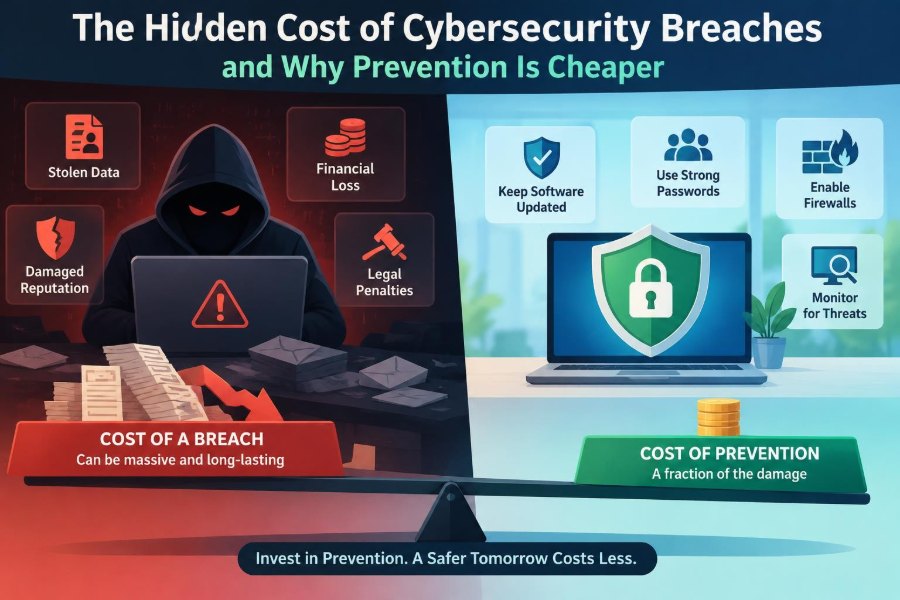
The hidden cost of a breach is the compounding effect of downtime, lost data, diverted staff, uncertainty, customer concern, and rushed decisions. Prevention is usually cheaper because it lets an organization choose its safeguards calmly and improve them deliberately.
The best starting point is not necessarily the most advanced tool. It is a clear understanding of critical assets, sensible access controls, resilient backups, prepared people, and an honest plan for what happens when something goes wrong.
Prevention is cheaper not because security is free, but because preparation turns a potential emergency into a manageable operational problem. Start with the protections that reduce the largest risks, test them, and keep improving them as the organization changes. 🛡️💻📌