
You click an app icon, type into a document, or open a browser tab, and the response usually feels immediate. Yet the processor inside your computer is working at a pace that ordinary memory cannot always match.
This gap is easy to miss because RAM already seems fast. It holds the programs and data currently in use, so why would a computer need another kind of memory between the processor and RAM?
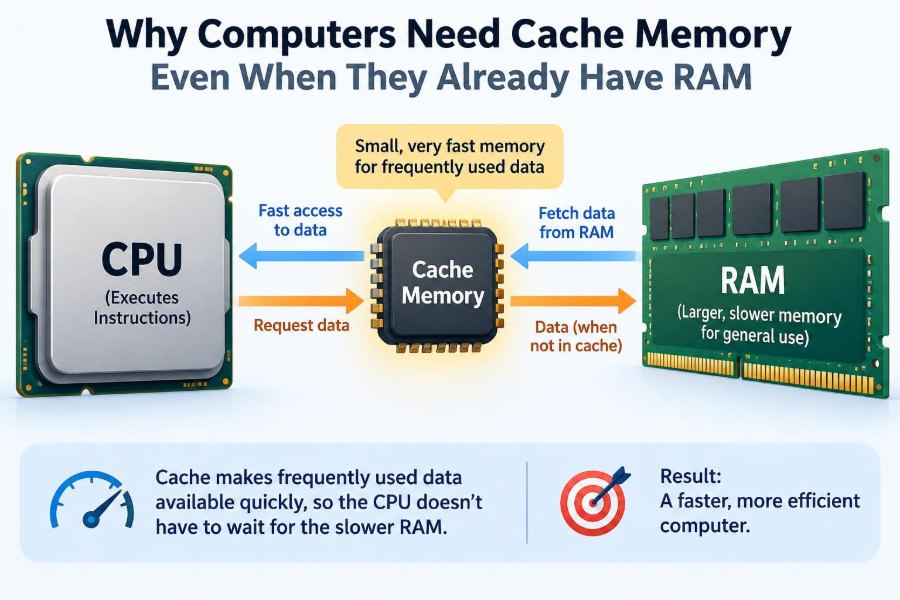
The answer is cache memory: a small, extremely fast workspace that helps the processor avoid waiting. Without it, even a powerful CPU would spend surprisingly large stretches of time stalled for data to arrive.
Understanding cache explains why two computers with similar RAM can perform differently, why some programs become slow as data grows, and why hardware designers care so much about where data is stored—not only how much exists.
🧩 The Short Answer: Speed Mismatch
Computers need cache because a CPU can process instructions much faster than main memory can deliver their required data. Cache keeps likely-needed instructions and data physically close to the processor in a form it can access quickly.
RAM provides capacity; cache reduces waiting time. Both are essential, but they solve different parts of the same problem.
🏠 A Desk-and-Storage Analogy
Imagine preparing a report. A large filing cabinet holds all your documents, but repeatedly walking to it interrupts your work. Your desk holds the pages, notes, and tools you expect to use next.
RAM is like the accessible filing cabinet. Cache is like the small space on your desk: limited, but close enough to support continuous work. Keeping every document on the desk would be impossible, yet keeping nothing there would be inefficient.
⚙️ What the CPU Actually Needs
A central processing unit, or CPU, repeatedly fetches an instruction, interprets it, and performs an operation. Many operations also need values: a number to add, an address to inspect, or a result to store.
If the needed instruction or value is not immediately available, the CPU may have to pause. Modern CPUs can do other useful work in some situations, but missing data still creates a major performance obstacle.
🧠 What Cache Memory Is
Cache memory is a small amount of high-speed memory managed largely by hardware. It stores copies of selected information from slower memory, usually data and instructions that the processor is likely to use again soon.
It is commonly built using static RAM, or SRAM. SRAM is fast but takes more silicon area per stored bit than the dynamic RAM, or DRAM, normally used for system RAM. That trade-off makes large caches expensive in chip space and power.
🪜 The Memory Hierarchy
Computer memory is arranged in layers rather than as one universal store. Layers nearer to the CPU tend to be faster, smaller, and more costly per byte; farther layers tend to be larger and slower.
| Layer | Typical role | Relative traits |
|---|---|---|
| CPU registers | Values being used immediately | Tiny and fastest |
| Cache | Recently or predictably needed data | Small and very fast |
| RAM | Active programs and working data | Large and fast, but slower than cache |
| Storage | Files and long-term data | Much larger and slower |
This hierarchy lets a machine offer both speed and capacity without attempting to build its entire memory system from the fastest, most costly technology.
📦 Why RAM Cannot Simply Replace Cache
Adding more RAM gives the operating system more room for applications and files. It can reduce the need to retrieve data from storage, which is valuable when multitasking or working with large projects.
But more RAM does not automatically make each RAM access as fast as a cache access. The electrical distance, organization, signaling, and design priorities are different. A processor still benefits from a nearby layer that can answer frequent requests quickly.
🔬 SRAM and DRAM Make Different Trade-Offs
System RAM usually uses DRAM, which stores bits in tiny capacitors that must be periodically refreshed. This design packs a great deal of memory into a relatively affordable module.
CPU caches generally use SRAM cells, which can retain a value while power is supplied without the same refresh process. SRAM is well suited to low-latency access, but its lower density makes it impractical to use as all of a computer’s main memory.
🎯 The Principle of Locality
Cache works because real programs do not usually request completely random information every moment. Their memory-access patterns often show locality: useful information tends to cluster in time or location.
Hardware does not need to predict the future perfectly. It only needs useful patterns often enough that cache hits substantially reduce the average time needed to get data.
⏱️ Temporal Locality: Using Things Again Soon
Temporal locality means that if a program uses something now, it may use it again shortly. A loop counter, a frequently called function, or a repeatedly checked setting are familiar examples.
When that information remains in cache, the next request can be served quickly. Reuse is one reason a small cache can have an effect much larger than its size suggests.
📍 Spatial Locality: Using Nearby Things
Spatial locality means that if a program accesses one memory location, it may soon access nearby locations. Reading a list from beginning to end is a classic case.
For this reason, caches typically move data in fixed-size chunks called cache lines, rather than fetching only one byte at a time. A request for one item can bring its neighbors along, preparing for likely future accesses.
✅ A Cache Hit Is the Fast Path
A cache hit occurs when the CPU asks for information and finds a valid copy in the relevant cache level. The processor receives the data far sooner than it would from RAM.
Programs do not need to announce most hits. The cache hardware checks automatically, making the fast path largely invisible to application developers and everyday users.
🚧 A Cache Miss Has a Cost
A cache miss occurs when requested data is absent from a cache. The machine must look to a lower level, such as another cache or RAM, then usually bring the result upward for future use.
The delay is called a miss penalty. It does not mean the computer has failed; it means the processor’s carefully planned rhythm has been interrupted by a slower lookup.
🧱 Cache Lines Are Useful but Imperfect
Fetching a whole cache line helps sequential access, but it can also fetch bytes a program never uses. This is an acceptable trade-off when nearby data is commonly useful.
When an application jumps unpredictably through a huge data structure, many fetched lines may provide little value. The cache then spends bandwidth moving information that is quickly replaced.
🏷️ Tags Let the Cache Recognize Data
Memory addresses are much larger than the cache itself. A cache therefore stores identifying information, often called a tag, alongside each cached line.
When the CPU requests an address, the cache checks whether a stored line corresponds to that address and is valid. This lookup is part of why cache design is sophisticated: it must be fast enough that the lookup itself does not become the delay.
🪜 L1, L2, and L3 Share the Work
Most modern processors use multiple cache levels. L1 cache is smallest and closest to each processor core. L2 is typically larger and somewhat slower, while L3 is generally larger again and may be shared among several cores.
The exact sizes and sharing arrangements vary by processor design. The basic strategy stays consistent: use tiny, extremely fast caches for the most urgent requests and larger layers to catch more data before RAM is needed.
🔀 Instruction and Data Caches
At the closest level, processors often separate instruction cache from data cache. One holds the machine instructions being executed; the other holds values being read and written.
This separation can help because a program needs both streams at once. Fetching the next instruction should not necessarily compete with loading the number that instruction needs to process.
🔁 When the Cache Must Evict Something
Cache space is finite. When new data arrives and there is no suitable empty location, the cache chooses an existing line to remove, or evict.
Replacement policies attempt to retain useful information and remove less likely candidates. Actual hardware policies vary, and no policy can be perfect: a future access is not fully known.
🧭 Mapping Data into Limited Locations
A cache cannot normally place every memory address anywhere it wants without making searches costly. Instead, cache designs use rules that map addresses to possible locations.
- Direct-mapped caches give each address one possible location.
- Set-associative caches allow several possible locations within a set.
- Fully associative caches allow broad placement but require more complex searching.
Set associativity is common because it reduces avoidable collisions without demanding the complexity of searching every cache line.
💥 Conflict Misses and Unlucky Patterns
Two pieces of data may map to the same cache location or set even though there is unused capacity elsewhere. If a program alternates between them, each can evict the other repeatedly.
That is a conflict miss. It illustrates a subtle point: cache performance depends not only on how much data exists, but also on access order and address layout.
📏 Capacity Misses and Working Sets
A program’s working set is the portion of instructions and data it actively needs during a period of execution. If that working set exceeds the relevant cache capacity, useful information is evicted before it can be reused.
This produces capacity misses. Enlarging a cache can help some workloads, but it may also increase chip area, energy use, and lookup complexity. Bigger is not automatically better at every level.
✍️ Reading Is Easier Than Writing
Reading cached data is only part of the job. When a CPU changes a value, the system must eventually ensure that RAM has the correct version.
With a write-through approach, changes are sent to lower memory promptly. With write-back, modified cache lines may remain in cache until eviction. Write-back can reduce traffic, but it requires tracking which lines have changed.
👥 Multiple Cores Create a Consistency Challenge
In a multicore processor, different cores may cache copies of the same memory location. If one core changes it, another core must not keep using an obsolete copy when correct program behavior requires the update.
Cache coherence refers to hardware mechanisms that coordinate these copies. Coherence is necessary for shared-memory programming, but communication and synchronization between cores can still carry performance costs.
🧵 Why Threads Can Slow Each Other Down
Two threads can interfere even when they appear to work on separate variables. If those variables happen to sit in the same cache line, writes by one core can force coordination with the other core’s cache.
This situation is known as false sharing. Programmers building high-performance parallel software may avoid it by arranging frequently written data so independent threads do not repeatedly modify the same cache line.
🗂️ Data Layout Can Change Program Speed
Consider a hypothetical program that processes millions of records. If it walks through contiguous arrays, each fetched cache line is likely to contain upcoming values. If it follows pointers scattered throughout memory, each step may require a new line from elsewhere.
The two approaches can perform differently even when they execute similar high-level work. This is why data structures and memory layout matter in systems programming, game engines, scientific computing, and data processing.
🔄 Loops Often Reveal Cache-Friendly Code
Loop order can affect locality. In a two-dimensional array stored row by row, visiting elements across a row usually accesses nearby memory, while jumping down a column may skip across larger gaps.
Compilers and libraries sometimes transform work to improve locality, but they cannot safely or effectively fix every access pattern. Developers benefit from recognizing that “same number of operations” does not always mean “same time to finish.”
📉 Cache Is Not a Universal Performance Cure
Cache helps most when a workload has reuse or nearby accesses. It cannot eliminate delays caused by slow storage, network requests, complex calculations, limited memory bandwidth, or an algorithm that performs too much work.
Nor can cache make a RAM shortage disappear. If active programs exceed available RAM, the operating system may move data to storage, a much slower process that cache can only partly mask.
🧰 What More RAM Actually Helps With
More RAM is especially helpful when a computer runs many applications, edits large media files, hosts virtual machines, or handles data sets that otherwise force frequent storage access. It allows more active information to remain in main memory.
That benefit complements cache rather than replacing it. Think of more RAM as a larger filing cabinet near your desk; it still does not put the page you are using directly under your hand.
🖥️ Why CPU Specifications Mention Cache
Processor specifications often list cache sizes because cache capacity can influence performance. However, cache size alone is not a reliable ranking system for CPUs.
Latency, bandwidth, associativity, core count, clock behavior, instruction design, and the workload itself all matter. A larger cache may help one application substantially and make little practical difference to another.
🎮 Different Workloads Stress Cache Differently
Games may benefit from fast access to simulation data, code, and graphics-related work, although dedicated graphics hardware has its own memory hierarchy. Compiling software can reuse source-processing structures and instructions. Databases often depend heavily on access patterns and data locality.
Meanwhile, a workload that streams through an enormous file once may gain less from cache reuse. It can still benefit from efficient line fetching and prefetching, but its data may not remain useful long enough for repeated hits.
🔮 Prefetching Tries to Arrive Early
Many processors try to recognize predictable access patterns and fetch data before the program explicitly requests it. This is called prefetching.
Effective prefetching can hide some memory delay. Incorrect guesses consume bandwidth and may displace useful cache contents, so processors use it as a prediction technique rather than a guarantee.
🛠️ Practical Lessons for Programmers
Most application code should prioritize correctness, clear design, and a sound algorithm before low-level cache tuning. Premature changes based on guesses can make code harder to maintain without improving the actual bottleneck.
When profiling shows memory access is limiting performance, useful practices include:
- Process contiguous data in a predictable order when practical.
- Avoid repeatedly scanning large structures for small pieces of information.
- Reuse computed values when doing so is correct and readable.
- Choose data structures that fit the access pattern, not only the abstract operation.
- Measure changes on realistic workloads rather than assuming a cache effect.
🧪 Why Measurement Matters
Cache behavior is difficult to judge from source code alone. Processor generation, compiler decisions, operating-system activity, input size, and competing programs can all affect observed results.
A benchmark should represent the real task and be run carefully enough to distinguish a meaningful pattern from ordinary variation. The goal is not to chase a single number, but to identify where time is actually being spent.
🚫 Common Misunderstandings About Cache
One common mistake is calling cache “extra RAM.” Cache stores copies of RAM data, but it has a distinct role, design, and location. Another is assuming that clearing a browser cache concerns CPU cache; browser caches store web resources and are unrelated to processor cache hardware.
It is also misleading to say cache makes RAM unnecessary. A cache is too small to hold the full active contents of a modern system, and it relies on lower memory layers to supply data that is not already nearby.
🔐 Cache and System Boundaries
Because caches affect the timing and visibility of memory activity, they have also been relevant to certain advanced security concerns. Some attacks attempt to infer information from cache timing behavior under particular conditions.
Mitigations can involve hardware design, operating-system behavior, browser safeguards, and software practices. The details are specialized, but the broad lesson is useful: performance mechanisms can create design considerations beyond raw speed.
🌍 The Core Principle: Fast Work Needs Nearby Data
Cache memory exists because computation is only as smooth as the supply of instructions and data allows. A fast CPU without a fast nearby source would repeatedly wait for a much slower layer of the system.
By exploiting temporal and spatial locality, cache turns many common requests into quick hits. RAM remains the large active workspace, while cache serves as the processor’s immediate, carefully managed staging area.
Computers need cache memory not because RAM is unhelpful, but because even fast RAM is too distant and too slow to feed a modern CPU on every request. Once you see memory as a hierarchy rather than a single pool, many performance differences become easier to understand. 🧠⚙️