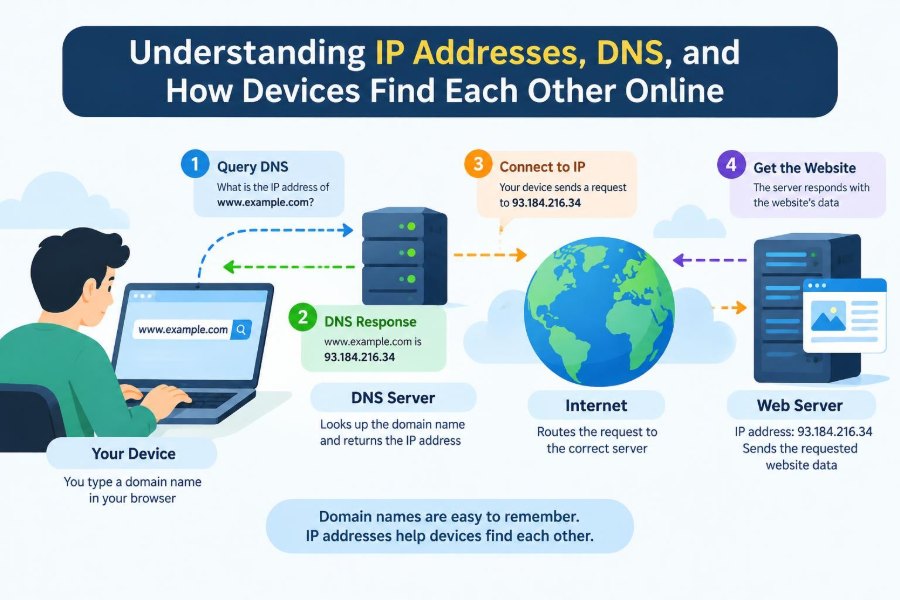

You type a web address, press Enter, and a page appears. A video starts, a message reaches a friend, or a work application opens—usually before there is time to wonder what happened between the tap and the result.
Behind that ordinary moment, many computers make small, coordinated decisions. Your phone or laptop needs a way to identify itself on a network, find the destination you requested, and move data through routers that may be thousands of kilometres apart.
IP addresses and DNS are two of the systems that make this possible. They are not the whole internet, but they solve a basic problem: computers need precise numerical destinations, while people prefer memorable names.
Learning the basics makes everyday technology less mysterious. It also helps when troubleshooting Wi-Fi, understanding privacy and security warnings, configuring a home network, or working with cloud services.
🌐 The Internet Is a Network of Networks
The internet is not one giant machine or one single company’s network. It is a collection of independently operated networks—home networks, mobile carrier networks, universities, businesses, cloud providers, and internet service providers—that agree on common communication rules.
When your device sends data to a site, that data often crosses several of these networks. Equipment called routers passes it onward, choosing routes based on network information rather than knowing the complete content of every request.
This arrangement allows the internet to grow and adapt. A local network can connect to a larger provider, which connects to other providers, while still using shared technical standards.
📍 What an IP Address Is
An Internet Protocol address, usually called an IP address, is a numerical identifier used for sending data across an IP network. It serves a role similar to an address on a mailed package: it tells network equipment where data should be delivered.
IP addresses identify network interfaces, not necessarily permanent people or physical places. A laptop can have one address on home Wi-Fi, another on an office network, and another when using a mobile hotspot.
An address alone does not reveal everything about a user. It can often indicate the network or approximate region associated with a connection, but shared connections, mobile routing, virtual private networks, and provider infrastructure make precise conclusions unreliable.
🔢 IPv4 and Its Familiar Dotted Numbers
IPv4 is the older and still widely used version of Internet Protocol addressing. An IPv4 address is commonly written as four decimal numbers separated by periods, such as 192.0.2.25.
Each number represents part of a 32-bit address. This notation is easier for people to read than raw binary, but computers ultimately process addresses as bits: zeros and ones.
IPv4 has a limited number of possible addresses. That limit became increasingly significant as phones, home devices, servers, and connected equipment joined the internet.
🧭 IPv6 and the Larger Address Space
IPv6 was designed to provide a vastly larger address space. It uses 128-bit addresses and is written in hexadecimal groups, such as 2001:db8:1234::25. Hexadecimal uses digits and letters because it compactly represents binary data.
IPv6 addresses look less familiar, but their larger size allows many more unique addresses. IPv6 also includes improvements to address configuration and network operation, although its practical behavior depends on the network using it.
IPv4 and IPv6 coexist. Many devices and services use dual stack networking, meaning they can communicate using either version when both are available.
🏠 Public Addresses and Private Addresses
A public IP address can be routed across the public internet. A private IP address is intended for use inside local networks and is not directly routable across the public internet.
Your home router may give a laptop an address such as 192.168.1.20. That address is meaningful inside the home, but countless other homes can use the same private range without conflict because those networks are separate.
Private addressing makes local networking practical and reduces demand for public IPv4 addresses. It also means that seeing a device’s local address is not enough to reach it from anywhere on the internet.
🚪 Network Address Translation at Home
Network Address Translation, or NAT, is commonly used by routers to let many private devices share one public IPv4 address. The router keeps track of connections so returning data can be sent back to the correct laptop, phone, or game console.
For example, two people in one house can visit the same site at once. Their devices may have different private addresses, while the website sees traffic arriving through the household’s shared public address and connection details.
NAT conserves IPv4 addresses, but it can complicate incoming connections. Hosting a service, joining certain peer-to-peer applications, or reaching a device remotely may require port forwarding, a relay service, or another deliberate setup.
🔄 Static, Dynamic, and Changing Addresses
A static IP address stays assigned to a device or service until an administrator changes it. Servers often benefit from stable addresses because other systems need a predictable destination.
A dynamic IP address is assigned for a limited period and may change later. Dynamic assignment is common for home devices because it is easier to manage and avoids reserving a fixed address for every occasional visitor.
A public address supplied to a home can also be dynamic. That is why a home internet connection should not be assumed to have the same public address forever.
🤝 DHCP Assigns Local Network Settings
When a device joins many Wi-Fi or wired networks, it does not need a person to type every setting. A service using the Dynamic Host Configuration Protocol, or DHCP, can provide an IP address and other essential configuration automatically.
Along with an address, DHCP commonly supplies a subnet mask or prefix length, a default gateway, and DNS server addresses. These settings tell the device what is local, where to send outside traffic, and whom to ask about names.
If DHCP fails, a device may connect to Wi-Fi yet still be unable to reach useful network resources. “Connected” only means the radio or cable connection exists; it does not guarantee correct network configuration.
🗺️ Subnets Define the Local Neighbourhood
A subnet is a logical portion of an IP network. It helps a device decide whether a destination is nearby on the same local network or should be sent to a router.
Imagine an office with several departments. Splitting the network into subnets can reduce unnecessary local traffic and make access rules easier to apply. It does not automatically create security, but it supports useful boundaries when paired with proper configuration.
In IPv4, a subnet is often described with a mask such as 255.255.255.0 or with slash notation such as /24. The notation describes which part identifies the network and which part identifies devices within it.
🚦 The Default Gateway Is the Way Out
Your device can send directly to a device on the same local network. To reach a destination outside that network, it sends the traffic to its default gateway, usually a router.
Think of the gateway as the road leaving a neighbourhood. It does not need to know every final address in advance; it forwards traffic toward another router according to its routing table.
A wrong gateway setting can produce a common troubleshooting clue: local devices may work, but websites and external services do not.
📦 Packets Carry Data in Small Pieces
Data sent across IP networks is divided into units commonly called packets. A packet includes addressing information and a portion of the data being transferred.
Breaking data into packets lets different conversations share network capacity. A large download does not need to occupy an entire path as one uninterrupted block; its pieces can be interleaved with voice calls, messages, and other traffic.
Packets can be delayed, dropped, duplicated, or arrive in a different order. Higher-level protocols often handle those realities, depending on what the application needs.
🛣️ Routers Choose the Next Hop
Routers examine destination IP addresses and forward packets toward the next appropriate network. Each forwarding decision is typically about the next hop, not a complete map of every cable and device ahead.
Routes can change when links fail, networks become congested, or providers adjust their connections. This resilience is useful, but it also means the path to a service is not always identical from one moment to the next.
Tools such as traceroute can reveal a sequence of responding network hops, but they provide a partial diagnostic view rather than a perfect map. Some routers are configured not to respond to such probes.
📬 Ports Identify the Right Application
An IP address gets traffic to a device or network interface. A port number helps direct that traffic to the intended application or service on that device.
For instance, a web server may listen for encrypted web traffic on a conventional port, while an email or database service uses another. The combination of an IP address, protocol, and port gives software a more specific communication endpoint.
Ports are not physical sockets. They are logical numbers used by networking software. Opening a port unnecessarily can expose a service to the network, so administrators should expose only services that are needed and protected.
🔗 TCP and UDP Make Different Trade-Offs
IP handles addressing and forwarding, but applications usually rely on transport protocols for additional behavior. Two common ones are TCP and UDP.
| Protocol | General behavior | Common fit |
|---|---|---|
| TCP | Builds a connection and supports ordered, reliable delivery through acknowledgements and retransmission. | Web pages, file transfers, remote administration |
| UDP | Sends messages with less connection overhead; delivery and ordering are not guaranteed by UDP itself. | Live media, online games, DNS queries |
Neither is simply “better.” A live conversation may prefer timely audio over waiting for an old missing packet, while a file download must detect and recover from missing data.
📛 Why Humans Need Domain Names
People can remember names such as example.com far more easily than changing numerical addresses. A domain name is a human-readable label that can be associated with network information, including IP addresses.
Names also provide flexibility. A company can move a service to new servers without asking every user to memorize a replacement address. It can direct different names to different services while keeping a consistent public identity.
A domain name is not automatically a website. It can be used for email routing, service verification, and other technical purposes as well.
📖 DNS Is the Internet’s Distributed Directory
The Domain Name System, or DNS, translates domain names into information that computers can use. Its most familiar job is finding IP addresses, but DNS is better understood as a distributed directory.
When you enter a domain in a browser, the device or browser may ask a DNS resolver for the relevant record. The resolver can return a previously cached answer or perform additional lookups to find an authoritative answer.
DNS is distributed so that no single directory server must store and answer every request for the whole internet. Different organizations manage different portions of the namespace.
🌳 The DNS Hierarchy Organizes Names
DNS names are structured from right to left. In www.example.com, .com is a top-level domain, example is a domain registered beneath it, and www is a host or service label within that domain.
Root servers help point resolvers toward the servers responsible for top-level domains. Those top-level domain servers can point toward the name servers responsible for a particular domain. The authoritative name servers then provide records for that domain.
This hierarchy delegates responsibility. A domain owner can manage its own records without operating the global DNS system.
🧑💻 Resolvers Perform the Lookup Work
A recursive resolver is the DNS service that usually performs lookup work on a user’s behalf. It may be supplied by an internet provider, an organization, a router, or a chosen public DNS provider.
In simplified form, a resolver follows referrals through the hierarchy until it reaches an authoritative source for the requested domain. It then returns the result to the requesting device.
Modern browsers, operating systems, and networks may add optimizations or use encrypted DNS transports. The basic question remains the same: which server has the trustworthy record for this name?
🗂️ Common DNS Record Types
DNS stores different kinds of records. Knowing a few makes configuration screens and error messages much easier to interpret.
- A record: associates a name with an IPv4 address.
- AAAA record: associates a name with an IPv6 address.
- CNAME record: makes one name an alias of another name.
- MX record: identifies servers that receive email for a domain.
- TXT record: holds text used for purposes such as domain verification and email policy.
- NS record: identifies authoritative name servers for a domain or delegated zone.
Records are not interchangeable. An email provider may ask for an MX or TXT record, while a web host may ask for A, AAAA, or CNAME records.
⏳ Caching Makes DNS Faster but Not Instant
DNS responses commonly include a time to live, or TTL. This tells caches how long they may reuse an answer before checking again.
Caching reduces repeated lookup work and can speed up browsing. The trade-off is that DNS changes may not appear everywhere immediately: devices and resolvers can continue using a valid cached answer until its TTL expires.
Lowering a TTL before a planned migration can reduce the waiting period for new answers, but it does not erase every cache instantly. Planning changes and keeping the old service available during the transition is often safer.
🔒 DNS Privacy and DNS Security Are Different
Traditional DNS queries may be visible to parties handling the connection, such as a local network operator or DNS provider. Encrypted DNS methods can protect queries while they travel between a device and a resolver.
That privacy protection does not mean the resolver knows nothing. The resolver still needs to process the query, so its policies and trustworthiness matter.
DNSSEC addresses a different concern: it provides a way to validate that DNS data has not been altered in transit when the relevant domain is properly signed and validation is available. It does not encrypt the domain name query itself.
🛡️ DNS Mistakes Can Create Real Risks
Because DNS directs users to services, a wrong or malicious answer can cause disruption or deception. Misconfigured records can take a site or email service offline; compromised account access can allow an attacker to change records.
DNS is not the only security layer. A correctly resolved name should still be paired with secure application protocols, certificate validation, account protections, and careful software updates.
- Use strong, unique passwords and multi-factor authentication for domain and DNS accounts.
- Limit who can edit production DNS records.
- Document record purposes before deleting “unused-looking” entries.
- Verify unusual login or record-change alerts promptly.
🌍 What Happens When You Open a Website
Consider the hypothetical address shop.example. Your browser first checks whether it already has a usable cached answer. If not, it asks a configured DNS resolver for the address associated with that name.
After receiving an IP address, the device decides whether the destination is local. It usually is not, so the device sends packets to its default gateway. Routers then forward the packets across networks toward the server or a nearby content delivery endpoint.
The browser establishes the needed transport and security connections, requests the page, and receives response data. DNS found the destination name; IP routing moved packets there; other protocols handled the web conversation.
⚖️ One Name Can Lead to Many Servers
A domain name does not have to point to one machine. DNS can return multiple addresses, allowing traffic to be distributed across servers or data centres.
Large services may use content delivery networks, which place copies or cached content in multiple locations. The address returned can vary based on network conditions, geographic hints, service design, or resilience needs.
This is why “the IP address of a website” is often an oversimplification. A service may have several addresses, and multiple unrelated websites can also share one address through virtual hosting.
📶 Wi-Fi Names Are Not Internet Addresses
A Wi-Fi network name, also called an SSID, identifies a wireless network for nearby devices. It is not an IP address, a domain name, or proof that internet access is working.
You might join a hotel network called Guest-WiFi, receive a local IP address, and still need to accept a sign-in page before external traffic is allowed. Conversely, a strong Wi-Fi signal does not help if the router’s internet connection has failed.
Separating these layers helps troubleshooting: wireless association, IP configuration, DNS resolution, and application access are related but distinct stages.
🔍 A Practical Way to Troubleshoot Connection Problems
When something “does not work,” avoid changing random settings. Test from the nearest layer outward to narrow down where the failure begins.
- Check whether the device is connected to the intended Wi-Fi or wired network.
- Confirm it received a plausible IP address, gateway, and DNS configuration.
- Try reaching the router or another known local device if appropriate.
- Try a known IP-based service only if you have a legitimate test address; if that works but names fail, DNS may be involved.
- Compare another device on the same network to determine whether the problem is local or network-wide.
Corporate networks, captive portals, firewalls, and VPNs can make diagnosis more complex. If the network is managed by someone else, document the symptoms and ask the administrator rather than bypassing controls.
🧩 VPNs Change the Visible Network Path
A virtual private network, or VPN, creates an encrypted tunnel between a device and a VPN server. Traffic intended for external services may exit to the internet from that server rather than directly from the user’s usual network.
This can protect traffic from observation on an untrusted local network and can make websites see the VPN server’s public IP address. It does not make a person anonymous in every context, and it shifts trust toward the VPN provider.
VPN configuration also affects DNS. A well-designed setup should consider whether DNS queries travel through the tunnel or use another resolver, because that changes who can observe and process them.
🧱 Firewalls Control Allowed Traffic
A firewall applies rules about which network traffic is allowed, blocked, or logged. Rules can consider addresses, ports, protocols, connection state, and sometimes application-level information.
Firewalls are useful because not every reachable service should be accessible from every network. A database may need to accept connections only from an application server, not from the public internet.
A blocked connection is not always a malfunction. In a managed environment, it may be an intentional policy. The right solution is to understand the required communication and adjust rules through authorized processes.
⚠️ Common Misunderstandings to Avoid
Several shortcuts are tempting but inaccurate. An IP address is not automatically a person’s identity, DNS is not the same thing as a web host, and a domain registration does not by itself create a working website.
Another common mistake is assuming that changing DNS servers makes all internet problems disappear. A different resolver may help when the original resolver is failing or filtering incorrectly, but it cannot repair a broken cable, invalid gateway, blocked port, or unavailable server.
Likewise, hiding a local IP address behind NAT is not a complete security strategy. Devices still need updates, sensible passwords, and carefully configured services.
🧠 The Core Model: Names, Addresses, and Paths
A useful mental model has three parts. DNS supplies names-to-information lookup, IP provides addressing, and routers provide paths between networks. Ports and transport protocols then help the data reach the correct application reliably or efficiently.
These systems work together but solve different problems. That separation explains why a website can have a valid name but fail to load, why an IP connection can work while name lookup fails, and why a local network can function without access to the wider internet.
Once you can identify which layer is involved, networking becomes less like invisible magic and more like a set of understandable, testable steps.
Devices find each other online because shared protocols turn human-friendly names into usable addresses and guide packets across connected networks. That quiet coordination sits behind nearly every click, call, stream, and message you send. 🌐📦🔎