
A delivery driver follows a route on a phone while traffic changes by the minute. A factory camera notices a defect on a moving production line. A video call adjusts when a home internet connection becomes busy. In each case, waiting for a distant data center can make a system feel slow—or make it miss the moment entirely.
For many years, the usual model was straightforward: collect data on a device, send it to the cloud, process it there, and return a result. Cloud computing remains extremely useful, but the amount of data created by cameras, sensors, vehicles, machines, and connected devices has changed the trade-offs.
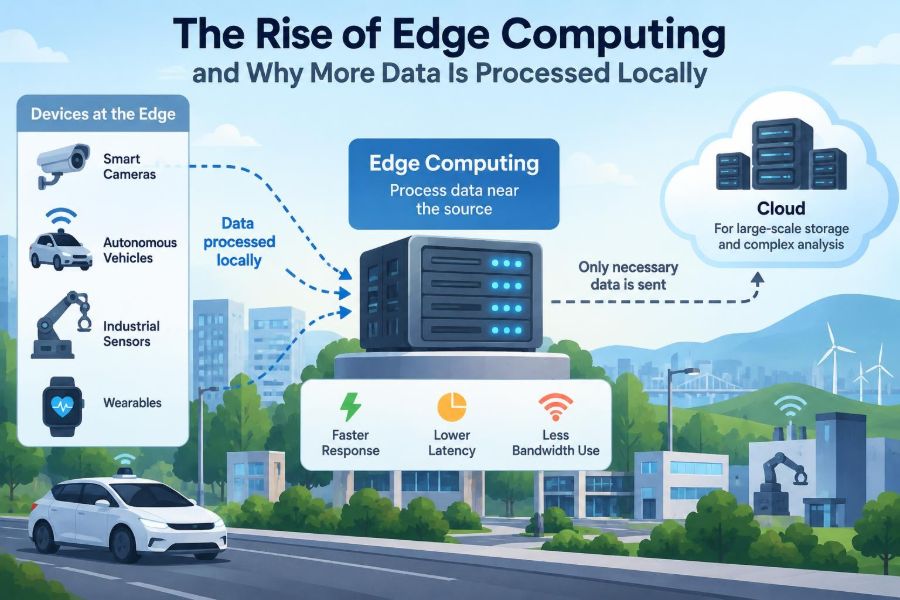
Edge computing moves some computation closer to where data is produced and where decisions are needed. “Closer” might mean a phone, a router, a server in a shop, or a small data center near a city. It does not mean abandoning the cloud.
The shift matters because computing is no longer confined to desktops and centralized servers. Understanding where data is processed helps students, developers, and organizations make better decisions about speed, cost, reliability, privacy, and system design.
🌐 What Edge Computing Means
Edge computing is an approach in which data processing happens near the edge of a network: close to devices, users, sensors, or machines generating the data. Instead of sending every raw input to a faraway cloud region, an edge system handles time-sensitive or routine work locally.
For example, a security camera can analyze its own video stream for motion. It may save or transmit only a short clip when something relevant occurs, rather than continuously uploading every frame.
The word “edge” is relative. A smartphone is at the edge compared with a cloud data center. A server in a retail store can also be an edge location compared with a central corporate system.
☁️ The Cloud Is Still Part of the Picture
Edge computing is often described as the opposite of cloud computing, but that framing is misleading. Most practical systems use both. The edge responds locally, while the cloud provides large-scale storage, coordination, training, reporting, and long-term analysis.
A smart thermostat, for instance, can make an immediate local adjustment based on a temperature reading. Its manufacturer may use cloud services to deliver software updates, aggregate optional diagnostic information, and improve future product behavior.
The useful question is not “edge or cloud?” It is which work belongs at which location?
⏱️ Why Latency Drives Local Processing
Latency is the time between an action and a response. Network travel, routing, congestion, and remote processing all add delay. A fraction of a second may be unnoticeable for a photo backup, yet unacceptable for a machine that must stop when it detects a safety issue.
Consider a hypothetical warehouse robot. If its collision detection depends entirely on a remote connection, an interruption or delay could prevent a timely response. Local processing allows the robot to recognize an obstacle and brake without first requesting a decision from the cloud.
Edge computing does not remove all delay, but it removes avoidable network round trips from urgent decisions.
📡 Bandwidth Is Not Unlimited
Bandwidth is the amount of data a network connection can carry over time. High-resolution video, industrial sensors, medical imagery, and vehicle telemetry can create large streams of information. Sending all of it across wide-area networks can be expensive, slow, or simply impractical.
An edge device can filter, compress, summarize, or discard routine data. A camera might report “person detected at entrance” with a relevant clip instead of transferring hours of empty hallway footage.
This approach is called data reduction at the source. It preserves the information needed for action while avoiding unnecessary movement of raw data.
🚦 Real-Time Decisions Cannot Always Wait
Some systems have strict timing requirements. Industrial control, traffic management, augmented reality, interactive gaming, and certain healthcare monitoring workflows may need a response within a predictable time window.
Edge infrastructure helps make timing more consistent because the path between the device and processor is shorter and more controlled. This is valuable even when average cloud performance is good, because occasional slow responses can matter in a real-time workflow.
Not every task is real-time. Generating a monthly energy report can wait; identifying a potentially dangerous equipment condition often should not.
📱 Your Phone Is an Everyday Edge Device
Modern phones already perform many edge-computing tasks. They unlock with facial recognition, improve photos, translate text, filter spam calls, and suggest words while you type. Some of these features can work partly or fully on-device.
Local processing makes features feel responsive and can limit the need to transmit sensitive inputs. However, the exact behavior depends on the app and its settings; a phone feature may still use remote services for some requests.
This familiar example shows that edge computing is not only an enterprise technology. It is built into many daily digital experiences.
🏭 Factories Use the Edge Near Machines
Manufacturing equipment produces constant readings from cameras, vibration sensors, temperature probes, and control systems. A nearby edge server can inspect products, detect unusual patterns, and coordinate machinery with much lower dependence on an external internet connection.
Suppose a vision system finds a cracked component on a conveyor. An edge computer can flag it immediately, trigger a sorting mechanism, and retain the relevant images for review. Aggregated production records can later go to central systems.
Local processing is particularly helpful where production networks are isolated for safety or operational reasons.
🚗 Vehicles Need Decisions Close to the Road
Connected vehicles generate data from cameras, radar, positioning systems, and internal diagnostics. Functions related to braking, steering, and driver assistance require computation inside the vehicle because a remote network cannot be treated as continuously available or predictably fast.
Cloud systems still have roles: map updates, fleet analysis, maintenance planning, and software distribution. But the basic safety principle is clear: an immediate driving decision should not depend on a distant server replying in time.
This does not mean every vehicle feature is fully autonomous. It illustrates why location matters when software interacts with the physical world.
🏥 Healthcare Requires Careful Local Design
Hospitals and clinics use connected devices for imaging, monitoring, records, and equipment management. Edge processing can support faster local analysis and keep certain data within a facility’s controlled environment.
Yet healthcare is not a simple “process locally and privacy is solved” case. Systems still need strong access controls, auditing, accurate software, secure updates, and compliance with applicable rules. Clinical decisions also require appropriate human oversight.
Edge computing can improve workflow, but it does not replace professional judgment, validation, or patient-data governance.
🏪 Stores Can Act on Local Information
Retail locations may use edge systems for point-of-sale operations, inventory sensors, digital signage, and loss-prevention tools. A local server can keep selected functions operating when a connection to central services is degraded.
For example, a store might synchronize product and sales data later while handling basic transactions locally under defined operational rules. The details depend on payment systems, security requirements, and business policy.
The key benefit is operational continuity, not merely speed. A distributed business should plan for what happens when its internet connection is imperfect.
🎮 Interactive Media Benefits From Nearby Compute
Online games, live streaming, virtual reality, and augmented reality are highly sensitive to delay. When computing resources are deployed nearer to users, interactions can feel more immediate and stable.
For an augmented-reality application, a device may process camera input locally while requesting heavier content or shared-world updates from nearby or cloud infrastructure. Splitting tasks avoids making every visual adjustment wait for a distant round trip.
Experience still depends on device capability, network quality, and application design. Edge placement helps, but it cannot overcome every source of lag.
🧠 Edge AI Turns Raw Inputs Into Decisions
Edge AI refers to running artificial intelligence models on local devices or nearby servers. A model is a trained computational system that recognizes patterns, such as detecting an object in an image or identifying an unusual sound.
Instead of uploading every input for analysis, an edge device can run an optimized model itself. A wearable might identify a gesture; a machine sensor might detect a pattern associated with abnormal vibration.
Many AI models are too large or power-hungry for small hardware without modification. Developers may use smaller models, specialized chips, or techniques that reduce computation while preserving acceptable accuracy.
🗂️ Training and Inference Are Different Jobs
AI discussions often blur two distinct activities. Training is the resource-intensive process of adjusting a model using many examples. Inference is using the trained model to make a prediction on new data.
Cloud systems are often well suited to training because they can provide large pools of computing resources and datasets. Edge devices are commonly used for inference because they need quick local results.
This split is not absolute. Some learning can happen locally, but it is a helpful starting point when designing an edge AI system.
🔒 Privacy Can Improve, but It Is Not Automatic
Processing data locally can reduce exposure by keeping raw audio, video, location, or sensor information from leaving a device unnecessarily. A system may transmit only a result, such as “wake word detected,” rather than an entire continuous recording.
But local processing is not automatically private. The device could still store sensitive information insecurely, send metadata elsewhere, or be accessed by unauthorized users. Privacy depends on data collection choices, retention periods, encryption, permissions, and transparency.
Data minimization—collecting and retaining only what is needed—is often as important as where processing happens.
🛡️ More Locations Create More Security Work
A centralized data center may have tightly controlled physical access and a dedicated operations team. Edge deployments can place hardware in stores, vehicles, homes, street cabinets, or factory floors, where physical and network conditions vary.
Each endpoint needs identity management, secure configuration, encryption, software patching, and monitoring. If attackers compromise an edge device, they may gain access to local data or use it as a path into a wider network.
- Use secure boot and signed software where supported.
- Apply updates through controlled, tested rollout processes.
- Give devices only the permissions they require.
- Plan how to revoke access from lost, retired, or compromised hardware.
🔌 Reliability Means Planning for Disconnection
An important edge design question is: what should the system do when the network disappears? A good answer differs by use case. A sensor may buffer readings until reconnection; a local control system may continue safely; a nonessential service may pause.
Designers call this offline-first or disconnected operation when a product remains useful without constant connectivity. It requires local storage, conflict-handling rules, and clear limits on what can happen independently.
Simply adding a local server is not enough. Teams must define safe fallback behavior before an outage occurs.
🔄 Synchronization Is a Hard Engineering Problem
When several devices and edge locations hold copies of data, those copies can temporarily disagree. A technician may update a record in one location while another location is offline. When both reconnect, the system must determine how to merge changes.
This is called data synchronization. Common approaches include timestamps, version numbers, event logs, and application-specific conflict rules. None is universally correct; the right strategy depends on whether accuracy, availability, or human review matters most.
For example, inventory counts may tolerate a brief delay, while two conflicting commands to industrial equipment may require strict ordering and confirmation.
💾 Local Storage Needs Clear Rules
Edge devices often cache data so they can respond quickly or survive outages. A cache is temporary stored information that can be reused instead of fetched again. Local storage improves performance, but it also creates questions about capacity, deletion, backup, and recovery.
Teams should decide which data stays local, for how long, and what happens when storage fills. They should also distinguish temporary operating data from records that must be preserved centrally.
Without retention rules, a useful edge deployment can become a collection of forgotten data stores with uncertain security and ownership.
⚡ Power and Hardware Constraints Shape the Design
A cloud data center can use powerful servers and carefully managed cooling. An edge device may run on a battery, operate in heat or cold, and have limited memory, storage, and processing power.
These constraints influence software choices. Developers may process fewer video frames, schedule work in batches, use lightweight containers, or select hardware accelerators for specific AI tasks.
Efficiency is not only about lowering power use. It can determine whether an edge solution is practical at all.
🧩 Edge Hardware Comes in Several Forms
There is no single “edge computer.” The appropriate hardware depends on data volume, response time, environmental conditions, and maintenance capacity.
| Edge location | Typical role | Example |
|---|---|---|
| Device edge | Immediate sensing and response | Phone, camera, wearable, controller |
| Local gateway | Connects devices and filters data | Industrial gateway or home hub |
| On-site server | Runs local applications for a location | Factory or retail-store server |
| Regional edge site | Serves nearby users with lower delay | Network-adjacent compute facility |
These layers can work together. A sensor can make a basic local decision, a gateway can aggregate readings, and a cloud platform can analyze trends across many sites.
📊 A Practical Cloud, Edge, and Device Split
A useful architecture assigns each task according to its needs. Immediate control and sensitive raw inputs often belong close to the source. Long-term analysis and organization-wide coordination often belong centrally.
- Device: capture data, perform instant checks, control local hardware.
- Edge site: aggregate nearby devices, run local applications, maintain short-term operations.
- Cloud: archive data, train large models, manage fleets, and produce cross-location insights.
This division is a design pattern, not a rule. A small application may need only a device and cloud; a large industrial system may use all three layers.
💸 Costs Move Rather Than Disappear
Sending less data to the cloud may reduce network transfer and centralized processing costs. However, edge computing adds hardware, deployment, monitoring, replacement, support, and security work across many locations.
It is easy to focus only on the price of a device and overlook its operational lifetime. Who installs it? Who patches it? How is a failed unit replaced? How are logs collected without overwhelming the network?
A sound business case compares the whole system: connectivity, cloud use, hardware, energy, staff time, risk, and the value of faster local decisions.
🧰 Managing a Fleet Is Different From Managing One Server
Operating thousands of distributed devices is known as fleet management. Devices may run different software versions, lose connectivity, fail unexpectedly, or be installed in locations that are difficult to visit.
Teams need an inventory, device identity, health reporting, remote configuration, staged updates, and a way to roll back changes. A staged rollout sends an update to a small group first, helping reveal problems before a broad release.
Remote management should be designed from the beginning. Retrofitting it after deployment is costly and leaves systems difficult to trust.
⚠️ Common Mistake: Processing Everything Locally
Local processing sounds attractive, but placing all computation at the edge can make systems harder to update, analyze, and secure. Small devices may lack the capacity for complex workloads, and isolated data can hide valuable patterns across locations.
A chain of stores may need a central view of stock trends. A manufacturer may need cross-factory analysis to identify recurring quality issues. These are cloud-friendly tasks because they benefit from aggregated information and shared computing resources.
The goal is not maximum decentralization. It is an intentional placement of workloads.
⚠️ Common Mistake: Sending Everything to the Cloud
The opposite mistake is treating remote cloud services as the default path for every byte of data and every decision. This can create unnecessary delay, network dependence, transfer costs, and exposure of raw data.
Before sending a stream upstream, ask what the cloud truly needs. Does it need every frame, every reading, or only events and summaries? Does an action need a response now, or can it be analyzed later?
Those questions often reveal opportunities for filtering and local autonomy without sacrificing central visibility.
🧭 A Simple Method for Choosing Where Work Runs
Start with the decision, not the technology. Define what the system must do, how quickly it must respond, and what happens if connectivity fails. Then map data flow and choose locations for each operation.
- Identify the source of data and the action it enables.
- Set the maximum acceptable delay for that action.
- Classify data by sensitivity, volume, and retention needs.
- Define safe behavior during outages.
- Estimate hardware, network, cloud, and maintenance costs.
- Test with realistic load, failure, and recovery scenarios.
This method prevents architecture from being driven solely by a trend or vendor label.
🧪 Test Failure Modes, Not Only Happy Paths
An edge system may work perfectly in a demonstration with fast connectivity and clean data. Real deployments face power interruptions, corrupted inputs, full disks, clock drift, overheating, failed updates, and intermittent networks.
Testing should include these conditions. Can the device recover safely after rebooting? Does it avoid repeating an action after a network retry? Does it alert operators when it cannot make a trustworthy decision?
For systems with physical consequences, fail-safe behavior deserves especially careful engineering and domain-specific review.
📚 Skills That Matter for Edge Computing
Edge computing combines several areas of computer science. Useful foundations include networking, operating systems, embedded systems, distributed systems, databases, cybersecurity, cloud platforms, and machine learning.
Students can learn the core ideas with modest projects: build a sensor application that stores readings locally, detects a threshold event, and syncs summaries when a connection returns. The educational value lies in handling real constraints, not in using expensive hardware.
Working professionals benefit from thinking across teams. An edge project can involve software developers, network engineers, security specialists, operations staff, and domain experts who understand the physical process.
🔮 Where Edge Computing Is Heading
Edge computing will likely grow alongside connected devices, faster networks, specialized processors, and applications that interact more directly with the physical world. More capable local hardware makes it feasible to run analysis where data originates.
Growth does not mean every product needs an edge architecture. Central cloud platforms remain efficient for many workloads, especially those requiring broad aggregation or large-scale computation.
The lasting direction is hybrid computing: systems will distribute work based on timing, connectivity, privacy, cost, and operational requirements rather than treating one location as best for everything.
✅ The Core Principle: Put Computation Where It Serves the Task
Edge computing rises because data is increasingly created outside traditional data centers, and some decisions are more useful when made nearby. Local processing can reduce latency, conserve bandwidth, support resilience, and limit unnecessary movement of sensitive raw data.
It also creates real responsibilities: distributed security, software updates, synchronization, hardware maintenance, and thoughtful failure handling. An edge deployment is not a shortcut around good engineering.
The strongest systems combine local autonomy with central coordination. They process urgent information close to its source, then use cloud resources where scale, shared visibility, and long-term analysis add value.
Edge computing is not about replacing the cloud; it is about placing each computation where it can deliver the most reliable, timely, and responsible result. That principle turns a technology trend into a practical design decision. 💻📡🌐