
You tap a phone app, click a desktop shortcut, or press Enter after typing a command. A moment later, something happens: a document opens, a game begins, a calculation appears, or a message is sent.
That response can feel immediate, but a computer has completed a remarkably organized chain of work. It has found program instructions, placed data in memory, asked the processor to execute tiny operations, and communicated with devices such as the screen, storage drive, or network card.
Understanding this path makes computers less mysterious. It also helps when software is slow, a program crashes, a system runs out of memory, or a developer needs to understand why the same code behaves differently on two machines.
A computer does not “understand” a program in the human sense. It follows precise representations and rules, at extraordinary speed, one carefully managed step at a time.
🧭 The Big Picture: From Program to Results
A program is a set of instructions that tells a computer how to transform inputs into outputs. A web browser, spreadsheet, game, and command-line tool are all programs, even though they have very different purposes.
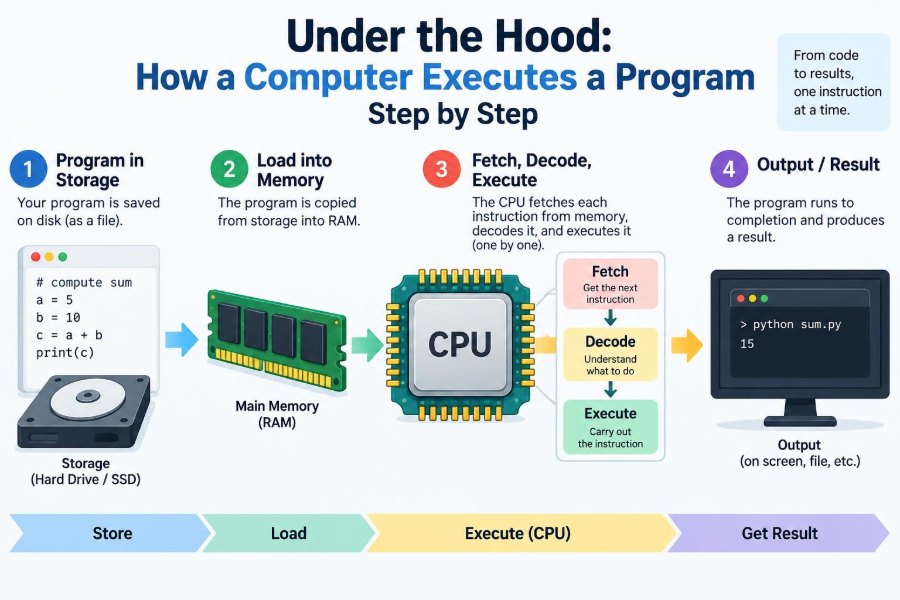
At a high level, execution follows this path:
- You request that a program run.
- The operating system creates a process and loads the program.
- The processor repeatedly fetches and executes machine instructions.
- The program reads data, performs calculations, and requests input/output.
- The operating system and hardware help deliver results.
Those stages overlap in real systems, especially when several programs run at once. Still, this model gives us a useful map.
📄 Source Code Is Written for People
Most programmers begin with source code: readable text written in a language such as Python, Java, C, JavaScript, or Rust. Source code lets people express ideas using names, functions, loops, and conditions.
Consider the simple instruction total = price * quantity. A programmer can understand the goal at a glance. The processor cannot execute that sentence directly, because its hardware recognizes a much smaller, numeric instruction set.
The gap between human-friendly code and processor-friendly work is filled by language tools such as compilers, interpreters, and virtual machines.
🔧 Compilers Translate Code Before It Runs
A compiler translates source code into another form before the program is executed. For languages such as C or C++, the output is often native machine code for a particular processor family.
Compilation also checks many structural rules. It can catch a missing symbol, an incompatible type, or malformed syntax before the program ever starts. It may optimize code too, rearranging work while preserving the intended behavior.
The result is commonly stored in an executable file, along with information the operating system needs to load it. An executable built for one processor architecture usually cannot run directly on a substantially different one without translation or emulation.
🗣️ Interpreters and Virtual Machines Take Another Route
Not every language turns directly into native instructions ahead of time. Python typically uses an interpreter that processes a compiled intermediate form called bytecode. Java commonly compiles to bytecode that runs on the Java Virtual Machine.
A virtual machine is software that provides an abstract computing environment. It can make the same program more portable across operating systems and processors, provided an appropriate runtime exists.
This approach adds layers, but the layers can provide useful services: memory management, safety checks, dynamic loading, and runtime optimization. Eventually, however, physical hardware still performs the underlying operations.
📦 Executable Files Contain More Than Instructions
An executable is not simply one uninterrupted stream of processor commands. It usually contains multiple regions, often called sections or segments, that organize code and data.
| Region | Typical purpose |
|---|---|
| Code | Machine instructions to execute |
| Read-only data | Constants, text strings, and fixed tables |
| Initialized data | Variables with starting values |
| Uninitialized data | Space reserved for variables that start empty or zeroed |
| Metadata | Information for loading, linking, debugging, or security checks |
This structure lets the system apply different permissions. Program code, for example, is generally readable and executable but not writable, helping prevent accidental or malicious changes to instructions while they run.
🖱️ Starting a Program Is a Request to the Operating System
When you open an application, the action reaches the operating system (OS). The OS is the system software that manages hardware resources and provides standard services to programs.
The OS checks whether it can locate the program and whether you have permission to run it. It then prepares an execution environment rather than merely “turning on” a file.
On a graphical desktop, your click may first be handled by the window system and file manager. On a terminal, a shell interprets your command and asks the OS to start the named program.
🏭 A Process Gives the Program a Working Identity
Once started, a running instance of a program is called a process. You can run the same application twice and create two separate processes, each with its own state.
A process includes more than code. It has a virtual address space, open files, security credentials, environment settings, and bookkeeping information maintained by the OS.
This separation matters. If two text editor processes each use a variable named count, they do not automatically overwrite each other’s memory. The operating system and processor work together to preserve that isolation.
🧵 Threads Are Paths of Execution Inside a Process
A process may contain one or more threads. A thread is an individual sequence of instructions that the processor can schedule for execution.
A simple command-line program may use one thread. A browser may use many: one handling the interface, others rendering content, processing network responses, or running background tasks.
Threads in the same process can share much of the process’s memory. That makes communication efficient, but it also creates risks. If two threads modify the same data without proper coordination, the result can depend on timing; this is a race condition.
🗺️ Virtual Memory Gives Each Process Its Own Map
Programs work with virtual addresses, addresses in a private-looking memory map. A program might behave as though it has a large, continuous stretch of memory available to it.
Physical RAM is the actual hardware memory. Hardware called the memory management unit (MMU), guided by tables maintained by the OS, translates virtual addresses into physical locations when needed.
This design supports isolation, flexible placement of memory, and efficient sharing of certain code pages. It also means a program should not assume that nearby virtual addresses are physically adjacent in RAM.
🧱 Memory Is Divided Into Pages
Virtual memory is normally managed in fixed-size blocks called pages. Instead of loading every byte of a large program at launch, the OS can often load pages when the program actually needs them.
If the processor accesses a page that is not currently mapped into usable physical memory, a page fault occurs. Despite the alarming name, this can be a normal event: the OS may locate the page, map it, and resume the instruction.
A page fault becomes more costly when needed data must be retrieved from storage rather than RAM. Heavy memory pressure can lead to repeated storage transfers and noticeable sluggishness.
📚 The Loader Places the Program in Memory
The OS uses a loader to prepare the executable for execution. It creates the process address space, maps code and data regions, and identifies the initial instruction where execution should begin.
The loader may use dynamic linking. Rather than copying every shared library into each executable, it can connect the program to common library code already installed on the system.
For example, many programs need routines for drawing windows, formatting text, or communicating over a network. Shared libraries reduce duplication, although version compatibility and loading failures can sometimes complicate deployment.
🧩 Libraries Supply Reusable Capabilities
A library is a collection of reusable code. A program might call a library function to sort data, encrypt a connection, decode an image, or display a dialog box.
At first, a program may contain a placeholder for an external function. The loader or runtime resolves that reference so the call reaches the correct implementation.
This is why an application can fail before its main window appears: it may be missing a required library, have an incompatible dependency, or be blocked while the runtime performs setup work.
🧾 The Stack Tracks Calls and Local Work
Most processes reserve a region called the stack. It helps manage function calls: when one function calls another, the system records where to return and stores small pieces of temporary state.
A stack frame commonly holds return information, parameters, and local variables. When the function completes, its frame is removed and execution resumes in the calling function.
Deep or unbounded recursion can exhaust this limited space, causing a stack overflow. For example, a faulty function that repeatedly calls itself without reaching a stopping condition may fail quickly even if the computer has plenty of unused storage space.
🧰 The Heap Holds Longer-Lived Dynamic Data
The heap is another memory area, generally used for data whose size or lifetime is decided while the program runs. A photo editor, for instance, may request memory for an image after you open it.
Languages differ in how they manage heap memory. In C, programmers often allocate and release memory explicitly. In languages with garbage collection, a runtime identifies data that is no longer reachable and can reclaim its space.
Neither model removes every problem. Manual management can produce leaks or invalid accesses; garbage collection can add runtime overhead and occasional pauses. Good design still requires attention to object lifetime and memory use.
🧠 Registers Provide the CPU’s Fast Workspace
The central processing unit, or CPU, has tiny, extremely fast storage locations called registers. They hold values the processor is actively using: numbers, addresses, instruction positions, and status information.
One important register conceptually tracks the address of the next instruction. Others may hold operands for arithmetic, the current stack position, or flags such as whether a comparison was equal.
Registers are scarce compared with RAM. Compilers decide which values are worth keeping there and which must be temporarily stored in memory.
🔁 The Fetch-Decode-Execute Cycle Drives Computation
At the heart of program execution is a repeated cycle. The processor fetches an instruction from memory, decodes what that instruction means, performs the requested operation, and moves on.
- Fetch: obtain the next instruction using the instruction address.
- Decode: determine its operation and operands.
- Execute: perform arithmetic, move data, compare values, branch, or begin another action.
- Update: record results and choose the next instruction address.
Real processors make this much more complex internally, but the cycle remains the basic mental model. A high-level statement such as a loop can become many machine instructions and many repeated cycles.
➕ Arithmetic and Logic Units Do the Small Operations
Within the CPU, specialized circuitry performs operations such as addition, subtraction, comparisons, bitwise logic, and shifts. These are building blocks for calculations, decisions, graphics, encryption, and countless other tasks.
A comparison such as “is this value zero?” may set a flag. A later branch instruction reads that flag and chooses which instruction address to execute next.
That simple pattern—compare, then branch—is how machine code expresses familiar structures such as if statements, loops, and error checks.
🚦 Branches Make Programs Choose and Repeat
Instructions usually proceed in sequence, but a branch changes that flow. A conditional branch can jump to one location when a condition is true and another when it is false.
Imagine a program checking a password. It compares the entered value with the expected one, then branches either to “grant access” logic or to “show an error” logic. The processor is not reasoning about security; it is following encoded conditions.
Loops are branches too. A loop processes an instruction sequence repeatedly until a counter or condition tells it to exit.
⚡ Modern CPUs Overlap Work for Speed
The simple cycle suggests one instruction finishes before the next begins. Many modern CPUs improve throughput by overlapping stages, an approach called pipelining.
They may also execute independent instructions in a different internal order, predict likely branch directions, or perform multiple operations in parallel. These techniques can make programs much faster without changing their visible result.
There is a trade-off: the processor must preserve the behavior required by its architecture. Dependencies, unpredictable branches, and memory delays can reduce the benefit of these optimizations.
🗃️ Caches Reduce Waiting for Main Memory
RAM is much larger than CPU registers but slower to access. CPUs use small, fast memory stores called caches to keep recently used instructions and data close to the processor.
Programs often benefit from locality. Temporal locality means recently used data may be used again soon; spatial locality means nearby data may be used soon. Sequentially scanning an array often fits these patterns well.
A cache miss is not an error. It means the needed item is absent from a particular cache level and must be fetched from a slower level or from RAM. Data layout and access patterns can therefore affect performance substantially.
⏱️ The Scheduler Shares CPU Time
Your computer can play audio, receive network data, update a clock, and respond to typing while several applications appear active. The OS scheduler makes this possible by deciding which runnable thread receives CPU time.
On a multi-core processor, several threads can truly execute at the same time. When there are more runnable threads than available cores, the scheduler rapidly switches between them.
A context switch saves enough state from one thread and restores another so execution can continue correctly. Switching is necessary, but excessive switching creates overhead and can reduce useful work.
🔐 User Mode and Kernel Mode Enforce Boundaries
Application code normally runs in user mode, where it has restricted privileges. It cannot freely control hardware, overwrite any memory location, or directly manage other processes.
The operating system kernel runs in kernel mode, a privileged environment used to manage memory, devices, scheduling, and protection rules. This division limits the damage a faulty or compromised application can do.
The boundary is not absolute security by itself; software bugs and configuration errors still matter. But hardware-enforced privilege levels are a central part of modern system design.
📞 System Calls Let Programs Ask for Protected Services
When a program needs to read a file, create a network connection, allocate certain resources, or write output, it requests help through a system call.
A system call transitions from user-mode code into carefully controlled kernel code. The kernel validates the request, checks permissions, coordinates with drivers or storage systems, and returns a result or an error.
For example, a program does not normally write bytes straight onto a disk surface. It asks the OS to write a file, and the OS manages the lower-level details.
⌨️ Input Arrives Through Devices and Drivers
Keyboards, mice, touchscreens, microphones, and cameras create input events. A device driver is specialized system software that helps the OS communicate with a particular class of hardware.
When you press a key, the event may travel through hardware controllers, a driver, the OS input system, and finally the application that currently has focus. The application receives a structured event rather than interpreting raw electrical signals itself.
This layered approach makes applications less dependent on the exact keyboard or touch device attached to the machine.
🖥️ Output Reaches Screens, Files, and Networks
Output takes many forms. Printing a character in a terminal, saving a file, rendering a web page, and sending a message all involve different device paths.
For screen output, an application may ask a graphics library or window system to draw content. A graphics processor can handle many rendering tasks, while the operating system coordinates access to the display.
For network output, the program hands data to the OS networking stack. That stack organizes data into protocol-specific units and passes them to the network hardware. The receiving machine performs a corresponding sequence in reverse.
💾 Storage Is Persistent but Much Slower Than RAM
RAM is designed for active work and is normally volatile: its contents disappear when power is removed. Storage devices preserve files, but accessing them is generally slower than accessing RAM.
Operating systems hide much of this complexity with file systems. A file system tracks names, folders, permissions, and where file contents are stored.
The OS may buffer or cache file data in RAM. A successful write request may therefore mean the data has reached an operating-system buffer, not necessarily that every physical storage operation has completed at that exact moment. Programs with strict durability requirements must use appropriate mechanisms for their environment.
🛑 Interrupts and Exceptions Change the Usual Flow
The CPU does not only follow the current program’s next instruction. Interrupts are signals, often from hardware, that request prompt attention. A network adapter may signal that data has arrived, for example.
Exceptions arise while executing an instruction. They can represent expected conditions, such as a page fault that the OS resolves, or errors, such as attempting an invalid operation.
The processor saves enough state to run a handler, then may resume the original work, report an error, or terminate the process. This controlled detour is essential for responsive devices and reliable error handling.
🐞 What a Crash Usually Means
A crash is not one single kind of failure. A program might contain a bug, encounter corrupted input, lose access to a needed file, exhaust memory, or hit a library incompatibility.
In lower-level code, accessing memory outside permitted boundaries can trigger a protection fault. In managed runtimes, an unhandled exception may end the program. The visible symptom can look similar even though the root causes differ.
Crash reports, logs, and debuggers help developers reconstruct what happened. They may show a call stack, error message, loaded modules, or the instruction location where execution stopped.
🔍 Debuggers Pause the Machine’s Story
A debugger lets a developer inspect a running program in a controlled way. It can pause at a breakpoint, execute one instruction or source line at a time, examine variables, and show the call stack.
Stepping through code reveals a useful truth: a single line in source code may correspond to many machine-level operations, library calls, and memory accesses. Optimized builds can make this mapping less direct because the compiler has rearranged or removed work.
Debugging is therefore partly about logic and partly about observing the actual runtime state rather than assuming the source code tells the whole story.
📈 Why the Same Program Can Perform Differently
Two computers can run identical program files yet feel different. Processor design, available RAM, storage speed, graphics hardware, background tasks, driver behavior, and network conditions all influence the result.
The program’s own workload matters too. Sorting a small list is unlike sorting millions of records; rendering a simple document is unlike editing high-resolution video. Algorithm choice can dominate hardware improvements for some tasks.
Performance measurement should focus on the real bottleneck. A faster CPU does not solve a task that is mostly waiting for a remote server, and extra RAM may not help a poorly designed algorithm.
🧪 Following a Tiny Example End to End
Suppose a hypothetical program asks for two numbers and displays their sum. The source code contains input, addition, and output instructions.
- A compiler or interpreter prepares code the runtime can execute.
- The OS creates a process, maps memory, and begins its first thread.
- The CPU fetches instructions that request input through OS services.
- The user’s keystrokes arrive through the input system and are placed in the program’s data structures.
- The CPU executes arithmetic instructions to calculate the sum.
- The program requests output, and the OS helps send characters to the terminal or window.
This small example contains nearly every major layer: source code, runtime preparation, memory, CPU instructions, protected system services, device input, and visible output.
🧠 The Core Principle to Remember
A running program is a collaboration, not a single event. Languages and runtimes express a task; the operating system creates a safe environment; the CPU executes instructions; memory stores active state; and devices exchange information with the outside world.
The details vary between a laptop, server, phone, and embedded device. Yet the same foundation remains: instructions and data are represented in machine-readable forms, resources are managed, and the processor advances through controlled changes of state.
Once you see that chain, common computing terms become easier to connect. A “slow app” may be waiting for storage, missing cache locality, competing for CPU time, or stalled on a network request. A “crash” is an interruption in a carefully managed execution path, not magic.
Every visible software action is the result of many small, coordinated operations moving from code to hardware and back to you. That is the practical idea behind program execution—and the reason computer systems are both powerful and worth understanding. 💻⚙️🧠