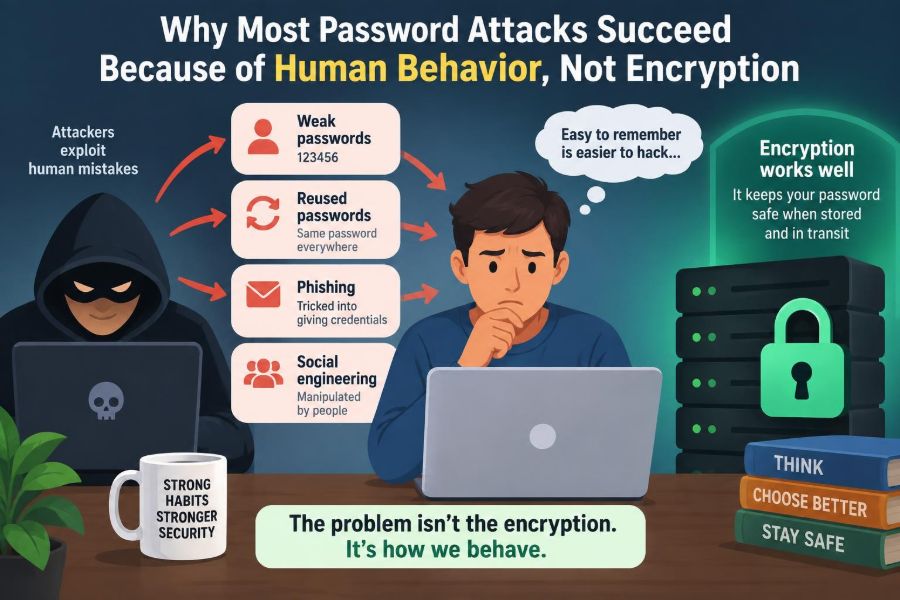

You receive an email that appears to come from your payroll system. It says there is a document waiting, the logo looks familiar, and the message warns that access will expire soon. You are busy, so you sign in without examining the address closely.
Nothing about the password itself may have been weak. It could have been long, random, and stored nowhere obvious. But the fake page did not need to crack it; it simply persuaded you to enter it.
This is the uncomfortable reality behind many account compromises. Modern encryption can protect passwords extremely well when systems use it correctly, yet attackers often focus on the much more flexible part of the system: people.
Understanding that distinction does not mean blaming users. It means recognizing predictable pressures—urgency, routine, trust, fatigue, and confusion—and designing safer habits and systems around them.
🔐 Encryption Is Usually Not the First Barrier That Fails
Encryption turns readable information into data that cannot be understood without the right cryptographic key. It protects information while it moves across a network or while it is stored in certain forms.
When a website uses secure connections and handles passwords responsibly, an attacker cannot normally just “read” your password from the Wi-Fi around you. Breaking strong modern encryption directly is generally far harder than exploiting a rushed decision, a reused password, or a deceptive message.
That is why password security is not only a math problem. It is a human-and-system problem involving software design, organizational processes, and everyday choices.
🧂 Passwords Should Be Hashed, Not Stored as Plain Text
A responsible service should not keep a readable copy of your password. Instead, it stores the output of a one-way process called hashing. When you sign in, the service hashes what you typed and compares that result with its stored value.
Good password storage also uses a unique random value, often called a salt, and a deliberately slow password-hashing method. These measures make large-scale guessing less convenient if a database is stolen.
None of this makes a service invulnerable. Poor implementation, stolen session tokens, phishing, or malware can still lead to account access. But it explains why attackers frequently choose routes that bypass the need to defeat password encryption or hashing at all.
🎯 Attackers Choose the Cheapest Successful Route
Security attackers, like anyone solving a problem, tend to prefer methods with a favorable cost and chance of success. Finding one person likely to click a convincing link may be easier than attempting to guess a well-made password.
This does not mean every attacker is highly sophisticated. Many use widely available phishing kits, lists of breached credentials, and automated login tools. Their advantage often comes from scale: a small success rate can still produce valuable access when many targets are contacted.
Think of a secure safe behind an office door. Attacking the safe may be difficult, but convincing an employee to open the door is a different path entirely.
🎣 Phishing Captures Passwords Instead of Cracking Them
Phishing is an attempt to trick someone into revealing credentials, approving a login, opening a harmful attachment, or taking another action that benefits an attacker. Email is common, but phishing can also arrive by text message, social media, phone call, QR code, or collaboration app.
A phishing page may imitate a familiar sign-in screen with surprising accuracy. Once a victim types a password, the page can send it directly to the attacker and may immediately relay it to the real service.
The decisive weakness is not flawed encryption. It is the gap between what a page looks like and where it actually sends information.
⏰ Urgency Changes How People Evaluate Risk
Messages that demand immediate action reduce careful thinking. “Your account will be closed,” “payment failed,” and “your manager needs this now” all push recipients toward speed rather than verification.
Urgency is especially effective when the request resembles a normal work task. A person may know that suspicious links are risky and still click because they are trying to meet a deadline or avoid causing a problem.
A useful pause question is: What happens if I verify this through a separate route first? Opening the known application, using a bookmarked address, or calling a known number often takes little time and defeats the artificial deadline.
🏛️ Familiar Brands Borrow Trust
Attackers regularly imitate banks, delivery firms, cloud providers, universities, and internal IT departments because people already know what messages from those organizations tend to look like.
Brand recognition is not identity verification. A logo can be copied, a display name can be forged, and a sender address can be made to look similar at a glance. Even a genuine organization may be discussed in a fraudulent message.
Look beyond visual familiarity. Check the full sender address, the destination domain before entering credentials, and whether the request makes sense for your relationship with that organization.
🧠 Cognitive Shortcuts Are Normal, Not Carelessness
People make quick judgments constantly. We rely on patterns because examining every email, prompt, and notification from first principles would make ordinary work impossible.
Security deception abuses these shortcuts. A familiar template suggests legitimacy; a technical-looking warning suggests authority; a message matching an expected event seems safer than one that arrives randomly.
Calling victims careless misses the lesson. Better security recognizes normal human limits and adds checks that are easy to use when attention is limited.
🔁 Password Reuse Turns One Breach into Many Risks
When the same password is used on several services, a breach at one service can endanger accounts elsewhere. Attackers can try known email-and-password pairs at popular websites in a process often called credential stuffing.
They are not necessarily guessing a new password. They are testing whether an old, exposed password was reused. Automated tools can make these attempts fast, while services must distinguish malicious traffic from legitimate login attempts.
A password that is unique to one service limits the damage from that service’s breach. It does not prevent every attack, but it stops a single exposed secret from becoming a master key.
📚 Password Managers Solve a Memory Problem
Humans are not well suited to remembering a different long random password for every account. Asking people to do that without help predictably encourages reuse, small variations, or written notes in unsafe places.
A password manager creates and stores unique credentials so you only need to protect its main account carefully. Many can also recognize the legitimate website domain and avoid filling a password into an imitation site.
Password managers have trade-offs: users must choose one they trust, secure the main account, and maintain recovery options. Still, for most people, the benefit of unique generated passwords is substantial.
🧩 Small Password Variations Are Often Predictable
Changing Summer2024! to Summer2025! feels like a new password, but it follows an obvious rule. Attackers who obtain one password may try common transformations, names, dates, seasons, and symbol substitutions.
The issue is not that memorable passwords are always bad. The issue is that personal patterns are often easier to predict than they feel from the inside.
A long passphrase made from unrelated words can be easier to remember than a short complicated string, but it should still be unique. For accounts where a manager is available, generated random passwords remove the need to invent patterns.
👤 Social Engineering Targets Roles and Relationships
Social engineering means manipulating people into taking actions or disclosing information. It may exploit authority, helpfulness, fear of conflict, or a desire to solve a colleague’s problem quickly.
For example, a hypothetical caller might claim to be from IT and ask an employee to read out a one-time code “to fix email.” The code may actually be the final step the caller needs to enter the employee’s account.
Good organizations make verification socially acceptable. Employees should be able to question a request, use an official support channel, and report suspicious contact without being embarrassed.
📱 Multi-Factor Authentication Changes the Equation
Multi-factor authentication, usually shortened to MFA, requires another form of proof in addition to a password. That proof might be an authenticator-app code, a hardware security key, a device prompt, or a biometric check tied to a device.
MFA can stop many attacks involving stolen passwords because the password alone is no longer enough. It is not one identical technology, however, and different methods resist different threats.
| Method | Useful protection | Key limitation |
|---|---|---|
| Text-message code | Adds a second step beyond the password | Can be targeted through phone-number attacks or phishing |
| Authenticator app | Avoids relying on text delivery | Codes can still be entered on a fake site |
| Security key or passkey | Can strongly bind sign-in to the real site | Requires supported devices and recovery planning |
🔔 MFA Prompts Can Be Manipulated Too
Some sign-in systems send a simple approval prompt to a phone. Attackers who already have a password may repeatedly trigger prompts, hoping the account owner approves one to stop the noise or mistakes it for their own login.
This is sometimes called prompt fatigue or MFA fatigue. It works because a repeated interruption becomes a usability problem, not because cryptography has failed.
Never approve an unexpected prompt. Where available, number matching or a method that requires entering a displayed number can provide more context than a plain “Approve” button.
🗝️ Passkeys Reduce the Value of a Stolen Password
Passkeys are a newer sign-in approach based on public-key cryptography. Your device keeps a private credential, while the service stores a related public credential. The private part is not typed into a website like a password.
Properly implemented passkeys are designed to be tied to the genuine site, making ordinary fake login pages much less useful. They can also make sign-in simpler through device unlocking.
Availability and recovery experiences vary among services and devices, so users should understand how account recovery works. Still, passkeys illustrate a broader principle: safer authentication can remove risky human steps rather than merely asking people to be more vigilant.
🖥️ A Secure Connection Does Not Prove a Site Is Honest
The padlock symbol in a browser generally indicates that the connection between your browser and that website is encrypted. It does not mean the website itself is trustworthy, legitimate, or safe to give credentials to.
Criminal sites can use encrypted connections too. The relevant question is whether you reached the correct domain and whether the request is expected.
This distinction matters because the visual signals people once associated with “safe websites” are not complete identity checks. Encryption protects a conversation; it cannot judge the intent of the person operating the other end.
🧪 Lookalike Domains Exploit Fast Reading
Fake sites often use domains that resemble real ones through extra words, swapped letters, unusual subdomains, or visually similar characters. A destination may look plausible in a notification preview while being clearly wrong when inspected in full.
Rather than trusting a link in an unexpected message, navigate independently to the service. Use a saved bookmark, a trusted app, or a manually entered address you already know.
On a phone, where addresses may be hidden or truncated, this habit matters even more. A small screen makes close inspection harder, not less necessary.
📨 Business Email Compromise Often Avoids Technical Drama
Business email compromise is a broad term for fraud involving trusted-looking business communications. An attacker may impersonate an executive, supplier, recruiter, or employee and request credentials, invoices, bank-detail changes, or confidential files.
The message may contain no attachment and no obvious malware. Its power comes from context: an upcoming payment, a manager’s travel schedule, or a vendor relationship mentioned in public materials.
For high-impact requests, organizations need a second channel of confirmation. A known phone number or established approval process is safer than replying directly to the message that made the request.
🧑💻 Public Information Can Make Scams More Convincing
Professional profiles, organization charts, conference posts, and public announcements can help attackers write believable messages. Knowing a person’s team, manager, project, or recent event lets a generic scam become targeted.
This does not mean people should disappear from the internet. Public professional information has legitimate value. The practical lesson is to assume that public details can be combined and used persuasively.
A request is not trustworthy merely because it contains accurate personal or workplace context. Verify the action, not just the story.
🦠 Malware Can Steal Sessions After Login
Passwords are not the only thing that grants account access. After a successful login, websites often issue a temporary session token, usually stored in a browser, so you do not have to enter your password on every page.
Malware, malicious browser extensions, or a compromised device may attempt to steal these tokens. In some situations, a stolen active session can be valuable even if the attacker never learns the password.
Keeping operating systems and browsers updated, installing software carefully, limiting extensions, and signing out of shared devices all reduce this category of risk. MFA helps greatly, but it is not a substitute for device security.
🌐 Shared Devices and Networks Create Different Risks
Using a shared computer can expose credentials through saved browsers, keylogging software, lingering sessions, or someone accessing the device after you leave. Private browsing can reduce local traces in some cases, but it does not make an untrusted computer safe.
Public Wi-Fi is less dangerous than it once was for ordinary browsing when services use secure connections, but fake networks and deceptive captive portals remain possible. The larger danger is often entering credentials into an untrusted page, not merely being near other users.
For sensitive work, prefer your own updated device and trusted connection. If that is not possible, delay the task or use an approved secure access method.
🧾 Recovery Paths Can Become the Weak Link
Every account needs a recovery path for forgotten passwords, lost devices, and changed phone numbers. But recovery can be easier to attack than normal sign-in if it depends on widely known personal details or an insecure email account.
Protect the email account that receives reset messages especially carefully. It is often the control center for other accounts. Review recovery phone numbers, backup email addresses, and security questions where a service still uses them.
Security questions deserve caution because answers such as a birthplace, school, or pet name may be discoverable or guessable. Treat them as credentials, not as trivia.
🚨 Recognizing a Suspicious Authentication Request
Warning signs are often contextual rather than technical. An unexpected reset email, a login prompt when you are not signing in, a request for a one-time code, or a file-sharing notice you did not initiate all deserve a pause.
- A sender urges secrecy, speed, or bypassing normal procedures.
- A login page appears after an unexpected link or QR code.
- A caller asks for a password, recovery code, or MFA approval.
- The request conflicts with how the organization normally communicates.
One sign alone is not always proof of fraud. Several signals together should shift the default response from “act now” to “verify independently.”
🛑 What to Do When You Think You Fell for a Phish
Act promptly, but do not panic. If you entered credentials into a suspicious page, change that password through the legitimate site, starting with the affected account and then any other account where it was reused.
Review active sessions, recent sign-ins, forwarding rules, recovery details, connected apps, and financial or business activity as appropriate. Report the incident through your organization’s security or IT process; early reporting can help contain a broader attack.
If you approved an unexpected MFA request or suspect device compromise, tell the service or support team exactly what happened. Changing a password may not be enough if an attacker has an active session or altered recovery settings.
🏢 Organizations Must Design for Real Human Work
Security rules fail when they make routine work so difficult that people invent workarounds. Requiring frequent arbitrary password changes, for example, can encourage predictable modifications and forgotten passwords.
Better controls include password managers, MFA methods suited to the risk, clear reporting channels, phishing-resistant authentication where practical, and simple processes for verifying unusual requests. Training should use realistic scenarios, not just a list of things employees must never do.
Organizations also need technical safeguards: rate limits for login attempts, detection of unusual sign-ins, secure password storage, device management, and recovery processes that balance accessibility with verification.
🧭 Training Should Build Judgment, Not Suspicion of Everything
Useful security awareness training teaches people what to inspect and what to do next. Telling everyone to distrust all email is not practical; work depends on communication.
The goal is calibrated skepticism. Staff should recognize high-risk actions—entering credentials, approving MFA, changing payment details, sharing sensitive files—and know the approved verification method for each one.
Training also works best when reporting is encouraged. A person who reports a suspicious message gives the organization a chance to protect others, even if the message later turns out to be harmless.
⚖️ Security Requires Layers, Not Perfect Users
No single control solves every password attack. Unique passwords reduce credential stuffing, MFA reduces the value of a stolen password, passkeys can resist many phishing attempts, and endpoint security helps protect sessions and devices.
These controls overlap by design. If one layer fails—a person clicks a convincing message—another layer may prevent account takeover or limit its impact.
The same principle applies to organizations. Technical controls, sensible procedures, and respectful training work together better than a strategy built around blaming users for inevitable moments of distraction.
✅ A Practical Personal Account Checklist
Security improves most when protective actions become routine rather than emergency responses. Start with the accounts that control the rest of your digital life: primary email, financial services, work identity, cloud storage, and password manager.
- Use a password manager to create a unique password for every account.
- Enable MFA, preferring phishing-resistant options when available.
- Do not approve unexpected login prompts or share one-time codes.
- Reach sensitive services through trusted apps, bookmarks, or known addresses.
- Keep devices, browsers, and important apps updated.
- Review recovery methods and save recovery codes securely.
This is not a promise that attacks will never succeed. It is a practical way to make common attacks harder, easier to detect, and less damaging.
🌟 The Core Principle: Protect Decisions as Well as Secrets
Strong encryption, secure password hashing, and modern authentication are essential. They protect information from direct technical attack and provide the foundation for trustworthy systems.
But attackers often do not confront those defenses head-on. They seek moments when a person is hurried, trusting, tired, or following an unusual request that appears normal.
The most durable response combines technology with habits and processes that make verification easy. Security improves when systems assume people are human and help them make safe decisions at the moment those decisions matter.
The goal is not to become fearful of every message; it is to make stolen passwords, rushed clicks, and persuasive stories far less useful to an attacker. Small, repeatable safeguards create meaningful protection for individuals and organizations alike. 🔐🧠💻