
You are standing at a checkout counter, opening a work dashboard, or trying to watch a film on a new device. Before you can continue, a familiar interruption appears: enter your password.
Maybe you remember it. Maybe it was saved on another device. Maybe the site rejects it because you used the wrong capital letter, or because you changed it months ago and cannot recall the replacement.
Passwords protect an enormous amount of everyday life, from email and bank accounts to school portals and healthcare services. Yet they are also a frequent source of lost access, scams, and security breaches.
That contradiction explains why the technology industry is working toward a future where passwords are less visible—or sometimes unnecessary. The change is already beginning, but “passwordless” does not mean security without proof of identity.
🔐 Why Passwords Have Become a Problem
A password is a secret shared between a person and a service. In principle, only the account owner knows it. In practice, people must manage dozens or hundreds of accounts, each with different rules.
This creates predictable shortcuts: reusing passwords, choosing memorable phrases, storing secrets in unsafe places, or clicking “forgot password” repeatedly. The problem is not simply that users are careless. Passwords ask humans to perform a difficult memory task at internet scale.
🧠 The Basic Idea Behind Authentication
Authentication is the process of proving that you are the person allowed to enter an account or system. A password is only one type of authentication factor.
Security systems commonly use evidence from three categories: something you know, something you have, and something you are. A password belongs to the first category. A phone or security key can be something you have; a fingerprint can be something you are.
🗝️ Why a Password Is Not the Same as Identity
A password does not identify you in a deep sense. It only shows that someone presented a string of characters expected by a service. Anyone who learns, steals, guesses, or tricks you into revealing that string may be able to use it.
That is the central weakness of knowledge-based login. The system cannot easily tell the difference between the legitimate user and a criminal who obtained the same secret.
🎣 Phishing Exploits Human Trust
Phishing is a deceptive attempt to collect credentials, often through a message or website that imitates a trusted organization. A fake sign-in page can look convincing because it asks for exactly the information a real page requests.
Even a long, unique password cannot help once it has been entered into a fraudulent site. This is why newer authentication methods aim to avoid sending reusable secrets to websites in the first place.
🧨 Password Reuse Multiplies Damage
When one service suffers a breach, attackers may try exposed email-and-password combinations on other popular services. This technique is often called credential stuffing.
Using a distinct password for every account limits this chain reaction. But expecting people to create and remember a large collection of unique, strong passwords is exactly what makes passwords an awkward long-term foundation.
📋 How Servers Traditionally Check Passwords
Responsible services should not store passwords in readable form. Instead, they store a transformed value created by a one-way process called hashing, usually with additional safeguards such as salts and deliberately slow password-hashing methods.
At login, the service transforms the submitted password and compares the result with its stored record. This reduces the harm of a database leak, but it does not eliminate it: weak or commonly used passwords can still be guessed offline.
🔑 Password Managers Improve the Present
A password manager generates and stores long, unique passwords, then fills them in when needed. For many people, it is the most practical way to improve security right now.
It also reduces the temptation to reuse passwords. However, password managers do not make the underlying password model disappear; a website may still ask for a password, and users must protect the manager itself carefully.
📱 What “Passwordless” Actually Means
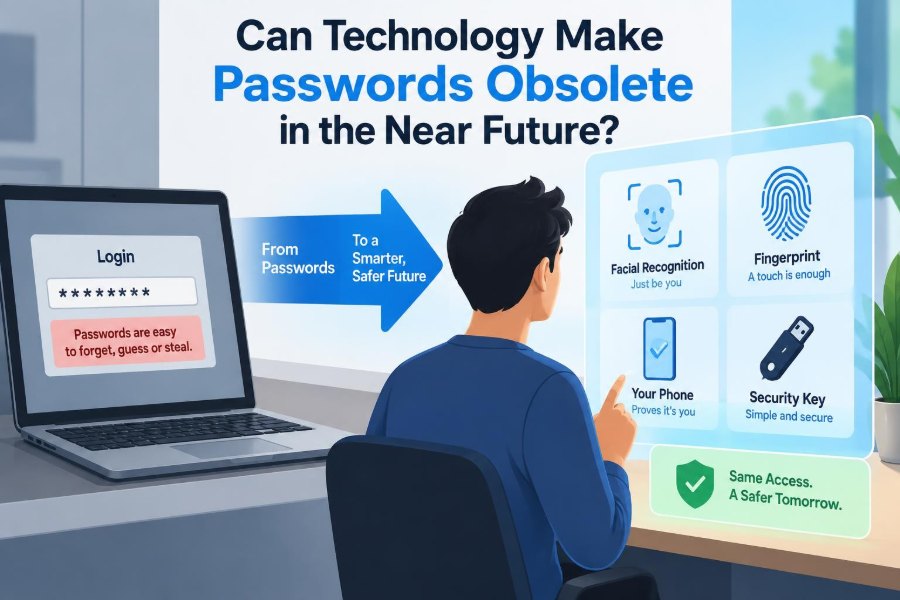
Passwordless authentication means you can sign in without typing or remembering a conventional password. It does not mean an account has no security check.
Instead, the service may verify a device, a cryptographic key, a temporary approval, or a biometric check that unlocks a key. The aim is to replace a reusable secret with evidence that is harder to steal and reuse remotely.
🧩 The Three Factors Still Matter
| Authentication factor | Typical example | Main concern |
|---|---|---|
| Something you know | Password or PIN | Can be guessed, reused, or phished |
| Something you have | Phone or security key | Can be lost or stolen |
| Something you are | Fingerprint or face match | Accuracy, privacy, and recovery concerns |
Strong systems often combine factors. Unlocking a phone with a fingerprint, then using a device-held credential to sign in, blends possession with a local biometric or PIN check.
🔢 One-Time Codes Are a Transitional Tool
Many services send one-time codes by text message, email, or authenticator app. These codes expire quickly and add a second check beyond a password.
They are useful, but they are not equally secure. Text messages can be redirected through phone-number takeover attacks, and a phishing site can ask for a code in real time. Authenticator apps and hardware keys generally offer stronger protection against some of these risks.
📲 Approval Prompts Make Login Easier
A login approval prompt sends a request to a trusted device: “Are you trying to sign in?” The user confirms or rejects it, avoiding password entry.
A risk called prompt fatigue appears when attackers trigger many requests and hope someone approves one just to stop the interruptions. Number matching or showing login details such as location and device can make blind approval less likely.
🪪 Biometrics Are Usually Local Gatekeepers
Fingerprints and facial recognition feel like direct proof of identity, but their common role is more limited. On a modern phone or laptop, biometric data usually unlocks a credential stored securely on that device.
In a well-designed setup, the website does not receive a copy of your fingerprint. It receives cryptographic proof that the local device allowed the login. This distinction matters for both privacy and security.
🧬 Why Biometrics Cannot Simply Replace Everything
Biometrics are convenient, but they are not secrets. You leave fingerprints on objects, and your face is often visible. Unlike a password, a biometric trait cannot be changed easily if a template or related data is compromised.
People also need alternatives. Injuries, changed appearance, inaccessible sensors, disabilities, and device-sharing situations mean a single biometric method cannot be the only path into every account.
🔐 Security Keys Offer Stronger Proof
A hardware security key is a small device that participates in cryptographic login. It can communicate through USB, NFC, or other supported connections, depending on the key and device.
Its major advantage is that it can verify the real site during authentication. A fake site at a look-alike address cannot normally use the response meant for the legitimate one, making this approach highly resistant to ordinary phishing.
🧮 Public-Key Cryptography Changes the Model
Most modern passwordless systems rely on public-key cryptography. Your device creates a pair of mathematically related keys: a public key that can be shared and a private key that must remain protected.
The service stores the public key. During login, it sends a challenge, and your device proves it has the corresponding private key without sending that private key across the internet. A thief who steals the server’s public-key record cannot use it as a login secret.
🌐 Passkeys Bring This Approach to Consumers
Passkeys are a user-friendly form of passwordless credential based on widely adopted web authentication standards. A passkey is tied to a site or app and is used through a device’s secure authentication tools.
You may unlock it with a fingerprint, face recognition, or device PIN. The familiar action is local, while the actual online proof uses cryptography. As a result, there is no password for the site to request and no reusable password to type into a fake page.
🧭 Why Website Matching Matters
Passkeys are designed to be associated with the legitimate website or app identity. If you visit a deceptive domain that merely resembles a real brand, the credential should not authenticate to it as though it were the original site.
This does not make every scam impossible. Criminals can still persuade people to send money, install malicious software, or approve harmful actions. But it removes one common route: collecting a reusable password from a convincing imitation page.
☁️ Device Sync Makes Passkeys More Practical
A passkey on only one phone would create a frustrating failure point. Many ecosystems therefore allow credentials to sync securely among a user’s trusted devices, protected by account-level safeguards and encryption.
Sync improves convenience, but it also shifts trust toward the account that manages the sync service. Users should secure that central account, understand its recovery options, and avoid assuming that every device in an ecosystem has identical protections.
💻 Cross-Device Sign-In Has Limits
You may use a phone to sign in on a nearby computer by scanning a QR code or confirming a prompt. This can be convenient when the computer does not hold your passkey.
Compatibility varies by browser, operating system, device settings, and workplace policy. Passwordless technology is advancing, but real deployments still need clear fallback methods for people on older or restricted devices.
🏢 Workplaces Face Different Requirements
Organizations need more than a smooth sign-in screen. They must manage employees joining and leaving, shared equipment, contractor access, lost devices, audit records, and systems that may be decades old.
A company might use passkeys for cloud services while retaining smart cards, hardware keys, or carefully controlled passwords for specialized systems. The likely future is mixed authentication, not a single overnight switch.
🏛️ High-Risk Accounts Need Extra Protection
Email accounts deserve particular attention because they often control password resets for other services. Financial, healthcare, administrator, and business accounts can also cause significant harm if taken over.
For these accounts, a phishing-resistant method such as a passkey or hardware security key is especially valuable where available. Recovery contacts, backup keys, and notifications for new sign-ins should be considered before an emergency occurs.
🚪 Account Recovery Is the Hardest Part
Every system needs a way back in after a lost phone, broken laptop, forgotten PIN, or inaccessible biometric sensor. Recovery is also an attractive target for attackers because it can bypass the strongest normal login process.
A secure recovery process may require verified backup devices, recovery codes stored safely offline, support review, or waiting periods. Easier recovery can improve usability, while stricter recovery can reduce impersonation; designing the balance is difficult.
👥 Accessibility and Shared Access Must Be Designed In
Password replacement should not assume everyone owns a recent smartphone or can use a fingerprint reader, camera, or small security key. Accessible alternatives and human support remain essential.
Shared household accounts and team workflows also raise questions. The secure answer is usually separate accounts with appropriate permissions, not passing one credential around. Technology can help, but account design and organizational habits matter too.
🕵️ Privacy Depends on Implementation
Passwordless login can reduce the need to hand a secret to every website, but it does not automatically solve every privacy concern. Services may still collect device information, login times, approximate locations, and usage data.
Biometrics deserve special care because they relate to the body. A system that keeps biometric matching on the user’s device generally presents a different privacy model from one that centrally stores biometric templates. Read account and device settings rather than treating all biometric systems as equivalent.
⚠️ New Technology Creates New Failure Modes
A passwordless method can fail through lost devices, weak account recovery, malware on an unlocked device, careless approval, or a compromised cloud account. Security never becomes automatic simply because typing disappears.
The practical question is not “Can this system be attacked?” Nearly every system can be attacked under some conditions. A better question is whether it removes common, scalable attacks and whether users can recover safely when something goes wrong.
🧰 What You Can Do Right Now
- Use a password manager to create unique passwords for services that still require them.
- Turn on multi-factor authentication, preferring an authenticator app, passkey, or security key when supported.
- Create passkeys for high-value accounts and test them on your regular devices.
- Save recovery codes in a protected offline location, not only in the account they recover.
- Review old devices, trusted sessions, recovery email addresses, and phone numbers.
- Pause before approving a login prompt or entering a code requested by someone else.
Small improvements are meaningful. You do not need to rebuild every account in a day; start with the accounts that could unlock the rest of your digital life.
🚫 Common Mistakes During the Transition
One mistake is treating a phone number as a permanent identity document. Phone numbers can change, be recycled, or be targeted by social engineering. Keep recovery information current and add stronger methods where possible.
Another is removing every fallback before testing a new sign-in method. Register a backup device or security key first, and make sure you know how recovery works. Convenience becomes a problem when it turns into lockout.
📈 What Will Probably Change Soon
More consumer services are likely to offer passkeys, device-based approval, and phishing-resistant multi-factor authentication. Password fields may become less prominent, especially on mobile devices where secure hardware and biometric unlock are already common.
Adoption will be uneven. Older applications, cross-platform needs, regulations, cost, accessibility requirements, and user support will keep passwords alive in many places for some time. “Near future” is more likely to mean fewer passwords in daily use than their complete disappearance.
🔮 Will Passwords Ever Fully Disappear?
Passwords may remain as legacy options, emergency fallbacks, or low-cost login methods long after better alternatives are available. Some environments cannot quickly replace old hardware and software, while some users need methods that do not depend on a personal device.
Still, the direction is clear: systems are moving away from asking people to remember and repeatedly reveal shared secrets. The most successful replacements will be secure, recoverable, accessible, and understandable—not merely technically impressive.
✅ The Core Principle: Better Proof, Not No Proof
Technology can make passwords less central by replacing them with cryptographic credentials, trusted devices, and local verification. These methods can reduce password reuse and make many phishing attacks much less effective.
But no login method removes the need for judgment. People must protect devices, recognize suspicious requests, plan for recovery, and choose authentication that matches the value and risk of an account.
Passwords are unlikely to vanish everywhere soon, but passwordless technology can make digital identity safer when it replaces reusable secrets with stronger, user-controlled proof. The goal is not a world with no security barriers; it is a world with barriers that are harder for criminals to copy and easier for legitimate people to use. 🔐📱✨