
You type a message, tap a photo, or ask a navigation app for directions. The screen responds in familiar human forms: words, colors, maps, and numbers written in decimal.
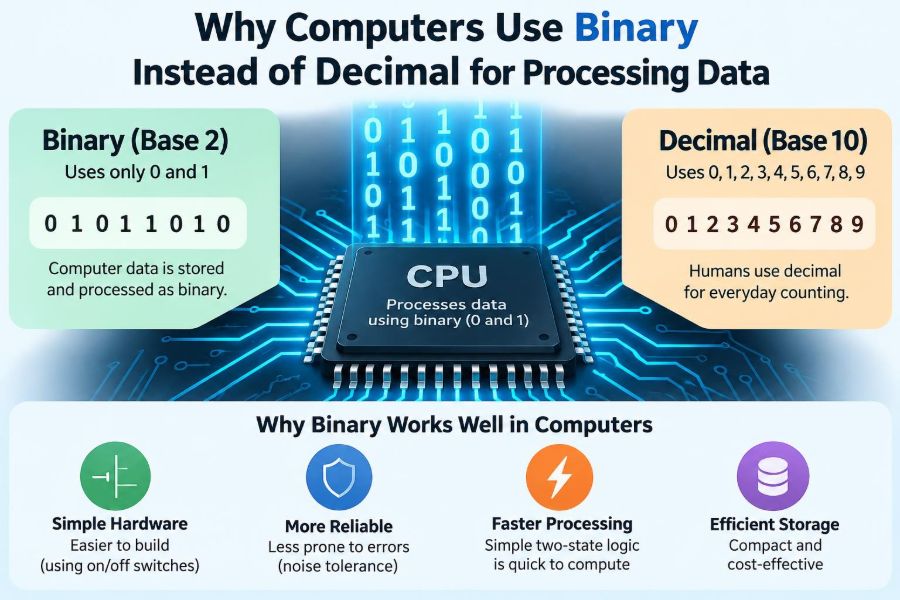
Inside the device, however, none of that information is handled as ordinary decimal digits. The processor works with patterns of two states, conventionally written as 0 and 1. A photo, a song, a spreadsheet, and a video call all become binary data at some stage.
This can seem unnecessarily indirect. People have ten fingers and naturally count in tens, so why were computers not built around decimal from the beginning?
The answer is less about mathematics being difficult and more about building reliable physical machines. Binary matches the behavior of electronic components remarkably well, while still being powerful enough to represent almost anything we want a computer to process.
🔢 Decimal Is a Human Convenience
Decimal, or base 10, uses ten symbols: 0 through 9. Its widespread use is strongly connected to human counting habits, especially our ten fingers. It is practical for prices, measurements, and everyday communication.
A number’s value depends on position. In 347, the digits represent 3 hundreds, 4 tens, and 7 ones. Each position is a power of ten.
There is nothing physically mandatory about base 10. Number systems are ways to organize quantities. A machine can use any base if its hardware can reliably distinguish the required states.
⚪ Binary Uses Only Two Symbols
Binary, or base 2, uses just 0 and 1. Each binary position represents a power of two: 1, 2, 4, 8, 16, and so on.
For example, binary 1011 means 8 + 2 + 1, which equals decimal 11. A zero means that power of two is absent; a one means it is present.
This is not a limited or primitive system. Adding more binary positions lets a computer represent increasingly large values, just as adding more decimal positions does for humans.
⚡ Physical Circuits Naturally Have Two Reliable States
Electronic circuits can be designed to recognize two broad conditions, such as a low voltage and a high voltage. Those conditions can represent 0 and 1.
A transistor, the tiny switching device at the heart of modern processors, can be controlled so that it is effectively off or on. Real electronics are more nuanced than a simple light switch, but digital design deliberately treats ranges of voltages as distinct logical states.
That choice is practical: reliably distinguishing two ranges is easier than distinguishing ten precisely separated electrical levels in a fast, tiny, noisy circuit.
🔌 What “0” and “1” Really Mean
A common misconception is that binary 0 always means no electricity and 1 always means electricity. The exact physical meaning depends on the technology and circuit design.
In many systems, a voltage below one threshold is interpreted as logic 0, while a voltage above another threshold is interpreted as logic 1. The space between those thresholds helps circuits tolerate small fluctuations.
Binary digits are therefore logical labels, not universal descriptions of a particular voltage. A 1 can mean “true,” “enabled,” “selected,” or simply a contribution to a number, depending on context.
🛡️ Noise Margins Make Binary Robust
Electrical signals are affected by heat, interference, resistance, manufacturing variation, and timing. These effects can slightly alter a voltage as it travels through a circuit.
Digital systems use a noise margin: a safety gap between voltages accepted as low and voltages accepted as high. A small disturbance is less likely to turn a valid 0 into a mistaken 1, or the reverse.
A decimal electronic system would need to tell apart ten signal ranges. Each range would be narrower or the hardware would need a larger, more carefully controlled voltage range. That creates more opportunities for ambiguity.
🚦 Two-State Decisions Simplify Hardware
At a basic level, computation consists of decisions and transformations: should a signal pass, should a result be stored, should an instruction be selected, and should two values be combined?
Two-state components make those decisions straightforward. Circuits can be connected to implement operations such as NOT, AND, and OR. From these small building blocks, designers construct adders, memory units, processors, and communication systems.
The key advantage is not that binary eliminates complexity. It lets engineers build complex systems from components whose expected behavior is relatively easy to define, test, and reproduce.
🚪 Logic Gates Turn Binary Into Decisions
A logic gate is a circuit that produces an output based on one or more binary inputs. An AND gate outputs 1 only when both inputs are 1. An OR gate outputs 1 when at least one input is 1. A NOT gate reverses a value.
Suppose a security system should unlock only when a valid card is present AND a correct code is entered. Each condition can be represented by a binary value, and an AND operation expresses the rule.
Gates do not understand “security” or “codes.” They only transform states according to fixed rules. Meaning appears when people assign those states a purpose.
➕ Binary Arithmetic Is Systematic
Binary addition follows the same positional idea as decimal addition, but with fewer digit combinations. Adding 0 and 0 gives 0; adding 0 and 1 gives 1; adding 1 and 1 gives binary 10, which means write 0 and carry 1.
For example, 0101 (5) plus 0011 (3) equals 1000 (8). Circuits called adders perform this operation one bit at a time, with carry information passed onward.
Subtraction, multiplication, comparison, and shifting can also be implemented with binary logic. Hardware does not need a special decimal concept to calculate values displayed as decimal later.
🧩 A Bit Is the Smallest Unit of Digital Information
A bit, short for binary digit, holds one of two values: 0 or 1. By itself, one bit can answer a yes-or-no question: is a button pressed, is a file permission enabled, or is a network signal present?
Most useful data needs groups of bits. Eight bits are commonly called a byte. A byte can form 256 different patterns, from 00000000 through 11111111.
Those patterns have no fixed meaning on their own. The software, file format, or processor instruction determines whether a pattern is treated as a number, a letter, a color component, or part of a machine instruction.
🧱 More Bits Create More Possible Values
Each additional bit doubles the number of possible patterns. One bit has 2 patterns, two bits have 4, and eight bits have 256.
| Bits available | Possible binary patterns | Example use |
|---|---|---|
| 1 | 2 | On/off flag |
| 4 | 16 | One hexadecimal digit |
| 8 | 256 | Small numeric value or encoded data |
| 16 | 65,536 | Broader numeric range or code unit |
This doubling is why binary scales effectively. Long bit strings can represent huge ranges, precise measurements, and detailed media without requiring hardware to recognize many separate signal levels.
🧮 Decimal Values Can Be Stored in Binary
When you enter 125 into a calculator, the device can convert that value into ordinary binary and perform arithmetic on the binary representation. The display converts the result back into decimal for you.
The binary form of 125 is 1111101. It may look unfamiliar, but it represents exactly the same quantity. A base changes notation, not the underlying amount.
This distinction matters when debugging software or reading data formats. A value may be shown in decimal for readability even though it is stored and processed as binary bits.
🧾 Decimal Arithmetic Still Has a Place
Some applications, especially financial systems, need to preserve decimal quantities exactly. Values such as 0.1 cannot always be represented exactly using a finite ordinary binary fraction, much as one-third cannot be represented exactly with a finite decimal fraction.
Software may use decimal arithmetic, scaled integers, or specialized decimal formats to avoid unwanted rounding in currency calculations. For example, an amount might be stored as an integer number of cents rather than as a binary floating-point approximation.
Even then, the underlying hardware is usually still built from binary logic. “Using decimal” in software does not normally mean the processor has become a ten-state machine.
🌊 Fractions Reveal a Binary Limitation
Binary represents fractions using negative powers of two: one-half, one-quarter, one-eighth, and so on. A fraction terminates neatly in binary only when it can be expressed as a sum of those powers.
One-half is easy: 0.1 in binary. But decimal 0.1 repeats forever in binary, so a computer using a fixed number of bits stores a close approximation.
This is the source of familiar results such as a calculation displaying 0.30000000000000004. It is not evidence that computers cannot do arithmetic; it is a consequence of finite representations and rounding rules.
📏 Fixed-Point and Floating-Point Solve Different Problems
Fixed-point values reserve a known number of digits for the fractional part. They are useful when a predictable precision is needed, such as storing a measurement in thousandths or currency in cents.
Floating-point values store a sign, a scaled significand, and an exponent. This provides an enormous range, making it useful for graphics, engineering calculations, and scientific work, but not every decimal value is exact.
Choosing between them is a design decision. Binary processing is fast and flexible, but correct software must match its numeric representation to the consequences of rounding and range limits.
🔤 Text Becomes Numbered Binary Patterns
Letters are not stored as miniature pictures in ordinary text files. A character encoding assigns numbers to characters, and those numbers are stored as binary patterns.
ASCII historically assigned values to a limited set of characters. Unicode provides a much broader framework for writing systems, symbols, and many other characters; UTF-8 is a widely used way to encode Unicode text into bytes.
When you press a key, software interprets the input, chooses encoded values, and stores or transmits bits. The receiving system uses the agreed encoding to turn those patterns back into readable text.
🖼️ Images Are Also Binary Data
A digital image is typically organized as a grid of pixels. Each pixel’s color is represented by numbers, often with separate values for red, green, and blue components.
For a simple example, a pixel might use one byte for each color component. The bit pattern in each byte indicates the component’s intensity according to the image format’s rules.
Image files also contain structural information: dimensions, color model, and sometimes compression data. Binary is not merely used to store the visible colors; it carries every instruction needed to reconstruct the image.
🎵 Sound Is Measured and Encoded
Sound begins as a continuous physical wave. A microphone and audio system can measure that wave at regular intervals, producing numeric samples that can be stored as bits.
The number of bits assigned to a sample affects how many amplitude levels are available. Other choices, including sampling rate and compression method, affect storage needs and perceived quality.
Binary makes it possible to copy, edit, transmit, and process those samples with consistent rules. A music file is therefore a carefully organized sequence of binary values, not sound trapped directly inside a device.
🗂️ File Types Give Bits Their Meaning
A file is ultimately a sequence of bytes, but its format tells software how to interpret them. The same byte pattern could be part of a photograph, program, compressed archive, or text document depending on the rules being applied.
Formats define structure: where headers appear, how lengths are recorded, how data is compressed, and what metadata is included. Without those shared conventions, a collection of bits has no useful interpretation.
This is why opening a file with the wrong application can produce nonsense. The bits may be intact, but the program is applying the wrong decoding rules.
🧠 Memory Stores Binary States
Computer memory must preserve information long enough for a processor to use it. Different technologies accomplish this in different ways: tiny electrical charges, stable transistor configurations, or physical changes in storage materials.
RAM is designed for rapid temporary access and generally loses its contents when power is removed. Solid-state storage and magnetic drives retain data differently, but all expose information as bits to the rest of the computer.
The physical implementation changes, yet the abstraction remains useful: each location stores a pattern of binary values that software can read or change.
🏭 Binary Enables Mass-Produced Digital Systems
Modern computing depends on components operating predictably across billions of switching events. Binary logic supports standardized designs, automated testing, and layers of abstraction that let hardware and software teams work separately.
A processor designer can specify logical behavior without requiring every software developer to understand voltage thresholds. A programmer can use integers and text without managing individual transistor states.
This separation does not remove engineering challenges. It makes those challenges manageable by defining stable interfaces between physical circuits, machine instructions, operating systems, and applications.
⏱️ Timing Matters Along With Voltage
Correct binary processing depends on more than whether a signal is read as 0 or 1. It also depends on when the signal is read. A value changing at the wrong moment can lead to an incorrect result.
Many circuits use a clock to coordinate operations. On selected clock edges, storage elements capture values so that different parts of a processor advance in an organized sequence.
At high speeds, signal travel time becomes significant. Hardware design must account for delays, synchronization between clock domains, and the possibility that an input changes near a sampling instant.
🌡️ Real Hardware Is Analog Underneath
Calling a computer “digital” does not mean its physical world is perfectly discrete. Voltages vary continuously, transistors have physical limits, and signals take time to move through wires.
Digital engineering works by imposing carefully designed thresholds and timing rules on that analog reality. In this sense, binary is an abstraction that helps circuits behave reliably enough for logical computation.
This also explains why hardware can fail under extreme heat, weak power, aging, or interference. The logical 0s and 1s depend on physical conditions staying within designed operating limits.
📡 Communication Benefits From Binary Decisions
When data travels through a cable, fiber link, or radio connection, the signal can be weakened or distorted. Receivers must decide which information was sent despite imperfections in the channel.
Binary signaling makes a basic receiver decision simple: classify the received signal as one state or the other. Real communication standards often use more sophisticated schemes to increase data rates, but they still rely on carefully defined distinguishable signal states and error control.
At higher layers, the content is commonly organized into bits and bytes. Checksums, error-detecting codes, and retransmission methods help systems notice or recover from corrupted data.
🎛️ Some Systems Use More Than Two Signal Levels
Binary is dominant inside general-purpose computers, but it is not the only useful design. Some storage and communication technologies use multiple physical levels to store or transmit more information per signal event.
For example, multi-level memory cells can represent several bit patterns through different charge ranges. Multi-level signaling can increase bandwidth over a connection.
The trade-off is tighter margins and more complex sensing or correction. These systems often still present binary data to software because binary remains a convenient logical language, even if the physical layer uses several levels.
🧮 Why Not Build a Fully Decimal Computer?
A decimal computer would need components that reliably represent and manipulate ten distinct digit states. Such machines have existed historically in various forms, and decimal arithmetic hardware can be useful for specific tasks.
However, ten-state logic generally demands more precise discrimination than two-state logic. Arithmetic circuits, storage, testing, and error tolerance become more complex when each unit must cleanly distinguish among many levels.
Binary does require more digits to write a given number. Hardware designers usually consider that a worthwhile exchange for robust switching, scalable circuits, and simple logical operations.
🔶 Hexadecimal Makes Binary Easier for People
Long binary strings are awkward for humans to read. Hexadecimal, or base 16, solves this display problem because one hexadecimal digit corresponds exactly to four binary bits.
For example, binary 1111 1010 becomes hexadecimal FA. This compact notation is common in programming, memory addresses, color values, and debugging tools.
Hexadecimal is not a replacement for binary hardware. It is a convenient shorthand that preserves the bit structure more visibly than decimal often does.
🧑💻 Programming Languages Hide Most Binary Details
When writing code, you may use values such as 42, true, or "hello". Compilers and interpreters translate those high-level expressions into lower-level operations and data representations.
This abstraction lets developers focus on solving problems. Still, binary concepts become useful when dealing with performance, networking, file formats, permissions, embedded devices, encryption, or unexpected numeric behavior.
You do not need to memorize every bit pattern. Understanding that data has a representation helps explain why types have ranges, why files need formats, and why conversions can change results.
🔍 Bits Help Explain Common Computing Problems
Several everyday technical issues become clearer once you think in binary terms:
- An unsigned value with a fixed number of bits has a maximum size; exceeding it can cause overflow.
- Text can display incorrectly when the sender and receiver assume different character encodings.
- Small floating-point discrepancies can appear when decimal fractions are approximated in binary.
- A corrupted file may fail because even a few changed bits can alter its structure or content.
These are not separate mysteries. They are consequences of representing information with finite patterns governed by specific rules.
⚠️ Avoid the “Binary Means Simple” Mistake
Binary hardware is simpler to make reliable at the basic signal level, but computer systems built from binary are not simple overall. Processors contain enormous numbers of components, and software layers create further complexity.
Likewise, 0 and 1 are not automatically “false and true.” They can represent any two alternatives. Treating every bit as a truth value can lead to confusion when reading machine data.
A better mental model is this: binary provides a dependable alphabet of two symbols. Systems become meaningful through the rules that combine, store, transmit, and interpret those symbols.
🧪 A Small Conversion Method You Can Use
To convert a positive decimal whole number to binary, repeatedly divide it by 2 and record each remainder. Read the remainders from bottom to top.
- Convert 13: 13 divided by 2 leaves remainder 1.
- 6 divided by 2 leaves remainder 0; 3 divided by 2 leaves remainder 1.
- 1 divided by 2 leaves remainder 1.
- Reading upward gives
1101, or 8 + 4 + 1.
This method is useful for learning, but software tools should handle conversion in practical work. The deeper lesson is positional value: each bit contributes a power of two.
🌍 Binary Is an Engineering Choice, Not a Human Limitation
People can reason in decimal, binary, hexadecimal, or any other base. The choice of binary in computers is not a claim that humans should think in 0s and 1s.
It is an engineering decision shaped by reliable switching, manageable noise tolerance, simple logic operations, and the ability to build large systems from repeatable components. User interfaces then translate those internal representations into forms people can use naturally.
This division of labor is one of computing’s strengths: machines handle precise, rapid state changes, while people work with language, images, goals, and familiar numbers.
🏁 The Core Reason Computers Favor Binary
Computers use binary because physical devices can distinguish two states more reliably and economically than many finely separated states. Those dependable 0s and 1s can be combined into arithmetic, instructions, memory, text, media, and communication.
Decimal remains the right notation for many human tasks, and decimal-aware software is essential in places such as finance. But beneath most modern digital systems, binary provides the stable foundation on which those user-friendly representations are built.
Binary succeeds not because it looks natural to people, but because two well-separated physical states make reliable computation possible at enormous scale. Once that principle is clear, the strings of 0s and 1s stop looking like a secret code and start looking like a practical engineering language. 💻🔢⚡