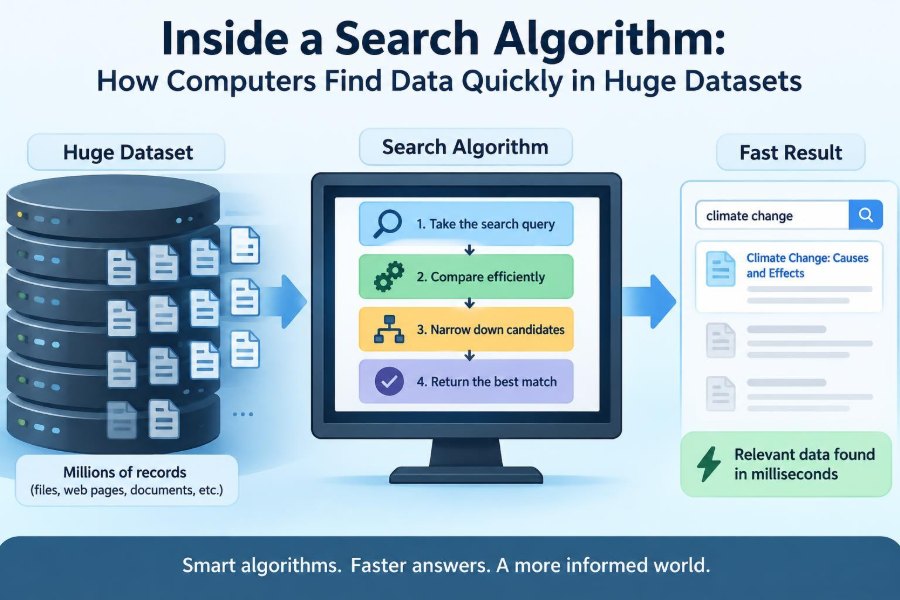

You type a contact’s name into your phone, search a product catalog, or look for one file among years of downloads. The result often appears before you have finished typing.
That speed can feel ordinary, but it is not the result of a computer “looking everywhere” at once. With a huge collection of data, checking every item one by one would quickly become too slow.
Search algorithms are the strategies computers use to locate a target: a number, word, record, image identifier, or any other item. The strategy matters because the same data can be easy or painfully expensive to search depending on how it is arranged.
Understanding search explains much more than a programming exercise. It helps explain databases, search bars, indexes, autocomplete, and why a small design choice can make software responsive or frustrating.
🔎 What a Search Algorithm Actually Does
A search algorithm is a defined procedure for finding whether a target exists in a collection and, if it does, identifying its location or related record.
For example, a program might search a list of employee IDs for 4821. A successful search can return the position of that ID; a database search may instead return the employee’s entire record. If no match exists, the algorithm needs a clear way to report that outcome too.
🎯 Searching Is More Than Finding a Match
Different tasks need different kinds of results. A music app may seek every song containing a phrase, while a login system needs to find one account with an exact identifier.
Search requirements commonly include whether matches must be exact, whether several matches are allowed, whether results need ranking, and whether the collection changes frequently. Those details determine which technique is practical.
📦 The Collection Determines the Strategy
An unsorted array is like a pile of numbered papers in no useful order. To know whether a particular paper is present, a program may need to inspect each one until it finds the target.
A sorted list is more like a dictionary. Its arrangement provides information: if a word comes after “mango,” everything before that point can be ruled out. Good search algorithms exploit such structure.
🚶 Linear Search: Checking One Item at a Time
Linear search, also called sequential search, starts at one end of a collection and compares each item with the target. It stops when it finds a match or reaches the end.
Suppose a classroom app stores an unsorted list of student badge numbers. Searching for one badge number may require checking the first, second, third, and later entries in order. This is simple and reliable, even when the list is not organized.
for each item in collection:
    if item equals target:
        return item
return not found
⏱️ Why Linear Search Can Become Expensive
If the desired item is first, linear search is very quick. If it is last—or absent—the algorithm examines every item. A larger collection therefore creates a proportionally larger worst-case workload.
Linear search remains sensible for small lists, one-time searches, or data arriving as a stream. The cost of sorting or building an index may exceed the saving when the collection is tiny or rarely queried.
📏 Measuring Growth with Big O Notation
Big O notation describes how an algorithm’s work grows as the number of items, often called n, grows. It focuses on the overall growth pattern rather than a precise stopwatch measurement.
Linear search has worst-case time complexity O(n). Doubling the number of items can roughly double the number of comparisons required in its worst case. Real running time also depends on hardware, programming language, memory behavior, and the data itself.
📖 Sorted Data Changes the Game
Sorting puts records into a known order, such as names alphabetically or identification numbers numerically. Once that order exists, a search can use comparisons to discard large regions immediately.
The trade-off is preparation. Sorting costs work, and maintaining order becomes more complicated when new data is inserted. Whether it pays off depends on the balance between updates and searches.
✂️ Binary Search: Repeatedly Halving the Range
Binary search looks at the middle item of a sorted collection. If the target is smaller, it continues in the lower half; if larger, it continues in the upper half. The half that cannot contain the target is discarded.
Imagine looking for page 730 in a 1,000-page ordered manual. Opening near the middle tells you whether to continue before or after that point. Each decision removes about half of the remaining possibilities.
🧭 A Binary Search Walkthrough
Consider the sorted values 3, 8, 12, 19, 27, 34, 41, 56, 63. To find 34, binary search first checks 27, the middle value. Since 34 is larger, it ignores the entire lower half.
It then checks the middle of the remaining upper range, perhaps 41. Since 34 is smaller, it narrows again. The next middle check finds 34. The exact sequence depends on implementation, but the repeated-halving idea is the same.
🪜 Why Logarithmic Growth Matters
Binary search has time complexity O(log n). “Logarithmic” means the number of comparison steps grows slowly because each step removes a large fraction of the remaining search space.
This does not mean every search is instantly fast in every system. Reading data from storage, processing text, network delays, and result formatting can dominate the experience. Still, reducing comparison work is a powerful foundation for large ordered datasets.
⚠️ The Non-Negotiable Rule of Binary Search
Binary search requires data to be sorted according to the same comparison rule used by the search. Searching alphabetical order with a case-sensitive rule after sorting case-insensitively can produce incorrect results.
It also needs a way to reach the middle efficiently. Arrays usually support direct access by position, while a basic linked list does not. Applying binary search mechanically without checking these assumptions is a common error.
🧩 Duplicates Need a Clear Policy
Data often contains repeated values: several orders may share a date, or many products may share a category. Standard binary search may find any matching position, which is enough for an existence check.
Other tasks need the first match, last match, or full range of duplicates. These variations continue searching after a match, carefully narrowing toward the desired boundary. The algorithm’s goal must be specified before its result can be judged correct.
🗂️ Hash Tables: Finding Data by Computed Location
A hash table stores data using a hash function, which converts a key—such as an email address or product code—into a location or bucket. Instead of navigating an ordered list, the program computes where the matching record should be stored.
For exact key lookups, hash tables are often very fast on average. They power many dictionaries, maps, caches, and lookup tables in programming languages.
🔐 Hashing Is Not the Same as Encryption
Both hashing and encryption transform data, but they serve different purposes. Encryption is designed so authorized parties can recover the original information using the correct process and key.
A hash function produces a fixed-style value used for organizing or checking data. In search structures, its primary job is distribution: keys should be spread across storage locations rather than crowded into one place.
💥 Collisions Are Expected, Not a Failure
A collision occurs when different keys produce the same bucket or location. Because the number of possible keys can exceed available buckets, collisions are normal.
Hash tables manage them with methods such as keeping a small list of entries in each bucket or probing nearby locations. Performance depends partly on keeping the table from becoming too crowded and choosing a suitable hash function.
⚖️ Average Speed Versus Worst Cases
Hash-table lookup is often described as average-case O(1), meaning its expected number of basic lookup steps does not grow much with the number of stored entries under favorable conditions.
That is not a promise of one literal operation or constant real-world time. Collisions, resizing, poor hash distribution, and adversarial input can make lookup slower. Ordered structures may be preferable when predictable ordering or range queries are needed.
🌳 Search Trees Keep Order While Supporting Updates
A binary search tree stores values so smaller values appear in one direction and larger values in the other. Searching follows comparisons from a root node down through branches.
Trees can support searches, insertions, and deletions while preserving order. They are useful when a program needs sorted traversal or questions like “find all values between these two limits,” which hash tables do not naturally answer.
🌲 Balanced Trees Avoid the Worst Shape
A tree can become lopsided. If already sorted values are inserted into a basic binary search tree in an unlucky pattern, it may resemble a long chain, losing much of the benefit of branching.
Balanced trees use rules and occasional restructuring to keep their height relatively small. This helps maintain logarithmic-style performance for search and updates, at the cost of more complex implementation.
🧭 Range Queries Need Ordered Data
An exact question asks, “Does customer ID A17 exist?” A range query asks, “Which purchases occurred between these dates?” or “Which temperatures fall within this interval?”
Sorted arrays and ordered trees are naturally suited to ranges because nearby values are stored in related order. A hash table can find an exact key well, but it generally cannot jump directly to all keys in a numerical or alphabetical interval.
🧱 Indexes Make Large Databases Searchable
A database index is an extra data structure built to help locate rows without scanning every row. It works much like a book index: it adds storage and maintenance work in exchange for faster access to commonly requested information.
Database systems often use tree-like index structures designed for storage devices and large blocks of records. The exact implementation varies, but the central idea is consistent: organize paths to data before a query arrives.
💳 The Cost of Maintaining an Index
An index can speed up reading, but inserts, updates, and deletions may need to update the index too. A table with many indexes can therefore make writes more expensive.
Indexes should follow real query patterns, not be added indiscriminately. Indexing a column that is rarely searched may consume space and update time without providing meaningful benefit.
🔤 Text Search Is More Than Exact Matching
Searching text introduces practical questions: should “Computer” match “computer”? Should punctuation matter? Should “run” and “running” be treated as related? The right behavior depends on the application.
A basic exact search can compare character sequences. More advanced systems may normalize case, split text into tokens, build an inverted index from terms to documents, and rank results by signals such as term occurrence and context.
📚 Inverted Indexes Connect Words to Documents
An inverted index maps a term to the documents or records containing it. Rather than opening every document to look for “algorithm,” a search system can consult the entry for that term and retrieve a candidate set.
This is a major idea behind document search. It does not solve every language problem—phrases, spelling variations, and ranking require additional work—but it avoids a full scan for many common queries.
✨ Autocomplete Searches Prefixes
Autocomplete begins before the user has entered a complete query. If someone types “bio,” the system may seek terms or titles beginning with those characters.
A trie, also called a prefix tree, stores shared beginnings of words together. Words such as “binary,” “bind,” and “biology” share initial paths, making prefix lookup efficient when that form of search is central to the application.
🧠 Fuzzy Search Handles Imperfect Input
People misspell names, transpose letters, and remember only part of a phrase. Fuzzy search attempts to find close alternatives rather than requiring a perfect match.
One approach measures edit distance: the number of basic insertions, deletions, or substitutions needed to change one string into another. Fuzzy matching is useful, but it can return irrelevant results if its tolerance is too broad, especially for short queries.
🧮 The Hidden Cost of Comparing Items
Complexity labels count broad algorithmic steps, but a single comparison is not always equally cheap. Comparing two integers is usually straightforward; comparing long text strings, structured records, or encrypted identifiers may involve more work.
Search design should therefore consider both the number of candidates and the cost of evaluating each candidate. Preprocessing a searchable field can sometimes reduce expensive repeated comparisons.
💾 Memory Layout and Storage Affect Speed
Searching data already in memory differs from searching data stored on a disk, solid-state drive, or remote server. Fetching data from storage or across a network can cost far more than a few in-memory comparisons.
This is why database and file-system search structures often group related data into blocks. Reducing costly storage reads can matter as much as reducing theoretical comparison counts.
🔄 Static Data and Changing Data Need Different Choices
A sorted array is attractive when data changes rarely and searches are frequent. Build or sort it once, then use binary search repeatedly.
If records arrive continuously and must be found immediately, a hash table or balanced tree may be more suitable. There is no single “fastest search algorithm” detached from the workload; update frequency, query type, memory limits, and ordering requirements all matter.
🧪 Test the Cases That Break Search Code
Search implementations often fail at boundaries rather than at ordinary examples. Test an empty collection, a single item, a target at either end, a missing target, duplicate values, and values just outside the valid range.
For binary search, carefully define whether the active interval includes its endpoints. Many bugs come from updating the low and high boundaries incorrectly, causing missed results or loops that never terminate.
🛠️ Choose the Simplest Structure That Meets the Need
A more sophisticated algorithm is not automatically the better engineering choice. For a short configuration list, linear search may be clearer, easier to maintain, and completely adequate.
- Use linear search for small or unsorted collections.
- Use binary search for sorted, directly accessible data and exact comparisons.
- Use hash tables for frequent exact-key lookups.
- Use ordered trees or database indexes when ordering and ranges matter.
- Use specialized text structures for prefixes, documents, or approximate matches.
🚫 Common Mistakes When Optimizing Search
One mistake is optimizing before identifying the real bottleneck. A slow page may be waiting on a network request or rendering a large result set, not spending too long comparing values.
Another is measuring only one favorable example. Useful evaluation includes realistic data sizes, successful and unsuccessful searches, typical update patterns, and the memory cost of the supporting structure.
🧩 Search Results Still Need Validation
Finding a record is not always the final decision. A system may need to verify permissions, confirm that data is current, or check that a fuzzy match is truly the intended item.
This distinction matters in applications involving accounts, inventory, or sensitive information. A fast lookup improves responsiveness, but correctness also depends on validation rules around the lookup.
🚀 The Core Principle: Eliminate Work Intelligently
Every effective search method reduces unnecessary checking. Binary search uses order to eliminate halves, hash tables compute likely locations, trees follow structured branches, and indexes prearrange paths to records.
The best approach is the one whose structure matches the question being asked. Exact lookup, alphabetical browsing, date ranges, document retrieval, and typo tolerance are different problems, so they deserve different tools.
Fast search is not about checking data faster one item at a time; it is about organizing information so most items never need to be checked at all. Once you see that pattern, search algorithms become a practical way to reason about the software you use and build every day. 🔎💻📚