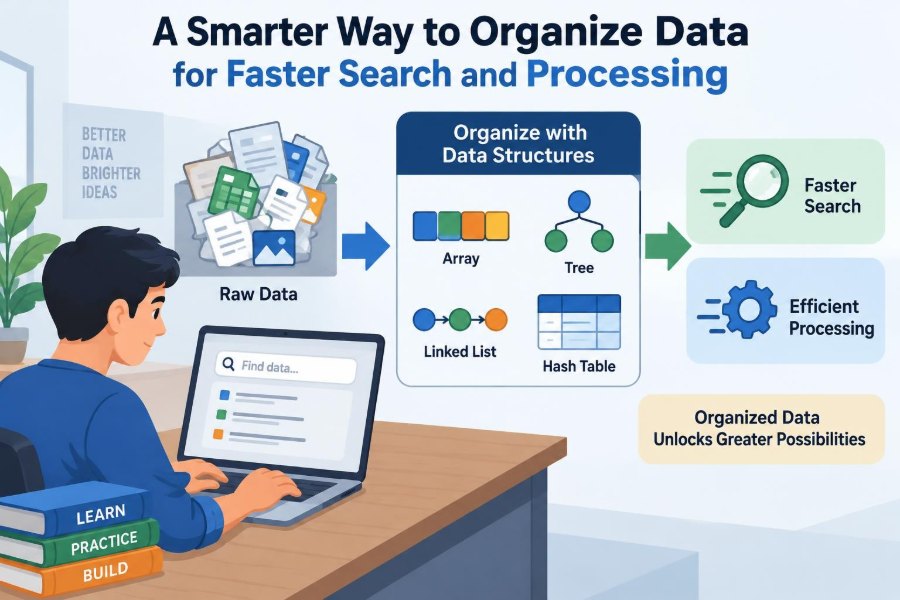

Imagine searching through a cluttered downloads folder for one document. If every file has an unclear name and everything sits in one long list, finding it takes time. If files are grouped into sensible folders and named consistently, the same search becomes much easier.
Computers face a version of this problem constantly. They store customer accounts, product catalogs, messages, sensor readings, game objects, and millions of other pieces of information. The way that information is arranged can determine whether a task feels immediate or painfully slow.
A program can have a fast processor and still perform poorly when it repeatedly searches data in an inefficient structure. Conversely, organizing data well can reduce unnecessary work before any advanced optimization begins.
This is the central idea behind data structures: practical ways to store, connect, and access data so that common operations such as searching, inserting, sorting, and updating can be performed efficiently.
🧩 Data Organization Is a Design Decision
A data structure is more than a container. It describes where items are placed, how they relate to one another, and which operations are convenient or expensive.
For example, a collection of student names may be stored in a simple list when order matters. If the main task is checking whether a particular student is enrolled, a set may be more suitable. The data is similar; the expected use is different.
Good organization starts by asking what the program needs to do most often. There is no universally best structure.
🔎 Why Search Becomes Slow
In an unsorted list, finding a particular item may require checking entries one by one. If the desired item is near the end, or absent entirely, the program may inspect the whole collection.
This approach is called linear search. It is perfectly reasonable for a short list, but its cost grows directly with the amount of data.
Searching a list of ten items is trivial. Repeating that same style of search across hundreds of thousands of records, many times per request, can become a visible bottleneck.
📏 Thinking About Growth With Big O
Computer scientists use Big O notation to describe how the amount of work tends to grow as input grows. It does not predict an exact running time; hardware, programming language, and implementation details still matter.
Instead, it helps compare growth patterns. A linear scan is often described as O(n), meaning the work grows roughly with the number of items. A well-designed lookup in a hash table is commonly O(1) on average, meaning it usually does not grow much as the collection becomes larger.
Big O is a planning tool, not a stopwatch. It highlights where an approach may stop scaling comfortably.
📚 Arrays Keep Items in Order
An array stores items in consecutive positions, usually accessed by an index such as 0, 1, 2, and so on. Reading an item at a known position is fast because the computer can calculate its location directly.
Arrays work well for ordered data: daily temperatures, pixels in an image, quiz answers, or the cards currently displayed in an interface.
However, inserting an item near the beginning may require shifting many later items. An array is excellent at direct access, but frequent middle insertions can be costly.
🔗 Linked Lists Favor Local Changes
A linked list stores each item in a separate node, with each node pointing to the next one. Rather than relying on neighboring memory positions, it follows links from item to item.
If a program already knows the location where a new node belongs, inserting or removing it can be efficient. Nearby elements do not need to shift as they do in an array.
The trade-off is navigation. To reach the hundredth node, the program generally follows the first ninety-nine links. Linked lists are useful in some specialized situations, but they are not automatically faster than arrays.
📦 Stacks Model “Last In, First Out”
A stack allows access mainly at one end. The most recently added item is the first one removed, a rule known as last in, first out, or LIFO.
A stack resembles a pile of plates: adding and taking from the top is simple, while removing one from the middle is not the intended operation.
Common uses include undo histories, browser back-navigation, function calls, and checking whether brackets in code are properly nested.
🚶 Queues Preserve Arrival Order
A queue follows first in, first out, or FIFO. New items join at the back, while the oldest item leaves from the front.
This pattern fits print jobs, support tickets, tasks waiting for a background worker, and people waiting in a line. It provides a clear fairness rule when arrival order matters.
Some systems use priority queues instead, where urgent work can be selected before older work. That is useful, but it intentionally changes the meaning of “first.”
🗂️ Hash Tables Make Lookup Practical
A hash table stores values using keys. For example, an application might associate the key user_482 with one customer profile, or a product code with inventory details.
A hash function converts a key into a location where the value can be found. When the function distributes keys well and the table is not too crowded, lookups, additions, and removals are usually very fast.
This makes hash tables a common choice for dictionaries, caches, configuration settings, and membership checks.
⚠️ Hashing Does Not Eliminate Collisions
Different keys can sometimes map to the same location. This is called a collision, and it is a normal issue that hash-table implementations must handle.
Common strategies include storing multiple entries in a small bucket or searching for another available position. As collisions become frequent, performance can decline.
Good implementations monitor how full the table is and may resize it when necessary. Developers should also avoid assuming that a hash table keeps keys in sorted or insertion order unless the specific language feature promises that behavior.
🌳 Trees Represent Hierarchies Naturally
A tree organizes data into parent-child relationships. A folder system is an everyday example: a folder may contain files and subfolders, which can contain more items below them.
Trees are useful whenever data branches: organization charts, website menus, document structures, family relationships, and decision processes.
Unlike a simple list, a tree does not imply one fixed path through every item. It lets the program move through meaningful groups and subgroups.
⚖️ Binary Search Trees Can Narrow the Search
In a binary search tree, each node has up to two children. Values smaller than a node are placed on one side, while larger values are placed on the other.
To locate a value, the program compares it with the current node and discards an entire side of the tree when that side cannot contain the answer. A reasonably balanced tree can narrow the search quickly.
But shape matters. If values arrive in an unfortunate order, a basic binary search tree can become a long chain, losing much of its advantage.
🌿 Balanced Trees Protect Performance
Balanced trees use rules that prevent the structure from becoming excessively lopsided. Examples include AVL trees and red-black trees, although most application developers use them through built-in libraries rather than implementing them from scratch.
Balancing adds maintenance work during insertions and deletions. In return, searches and updates remain predictably efficient even as the collection changes.
They are particularly useful when data must remain sorted while also supporting frequent updates, such as a ranked collection or an ordered index.
✂️ Binary Search Requires Sorted Data
Binary search repeatedly checks the middle item of a sorted sequence. If the target is smaller, it ignores the upper half; if larger, it ignores the lower half.
Each comparison discards a large portion of the remaining candidates. This is much faster than scanning a large sorted array from start to finish.
The limitation is crucial: binary search only works correctly when the data is already sorted according to the same rule used for comparison. Sorting has its own cost, so this choice pays off when many searches follow.
🧭 Indexes Help Databases Find Records
A database index is similar to the index at the back of a textbook. Instead of reading every page, you use a structured reference to jump toward relevant entries.
For a table of orders, an index on an order number can make a lookup far quicker than examining every row. Many database indexes are built with tree-like structures because they support both search and ordered ranges.
Indexes consume storage and must be updated when indexed values change. Adding an index to every column is not a free improvement.
🧾 Choose Indexes for Real Queries
Index the fields that appear regularly in filters, joins, sorts, and lookups—not merely the fields that seem descriptive. A customer service application might often search by account ID, while an analytics task may commonly filter by date.
Consider a hypothetical shop database. An index on order_date can help queries for orders placed within a date range. An index on a rarely used notes field may add maintenance overhead without helping typical work.
Query plans and real usage patterns are better guides than guesses. Database tools can often show whether a query uses an index or scans a whole table.
🕸️ Graphs Capture Connections
A graph consists of nodes and edges. Nodes represent things, while edges represent relationships or paths between them.
Road maps, social connections, computer networks, dependency systems, and recommendation relationships all fit this model. A graph can show links that do not follow a simple parent-child hierarchy.
Graphs are powerful because many difficult questions are really questions about connections: What is the shortest route? Which services depend on this component? Who can reach this resource?
🛣️ Traversing a Graph Depends on the Goal
Breadth-first search explores nearby nodes before moving farther away. In an unweighted graph, it can find a path with the fewest edges, such as the fewest transfers between stations.
Depth-first search follows one path as far as possible before backtracking. It is useful for tasks such as exploring connected components or detecting certain dependency problems.
Neither method is simply “better.” The correct traversal follows the question being asked and the properties of the data.
🔄 Sorting Improves More Than Presentation
Sorting places values into a defined order, such as alphabetical names, ascending prices, or newest-first timestamps. It makes data easier for people to scan, but it also enables operations such as binary search and efficient range queries.
Different sorting algorithms make different trade-offs in memory use, implementation complexity, and behavior on nearly sorted data. In normal application code, a trusted library sort is usually the best starting point.
The practical question is often not “Which sorting algorithm is famous?” but “When should this data be sorted, and how long should it stay sorted?”
🧠 Caching Avoids Repeating Expensive Work
A cache stores results that may be needed again soon. For instance, an application might cache a frequently requested product page or a computed report summary rather than rebuilding it for every request.
Caching can reduce repeated searches, calculations, and database queries. It is especially helpful when the original work is slow and the answer changes infrequently.
Its main risk is stale data. A cached inventory count that does not reflect a recent sale can mislead users, so cache expiration and invalidation rules must match the business need.
🧮 Preprocessing Trades Preparation for Speed
Sometimes the fastest query is made possible by work done earlier. Preprocessing means preparing data in advance: sorting records, building an index, creating a lookup map, or calculating reusable summaries.
For example, a reporting system could calculate monthly totals once and save them. Later requests for a dashboard can read those totals instead of scanning every transaction again.
This trade-off is useful when many people ask similar questions. It is less attractive when data changes continuously or when the future questions are unpredictable.
⚡ Memory Layout Also Affects Real Performance
Big O describes growth, but it does not capture every practical cost. Modern processors work efficiently when related data is stored close together in memory, because they can fetch nearby information in batches.
Arrays often benefit from this locality. Linked structures may involve jumping between scattered memory locations, which can be slower in practice even when the theoretical operation count looks favorable.
This is one reason performance decisions should be measured in the actual environment. Elegant theory and observed behavior should inform each other.
🧪 Measure Before Rebuilding Everything
Slow software does not always have a data-structure problem. A delay may come from network requests, disk access, database locks, repeated rendering, or an external service.
Use profiling and timing tools to identify where time is actually spent. Then inspect the relevant workload: how many records exist, which operations repeat, and whether the slow path occurs under normal or unusual conditions.
Optimization is most effective when it targets evidence rather than suspicion. Replacing a list with a complex structure cannot fix time spent waiting for a remote server.
🧰 Match the Structure to the Operations
A useful selection process begins with concrete questions:
- Do you need fast access by position?
- Do you need fast lookup by a unique key?
- Must values remain in sorted order?
- Are insertions and deletions frequent?
- Is the data hierarchical or highly connected?
- Do you need predictable worst-case behavior, or is average performance sufficient?
Your answers narrow the options. A set is excellent for membership checks, but it does not replace an ordered list when display order is central to the feature.
📊 A Practical Comparison of Common Choices
| Structure | Best fit | Key trade-off |
|---|---|---|
| Array or list | Ordered items and position-based access | Middle insertions may require shifting items |
| Hash table or map | Lookup by unique key | Order is not inherently useful; collisions need handling |
| Set | Checking whether an item exists | Usually stores membership rather than associated details |
| Balanced tree | Sorted data with updates and range queries | More structural complexity than a simple map |
| Queue | Processing work in arrival order | Not designed for arbitrary lookup |
| Graph | Routes, dependencies, and relationships | Traversal logic can become complex at scale |
🚫 Avoid Premature Complexity
It is tempting to choose an advanced structure because it sounds efficient. But a small internal tool with a few dozen records may be clearer and safer with a straightforward list.
Complex structures increase implementation and maintenance costs. They can introduce subtle bugs around ordering, updates, concurrency, or memory use.
Start with a structure that clearly fits the current requirements. Improve it when measurements or expected growth justify the additional complexity.
🧯 Watch for Hidden Costs During Updates
Fast reads can make writes more expensive. A database index helps retrieve records, but each inserted or updated record may require index maintenance. A cache speeds repeated reads, but it creates invalidation work.
This matters for systems with different workloads. A read-heavy reference catalog may benefit from extensive indexing and caching, while a write-heavy event stream may prioritize fast ingestion.
Always ask where the cost moves. Optimization rarely makes cost disappear; it often shifts it to storage, preparation, updates, or operational complexity.
🔐 Organize Data With Access Rules in Mind
Efficient access should not bypass appropriate access control. A fast lookup by customer ID still needs to verify that the requesting user is permitted to see that customer’s information.
Indexes, caches, logs, and search systems can create additional copies or pathways to sensitive data. Their design should consider retention, permissions, encryption where appropriate, and safe handling of deleted or changed records.
Performance and privacy are not opposing goals, but both must be designed deliberately rather than treated as afterthoughts.
🧑💻 Use Language Libraries Wisely
Most programming languages provide standard collections such as lists, maps, sets, queues, and sorted collections. These libraries are usually well-tested and are preferable to building custom versions without a clear need.
Still, names can be misleading across languages. A “dictionary,” “map,” or “object” may have different rules for ordering, key types, thread safety, or missing values.
Read the documentation for the collection you use. Knowing its guarantees matters more than memorizing a generic definition.
📝 A Small Example: Tracking Course Enrollment
Suppose a school application stores enrolled student IDs for each course. If the main question is “Is this student enrolled?”, a set gives a natural model because duplicate enrollment IDs are not useful.
If the application must display students alphabetically, it may maintain a sorted view or sort the names when generating the roster. If it needs to retrieve full student profiles, a map from ID to profile can provide direct lookup.
One feature may use several structures together. Smart organization is often about assigning each responsibility to the structure that handles it best.
🎯 The Core Principle: Shape Data Around Its Use
Faster search and processing begin with understanding the workload. Arrays favor direct positions, hash tables favor key-based lookup, trees support ordered relationships, graphs model connections, and caches reduce repeated work.
The right choice also considers updates, memory, data freshness, security, implementation complexity, and the scale the system is expected to reach. A structure that is ideal for a read-heavy catalog may be wrong for a constantly changing queue of events.
Organize data according to the questions your program asks most often, then verify the result with realistic measurement.
When data has a clear shape, software spends less time hunting for information and more time doing useful work. Start with the operations that matter, choose the simplest fitting structure, and refine it as real needs become visible. 💻🔎📚