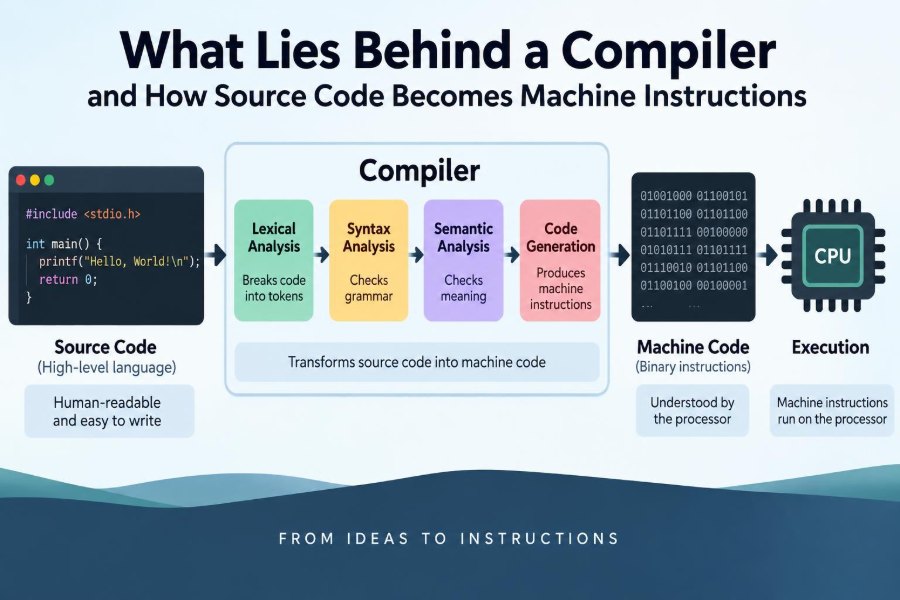

You write a few lines of code, press Run, and a program appears to obey. A number is calculated, a file is saved, or a window opens. The distance between your readable source code and the processor’s electrical operations is easy to overlook.
A compiler is one of the systems that closes that distance. It does not merely “translate code.” It reads a formal language, checks its meaning, reshapes it into several internal forms, improves it, and eventually produces instructions suited to a particular machine.
This matters whether you are learning C, building a Java service, debugging a performance problem, or choosing build settings at work. Compiler messages, executable sizes, optimization flags, and cross-platform behavior make far more sense once the pipeline is visible.
The exact details differ among languages and tools, but the central journey is remarkably consistent: turn human-written structure into operations a processor can execute safely and efficiently.
🧭 The Gap Between Source Code and a CPU
Humans prefer names, indentation, functions, and expressions such as total = price * quantity. CPUs execute far simpler operations: load a value from memory, add or multiply values held in registers, compare values, and jump to another instruction.
A processor does not understand a variable named price or a loop written with for. Those are abstractions supplied by a programming language and preserved by tools until they can be converted into lower-level behavior.
A compiler is the bridge between a language’s rules and a machine’s instruction set. An instruction set architecture, or ISA, is the defined collection of instructions a processor family can execute, such as ARM or x86-64.
🛠️ What a Compiler Actually Does
At its broadest, a compiler takes a program in one representation and transforms it into another representation. Traditionally, that means source code becomes native machine code stored in an executable or library.
However, a compiler may also target bytecode, JavaScript, WebAssembly, database queries, or another high-level language. The essential idea is still translation guided by strict rules.
Most compiler work falls into three broad areas:
- Front end: understands source text and checks language rules.
- Middle end: analyzes and improves a machine-independent program form.
- Back end: chooses instructions and emits output for a target platform.
📚 Compilation Is Not the Same as Interpretation
Ahead-of-time compilation produces code before a program is normally run. C and C++ commonly follow this model: a build creates native object files and executables for a selected target.
An interpreter instead reads and executes a program while it runs, often one operation at a time. Many languages combine approaches. Python implementations may compile source to bytecode before a virtual machine executes it, while Java commonly compiles to bytecode and may later use just-in-time compilation.
Just-in-time, or JIT, compilers create native code during execution. They can use information observed at runtime, but they also add startup and runtime complexity. Neither approach is universally superior; language design, deployment needs, and workload all matter.
🧾 The Build Begins Before the Compiler
For languages in the C family, source files often pass through a preprocessor first. The preprocessor expands macros, includes requested header content, and handles conditional compilation directives such as #if.
Consider a source file that says #include <stdio.h>. The compiler generally needs declarations from that header, but the exact mechanism is toolchain-specific. After preprocessing, the compiler receives a larger stream of text with those directives resolved.
This stage can be convenient, yet macros are not normal functions. They perform textual substitution, which can produce surprising code if arguments have side effects. Modern language features are often safer when they can express the same intent.
🔤 Lexing Turns Characters into Tokens
The compiler initially sees characters: letters, digits, punctuation, spaces, and comments. A lexical analyzer, often called a lexer or scanner, groups meaningful character sequences into tokens.
For example, count = 12 + 3; becomes tokens for an identifier, an assignment operator, integer literals, an addition operator, and a semicolon. Comments and most whitespace are discarded because they do not change the program’s meaning in many languages.
Lexing is also where malformed characters or an unfinished string literal can be recognized. Tokens make the next stage much simpler: the parser no longer has to reason about every individual character.
🌳 Parsing Finds the Program’s Structure
Tokens alone do not say which operations belong together. Parsing applies the grammar of the language to identify statements, declarations, expressions, function calls, and nested blocks.
The output is often an abstract syntax tree, or AST. It is a tree because a program has hierarchical structure: a function contains statements, and an expression can contain other expressions.
result = 2 + 3 * 4;A correctly designed parser understands that multiplication binds more tightly than addition. The AST represents this as “add 2 to the result of multiplying 3 and 4,” rather than evaluating left to right without regard to precedence.
🚫 Syntax Errors Stop at the Grammar
A syntax error means the source text does not match the language grammar. A missing closing brace, an unmatched parenthesis, or an invalid token sequence can prevent the parser from building a valid tree.
Compilers try to report an informative location and may recover enough to identify additional errors. Still, the first reported error is often the most useful one to fix. Later messages may be consequences of a parser trying to continue after losing the intended structure.
Syntax checking answers, “Is this written in the legal shape of the language?” It does not yet answer whether the legal-looking program makes sense.
🔎 Semantic Analysis Checks Meaning
Semantic analysis examines meaning beyond grammar. The expression 7 + ; is syntactically invalid, but print(total) may be syntactically valid even when total was never declared.
During this stage, the compiler commonly verifies that names exist, variables are used within scope, function calls have appropriate arguments, and operations are valid for their operand types. It also associates each identifier occurrence with the declaration it refers to.
Language rules vary. Some languages reject many questionable constructs at compile time; others deliberately defer checks until runtime. A compiler can enforce only the guarantees the language defines.
🏷️ Symbol Tables Keep Track of Names
To resolve names, compilers maintain a symbol table: a data structure that records declarations and their properties. An entry might include a name’s type, scope, storage information, and whether it refers to a variable, function, type, or field.
Scopes matter because the same spelling can name different things in different places. A local variable named index can shadow an outer variable with that name. The compiler must bind each use to the correct declaration according to the language’s scope rules.
This is why renaming a variable is not merely a text-editing operation. Development tools that understand symbols can rename the intended entity while leaving unrelated identifiers unchanged.
🔢 Type Checking Prevents Many Mismatches
A type describes what kind of value an expression represents and which operations make sense for it. Type checking might reject adding a number to a file handle, assigning text to an integer variable, or calling a method that a type does not provide.
Some languages require explicit type annotations in many places. Others use type inference, where the compiler deduces a type from declarations and expressions. Inference reduces repetition without removing the underlying type rules.
Static type checks are valuable, but they do not prove that every program result is correct. A variable can have the right type and still hold the wrong value because of an incorrect formula or flawed business rule.
🧩 From Syntax Tree to Intermediate Representation
ASTs closely reflect the way programmers write code, which is excellent for diagnostics and language rules. They are not always ideal for optimization or machine instruction selection.
Compilers therefore translate programs into one or more intermediate representations, often abbreviated IR. An IR is a structured internal language designed to make analysis and transformation manageable.
A simple expression might be broken into explicit temporary operations:
t1 = multiply price, quantity
t2 = add subtotal, t1
Different compiler projects use different IRs. The important point is that the program’s meaning is retained while its representation becomes easier for later stages to inspect and rearrange.
🧠 Control Flow Makes Branches Visible
Programs rarely proceed in one straight line. Conditions, loops, returns, exceptions, and function calls change where execution goes next. A compiler models this using a control-flow graph, whose nodes are blocks of instructions and whose edges show possible paths.
A basic block is a run of instructions with one entry point and no branches in the middle. Dividing code into blocks helps the compiler determine which computations reach a location and which paths can be eliminated.
For an if statement, one edge represents the true branch and another the false branch. For a loop, an edge returns to an earlier block. This graph is a practical map of a program’s possible execution.
⚙️ Optimization Is Careful Program Transformation
Optimization changes code while preserving behavior required by the language. Its purpose may be speed, lower memory use, smaller binaries, reduced energy use, or a balance among these goals.
A compiler can remove a calculation whose result is never used, precompute an expression made entirely of constants, or avoid repeating a value that it has proved cannot change. These transformations sound obvious, but correctness depends on details such as side effects, overflow rules, concurrency, and observable input/output.
An optimizer is not allowed to “fix” an algorithm that computes the wrong answer. It can improve an implementation only within the semantic promises of the language and selected compiler settings.
🧹 Dead Code Elimination Removes Useless Work
Dead code is code that cannot affect the observable result of a program. For example, a local calculation may be removable if its value is never read and the calculation has no side effects.
That qualification matters. A function call that appears to return an unused value may write to a file, update a global value, throw an exception, or communicate over a network. The compiler cannot simply delete it unless the relevant behavior is known to be unnecessary.
Unreachable statements after an unconditional return are another form of dead code. Compilers may warn about them, optimize them away, or both, depending on the language and tool.
🔁 Loops Offer Big Opportunities and Real Trade-Offs
Loops often consume substantial execution time, so optimizers examine them closely. They may move a loop-invariant calculation outside the loop, unroll a small loop by repeating its body, or combine independent operations so hardware can process several values together.
Vectorization uses instructions that operate on multiple data elements in parallel. It can help with arrays, image processing, and numerical workloads, but dependencies between iterations can block it.
More aggressive transformations can increase executable size or make debugging less intuitive. A faster inner loop is useful only when it improves the actual workload rather than making a build slower or a program larger for no measurable benefit.
🎯 The Target Machine Shapes the Final Code
Once the program is in a lower-level form, the back end maps operations to the target ISA. A multiply in the IR may become one instruction on one architecture and a different sequence on another.
Target details include register count, instruction formats, calling conventions, memory alignment requirements, and available vector features. This is why a native executable built for one processor architecture usually cannot simply run on another.
Cross-compilation uses a compiler running on one system to generate code for a different target. It is common in embedded development, where a developer’s computer builds software for a device with a different processor and operating environment.
🗂️ Register Allocation Decides Where Values Live
Registers are tiny, extremely fast storage locations inside a CPU. Machine instructions generally work most efficiently with values already in registers, but there are only a limited number available.
Register allocation chooses which active values remain in registers and which must be temporarily stored in memory, often called spilling. Poor choices can create extra loads and stores; excellent choices can reduce them.
This problem becomes more difficult when many variables are live at the same time, especially across function calls or complex control flow. It is one reason that apparently simple source code can produce surprisingly intricate assembly.
📞 Calling Conventions Let Separate Code Cooperate
A program is usually built from many functions and often many libraries. A calling convention specifies practical rules that let separately compiled pieces work together: where arguments go, where return values appear, which registers a call may overwrite, and how the stack is managed.
Without an agreed convention, one function might place an argument in a register while another looks for it on the stack. The call would fail even if both functions were individually translated correctly.
Application binary interfaces, or ABIs, include calling conventions and other low-level compatibility rules. They are one reason binary compatibility is more demanding than merely sharing the same source language.
📦 Object Files Are Not Finished Programs
Compilers commonly translate each source file into an object file. An object file contains machine code plus information about symbols, relocation needs, debugging data, and sections for code or data.
A function in one file may call a function defined elsewhere. At compilation time, the final address of that external function may not yet be known. The object file therefore records a placeholder and information needed to repair it later.
Compiling files separately makes large projects practical: changing one implementation file often requires rebuilding only its related output, not every source file in the project.
🔗 Linking Resolves the Whole Program
The linker combines object files and libraries, resolves references between them, assigns addresses, and creates an executable or shared library. If code calls a function for which no definition can be found, the linker reports an undefined reference.
Static linking copies needed library code into the final executable. Dynamic linking records that some code should be loaded from a shared library when the program starts or when it is first needed.
| Approach | Main advantage | Main trade-off |
|---|---|---|
| Static linking | Fewer runtime library dependencies | Potentially larger executable and independent library copies |
| Dynamic linking | Shared libraries can be reused and updated separately | Requires compatible libraries to be available at runtime |
The exact loading behavior depends on the operating system, file format, security policies, and build configuration.
🚀 Loading Prepares a Program to Run
Starting an executable is another stage, usually handled by the operating system’s loader. It maps program sections into memory, prepares runtime dependencies, establishes an initial stack, and transfers control to startup code.
Startup code performs work before your language-level main function begins. Depending on the environment, it may initialize global objects, set up runtime services, and pass command-line arguments and environment information.
Compilation produces code, linking assembles a binary, and loading prepares that binary for an actual process. Keeping these terms separate makes build and startup errors easier to diagnose.
🧪 Debug Builds and Release Builds Serve Different Jobs
A debug build usually prioritizes clear diagnostics and source-level debugging. It may include symbolic information that lets a debugger show function names, variables, and source lines rather than only raw instruction addresses.
A release build commonly enables more optimization and may omit or separate some debugging information. Optimized code can reorder, combine, inline, or remove operations, so stepping through it may not match the source line by line.
Neither build type is inherently “better.” Use a configuration that matches the task: understand a defect with good symbols, then test performance and behavior under production-like optimization settings.
🐛 Why Compiler Errors Can Feel Indirect
Compiler diagnostics describe what the tool could prove or parse, not necessarily what you intended. A missing delimiter on one line can cause an error to appear later, where the parser finally encounters something impossible.
Template systems, generated code, macros, and long type expressions can produce especially dense messages. Read the first clear error, locate the smallest relevant source region, and simplify if necessary.
- Check unmatched quotes, brackets, parentheses, and braces.
- Confirm that a name is declared in the intended scope.
- Compare the types and argument counts in a failing call.
- Reduce a complicated expression into named intermediate values.
This approach turns an intimidating message into a series of verifiable language rules.
🪲 Warnings Are Signals, Not Automatic Proof
Warnings identify patterns that are legal but suspicious: an unused variable, a likely unintended conversion, or a condition that appears always true. They deserve attention because they often reveal defects before execution.
Yet a warning is not always a bug. Context may make the code intentional, and compiler analyses are necessarily conservative in some cases. The professional habit is to understand the warning, correct the code, adjust the design, or explicitly document why the warning does not apply.
Suppressing warnings broadly can hide future problems. Prefer narrow, justified suppression when it is truly needed.
🔒 Compilers Can Add Safety Defenses
Many toolchains provide optional protections that make certain memory errors or control-flow attacks harder to exploit or easier to detect. Examples include stack protection, bounds-related sanitizers, and instrumentation that checks for undefined behavior during testing.
These features do not make unsafe code automatically safe, and their availability varies by language and platform. Some add runtime overhead or are intended mainly for development and test environments.
Still, compiler options are part of practical software security. Treat them as layers that complement careful design, code review, testing, dependency management, and timely updates.
⚠️ Undefined Behavior Limits Compiler Intuition
In some languages, certain operations have undefined behavior: the language standard does not define what must happen. Examples can include accessing memory outside an array’s bounds or using an invalid pointer, depending on the language.
Once undefined behavior is possible, an optimizer may make transformations that surprise a programmer who expected a particular accident to be handled consistently. The compiler is generally permitted to rely on the language’s assumptions when optimizing valid programs.
The lesson is not that optimizers are untrustworthy. It is that code must meet the language’s rules. Enable warnings and runtime checking tools where appropriate, and do not treat one observed machine behavior as a guarantee.
📈 Optimization Levels Are Engineering Choices
Compiler flags often select optimization levels, but their labels are not universal contracts. A setting called “high optimization” in one toolchain may enable a different set of transformations than a similarly named setting elsewhere.
More optimization can improve speed, but it may also increase compile time, binary size, or debugging difficulty. Profile-guided optimization goes further by using data from representative program runs to guide decisions such as code layout or inlining.
Measure on realistic inputs before making conclusions. A microbenchmark can reveal a local effect while missing memory access, input/output, synchronization, or algorithmic costs that dominate the real application.
🧱 Libraries, Runtimes, and Generated Code Extend the Pipeline
A compiler does not necessarily produce a self-sufficient program. Language runtimes may supply garbage collection, exception handling, reflection, thread support, or standard library functions. Frameworks may generate additional source or metadata before compilation.
This explains why a “simple build” can involve several tools: a package manager fetches dependencies, a code generator emits files, a compiler creates object code, a linker produces a binary, and a runtime participates when it executes.
Understanding the boundaries helps when a failure occurs. A missing package, a compilation error, a link error, and a runtime loading error require different fixes.
🔍 Reading Assembly Is a Useful, Limited Skill
Inspecting compiler output can teach you how loops, calls, conditionals, and data layouts become instructions. Tools can emit assembly text or show a disassembly of an executable, which is machine code decoded back into readable instruction names.
Use this skill to answer focused questions: Was a function inlined? Did the compiler vectorize this loop? Are repeated loads occurring? Avoid treating assembly as the only source of truth about performance.
Assembly is shaped by compiler version, target CPU, flags, ABI requirements, and surrounding code. A source-level change that looks cleaner may produce identical output, while a tiny data-layout change may have larger effects than an instruction-count comparison suggests.
🧰 Practical Habits for Working With Compilers
You do not need to write a compiler to work effectively with one. Start by knowing the command or build task that creates your program, the target platform it selects, and where diagnostics are reported.
- Build with useful warnings enabled and investigate new ones.
- Keep debug information available for test and production diagnosis when policy permits.
- Use formatter, linter, test, and static-analysis tools alongside compiler checks.
- Build in a clean environment periodically to reveal missing dependencies.
- Benchmark and profile before changing code solely for presumed speed.
These habits make the compilation pipeline a source of feedback rather than a black box that only appears when something fails.
🧭 The Core Idea: Preserve Meaning Through Many Forms
The source file is not magically executed. It moves through a sequence of representations: characters become tokens, tokens become structured syntax, syntax gains names and types, and internal forms are analyzed, optimized, and lowered toward machine instructions.
Object files, linkers, loaders, libraries, and runtimes then help turn that output into a running process. Each stage has a focused responsibility, which is why errors from different stages sound and behave differently.
The central principle is that a compiler preserves the intended meaning of a valid program while expressing it in forms that a particular machine can execute. Seeing that chain makes programming tools less mysterious and gives you better ways to debug, measure, and design software.
When you press Build, you are starting a disciplined translation process—not asking a machine to guess what your code means. That distinction is the foundation for understanding both compiler power and compiler limits. 💻⚙️🧠