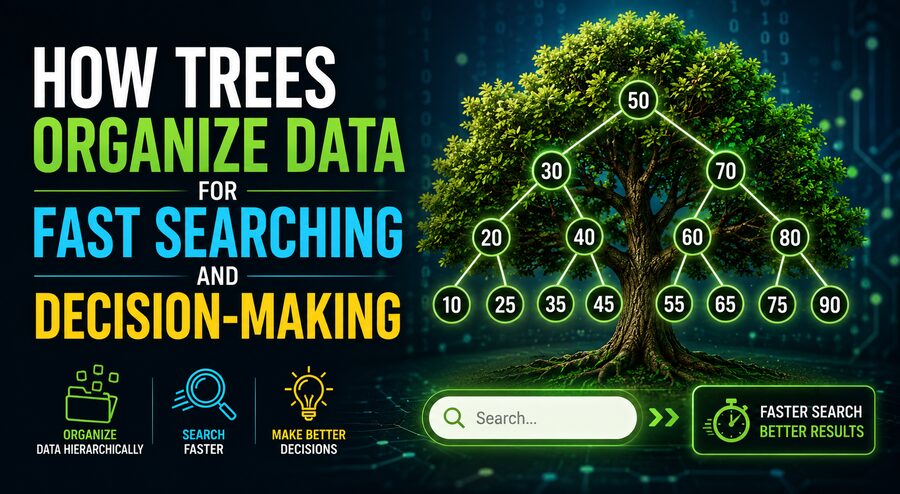

In computer science, a tree is one of the most important ways to organize information. Trees help computers search, sort, classify, prioritize, and make decisions efficiently. They appear in databases, operating systems, artificial intelligence, file systems, networking, compilers, web browsers, and countless other technologies. 💻🌿
The idea comes from the branching structure of a real tree, although computer science trees are usually drawn upside down. A tree begins with a single top element called the root, and from there it branches into smaller connected elements called nodes.
By arranging information hierarchically, trees often allow a computer to avoid examining every piece of data individually. Instead, the system can repeatedly narrow down where the desired information should be located. This ability makes tree structures especially valuable when applications need fast searching or efficient decision-making. 🔍⚡
🌱 What Is a Tree Data Structure?
A tree is a collection of nodes connected by relationships.
Each node can store information and may connect to one or more other nodes.
The first node is called the root node. Nodes connected below another node are commonly called children, while the node above them is called their parent.
For example:
        50
       /  \
     30    70
    / \    / \
   20 40  60 80
Here, 50 is the root.
The values 30 and 70 are children of 50, while 20 and 40 are children of 30.
This hierarchical arrangement allows data to be organized according to rules rather than simply being stored in a long sequence.
🧩 Important Parts of a Tree
Several terms are commonly used when describing tree structures.
🌳 Root
The root is the highest-level node in the tree.
Every tree normally begins with one root.
🌿 Parent
A node that has another node directly beneath it is called a parent.
🍃 Child
A node connected beneath another node is its child.
🍂 Leaf
A leaf node has no children.
Leaf nodes often represent final values, outcomes, or endpoints.
🔗 Edge
The connection between two nodes is called an edge.
📏 Depth
The depth of a node describes how far it is from the root.
📐 Height
The height of a tree is generally related to the longest path from the root to a leaf.
These concepts become important when analyzing how quickly a computer can search through a tree.
🔍 Why Trees Can Make Searching Faster
Imagine storing 1,000 numbers in an ordinary unsorted list.
If a computer wants to find one specific number, it may need to examine many entries one after another.
In the worst case, it could inspect almost all 1,000 values.
A properly organized tree can dramatically reduce the amount of searching required. ⚡
One of the clearest examples is a binary search tree.
In a binary search tree, every node can have at most two children:
- values smaller than the node are placed on the left,
- values larger than the node are placed on the right.
Consider this example:
        50
       /  \
     30    70
    / \    / \
   20 40  60 80
Suppose we want to find 60.
We begin at 50.
Because 60 is greater than 50, there is no need to search the entire left side of the tree. We move directly to the right.
Next, we reach 70.
Because 60 is less than 70, we move left.
We then arrive at 60.
The value was found after examining only three nodes. 🎯
This is much more efficient than checking every value individually.
⚡ The Power of Dividing the Search Space
Trees can be fast because each decision can eliminate a large part of the remaining search space.
In a well-balanced binary search tree, moving left or right may eliminate roughly half of the remaining possibilities.
That means searching follows a pattern similar to:
1,000 → 500 → 250 → 125 → 62 → 31 → 15 → 7 → 3 → 1
Instead of inspecting 1,000 elements, a computer may need only around 10 comparisons in an ideal or well-balanced arrangement.
This behavior is associated with logarithmic time complexity, often written as:
O(log n)
where n represents the number of stored elements.
As the data grows, the number of additional search steps grows relatively slowly. 📈
This is one of the main reasons tree structures are so powerful.
⚖️ Why Tree Balance Matters
Not every binary search tree is automatically fast.
Consider inserting numbers in this order:
10, 20, 30, 40, 50A poorly constructed tree might become:
10
  \
   20
     \
      30
        \
         40
           \
            50
This structure behaves almost like a regular linked list.
Searching for 50 requires moving through every node.
The tree has lost much of its speed advantage.
A balanced tree attempts to keep its branches at roughly similar heights.
For example:
        30
       /  \
     20    40
    /        \
   10        50
Balanced trees remain shallow, allowing searches to require fewer steps.
Special data structures such as AVL trees and Red-Black trees automatically perform adjustments to maintain useful balance as information is inserted or deleted. ⚖️🌳
🗄️ How Databases Use Trees
Databases may contain millions or even billions of records.
Searching every record whenever someone runs a query would be extremely inefficient.
Instead, database systems commonly build special tree-based indexes.
One important example is the B-tree.
B-trees differ from simple binary trees because each node can contain multiple values and connect to multiple child nodes.
They are particularly well suited to storage systems such as disks and solid-state drives because they reduce the number of storage accesses required during searches. 💾
A variation called the B+ tree is also widely used in database indexing.
Suppose a database contains millions of customer records sorted by customer ID.
Rather than scanning every row, the database can follow an index tree:
Root
 ↓
Relevant range
 ↓
Smaller range
 ↓
Exact record
This allows database queries to locate information rapidly.
📁 File Systems Are Naturally Tree-Shaped
Computer file systems provide another familiar example of tree organization.
Consider this directory structure:
Documents
├── Work
│   ├── Reports
│   └── Projects
└── Personal
    ├── Photos
    └── Music
The folder Documents acts like a parent node.
Work and Personal are child nodes.
Each folder can contain additional folders or files.
This hierarchical tree makes it easier for operating systems and users to navigate enormous collections of information. 📂🌳
Without hierarchy, every file on a computer might appear in one giant list, making organization extremely difficult.
🤖 How Trees Help Computers Make Decisions
Trees are not limited to storing information.
They can also represent decision-making processes.
A decision tree asks a sequence of questions.
For example:
Is it raining?
   /      \
 Yes       No
 /          \
Take        Is it cold?
umbrella     /      \
           Yes      No
          Jacket   T-shirt
Each internal node represents a question or condition.
Each branch represents a possible answer.
Leaf nodes represent final decisions or outcomes.
Decision trees are frequently used in machine learning, where a computer learns rules that divide data into categories. 🤖📊
For example, a financial system might evaluate a loan application by examining factors such as:
- income,
- credit history,
- debt level,
- employment stability,
- payment history.
The system follows branches according to the applicant’s characteristics until it reaches an outcome.
🎮 Trees in Games and Artificial Intelligence
Decision-making trees are especially important in games.
Imagine a chess-playing program deciding which move to make.
The program can create a game tree where:
- the root represents the current board,
- each branch represents a possible move,
- the next level represents the opponent’s responses,
- later branches represent future moves.
The computer explores potential outcomes before selecting an action. ♟️🤖
An algorithm called minimax is commonly used in two-player games.
It assumes one player tries to maximize their advantage while the opponent tries to minimize it.
More advanced techniques such as alpha-beta pruning can avoid exploring branches that cannot affect the final decision.
Once again, the tree structure helps reduce unnecessary work.
🌐 Trees in Internet and Network Technology
Tree-like structures also appear throughout networking and web technology.
For example, web pages are represented internally using the Document Object Model, or DOM.
HTML elements form a hierarchy:
html
├── head
└── body
    ├── header
    ├── main
    │   ├── article
    │   └── sidebar
    └── footer
Web browsers use this structure to understand how elements relate to one another.
JavaScript can then search, modify, add, or remove particular nodes. 🌐💻
Trees are also used in routing, domain-name systems, configuration management, and hierarchical network organization.
🔤 Tries Make Text Searching Efficient
A special type of tree called a trie, pronounced like “try,” is designed for handling strings and prefixes.
Suppose a system stores:
- car
- card
- care
- cat
Instead of storing each word completely separately, a trie can share common prefixes.
c
└── a
    ├── r
    │   ├── d
    │   └── e
    └── t
Because the words car, card, and care begin with the same characters, the tree stores their common path together.
Tries are useful for features such as:
- autocomplete,
- dictionaries,
- spell checking,
- search suggestions,
- IP routing,
- word games.
When you type a few letters into a search box and immediately receive suggestions, a tree-like structure may be helping produce those results. 🔤🔍
🏆 Priority Queues and Heap Trees
Another important tree structure is the heap.
Heaps are designed to quickly identify the highest- or lowest-priority element in a collection.
For example, a min-heap keeps the smallest value near the top.
A max-heap keeps the largest value near the top.
Heaps are commonly used for:
- task scheduling,
- priority queues,
- shortest-path algorithms,
- event simulation,
- resource management.
An operating system, for example, may need to decide which task should run next. A priority-based data structure can help it efficiently select the most important task. 🖥️⚙️
🔄 Tree Traversal: Visiting Every Node
Sometimes a computer needs to process every item in a tree.
The systematic process of visiting nodes is called tree traversal.
Common traversal methods include:
⬅️ Inorder Traversal
Visit the left branch, then the current node, then the right branch.
In a binary search tree, inorder traversal can produce values in sorted order.
⬇️ Preorder Traversal
Visit the current node first, then its children.
This can be useful for copying or serializing tree structures.
⬆️ Postorder Traversal
Visit the children before the parent.
This is useful in tasks such as deleting hierarchical structures.
🌊 Breadth-First Traversal
Visit nodes level by level.
Breadth-first search is useful when the desired result may be located near the top of the tree.
Different traversal methods are selected depending on what the computer needs to accomplish.
⚙️ Searching vs. Decision-Making
Trees support searching and decision-making in slightly different ways.
During searching, branches indicate where information is likely to be located.
For example:
Is the target smaller than 50?
If yes, search left. If no, search right.
During decision-making, branches represent conditions or possible actions.
For example:
Is the customer’s credit score above a threshold?
If yes, evaluate income. If no, follow another decision path.
In both cases, the key idea is the same: each step reduces the number of possibilities that must still be considered. 🎯
🧠 Why Trees Are So Useful
Trees provide several major advantages.
They can organize hierarchical relationships naturally, support efficient searching, make insertion and deletion manageable, represent complex decisions clearly, and allow algorithms to discard irrelevant possibilities.
Their usefulness comes largely from their structure.
Instead of treating all information as equally connected, trees create meaningful paths.
A computer can follow only the branches relevant to its current goal.
This is similar to using a library catalog rather than searching every shelf one book at a time. 📚🔍
⚠️ Trees Are Not Always the Best Choice
Despite their advantages, trees are not ideal for every problem.
A badly balanced tree may become slow.
Trees also require extra memory for references connecting nodes.
In some situations, other structures may be more appropriate.
For example:
- arrays can be excellent for sequential data,
- hash tables can provide extremely fast exact-key lookups,
- graphs are better for complex many-to-many relationships,
- linked lists can work well for certain sequential operations.
Computer scientists choose data structures according to the operations an application performs most frequently.
Choosing the correct structure can dramatically affect software performance. ⚙️📊
🌳 From Simple Branches to Powerful Computing
Tree data structures demonstrate how intelligent organization can make enormous amounts of information easier to manage.
By dividing data into branches, computers can often avoid searching through every possible item. Balanced binary search trees can narrow searches rapidly, database trees can locate records among millions of entries, tries can power autocomplete systems, and decision trees can guide machine-learning models toward predictions. 🔍🤖
Trees also provide a natural way to represent hierarchical information such as folders, web pages, company structures, categories, and game possibilities.
Their strength comes from a simple principle: organize possibilities so that every decision eliminates unnecessary choices.
Whether a database is searching for a customer record, a game-playing AI is evaluating its next move, or a search engine is suggesting the rest of a word, tree structures help computers reach useful results without examining everything.
That is why trees remain one of the foundational concepts in computer science—a simple branching idea capable of making modern computing dramatically faster and more organized. 🌳⚡💻