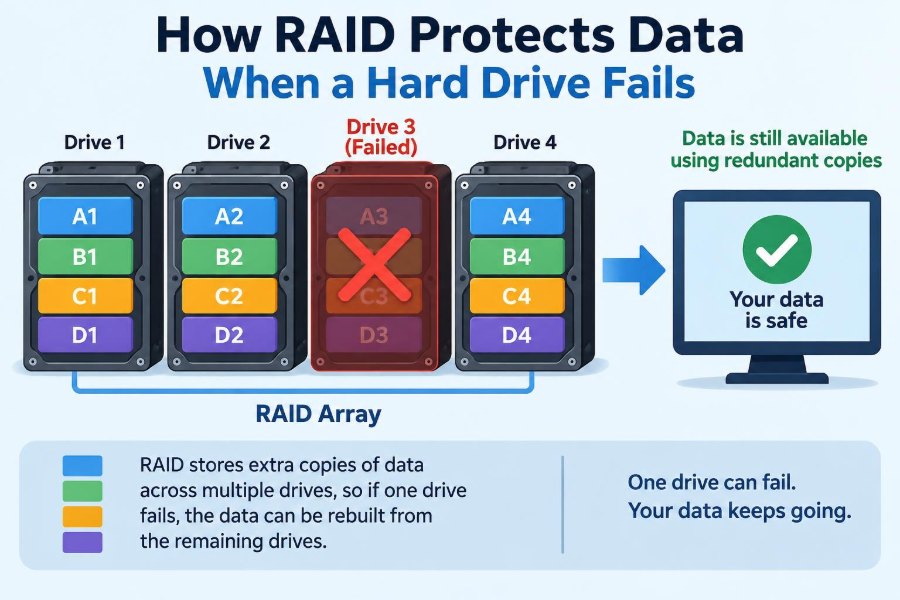

A small office file server begins making a clicking sound on a busy Monday morning. One drive has failed, but employees can still open shared documents, the accounting system continues running, and the IT team has time to replace the damaged disk.
That outcome is possible because the server uses RAID: a method of arranging multiple drives so they can work together. Depending on the RAID design, the system can keep operating after a drive failure or reconstruct the missing information onto a replacement drive.
But RAID is often misunderstood. It can provide valuable protection against a specific hardware problem, yet it is not a magic shield for every kind of data loss.
Understanding what RAID does, how it does it, and where its limits are helps students, home users, and professionals make safer storage decisions. 💾
🧩 1. What RAID Means
RAID originally stood for Redundant Array of Inexpensive Disks. Today, it is commonly understood as a group of drives organized to act as one storage system.
A RAID array may be designed for redundancy, better performance, larger usable capacity, or a combination of these goals. The exact behavior depends on the RAID level selected.
💿 2. Why One Drive Is a Risk
Every hard drive and solid-state drive can eventually fail. Mechanical hard drives have moving parts, while SSDs have electronic components and limited write endurance.
If a computer stores its only copy of important data on one drive, that drive becomes a single point of failure. A failed drive can make files unavailable immediately.
🛡️ 3. The Core Idea: Avoiding a Single Point of Failure
RAID distributes data across two or more physical drives. In redundant RAID arrangements, enough additional information is stored that the system can survive certain drive failures.
The important word is certain. A RAID array only protects against failures that its design can tolerate, such as one failed drive in many common configurations.
🧱 4. An Array Makes Several Drives Look Like One
To an operating system, a RAID array often appears as one logical disk or volume. Applications save files to that volume without needing to know which physical drive holds each piece.
Behind the scenes, a RAID controller or software layer decides where blocks of data are written. It also performs the extra work required for mirroring or parity.
📦 5. Data Is Stored in Blocks
Storage systems handle data in small units called blocks. A file is broken into many blocks, and RAID places those blocks across its member drives according to its rules.
This block-based design is why an array can split, copy, or mathematically protect the contents of a single file. RAID works below the level of folders and documents.
🪞 6. Mirroring Creates a Duplicate
Mirroring writes the same data to more than one drive. If one mirrored drive fails, the other drive still contains a complete copy of the data.
RAID 1 is the familiar example. With two drives in a basic RAID 1 mirror, usable capacity is roughly limited to the capacity of the smaller drive because the second drive holds duplicate information.
⚡ 7. Striping Splits Work Across Drives
Striping divides consecutive data blocks across multiple drives. One block might go to drive A, the next to drive B, and another to drive C.
Because several drives may read or write parts of a request at once, striping can improve throughput. However, striping alone does not provide redundancy.
🚨 8. RAID 0 Is Fast but Has No Failure Protection
RAID 0 uses striping without mirrors or parity. It combines drive capacity and can provide strong performance for suitable workloads.
However, if any drive in a RAID 0 array fails, data across the entire array is generally lost or inaccessible. RAID 0 should never be described as data protection.
- Useful for: replaceable scratch data and some performance-focused workloads.
- Unsafe for: the only copy of personal, business, or project data.
➕ 9. Parity Stores Recovery Information
Parity is extra information calculated from data blocks. It is not simply a full duplicate of every block, but it can be used to reconstruct missing data when a drive fails.
A common simplified explanation uses binary operations such as XOR. If a system knows two original values and their parity result, it can calculate the missing value.
A XOR B = P
A XOR P = B
B XOR P = A
Real RAID implementations operate on many blocks and include more practical details, but the principle remains: parity supplies enough information to recover a missing part.
🧮 10. A Simple Parity Example
Imagine three blocks stored across three drives: two are data blocks and one is a parity block. If one drive disappears, the controller reads the remaining blocks and calculates what belonged on the failed drive.
This reconstruction works only while the number of failed drives stays within the array’s tolerance. A single-parity arrangement cannot safely recover after two drives fail.
🔢 11. RAID Levels Describe Different Designs
A RAID level is a named layout that specifies how an array uses striping, mirroring, parity, or nested combinations. The number is not a quality score.
For example, RAID 1 and RAID 5 both offer redundancy, but they protect data differently and have different drive requirements, capacity trade-offs, and failure limits.
📊 12. Common RAID Levels at a Glance
| RAID level | Main method | Typical failure tolerance | Key trade-off |
|---|---|---|---|
| RAID 0 | Striping | None | Capacity and speed, but no redundancy |
| RAID 1 | Mirroring | One drive in a two-drive mirror | Half the raw capacity in a basic pair |
| RAID 5 | Striping with distributed single parity | One drive | Parity write overhead; needs at least three drives |
| RAID 6 | Striping with distributed dual parity | Two drives | More capacity and write overhead than RAID 5 |
| RAID 10 | Striped mirrors | Depends on which drives fail | Requires multiple drives; lower usable capacity |
These descriptions are general. Actual behavior can also depend on controller settings, drive sizes, and the specific RAID implementation.
🪞 13. How RAID 1 Handles a Failed Drive
When one drive in a RAID 1 mirror fails, the surviving drive contains the complete current data set. The array is usually described as degraded because redundancy is gone.
The system may continue running from the surviving drive. Once a replacement is installed, the controller copies data from the healthy member to rebuild the mirror.
🧠 14. How RAID 5 Reconstructs Missing Data
RAID 5 spreads data and single parity blocks across all member drives. Parity rotates among drives, so one disk is not dedicated only to parity.
After one drive fails, RAID 5 can calculate requested missing blocks from the remaining data and parity. It can also write reconstructed blocks onto a replacement drive during a rebuild.
🧯 15. How RAID 6 Adds Another Safety Layer
RAID 6 stores two independent forms of parity. This allows the array to tolerate two failed drives at the same time.
That extra protection can be valuable for arrays with many drives or situations where replacement may take time. In exchange, RAID 6 uses more storage space for protection and requires additional calculation during writes.
🏗️ 16. RAID 10 Combines Mirrors and Stripes
RAID 10 first creates mirrored pairs and then stripes data across those pairs. It combines the direct duplication of mirroring with the parallel access benefits of striping.
A RAID 10 array can survive a drive failure in each mirror pair. But two failures in the same pair can destroy the array, so the number of failed drives alone does not tell the whole story.
🔄 17. What “Degraded Mode” Means
An array enters degraded mode when a member drive has failed or is missing but the array remains operational. Data is still available because the remaining drives provide the needed copies or recovery information.
Degraded mode is a warning, not a comfortable long-term state. Performance may decrease, and another failure may exceed the array’s protection.
🔧 18. The Rebuild Process Restores Redundancy
After replacing a failed drive, the array performs a rebuild. It writes the missing mirror data or reconstructs missing striped blocks and parity onto the new drive.
A rebuild can take considerable time, especially with large drives, a busy system, or an array that must prioritize normal work. During this period, the array may have reduced fault tolerance.
⏳ 19. Why Rebuilds Need Careful Attention
Rebuilding reads substantial data from surviving drives and writes heavily to the replacement drive. This creates extra activity at a time when the array is already vulnerable.
Administrators should monitor alerts, confirm that the correct drive is being replaced, and avoid unnecessary disruptions. A mistaken removal of a healthy drive can turn a recoverable event into a serious outage. ⚠️
🧪 20. Not All Drive Failures Look the Same
A drive can fail suddenly and disappear, but it can also develop read errors, report warnings, become intermittently unavailable, or perform badly before complete failure.
Monitoring tools can report drive health information and array status. Alerts give people a chance to investigate early rather than discovering a problem only after redundancy is lost.
🖥️ 21. Hardware RAID and Software RAID
Hardware RAID is managed by a dedicated controller, often with its own processor and configuration interface. The operating system sees the resulting logical volume.
Software RAID is managed by the operating system or storage software. Modern software RAID can be capable and flexible, but it depends on correct system configuration and administration.
- Hardware RAID can simplify presentation to the operating system.
- Software RAID can offer transparency and may avoid dependence on a particular controller.
- Either approach needs monitoring, tested recovery procedures, and backups.
🔌 22. RAID Cannot Protect Every Part of a System
RAID protects against some member-drive failures. It does not automatically protect against a failed power supply, damaged motherboard, faulty RAID controller, accidental cable disconnection, fire, theft, or a site-wide disaster.
It also cannot guarantee that a damaged controller can be replaced without preparation. Configuration details, compatible hardware, and documented procedures matter.
🦠 23. RAID Is Not a Backup
This is the most important distinction: RAID keeps a storage system available after certain hardware failures, while a backup preserves an independent copy that can be restored later.
If someone deletes a folder, RAID faithfully copies or distributes that deletion. If ransomware encrypts files, the encrypted versions may be mirrored or protected by parity just as efficiently as the original files.
Backup protects against problems such as:
- Accidental deletion and unwanted changes.
- Malware, ransomware, and file corruption.
- Loss of the entire computer or storage device.
- Natural disasters, theft, and major electrical damage.
- Failures beyond the array’s drive-failure tolerance.
🗂️ 24. Good Protection Uses More Than One Copy
A practical data-protection plan keeps important information in more than one place and verifies that it can be restored. RAID may be one useful layer within that plan.
For example, a team might use RAID for local availability, regular backups for version recovery, and a separate offsite or cloud copy for location-related disasters.
🧾 25. Drive Size and Type Matter
In many RAID setups, drives of different capacities can be combined, but usable space may be limited by the smallest drive or handled according to implementation-specific rules. Matching drives usually makes planning easier.
Hard drives and SSDs also behave differently. SSDs remove mechanical moving parts but can still fail, while HDDs may be economical for high-capacity arrays. Neither type eliminates the need for redundancy and backups.
⚖️ 26. Choosing a RAID Level Means Choosing Trade-Offs
There is no universally best RAID level. The right choice depends on how much capacity is needed, how much downtime is acceptable, how many drive failures must be tolerated, and how the workload reads and writes data.
A simple mirrored pair may suit a small workstation. A server that needs more capacity and continued access may use a parity-based design or RAID 10, alongside a separate backup system.
📋 27. Questions to Ask Before Building an Array
- What data is being stored, and how costly would downtime be?
- How many drive failures must the system survive?
- Is performance more important for reads, writes, or both?
- How quickly can a failed drive be replaced?
- Where are independent backups stored?
- Who receives alerts and knows how to respond?
- Has restoring from backup been tested?
These questions shift the discussion from “Which RAID number is best?” to “What risks must this system manage?”
🧭 28. A Sensible Response When a Drive Fails
First, verify the alert using the array’s management tools. Identify the failed member carefully; drive bay labels, serial numbers, and controller information are safer than guessing from a blinking light alone.
Then replace the correct drive with a suitable replacement, follow the vendor or organizational procedure, and monitor the rebuild. Confirm that the array returns to a healthy state and that backups are current.
✅ 29. The Core Principle of RAID Protection
RAID protects data availability by ensuring that a failed drive does not immediately remove all the information needed to read files. It does this through duplication, parity calculations, or a combination of both.
Its value is time: time for users to keep working, time for an administrator to replace hardware, and time for the system to rebuild its missing protection. But that value exists only within the failure limits of the selected array.
RAID helps a system survive drive failure; backups help data survive everything else. Use both as parts of a wider protection plan. 💾🛡️🔄