
It is Monday morning, and you need to sign in to a project portal you have not used in months. You remember creating a very complicated password for it: uppercase letters, digits, punctuation, perhaps a personal pattern disguised as randomness. But which version of that pattern did you use?
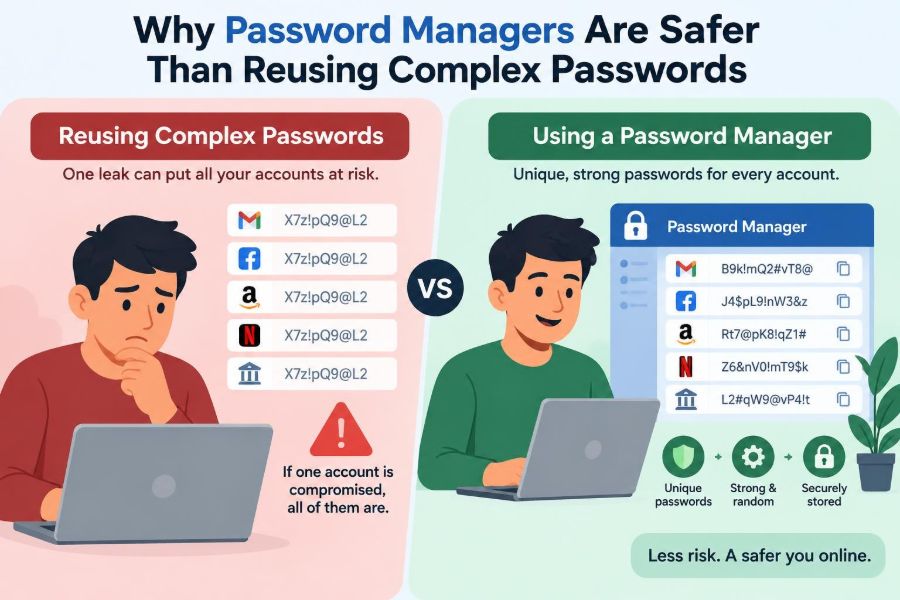
Many people solve this problem by using one strong-looking password on several accounts. It feels safer than using easy passwords, and it is certainly easier than remembering dozens of unique ones. Unfortunately, one compromised website can turn that convenience into a risk across your digital life.
Password managers address the real problem: people have more accounts than they can safely memorize. They make it practical to use a different long, random password for every account without needing to remember every string.
This does not mean password managers are magic, or that every product is equally trustworthy. It means their security model usually creates far less risk than reusing even an extremely complex password.
🔐 1. The password problem is really an account problem
Passwords protect individual accounts, not your entire identity. Every email service, store, school system, social platform, bank, and work tool is a separate door.
Using the same password at many doors means one copied key can open many places. A password manager helps you create a separate key for each door while keeping the daily experience manageable.
🧠 2. Human memory does not scale well
People can remember meaningful information, routines, and a limited number of secret phrases. They are much less reliable at remembering dozens or hundreds of unrelated random strings.
When memory is overloaded, people naturally reuse passwords, make small predictable changes, or write secrets in unsafe places. This is not simply carelessness; it is a design mismatch between human memory and modern account use.
🔁 3. Password reuse creates a chain of risk
Suppose one small forum or shopping site suffers a data breach. If your password from that site is also used for email, an attacker may try the same email-and-password combination elsewhere.
This turns a breach at a low-value account into a possible route to high-value accounts. Reuse connects the security of your important accounts to the security practices of every site you use.
🤖 4. Credential stuffing makes reuse especially dangerous
Credential stuffing is an automated attack in which stolen username-and-password pairs are tried against many other services. Attackers do not need to guess your password if they already obtained it from another breach.
Even a long and complicated password can be used in credential stuffing. Complexity does not help after the exact password has been exposed; uniqueness does.
🧩 5. Small variations are usually still reuse
Changing one character for each site can feel unique: perhaps adding a site abbreviation, changing a final digit, or swapping one symbol. But these variations often follow a pattern.
If an attacker sees one version and understands the pattern, related passwords may be easier to predict. A password manager avoids this problem by generating passwords with no personal pattern to learn.
🎲 6. Randomness is different from complexity that looks random
A password such as Summer!2024 contains multiple character types, but it follows familiar words and conventions. A system that guesses passwords can prioritize common words, dates, substitutions, and predictable symbol placement.
A generated password is created from random choices rather than from a memorable story. Its value comes from unpredictability, not from looking complicated to a person.
📏 7. Length usually matters more than clever tricks
Longer passwords can provide more possible combinations, especially when their characters or words are selected randomly. A password manager can generate long random passwords without forcing you to memorize them.
For accounts that accept them, generated passwords can include letters, numbers, and symbols. The best format also depends on a service’s rules, which is one reason a generator is useful.
🗝️ 8. Passphrases are useful, but uniqueness still matters
A randomly generated multiword passphrase can be easier to type and remember than a dense string of symbols. It can be a sensible choice where you genuinely need to remember a password.
But one memorable passphrase reused across accounts has the same fundamental weakness as any reused password. A password manager lets you reserve memorization for very few important secrets.
📦 9. A password manager is an encrypted vault
A password manager stores login entries in a protected vault. Entries commonly include a website address, username, password, and optional notes such as recovery codes or account details.
You unlock the vault with a master password, a device-based method, or both, depending on the product and your settings. The manager then retrieves the correct unique credential when you need it.
🛡️ 10. Encryption protects the stored vault
Well-designed password managers encrypt vault contents so that the provider should not be able to read your stored passwords in ordinary use. Encryption transforms readable data into data that requires the appropriate secret to unlock.
The exact implementation differs among products, so users should review a manager’s security documentation and reputation. The key idea is that storing passwords in an encrypted vault is very different from placing them in an unprotected text file.
🔑 11. Your master password deserves special treatment
Your master password protects access to many credentials, so it should be long, unique, and memorable only to you. Do not reuse it for any website account.
A strong approach is a long passphrase made from unrelated words selected in a way that is difficult for others to guess. Since you use it regularly, it is one of the few passwords worth deliberately memorizing.
- Do not base it on public biographical information.
- Do not use an old password with a few edits.
- Do not share it through chat, email, or screenshots.
📲 12. Multi-factor authentication adds another barrier
Multi-factor authentication, often abbreviated MFA, asks for another form of proof in addition to a password. That might be an authenticator-app code, a security key, or approval from a trusted device.
Enable MFA on the password manager itself and on important accounts such as email and financial services. It can reduce damage if a password is obtained, although it does not make poor password habits harmless.
🧱 13. The vault is a valuable target, not a reason to avoid it
It is reasonable to notice that a password manager concentrates important information in one place. This is often called a single point of failure.
But password reuse creates many hidden points of failure: every weak site holding your reused password becomes a possible entry point. A properly secured vault centralizes protection around one strong master password and MFA rather than spreading a shared secret everywhere.
⚖️ 14. Comparing the two security models
| Habit | If one site exposes a password | Typical result |
|---|---|---|
| Reuse one complex password | The same credential may work elsewhere | Multiple accounts can be tested and potentially taken over |
| Use minor password variations | A pattern may reveal related credentials | Other passwords may become easier to guess |
| Use a password manager | That account’s unique password is exposed | Other accounts retain different credentials |
The manager model does not make the breached account safe after exposure. Its major benefit is containment: one incident is less likely to spread.
🌐 15. Autofill can help prevent phishing
Phishing sites imitate trusted services in order to collect credentials. A password manager that matches saved credentials to the legitimate website address may decline to autofill on an impostor address.
This can provide a useful warning, especially when the fake site differs by a subtle misspelling or extra word. Still, users must look carefully at addresses and never treat autofill behavior as their only phishing defense.
👀 16. Autofill requires attention, too
Convenient features can create mistakes when several accounts have similar names or when a page is unexpected. Before filling or submitting credentials, confirm that the site is the one you intended to visit.
Be cautious with browser extensions and shared computers. Lock your vault when leaving a device, and configure an appropriate automatic lock time.
💻 17. Device security remains essential
A password manager cannot fully protect you if malware controls your device, records what you type, or captures your screen. Keeping operating systems, browsers, and security software updated remains important.
Use a screen lock, install software from trustworthy sources, and avoid entering sensitive credentials on public or untrusted computers. Password management is one layer in a broader security routine.
📧 18. Email is often the recovery key to everything else
Many services send password-reset links to your email account. If someone takes over your email, they may be able to reset passwords for other accounts.
Give email special protection: use a unique generated password, enable MFA, verify recovery options, and protect the password manager that stores its credentials. This account deserves early attention during any security cleanup.
🚨 19. A breach does not always mean you made a mistake
Organizations can experience breaches even when users choose sensible passwords. You may not control how a service stores credentials, monitors systems, or responds to vulnerabilities.
Unique passwords change the consequence of that uncertainty. If one service is compromised, you can replace that password without having to assume every unrelated account is exposed.
🔄 20. Change passwords for the right reasons
Changing passwords on a fixed schedule can lead people to create predictable variations. More important moments include learning of a breach, seeing suspicious activity, sharing a password accidentally, or believing an account may be compromised.
With a password manager, replacing a password is straightforward: generate a new unique value, save it in the vault, and update the account. The lack of memorization makes better response habits easier.
🧾 21. Store recovery information carefully
Recovery codes are often provided when you enable MFA. They can restore access if you lose your authentication device, so treat them as sensitive secrets.
A protected password-manager note may be suitable for some recovery information, depending on your recovery plan. Consider keeping a secure offline backup where appropriate, and make sure it is not casually accessible.
👨👩👧 22. Sharing access needs a safer method
Families and teams sometimes need shared access to utilities, subscriptions, or work services. Sending a password through a message or keeping it in a shared document makes control and later changes difficult.
Many password managers provide controlled sharing features or shared vaults. These can make it easier to revoke access, change credentials, and avoid exposing a password beyond the people who need it.
🏢 23. Work accounts need organizational rules
At work, use the password manager and security procedures approved by your organization. Business accounts may involve confidential information, customer data, administrative privileges, or compliance responsibilities.
Do not move workplace passwords into a personal vault unless policy explicitly permits it. The principle remains the same: unique credentials, secure sharing, MFA, and quick removal of access when roles change.
🔍 24. Choosing a manager requires judgment
Look for a provider with clear security information, strong account-protection options, regular maintenance, and features that fit your devices. Independent security review, transparent documentation, and a reasonable recovery design are useful signs to investigate.
No feature list can replace good configuration. A reputable manager with a weak reused master password is not being used safely.
📚 25. Browser password storage is not identical to a dedicated manager
Modern browsers can save and generate passwords, and this may be better than reusing passwords or writing them down openly. Their capabilities have improved substantially and may be enough for some basic situations.
A dedicated password manager may offer more cross-platform options, organization, secure sharing, detailed vault controls, and recovery-code storage. Evaluate the actual protection, synchronization, and account-security settings available to you.
🧪 26. Start by fixing the accounts that matter most
You do not need to repair every password in one sitting. Start with accounts that can reset other accounts, move money, reveal personal data, or control work systems.
Suggested first group
- Email accounts and password-manager account
- Financial, payment, and government-service accounts
- Cloud storage, phone-provider, and major social accounts
- Work accounts and accounts with administrator access
Generate a unique password for each, enable MFA where available, and confirm recovery details.
🧹 27. Remove old and unnecessary accounts
Every unused account is another place where old personal data and credentials may remain. Review your vault periodically and close accounts you no longer need when the service permits it.
For accounts you keep, update outdated passwords and remove duplicate or confusing entries. A tidy vault makes it easier to spot suspicious logins and choose the correct credential.
🧭 28. The core principle is containment
The central benefit of a password manager is not that it makes passwords visually more impressive. It makes strong password behavior practical: every account gets a long, random, independent credential.
When one password is stolen, that one account may still need attention. But the theft should not automatically provide access to email, banking, work, and every other account you own.
A unique password for every account, protected by a strong master password and MFA, limits the damage that any single breach can cause. That is why a password manager is generally safer than reusing a complex password. 🔐🛡️📱