
A payroll manager receives an email that appears to come from the company’s document-sharing service. The page looks familiar, the address looks close enough, and the manager enters a password. Within seconds, an attacker may have the same password—and a way into the account.
This is not necessarily a story about a weak password. The password could be long, random, unique, and carefully stored in a password manager. Once it has been entered into a convincing fake site or captured by malicious software, its strength no longer matters.
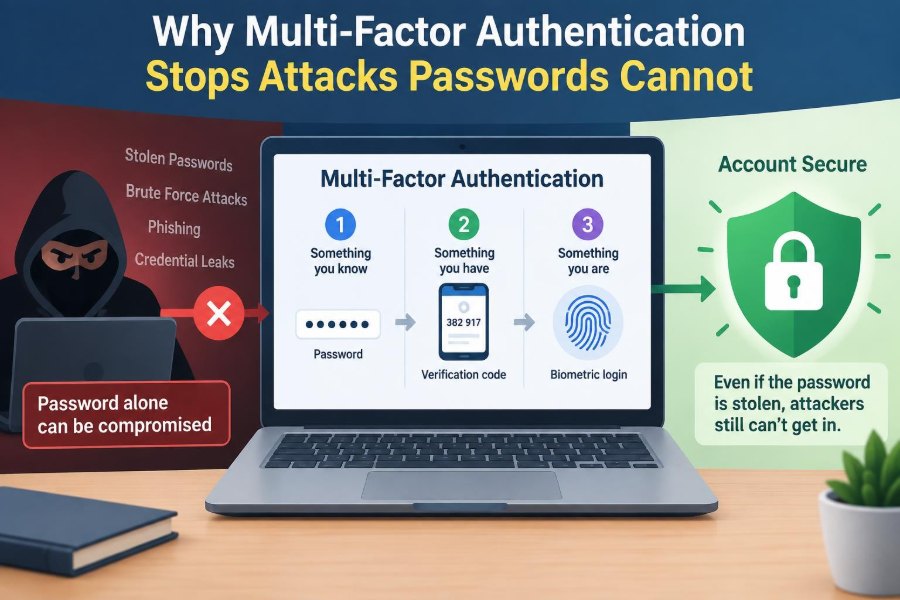
That is the gap multi-factor authentication, usually called MFA, is designed to close. It requires proof beyond a memorized secret, making a stolen password less useful to someone who tries to sign in from elsewhere.
For students protecting coursework and cloud storage, and for professionals protecting customer data, financial systems, and internal tools, MFA is one of the most practical ways to reduce account takeover risk. It does not stop every attack, but it stops important attacks that passwords alone cannot. 🔐
🧩 1. A Password Proves Only One Thing
A password is a knowledge factor: something a person is supposed to know. When a service accepts it, the service is really asking whether the person signing in knows the same secret stored or verified by the account system.
It does not prove who typed it. A legitimate user, a thief, a phishing site operator, or malware can all present the same password once it has been exposed.
🗝️ 2. Strong Passwords Still Have a Limit
Long, unique passwords are essential. They resist guessing, credential-stuffing attempts, and damage caused when one unrelated site suffers a breach.
But a strong password is still reusable evidence. If an attacker obtains the exact password, the login system usually cannot tell that the attacker is not the account owner. Password quality reduces the chance of theft; MFA reduces the value of a stolen password.
📚 3. What “Factor” Means in Authentication
An authentication factor is a different category of evidence used to verify identity. The usual categories are knowledge, possession, and inherence.
- Something you know: a password, PIN, or recovery answer.
- Something you have: a phone, hardware security key, smart card, or authenticator app.
- Something you are: a fingerprint, face scan, or other biometric check.
Using two independent categories is stronger than asking for two secrets, such as a password and a second PIN. Two secrets are still primarily one factor: knowledge.
➕ 4. Multi-Factor Is Not Just “More Passwords”
Some systems ask for a password plus security questions. This may create extra friction, but it is not strong MFA if both answers can be known, guessed, researched, or phished.
Effective MFA combines factors with different failure modes. An attacker who steals a password should still need access to a separate device, a cryptographic key, or a local biometric confirmation.
🎣 5. Phishing Is the Password Problem MFA Addresses
Phishing persuades a person to reveal credentials to an attacker. Fake login pages can imitate familiar brands, while urgent messages exploit distraction, fear, or routine work habits.
Once a password is submitted to a fake page, the attacker can attempt to use it immediately on the genuine service. MFA adds a second challenge that the phishing page usually cannot satisfy by itself.
🧱 6. The Second Barrier Changes the Attack
Suppose an attacker has a password from a breach or deceptive email. At the real sign-in page, the service asks for a code, an approval, or a hardware-key response.
The attacker now needs more than copied text. They may need physical possession of a registered device, access to an authenticator app, or the ability to make a security key respond to the legitimate website. This additional requirement blocks many otherwise successful account takeovers.
🔁 7. Credential Stuffing Loses Much of Its Power
Credential stuffing uses username-password pairs leaked from one service to try logging into many others. It succeeds when people reuse passwords across accounts.
Unique passwords are the first defense. MFA is a valuable second defense because even a correct reused password is normally insufficient without the account’s additional factor.
🧾 8. Data Breaches Do Not Need to Reveal Plaintext Passwords
Responsible services generally store password verifiers rather than readable passwords. Even so, a breach can expose data that attackers attempt to crack offline, especially if users chose weak passwords or the system was poorly protected.
MFA provides separation. A recovered password verifier or cracked password still does not automatically provide the attacker’s registered second factor.
🦠 9. Malware Can Capture What You Type
Keyloggers and other malicious software may record keystrokes, copy clipboard contents, steal browser sessions, or alter pages. A password manager helps avoid typing passwords into the wrong field, but it cannot solve every compromised-device scenario.
MFA can interrupt a login based only on captured credentials. However, malware running on a device may create broader risks, which is why updates, endpoint protection, and cautious software installation remain important.
📱 10. Authenticator Apps Generate Time-Limited Codes
Many MFA systems use an authenticator app that generates a short code changing at regular intervals. During setup, the service and app share a secret; afterward, both calculate matching codes based on time.
The code is useful only briefly and is separate from the password. An attacker with only the password cannot calculate the current code without also obtaining the app’s setup secret or the device.
💬 11. Text Messages Are Better Than Passwords Alone
SMS codes are widely available and can be easier to deploy than specialized equipment. They add a possession check because the attacker must also receive the message sent to the registered number.
However, SMS is vulnerable to risks such as social engineering against mobile carriers, number transfer fraud, message interception in some circumstances, and phishing of the code itself. It is often a meaningful improvement over password-only sign-in, but it is not the strongest available option.
🔔 12. Push Approvals Trade Typing for a Decision
With push MFA, an authenticator app displays a request asking whether a login should be approved. This can be convenient because the user does not need to copy a code.
The danger is approval fatigue. An attacker who knows a password may repeatedly trigger prompts and hope the user approves one to make them stop. Number matching or showing login details can make push approval safer by requiring a more deliberate check.
🔐 13. Hardware Security Keys Offer Stronger Phishing Resistance
A hardware security key is a small physical device that performs cryptographic authentication. Instead of sharing a typed one-time code, it can create a response tied to a particular service.
Modern web authentication systems can verify that the sign-in is occurring for the real website, not merely a convincing look-alike. A key may therefore refuse to authenticate to a phishing domain, even when the user is fooled by the page’s appearance.
🌐 14. Website Binding Is a Crucial Difference
A phishing site can ask a victim to type a password and a one-time code, then relay both to the real service before the code expires. This is often called an adversary-in-the-middle or real-time phishing approach.
Phishing-resistant authentication methods bind the cryptographic response to the legitimate site’s identity. The fake site cannot simply reuse that response for the real one, because it is not the same relying party.
🧬 15. Biometrics Usually Unlock a Device, Not a Server
Fingerprints and face recognition are often discussed as if a website receives a fingerprint. In many well-designed systems, the biometric check happens locally on a phone or computer.
The device uses the successful local check to unlock a protected credential or approve a cryptographic operation. This can be convenient and private: the remote service verifies the result, rather than storing a raw biometric template.
🪪 16. Passkeys Combine Convenience and Stronger Design
Passkeys use public-key cryptography to replace or reduce dependence on passwords. The device keeps a private key protected locally, while the service stores a related public key that cannot be used by itself to sign in as the user.
A passkey may be unlocked with a device PIN or biometric check. Because the authentication is designed for a specific service, passkeys can provide strong resistance to conventional phishing while removing the need to remember another password.
📊 17. Common Methods Differ in Important Ways
| Method | Extra evidence required | Key strength | Important limitation |
|---|---|---|---|
| Password only | None | Simple and familiar | Stolen password can be enough |
| SMS code | Access to phone number | Broad availability | Can be phished or targeted through phone-number attacks |
| Authenticator code | Access to authenticator | Does not depend on mobile delivery | Codes can be entered into phishing pages |
| Push approval | Approved device prompt | Convenient user experience | Users may approve unexpected prompts |
| Security key or passkey | Cryptographic device response | Can be phishing resistant | Requires compatible setup and recovery planning |
The best available option depends on the service, the account’s value, and the user’s ability to recover safely. In general, phishing-resistant methods offer meaningful advantages where they are supported.
🚫 18. MFA Does Not Make an Account Untouchable
MFA is a control, not a guarantee. Attackers may target account recovery, compromise a device, steal an existing browser session, exploit a vulnerable application, or manipulate a person into approving a request.
Security improves through layers. MFA works alongside software updates, unique passwords, secure recovery settings, careful review of prompts, and monitoring for unexpected account activity.
🍪 19. Session Theft Can Bypass a Fresh Login
After a successful login, services often issue a session token so the user does not have to authenticate for every page. If an attacker steals a valid session token, they may be able to act as the user until the session expires or is revoked.
This is why MFA cannot be the only defense against malicious browser extensions, infected devices, or sophisticated phishing that captures sessions. Logging out of suspicious sessions and protecting endpoints still matter.
🧠 20. Social Engineering Targets People and Processes
An attacker might call a help desk claiming to have lost a phone, impersonate an employee, or pressure a user to share a “verification” code. The technical MFA mechanism may be sound while the surrounding recovery process is weak.
Never share a code or approve a prompt because someone requested it by phone, email, chat, or text. Legitimate support staff should not need a code generated specifically to prove that you can sign in.
🧯 21. Recovery Is Part of the Security Design
People lose phones, replace laptops, and forget which device holds their authenticator. A secure account needs a recovery plan before an emergency happens.
- Store recovery codes in a protected location, not only on the device they recover.
- Register more than one approved method when the service allows it.
- Keep account recovery email addresses and phone numbers current.
- Understand an employer’s procedure for lost security keys or devices.
Recovery must be usable, but it should not be so easy that an impersonator can take over the account.
🏢 22. Organizations Need More Than an MFA Checkbox
For a workplace, enabling MFA is an important beginning rather than the end of identity security. Administrators should consider which accounts are most sensitive, which authentication methods are permitted, and how exceptions are handled.
Privileged accounts deserve especially careful protection because they can change systems, create users, or access large amounts of data. Separating administrative accounts from everyday accounts also limits the effect of an ordinary phishing mistake.
🧑💼 23. Different Accounts Need Different Priorities
Email deserves early attention because password resets for many other services flow through email. Financial accounts, cloud storage, school portals, developer platforms, and workplace identity accounts are also high-value targets.
Start where compromise would create the greatest downstream damage. Protecting a primary email account with strong MFA may indirectly protect many accounts that rely on it for recovery.
🛠️ 24. A Practical Setup Order
For most individuals, the following sequence is realistic and effective:
- Use a password manager to create unique passwords.
- Enable MFA on email, financial, work, school, and cloud-storage accounts.
- Choose an authenticator app, passkey, or security key when supported.
- Save recovery codes securely and add a backup method.
- Review active sessions, connected apps, and recovery details periodically.
This approach avoids waiting for a perfect solution before taking useful action. ✅
🔍 25. Learn to Read a Login Prompt
Before approving a request, check whether you initiated the login. If the prompt shows a location, device name, browser, or number-matching challenge, compare it with what you are actually doing.
An unexpected prompt is information, not an inconvenience. Deny it, change the password if appropriate, inspect account activity, and report the event through the organization’s normal security channel.
⚖️ 26. Usability Is a Security Requirement
A method users cannot understand or recover from may lead to unsafe shortcuts: shared devices, saved recovery codes in exposed files, or pressure to weaken controls. Good MFA design balances resistance to attacks with clear instructions and dependable recovery.
Accessibility also matters. People may need alternatives to a particular biometric, phone, or hardware device. Offering secure choices is better than assuming one method works for everyone.
🧭 27. The Core Principle: Stolen Knowledge Should Not Be Enough
Passwords remain useful, especially when they are unique and managed well. Yet they are information that can be guessed, leaked, copied, intercepted, or voluntarily entered into the wrong place.
MFA changes the question from “Does this person know the password?” to “Can this person also prove control of a separate factor?” That extra proof is what blocks many attacks built around stolen credentials.
The core principle is simple: a password can be copied, but a well-designed second factor makes copied knowledge insufficient for login. Use the strongest practical MFA option, protect recovery paths, and treat unexpected prompts as warning signs. 🔒🛡️✨