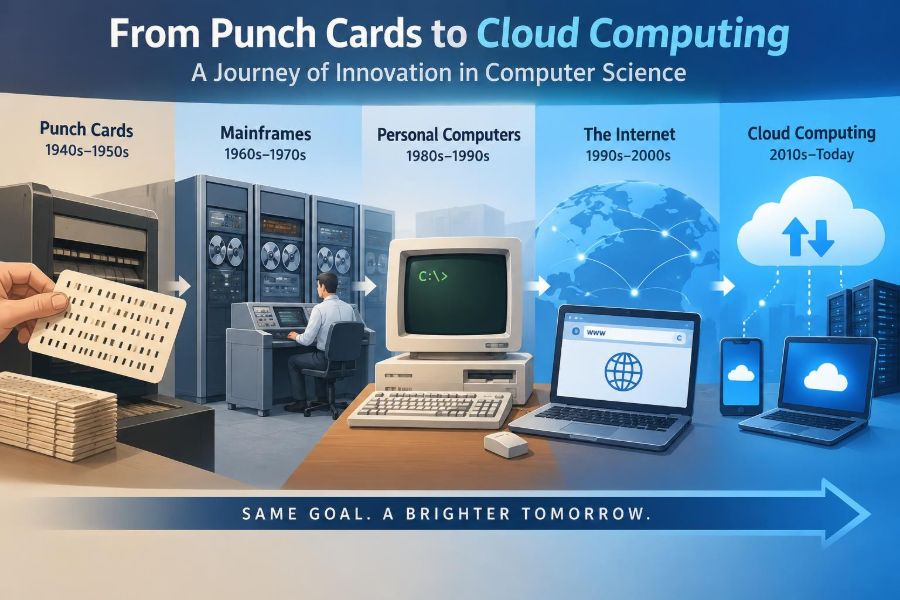

A message sent from a phone can cross continents in seconds. A navigation app recalculates a route while a streaming service recommends a film, and a workplace document updates for several people at once. These ordinary moments depend on a long chain of ideas that began far from touchscreens and wireless networks.
Early computers were room-sized machines operated through carefully prepared cards. They had little memory, no graphical interface, and required specialists to make even simple changes. Yet the fundamental challenge was familiar: how can people represent instructions so that a machine performs useful work reliably?
The history of computer science is not simply a story of devices becoming smaller. It is a story of abstractions: better ways to describe problems, organize information, share resources, and hide unnecessary complexity from users and programmers.
Understanding that progression makes modern technology less mysterious. It also helps students and professionals see why concepts such as algorithms, operating systems, networks, databases, and cloud services still carry the assumptions and lessons of earlier eras.
🧭 Computer Science Is More Than Computer Hardware
Computer science is the study of computation: what problems can be solved by following precise procedures, how to express those procedures, and how to make them efficient and reliable. Hardware matters because it executes instructions, but the field also includes algorithms, programming languages, data structures, security, and human-computer interaction.
A useful distinction is that a computer is a machine, while computer science is the collection of principles used to make machines process information. The same principle can outlast many generations of hardware.
🧮 Calculation Before Electronic Computers
People used tools such as the abacus, mechanical calculators, and printed tables long before electronic computers. These tools reduced repetitive arithmetic, but they did not generally follow a stored sequence of flexible instructions.
Mechanical devices showed an early insight: complex work can be broken into small, repeatable operations. That decomposition remains central to programming, whether the operations are additions in a calculator or requests handled by an online service.
🧵 Punch Cards Introduced Programmable Control
Punched cards were used to encode information through patterns of holes. In textile looms, cards could control which threads were raised, allowing a machine to produce intricate, repeatable patterns.
This separated a machine’s physical mechanism from its instructions. Change the card sequence, and the same loom could make a different design. That basic separation between program and machine behavior became a powerful model for later computing.
📋 Babbage and the Idea of a General-Purpose Machine
In the nineteenth century, Charles Babbage designed the Analytical Engine, a proposed mechanical machine with parts resembling a processor, memory, input, and output. It was not completed as a working general-purpose computer in his lifetime, largely because of practical engineering and funding limits.
Ada Lovelace described how such a machine could manipulate symbols according to rules, not merely perform arithmetic. Her notes anticipated an essential idea of programming: a machine can operate on any information that has been represented in a suitable form.
🗂️ Data Processing Made Information Machine-Readable
Punch-card systems later became practical tools for organizing large collections of records. Instead of treating cards only as instructions, organizations could use their holes to represent fields such as categories, locations, or identifiers.
This was an early form of data processing: collecting facts in a structured format so machines can sort, count, and summarize them. Modern databases are much more flexible, but they still depend on deliberate choices about how information is represented.
🔌 Electronic Switching Changed the Speed of Computation
Mechanical parts move slowly and wear out. Electronic switches can change state far more quickly, making electronic computers suitable for calculations that would be impractical with gears and relays.
Early electronic machines were large, power-hungry, and difficult to maintain. Their significance was not convenience; it was the demonstration that electronic circuits could execute long sequences of logical and arithmetic operations at unprecedented speed.
💡 Vacuum Tubes Brought Power and Fragility
Vacuum tubes acted as electronic switches and amplifiers in early computers. They enabled high-speed computation for their time, but systems using many tubes produced heat, consumed substantial electricity, and required frequent maintenance.
The era illustrates an engineering trade-off that still exists: a breakthrough can make new capabilities possible while introducing operational costs. Faster hardware alone does not guarantee a usable system if it is too unreliable or expensive to operate.
🧠 Stored Programs Made Computers Adaptable
A major conceptual shift was the stored-program computer. Rather than wiring a machine differently for every task, instructions could be held in memory alongside data. A machine could then load a new program to perform a new job.
This approach made computers genuinely adaptable. A single system could run payroll calculations in the morning, scientific simulations later, and file-management software afterward, provided suitable programs and data were available.
🔢 Binary Provided a Reliable Digital Language
Digital computers commonly represent information using bits, values that can be treated as 0 or 1. Electronic circuits can distinguish two states more reliably than many finely graded states, especially when electrical noise is present.
Binary is not limited to numbers. Text, images, music, instructions, and network messages can all be encoded as bit patterns. The interpretation comes from agreed rules: the same bits mean different things when read as an integer, a character, or a pixel color.
🔬 Transistors Shrunk and Stabilized Computers
Transistors replaced vacuum tubes in many computing systems. They were smaller, more durable, and more energy-efficient, allowing computers to become more practical for businesses, laboratories, and government organizations.
This was not merely a change of components. Smaller, more reliable electronics made it possible to build machines that could run longer and be deployed more widely, creating demand for better software and trained programmers.
🧩 Integrated Circuits Put Many Components on One Chip
An integrated circuit places multiple electronic components onto a small piece of semiconductor material. Instead of assembling every component separately, manufacturers could produce compact circuits with consistent behavior at larger scale.
As chip fabrication improved, more circuitry fit into less space. This enabled increasingly capable computers while lowering the cost per operation, though design, manufacturing, and supply chains remained highly complex.
⚙️ Microprocessors Put a CPU on a Chip
A microprocessor integrates the central processing unit, or CPU, onto one chip. The CPU fetches instructions, interprets them, and carries out operations such as arithmetic, comparisons, and movement of data.
Putting this core function on a chip helped make personal devices possible. A complete computer still needed memory, storage, input and output hardware, and software, but the cost and size of its computational core fell dramatically.
🏠 Personal Computers Moved Computing to Individual Desks
Early mainframes were shared, centralized resources. Personal computers changed the relationship between people and machines by placing computing power on desks, in homes, and eventually in classrooms.
This shift encouraged software for everyday work: word processors, spreadsheets, drawing programs, and educational tools. It also made file management, backups, and basic technical decisions the responsibility of many ordinary users rather than only specialized operators.
🖱️ Graphical Interfaces Made Software More Accessible
Command-line interfaces require users to type exact commands. A graphical user interface, or GUI, represents files, applications, and actions through windows, icons, menus, and pointers.
GUIs did not eliminate complexity; they made common tasks easier to discover and perform. A folder icon is an analogy for file organization, not a literal container, but useful analogies reduce the amount of technical knowledge needed to begin using a system.
🧱 Operating Systems Coordinate Shared Resources
An operating system sits between applications and hardware. It schedules processor time, manages memory, controls files, communicates with devices, and provides common services for programs.
Without an operating system, every application would need to handle hardware details itself. The operating system creates an abstraction: a program can request a file or network connection without needing to understand every electrical and mechanical detail beneath it.
🧰 Programming Languages Raised the Level of Abstraction
Machine code is expressed directly as processor instructions. Assembly language provides readable names for those instructions, while higher-level languages let programmers describe tasks using concepts such as variables, functions, objects, and collections.
A compiler or interpreter translates those descriptions into forms the computer can execute. Higher-level languages can improve clarity and productivity, but they do not remove the need to understand efficiency, errors, memory use, and the behavior of underlying systems.
🧠 Algorithms Turn Problems into Repeatable Methods
An algorithm is a finite, well-defined sequence of steps for solving a problem. A recipe is a familiar analogy, although computational algorithms must be precise enough that a machine can follow them without guessing.
Different algorithms can solve the same task with very different costs. Searching a sorted list using a strategy that repeatedly halves the remaining range is usually far more efficient than checking every item one by one.
🗃️ Databases Organized Growing Volumes of Information
As organizations collected more records, storing information in isolated files became difficult to manage. Databases provide structured ways to store, retrieve, update, and protect related data.
A relational database commonly organizes data into tables connected by shared values. For example, an online store may keep customer details, orders, and products separately, then combine relevant records when answering a question. Good design reduces duplication and helps preserve consistency.
🌐 Networks Let Computers Share Resources
A network connects computers so they can exchange data and share services. Early networks supported communication between expensive, separate systems; local networks later connected devices within offices, schools, and homes.
Networking introduced new concerns alongside convenience. A shared printer or file server can save effort, but every connection also requires rules for addressing devices, delivering data, handling failures, and preventing unauthorized access.
📦 Packet Switching Made Networks Resilient
On many digital networks, a message is split into smaller units called packets. Packets can travel through intermediate devices and be reassembled at their destination.
This design uses network capacity efficiently because different communications can share links. It also allows data to be routed around some failures, although packets can still be delayed, lost, duplicated, or arrive out of order. Protocols define how systems detect and manage those conditions.
🌍 The Internet Connected Networks, Not Just Machines
The internet is a network of networks that communicate through shared protocol families. Internet Protocol, commonly called IP, helps address and route packets between networks, while other protocols support reliable delivery, web browsing, email, and many other services.
The World Wide Web is one service that runs on the internet, not a synonym for the entire internet. This distinction matters: web pages, messaging, video calls, and file transfers may use different applications while relying on common underlying network infrastructure.
🔎 Search and the Web Changed Access to Knowledge
Web browsers made documents and services easier to navigate, while search engines helped users locate material among a rapidly growing number of pages. Publishing information no longer required distributing physical copies or controlling a broadcast channel.
Easy access has a downside: search results are not automatically accurate, current, or trustworthy. Digital literacy includes checking the source, date, purpose, and supporting evidence behind information rather than treating a prominent result as proof.
📱 Mobile Computing Made Context Part of Software
Smartphones combined computing, networking, cameras, sensors, and location capabilities in devices people carry constantly. Software could now respond to context, such as orientation, movement, nearby networks, or a user’s location when permission is granted.
This enabled useful services such as maps and emergency alerts, but it also increased privacy stakes. App permissions should be considered carefully: a feature may need certain data, but convenience is not a reason to grant every request automatically.
☁️ Cloud Computing Moved Infrastructure into Services
Cloud computing delivers computing resources over networks as services. Instead of buying and operating every server, an organization can rent storage, virtual machines, databases, or application platforms from a provider.
For a small team, this can mean launching an online application without first building a data center. For an individual, cloud storage can synchronize files across devices. The key idea is not that data exists “in the sky”; it exists on physical servers managed through remote services.
🏗️ Virtualization Makes Hardware More Flexible
Virtualization allows one physical server to host multiple isolated virtual machines, each behaving much like an independent computer. Software manages the sharing of processor time, memory, storage, and network access.
Containers provide a lighter-weight approach for packaging an application with the software it needs to run. Both approaches can improve deployment and resource use, but they require careful configuration. Isolation reduces some risks; it does not excuse weak passwords, unpatched software, or overly broad permissions.
🔒 Security Became a Core Computing Requirement
When systems were isolated, physical access was often the main concern. Connected computing expands the attack surface: the collection of points where an attacker might try to enter, misuse, or disrupt a system.
Security is a continuing process, not a product that can be installed once. Sound practices include updates, multifactor authentication, least-privilege access, backups, encryption where appropriate, and planning for incidents. People remain part of the system, which is why deceptive messages and reused passwords can defeat strong technology.
🤖 Artificial Intelligence Builds on Earlier Foundations
Modern artificial intelligence relies on advances in algorithms, data storage, powerful processors, networking, and cloud-scale infrastructure. Machine learning systems identify patterns from examples rather than following only explicitly written rules for every case.
These systems can assist with tasks such as classification, translation, and prediction, but outputs can be inaccurate, biased, or poorly suited to a particular context. A model’s confident wording is not evidence that its answer is correct; important decisions still require appropriate human judgment and verification.
🌱 Computing Carries Environmental and Social Costs
Digital services feel weightless, yet devices require materials, electricity, cooling, transportation, and eventual disposal. Data centers and networks support valuable services, but their energy use and local impacts depend on hardware efficiency, workload design, and energy sources.
Access is uneven as well. Reliable connectivity, affordable devices, accessible design, and digital skills influence who can benefit from computing. Technical progress should be evaluated not only by what a system can do, but also by who bears its costs and who is excluded.
🛠️ What This History Teaches New Technologists
A common mistake is to view older technologies as irrelevant because newer products look completely different. In practice, the old questions persist: How is data represented? Who controls a resource? What happens when a component fails? Which abstraction is hiding complexity, and when must you look beneath it?
- Learn the layers: hardware, operating systems, applications, and networks influence one another.
- Practice decomposition: turn a large problem into testable smaller tasks.
- Question defaults: convenient settings may have privacy, cost, or security consequences.
- Build for change: requirements, users, data volumes, and threats rarely remain fixed.
This perspective is useful whether you write code, analyze data, manage projects, design products, or simply depend on digital tools at work.
🚀 The Core Lesson of the Modern Era
Computer science reached the modern era through accumulated improvements rather than one single invention. Punch cards introduced programmable control; electronic circuits accelerated calculation; stored programs and programming languages made machines flexible; networks connected them; and cloud platforms turned large-scale infrastructure into an accessible service.
The enduring pattern is abstraction built on reliable foundations. Each layer makes certain tasks easier, but it also depends on lower layers working correctly and being understood well enough to troubleshoot, secure, and improve them.
From punched holes to cloud platforms, the central achievement of computer science is turning precise ideas into systems that can be shared, scaled, and adapted to new human problems. Learning the history reveals why modern computing is powerful, and why thoughtful design still matters at every layer. 💻☁️🧠