
You keep a backup folder with tax documents, project files, or private notes. The folder lives on your laptop, perhaps in cloud storage too, and it feels safely out of sight—until a device is lost, an account is exposed, or someone else uses the same computer.
Encryption addresses a specific part of that problem. It changes readable information into data that should be useless to anyone who does not possess the right secret.
That description can make encryption sound mysterious. Building a tiny command-line tool is a practical way to see its moving parts: bytes, keys, nonces, authentication, file handling, and failure cases.
The tool here is for learning, not for replacing established products. By using a well-reviewed cryptographic library rather than inventing a cipher, you can explore data protection without making the most dangerous beginner mistake.
🔐 What This Mini Project Will Do
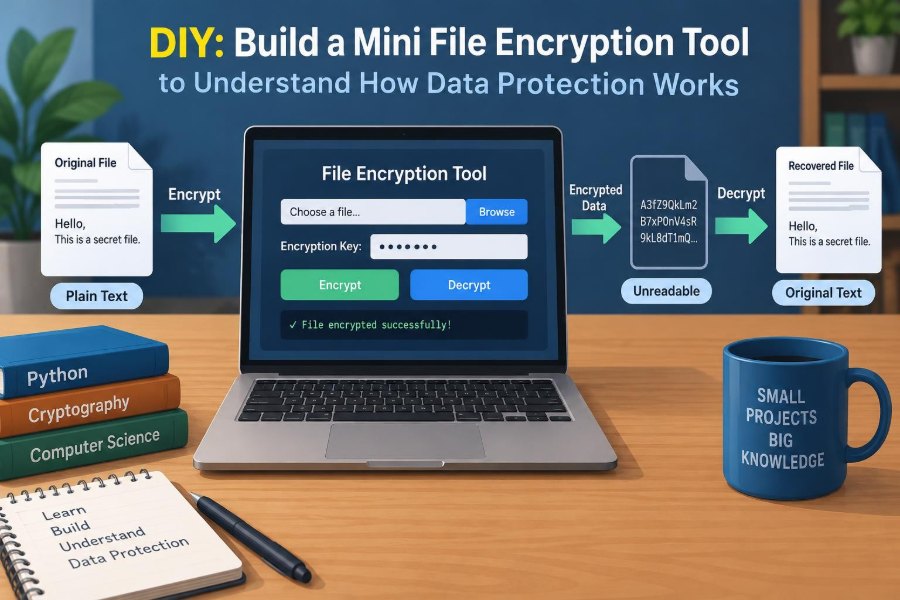
We will build a small Python program that encrypts one file into a new file and decrypts it later when given the same password. The encrypted output will not be readable in a text editor, and modifying it should cause decryption to fail.
The project demonstrates a realistic pattern: derive a cryptographic key from a password, generate random values, encrypt with authenticated encryption, and package the values needed for decryption alongside the ciphertext.
🧭 What This Tool Will Not Promise
A short learning program is not a complete security product. It does not handle secure key recovery, shared access, user identity, hardware-backed keys, audits, backups, or organizational policies.
Do not rely on the sample as the only protection for irreplaceable records. Test it on copies, keep backups, and use mature full-disk or file-encryption tools when protecting real data.
📦 Understanding Plaintext and Ciphertext
Plaintext is the original readable data: a PDF, photograph, spreadsheet, or source file. Ciphertext is the scrambled output created by encryption.
A correct encryption process does not merely hide words from a casual glance. Without the secret key, ciphertext should not reveal usable information about the original file, even when an attacker knows which encryption algorithm was used.
🗝️ Why the Key Matters More Than the Algorithm
Modern cryptography follows a useful assumption: attackers may know the algorithm and see the encrypted file. Security should depend on keeping the key secret, not on concealing the method.
Think of an algorithm as the design of a lock sold worldwide. The key is the particular secret that opens your lock. A public design can be extensively tested; a secret design is harder for others to examine for flaws.
🔑 Passwords Are Not Encryption Keys
A password is chosen or remembered by a person. An encryption key is a fixed-length value with enough unpredictable bits for a cryptographic algorithm. Human passwords are often too short or predictable to use directly as keys.
Our program therefore runs the password through a key derivation function, or KDF. This intentionally takes work, making large-scale password guessing more expensive for an attacker who obtains the encrypted file.
🧂 Why Every Password Needs a Salt
A salt is a random value stored with the encrypted file and supplied to the KDF. It is not secret. Its job is to ensure that the same password produces different derived keys for different files.
Without a salt, identical passwords would create recognizable repeated results. A random salt also reduces the usefulness of precomputed password-guessing databases.
🎲 The Different Job of a Nonce
Encryption also needs a random or unique value called a nonce. The name means “number used once.” Its requirements depend on the encryption mode, but reusing one incorrectly can seriously weaken security.
Our chosen library generates its own nonce when encrypting. It embeds the necessary value in its output, so we do not have to design a file format for it separately. That convenience reduces opportunities for mistakes.
🛡️ Confidentiality Is Only Half the Story
Encryption provides confidentiality: it keeps content hidden. But hidden data can still be altered. An attacker might flip a byte, replace a file, or corrupt it during transfer.
Authenticated encryption combines secrecy with an integrity check. During decryption, the tool verifies that the encrypted data has not changed and that the correct key is being used. If verification fails, it refuses to return plaintext.
⚙️ Choosing a Safe Building Block
Writing a cipher, selecting raw modes, or manually combining encryption and hashes is outside the scope of a beginner project. Small implementation details can have major security consequences.
Python’s cryptography package provides Fernet, a high-level authenticated-encryption interface. It is a suitable teaching building block because it handles encryption, authentication, timestamped tokens, and required internal randomness together.
🐍 Preparing a Python Environment
Use a supported Python installation and create a virtual environment so this project’s dependency does not affect unrelated programs. In a terminal, move into an empty project folder and run:
python -m venv .venv
# macOS or Linux
source .venv/bin/activate
# Windows PowerShell
# .venv\Scripts\Activate.ps1
python -m pip install cryptography
If python refers to a different version on your system, use the appropriate command, such as python3. Keep the package updated through normal maintenance, but test updates before using a tool in an important workflow.
📁 Designing a Small File Format
Decryption needs the salt used to derive the key. We can store it at the beginning of the output file, followed by the Fernet token. The salt is 16 bytes in this example.
This format is deliberately simple: salt || token, where || means concatenation. A production format would commonly include a version marker and explicit metadata so future software can interpret it safely.
🧰 Importing the Required Modules
Create a file named filecrypt.py. The standard-library modules handle arguments, passwords, and random bytes; the cryptography package handles the security-sensitive primitives.
import argparse
import base64
import getpass
import os
from pathlib import Path

from cryptography.fernet import Fernet, InvalidToken
from cryptography.hazmat.primitives import hashes
from cryptography.hazmat.primitives.kdf.pbkdf2 import PBKDF2HMAC
getpass reads a password without echoing it visibly in the terminal. That is better than placing a password in a command argument, which may be saved in shell history or visible to other local processes.
🧪 Deriving a Key from a Password
Add a function that turns a password and salt into the URL-safe Base64 key format Fernet expects. PBKDF2 is a password-based KDF that repeatedly applies a cryptographic function.
def derive_key(password: str, salt: bytes) -> bytes:
    kdf = PBKDF2HMAC(
        algorithm=hashes.SHA256(),
        length=32,
        salt=salt,
        iterations=600_000,
    )
    return base64.urlsafe_b64encode(kdf.derive(password.encode("utf-8")))
The iteration count is a configuration choice, not a magic universal number. It should be reviewed as hardware and library guidance change. Increasing it makes legitimate use slower too, so measure it on the systems that will run the tool.
📖 Reading Files as Bytes
Computers store every file as bytes, including text documents. Encryption operates on those bytes rather than on characters, lines, or file types.
Path.read_bytes() is convenient for a learning tool, but it loads the entire file into memory. That is fine for small files and unsuitable for very large files; later we will discuss why size affects design.
🔒 Writing the Encrypt Function
This function creates a fresh salt, derives a key, encrypts the file bytes, and writes the salt plus token to an output path. It never overwrites the source file.
SALT_SIZE = 16

def encrypt_file(source: Path, destination: Path, password: str) -> None:
    salt = os.urandom(SALT_SIZE)
    key = derive_key(password, salt)
    token = Fernet(key).encrypt(source.read_bytes())
    destination.write_bytes(salt + token)
os.urandom() obtains random bytes from the operating system’s cryptographic random source. Do not replace it with predictable functions such as a time-based seed or ordinary simulation-oriented random generator.
🔓 Writing the Decrypt Function
Decryption reverses the packaging step. It separates the salt, derives the same key from the entered password, and asks Fernet to verify and decrypt the token.
def decrypt_file(source: Path, destination: Path, password: str) -> None:
    package = source.read_bytes()
    if len(package) <= SALT_SIZE:
        raise ValueError("File is too short to be a valid encrypted package")

    salt = package[:SALT_SIZE]
    token = package[SALT_SIZE:]
    plaintext = Fernet(derive_key(password, salt)).decrypt(token)
    destination.write_bytes(plaintext)
Notice the order: decrypt and verify before writing output. That helps avoid creating a partial or untrusted plaintext file after a failed verification.
⌨️ Adding a Command-Line Interface
A command-line interface makes the program usable without editing source code each time. Add a main function that accepts an action, input file, and output file.
def main() -> None:
    parser = argparse.ArgumentParser(description="Encrypt or decrypt one file")
    parser.add_argument("action", choices=["encrypt", "decrypt"])
    parser.add_argument("input", type=Path)
    parser.add_argument("output", type=Path)
    args = parser.parse_args()

    password = getpass.getpass("Password: ")
    if not password:
        raise ValueError("Password cannot be empty")

    if args.action == "encrypt":
        encrypt_file(args.input, args.output, password)
    else:
        decrypt_file(args.input, args.output, password)
Arguments make each operation explicit. The output path is separate from the input path by design, which reduces accidental data loss while you experiment.
🚨 Handling Wrong Passwords and Tampering
Finish the program with a small entry point and a clear error for failed authentication. InvalidToken can mean a wrong password, altered data, or an invalid token; avoid claiming you know which one occurred.
if __name__ == "__main__":
    try:
        main()
    except InvalidToken:
        print("Decryption failed: password is incorrect or data was changed.")
    except (OSError, ValueError) as error:
        print(f"Could not complete operation: {error}")
For a larger application, errors should be logged carefully without recording passwords, plaintext, derived keys, or full sensitive paths. Error messages are part of the security boundary too.
▶️ Running Your First Round Trip
Create a harmless test file, then encrypt it and decrypt the result into a new name:
python filecrypt.py encrypt notes.txt notes.txt.enc
python filecrypt.py decrypt notes.txt.enc recovered-notes.txt
Compare notes.txt and recovered-notes.txt. Their contents should match exactly. Opening notes.txt.enc should show encoded-looking text because Fernet tokens use Base64 representation, but that representation is not what provides security—the underlying encryption does.
🧷 Testing That Altered Data Is Rejected
Make a copy of the encrypted file and change one character with an editor, if the editor preserves the file’s general form. Then try to decrypt the changed copy.
The program should report failure rather than outputting damaged plaintext. This is a concrete demonstration of authentication: the tool detects an alteration instead of silently treating manipulated data as trustworthy.
🧾 A Quick Map of What Gets Stored
| Component | Stored with encrypted file? | Purpose |
|---|---|---|
| Salt | Yes | Makes password-derived keys distinct across encryptions |
| Nonce and authentication data | Handled within Fernet token | Supports secure encryption and tamper detection |
| Ciphertext | Yes | Contains protected file content |
| Password | No | Must be supplied again to derive the key |
Storing salts and nonces is normal. Their safety comes from randomness or uniqueness, not secrecy. The password—and the key derived from it—remains the central secret.
🧠 Password Strength Still Sets a Limit
Encryption cannot transform a weak password into a strong secret. If someone can guess a password such as a common phrase, they can derive a candidate key using the stored salt and try it against the token.
Use a long, unique passphrase from a password manager when possible. Length and uniqueness generally matter more than clever substitutions such as replacing one letter with a symbol.
💾 Why Deleting the Original Is Complicated
After creating an encrypted copy, you may be tempted to delete the original. Ordinary deletion often removes a directory reference rather than immediately erasing every physical remnant, and copies may already exist in backups, sync folders, temporary files, or application caches.
Storage behavior varies by operating system, filesystem, and drive type. Treat encryption as protection for the encrypted copy, not as a guaranteed method for removing every historical plaintext trace.
☁️ What Cloud Sync Changes
Client-side encryption can protect the contents of a file before it reaches a sync provider, but it does not hide every fact. File names, sizes, modification times, and sharing patterns may still reveal useful metadata.
Sync systems can also retain previous versions. Decide whether your workflow needs encrypted filenames, encrypted folders, version controls, or a purpose-built encrypted vault rather than a one-file script.
📏 The Large-File Limitation
Our code reads a whole file at once, so memory use grows with file size. A multi-gigabyte video could make the program slow or fail on a device with limited available memory.
Streaming encryption processes chunks sequentially, but safe streaming formats require careful design for nonces, final authentication, truncation detection, and error recovery. This is a good reason to choose established tools and formats when large files are involved.
🧱 Why You Should Not Invent Your Own Crypto
It is reasonable to build a wrapper around vetted cryptographic primitives to learn system design. It is not reasonable to create a homemade scrambling formula and call it encryption.
Common ideas such as XOR with a repeated password, character shifting, or “encrypting” with Base64 fail because patterns remain or reversal is trivial. Cryptography is difficult partly because attacks exploit details that normal functional tests do not reveal.
🔄 Key Rotation and Format Versions
Real systems eventually need to change passwords, algorithms, KDF settings, or software versions. If an encrypted file has no version information, future code may not know how to interpret it.
A next iteration could prepend a short fixed header and version byte before the salt. The decryptor could then select a supported format and reject unknown versions safely, instead of guessing.
👥 Sharing Requires a Different Key Plan
Password-based encryption works well when one person remembers one secret. It becomes awkward when several people need access, when a team member leaves, or when access must be revoked.
Many systems instead encrypt data with a random data key, then encrypt that data key separately for each authorized recipient using public-key cryptography or a managed key service. That is a broader design problem than this mini tool solves.
🧪 Useful Tests Beyond “It Worked Once”
Security-related code deserves tests for expected failures, not only successful output. Work on copies and verify these cases:
- Encrypting and decrypting an empty file.
- Decrypting with a different password.
- Decrypting a file with one altered byte.
- Rejecting a file shorter than the salt length.
- Preserving binary files such as an image or archive.
- Confirming that source and destination paths are not accidentally the same.
Tests cannot prove a design is secure, but they reveal regressions and make intended behavior explicit.
🧹 Small Improvements You Can Make Safely
Once the basic round trip works, focus on usability improvements that do not change the cryptographic construction. For example, ask for password confirmation before encryption, refuse to overwrite an existing output file by default, and add a visible format header.
You could also use temporary output followed by an atomic rename where your platform supports it. That reduces the chance that an interruption leaves a file at the final destination that looks complete when it is not.
⚖️ When to Use an Existing Tool Instead
Use established software when the stakes are high, the files are valuable, the workflow involves other people, or you need cross-platform support. Full-disk encryption, encrypted backup tools, and reviewed encrypted archives solve many practical problems more completely.
Your script remains valuable as a learning artifact. Reading and modifying it connects abstract terms—salt, KDF, authenticated encryption, metadata—to decisions software must make.
🎯 The Core Lesson of the Project
Data protection is not a single “encrypt” button. It is a chain of choices: protecting keys, generating fresh randomness, checking integrity, handling failures, retaining backups, and matching a tool to a real threat model.
The mini tool succeeds educationally because it keeps the cryptographic core in a trusted library while exposing the surrounding engineering. Strong encryption depends as much on careful key and file handling as on the algorithm that scrambles the bytes.
Build it, test it on throwaway files, and let the failure cases teach you as much as the successful decryptions. That habit—treating security as a system rather than a magic feature—will transfer to every application you build. 🔐💻🧠