
You open a familiar app, and its home screen appears almost immediately. A product page you viewed yesterday loads faster than a new one. Your browser remembers an image instead of downloading it again. These small moments are usually the result of caching.
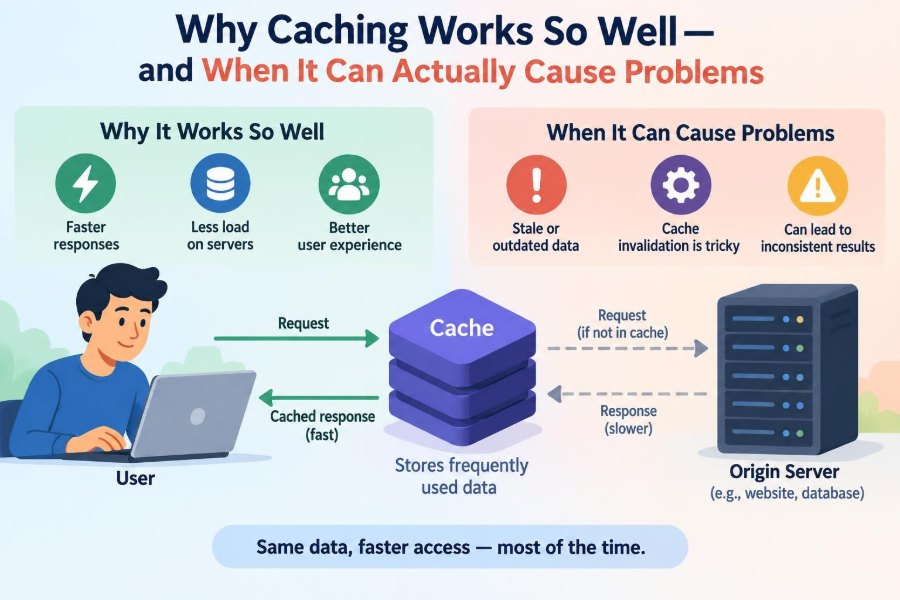
Caching is one of the quiet reasons modern software feels responsive. It helps websites serve huge audiences, lets phones conserve data, and prevents programs from repeating work they have already done.
But the same shortcut can show an outdated price, hide a newly published article, overload a database after an expiration event, or make a bug appear only for some users. Caching is powerful precisely because it trades perfect freshness for speed.
Understanding that trade-off helps students reason about computer systems and helps working professionals design, debug, and operate them more safely.
⚡ The Basic Idea: Reuse Instead of Recompute
A cache is a place that keeps a copy of data or the result of work so it can be used again quickly. Rather than retrieving data from its original source every time, a system checks whether it already has a usable copy.
Think of a cache as a nearby reference shelf. If the answer is on the shelf, you use it. If it is not, you go to the larger library, obtain the answer, and may put a copy on the shelf for later.
🎯 Why Repeated Work Is So Common
Many requests in software repeat. Thousands of people may request the same logo, weather forecast, popular video segment, configuration setting, or database record. Even one person may revisit the same screen several times.
Without caching, each request can trigger network travel, disk access, database queries, calculations, and serialization of data into a response. Repeating those steps wastes time and shared resources.
📍 The Principle of Locality
Caching works well because access patterns often have locality. Temporal locality means something used recently is likely to be used again soon. Spatial locality means data near something just used is also likely to be useful.
For example, after a program reads one instruction, it commonly reads the next instruction. After a shopper opens a product category, they may open several items in that category. Caches are designed around these common patterns, not a guarantee that every request repeats.
🚀 Cache Hits and Cache Misses
A cache hit occurs when the requested item is found and valid in the cache. The system can respond without consulting the slower source. A cache miss occurs when the item is absent, expired, or unsuitable.
On a miss, the system fetches or computes the value, returns it, and often stores it for future requests. A high hit rate can be useful, but it is not the only measure that matters: a fast cache containing wrong data is still a problem.
🪜 Caches Exist at Many Layers
“The cache” is rarely one thing. A request may encounter several caches before it reaches the application’s original data source.
| Layer | Typical cached item | Main benefit |
|---|---|---|
| CPU | Instructions and nearby memory | Reduces waits for main memory |
| Operating system | Recently read disk blocks | Avoids repeated disk access |
| Browser | Images, scripts, stylesheets | Faster repeat visits and less transfer |
| CDN or edge | Public web responses | Serves users near their location |
| Application | Query results or rendered pages | Reduces backend work |
| Database | Frequently accessed pages | Reduces storage reads |
Because these layers interact, an apparent “cache issue” may come from a browser, proxy, application, or database rather than the layer first suspected.
🧠 CPU Caches Make Processors Practical
Processors can execute instructions far faster than they can wait for data from main memory. CPU caches keep recently used instructions and data physically close to the processor, in small and very fast memory structures.
Programs with predictable access patterns often benefit more than programs that jump unpredictably through large datasets. This is why data layout and loop structure can matter in performance-sensitive code.
💾 Memory Is Also a Cache for Storage
Operating systems commonly use unused RAM to keep recently accessed file data. Reading the same file again may be much faster because the bytes are already in memory.
This can confuse simple performance tests. A program may appear fast on its second run not because the code changed, but because the operating system’s file cache avoided slower storage access.
🌐 Browser Caching Saves Round Trips
When a browser stores a stylesheet, JavaScript file, font, or image, later visits may reuse it. This reduces downloads and can make a site feel significantly more responsive, especially on slower or metered connections.
Servers can provide rules describing how long a response may be reused and whether the browser should check for a newer version first. Correct rules depend on whether the resource is stable or changes frequently.
📦 CDNs Put Content Closer to Users
A content delivery network, or CDN, keeps copies of content at edge locations. A user can receive a popular image or public webpage from a nearby cache instead of contacting a distant origin server.
This lowers latency and reduces work at the origin. It is especially effective for static assets and public content, but personalized responses require careful cache keys and access controls.
🗃️ Application Caches Protect Databases
Applications often cache expensive query results, computed recommendations, session-related information, or rendered fragments of a page. This can prevent a database from answering the same popular question over and over.
For instance, an online store might cache a category’s public product list briefly while reading inventory and checkout information directly from authoritative services. Different data has different freshness requirements.
🔑 A Cache Key Defines What Is Being Stored
A cache key identifies a cached item. It might include a URL, query parameters, language, device type, user identity, permissions, or a version number.
Choosing too little information creates collisions: one user may receive another user’s variant. Choosing too much information fragments the cache, meaning nearly identical requests cannot share entries. Good key design reflects the parts of a request that truly change the response.
🧩 Personalization Makes Caching Harder
A public article can usually be shared broadly in a cache. A dashboard showing account balances, private messages, or employee records cannot be treated the same way.
Accidentally caching sensitive content under a shared key is a security failure, not merely a performance bug. Private responses should be marked and designed so shared caches do not serve them to the wrong person.
⏳ Time-to-Live Limits Staleness
A time-to-live, often called TTL, is the period an entry may be used before it is considered expired. A short TTL tends to improve freshness but may create more backend work. A long TTL reduces work but permits older information to persist longer.
There is no universal best number. A logo can remain valid for a long time; a seat availability count may need a much shorter lifetime or a different approach altogether.
🔄 Validation Can Be Better Than Redownloading
Expiration does not always mean downloading an entire resource again. A client or intermediary can ask whether its known version is still current, often using a version marker or modification information.
If nothing changed, the server can confirm that the cached copy remains usable. This saves bandwidth while preserving a closer connection to the source of truth.
🧹 Eviction Makes Room for New Data
Caches have limited capacity, so they must remove entries. This is called eviction. A common strategy favors recently used items, while others consider frequency, entry size, expiration, or the cost of rebuilding a value.
No policy predicts every workload. A cache optimized for a small set of repeatedly used records may perform poorly when a one-time scan floods it with data that will never be requested again.
📊 Popularity Determines Whether a Cache Helps
Caching is most effective when requests overlap. A news homepage, a software update, or a shared configuration value can generate many hits from one stored item.
If every request is unique, such as a one-off report with many custom filters, storing each result may consume memory without meaningful reuse. Measure request patterns before assuming a cache is beneficial.
🧮 Caching Computation, Not Just Files
A cache can store the output of expensive work: parsed documents, resized images, compiled templates, route calculations, machine-learning features, or a complex aggregation. This pattern is often called memoization when used within code.
The key question is whether the output is determined by known inputs and remains valid long enough to reuse. If hidden state affects the result, a cached computation may quietly become incorrect.
📈 Why Caching Improves Scalability
Scaling means serving more work without proportionally increasing delay or infrastructure. When many requests become cache hits, the database and application servers handle fewer expensive operations.
This can improve both average response time and resilience during ordinary demand spikes. It does not create unlimited capacity: misses still reach the origin, and a poorly designed cache can move rather than remove a bottleneck.
🕰️ Stale Data Is the Central Trade-Off
A cached value can be stale: it was correct when stored but no longer matches the source. A user may see an old profile photo, yesterday’s search results, or a product description that has since changed.
Staleness is sometimes harmless and sometimes unacceptable. The right design begins by asking, “What is the consequence if this answer is a few minutes old?” rather than asking only, “Can we cache it?”
💰 Prices, Inventory, and Other Sensitive Values
Some data changes quickly and affects decisions. A hypothetical store can cache a product image and description safely for longer than it caches current stock. At checkout, it should validate the actual price, availability, and discount rules against authoritative systems.
This is a common pattern: cache information useful for browsing, then verify information that commits money, access, or a scarce resource.
🗑️ Invalidation Is Hard Because Change Has Many Paths
Cache invalidation means removing or replacing entries when the underlying data changes. The challenge is that one update may affect several cached representations: a record, a list containing it, a summary count, and a rendered page.
Miss one dependency, and part of the system appears updated while another part remains old. Systems therefore often combine expiration with explicit invalidation rather than relying on only one technique.
🏷️ Versioned Names Simplify Static Assets
For files such as scripts and stylesheets, a common solution is to place a content version in the filename or URL. When the file changes, the application references a new name.
Browsers can keep the old immutable file safely, while new pages request the new file. This avoids the frustrating situation where a page expects new code but a browser still has an incompatible older script.
🌊 Cache Stampedes Can Overwhelm the Origin
A cache stampede happens when many requests miss the same entry at roughly the same time. They may all ask the database to rebuild the same expensive value, creating a surge just when the cache is least helpful.
Useful defenses include allowing one request to rebuild while others wait or use a previous value, adding randomized expiration timing, precomputing predictable hot entries, and limiting concurrent work. The exact choice depends on how stale data may safely be.
🧊 Cold Caches Create Different Performance
A cache is cold when it has few useful entries, such as after deployment, restart, failure recovery, or a new region coming online. A warm cache has accumulated frequently needed data.
Testing only a warm system can hide startup risk. Teams should consider what happens when the cache is empty and whether the underlying services can tolerate the initial wave of misses.
🔁 Distributed Caches Introduce Consistency Questions
When an application runs on multiple machines, each machine may have its own local cache, or they may share a remote cache. Local caches are very fast but can disagree temporarily after an update. Shared caches centralize data but add network dependency and operational complexity.
Distributed systems cannot always make every copy update instantly under every failure condition. Designers need to choose acceptable consistency behavior for each type of data instead of assuming all copies are synchronized.
🧯 A Cache Outage Should Not Become a Full Outage
If a cache service slows down or fails, applications may suddenly send all requests to a database that was sized for only the misses. This can turn a cache failure into a broader incident.
Use timeouts, rate limits, fallback behavior, and capacity planning for the uncached path. A fallback must be deliberate: returning a slightly old public value may be reasonable, while returning unverified security information is not.
🔍 Debugging Requires Knowing Which Copy You Saw
When someone reports “the site did not update,” identify the data path. Was the response served from a browser cache, an edge cache, an application cache, or the origin? Was the entry expired, invalidated, and keyed correctly?
Useful observability includes hit and miss counts, eviction rates, cache lookup latency, age of entries, error rates, and backend load. Logs and response metadata can make cache decisions visible instead of mysterious.
📏 Measure the Whole System, Not Just Hit Rate
A high hit rate may still hide a poor outcome if entries are stale, memory use is excessive, or misses are extremely expensive. Conversely, a modest hit rate can be valuable if it removes a particularly costly database query.
Evaluate user-facing latency, origin load, freshness, error behavior, and cost together. Metrics should answer whether caching improved the actual service, not merely whether a counter looks impressive.
🛠️ A Practical Decision Checklist
Before caching a value, write down what it represents, who may see it, how it changes, and what happens when it is old. That short exercise prevents many accidental designs.
- Is the value requested repeatedly enough to justify storage?
- What inputs and permissions must be part of the key?
- How old may the answer safely be?
- What event should invalidate or replace it?
- Can the source handle a cold cache or a stampede?
- What will monitoring reveal when cached data is wrong?
🚫 Common Mistakes to Avoid
Do not cache merely because an operation is slow. First determine whether it repeats and whether the result is safe to reuse. Do not use a broad shared cache for user-specific responses without a precise isolation strategy.
Also avoid treating TTL as a complete correctness plan. Expiration eventually removes old data, but it does not guarantee that a critical update is reflected immediately. For important state changes, pair a freshness policy with explicit validation or invalidation.
🧭 Choosing Freshness Deliberately
Different parts of one application may need different policies. Public images can be aggressively cached. A public status page may allow a brief delay. Permissions, financial balances, and final transaction decisions generally need stronger verification.
This is not inconsistency in design; it is appropriate classification. The system becomes clearer when it states which data is allowed to be eventually consistent and which data must be current at the moment it is used.
✅ The Core Principle: Fast Copies Need Clear Rules
Caching succeeds because it exploits repeated access and places useful copies closer to where work happens. It reduces delay, bandwidth, and pressure on expensive components.
Its risks come from the same fact: a copy can be old, incomplete, incorrectly shared, or absent exactly when demand rises. The best caching designs define keys, ownership, freshness limits, invalidation paths, and failure behavior before performance becomes an emergency.
A cache is not simply a speed feature; it is a controlled promise about when a saved copy is good enough to use. Design that promise carefully, measure it in production, and let the importance of the data—not enthusiasm for speed—set the rules. ⚡🧠💻