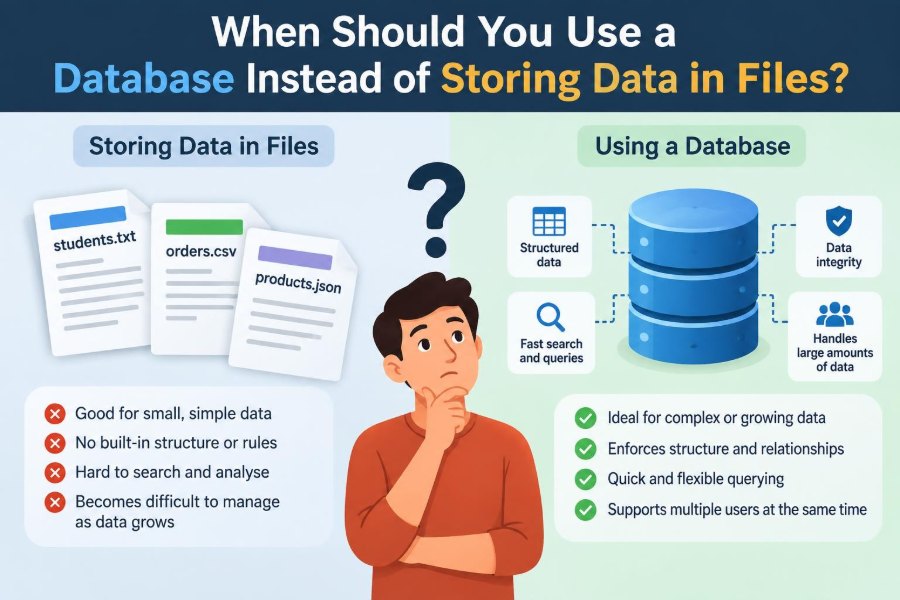

A small project often starts with a file. A to-do app saves tasks in JSON. A classroom program writes student records to CSV. A team keeps product information in a spreadsheet. This is sensible: files are familiar, portable, and quick to create.
Then the project grows. Two people edit the same information. Someone needs to find every order from a particular customer. A program crashes halfway through saving. A reporting request turns into several fragile formulas and manual exports.
At that point, the question is not whether files are “bad.” Files remain excellent tools. The real question is whether the data has become shared, connected, frequently changed, or valuable enough to need stronger rules.
A database is designed for those situations. Understanding the boundary helps you choose a simpler solution when simplicity is appropriate—and avoid expensive reliability problems when it is not.
🗂️ Start with the basic distinction
A file is a named collection of bytes stored by an operating system. Text files, CSV files, JSON documents, images, and spreadsheets are all files. Your program decides how to interpret their contents.
A database is a system for storing and managing data according to defined structures and rules. It provides a language or interface for adding, finding, changing, and protecting data. The database itself may ultimately store information in files, but it adds important behavior on top.
📦 Files are often the right first choice
Do not introduce a database merely because an application stores data. A configuration file, a static product catalog, a personal script’s settings, or a one-time export may be easier to manage as a file.
Files work particularly well when the data is small, mostly read rather than edited, used by one person or process, and naturally handled as one complete document.
- A website configuration in YAML or JSON
- A CSV export sent to an accounting system
- A local note-taking tool with individual text documents
- A machine-learning dataset downloaded and processed in batches
🏗️ A database is more than a large spreadsheet
Spreadsheets and CSV files organize values into rows and columns, so they can resemble a database table. But a database can enforce types, relationships, permissions, concurrent access, and reliable multi-step changes.
For example, a database can reject an order that refers to a customer who does not exist. A CSV file cannot do that on its own; every program and person editing it must remember the rule.
🔍 Querying becomes difficult with growing files
A query is a request for a particular set of data: “show unpaid invoices from last month” or “find customers who bought both products.” With files, code commonly loads the whole file and filters it in memory.
That approach is fine for a small list. It becomes awkward when queries multiply, data is large, or different users need different views. Databases are built to answer structured questions repeatedly, often using indexes that avoid reading every record.
⚡ Indexes make repeated lookups practical
An index is like the index at the back of a book: it helps locate relevant entries without scanning every page. A database can maintain indexes as data changes.
Imagine a support system with many tickets. Searching a JSON file for a ticket ID means inspecting entries until the match appears. A database index on the ID gives the system a direct route to the record. Indexes require storage and slow some writes slightly, so they should serve real query patterns rather than be added everywhere.
🔗 Relationships are a strong database signal
Use a database when information has stable connections. Customers place orders; orders contain order items; employees belong to departments; students enroll in courses. These are relationships, not just separate lists.
Files can represent relationships with IDs, but keeping references accurate becomes the responsibility of application code. Relational databases can define foreign keys, which help prevent references to missing records and make connected queries easier to express.
🧩 Avoid duplicating the same fact
In a file-based order system, each order might repeat a customer’s address. If the customer moves, older and newer orders can become inconsistent unless there is a deliberate historical-record policy.
Databases encourage separating facts into related tables where that makes sense. One customer record can be referenced by many orders. This reduces accidental duplication, although some duplication can be intentional when preserving a snapshot, such as the shipping address used for a completed order.
✍️ Frequent updates expose file weaknesses
Changing one record inside a structured file often means reading, modifying, and rewriting the entire file. That may be harmless for a tiny settings file, but it is inefficient and risky for frequently changing data.
Databases are designed for many small inserts, updates, and deletions. They track records and indexes in ways that make targeted changes practical without treating every edit as a full-document replacement.
👥 Concurrent users need coordination
Concurrency means more than one user, device, or program accesses data at about the same time. Consider two staff members opening the same inventory spreadsheet, both reducing stock, and then saving. One person’s update can overwrite the other’s.
Databases provide controlled concurrency. The exact mechanism varies, but the goal is consistent: readers and writers should not silently corrupt each other’s work. File locking exists, but coordinating it correctly across applications and networked systems can become difficult.
🧾 Transactions protect multi-step changes
A transaction groups related operations into one all-or-nothing unit. A bank transfer is the classic example: subtracting money from one account and adding it to another must succeed together, or neither change should remain.
The same idea matters in ordinary software. Creating an order may require saving the order, its line items, a payment status, and a stock adjustment. A database transaction reduces the chance that a crash leaves only half of that work completed.
🛡️ Constraints turn business rules into safeguards
Applications contain rules: an email should be unique, a quantity should not be negative, a required name should not be blank, and a booking should belong to a real user. If rules exist only in a web form or one program, another import script may bypass them.
Database constraints provide a second line of defense. Common examples include required fields, unique values, range checks, and foreign keys. They do not replace validation that gives users friendly messages, but they protect the underlying data.
🔒 Security is easier to centralize
A shared file usually grants access at the file or folder level. Anyone allowed to open it may see more information than they need. Copying the file also creates another version that must be protected.
Many database systems support accounts, roles, and permissions. An analyst might read selected reporting data while an application account can update only the tables it needs. Security still depends on careful setup, encryption, network controls, and backup practices; a database is not automatically secure.
🧱 Define a schema when consistency matters
A schema describes the expected shape of data: tables or collections, fields, types, and rules. It answers questions such as whether a date is stored as a real date, whether a price permits decimals, and which fields are required.
JSON files are flexible, which is useful during experimentation. But flexibility can also produce records with different field names, missing values, or incompatible formats. A schema becomes valuable when multiple parts of a system must interpret data consistently.
🧮 Choose the database model to fit the data
A relational database stores information in tables and is often a good choice for connected business data, reporting, and transactions. SQL is the common language used to query many relational systems.
Other models serve different needs. Document databases store flexible document-like records, key-value stores focus on fast lookup by key, and graph databases model richly connected entities. “Use a database” does not automatically mean “use one particular product or model.”
| Situation | Often a sensible starting point |
|---|---|
| Small, single-user configuration | JSON, YAML, or another text file |
| Data exchanged with a person or another tool | CSV or spreadsheet export |
| Related records, frequent queries, shared edits | Relational database |
| Flexible, nested records with evolving fields | Document database or validated documents |
📊 Reporting usually favors structured storage
Reporting questions change over time. A manager may first ask for weekly sales, then sales by region, product category, customer type, and refund status. If every answer requires writing a new script to parse files, reporting becomes fragile.
Databases support filtering, grouping, joining related data, and aggregating totals. Good database design does not make every report instant, but it creates a common source of data that reporting tools and applications can query consistently.
🕰️ History and audit needs change the decision
Some systems need to answer who changed a record, when it changed, and what the prior value was. This can matter for internal troubleshooting, customer support, or regulated work.
A database can support audit tables, timestamps, immutable event records, or change logs. These features require design: simply storing data in a database does not create a trustworthy audit trail by itself. Still, centralized updates make such design far more manageable than collecting copies of edited files.
💾 Backups are not the same as copies
Copying a file occasionally is better than having no backup, but it may capture an incomplete write or omit related files. Restoring a set of files can also be difficult if they were copied at different moments.
Database backup tools can create consistent backups and, in some systems, support recovery to a point before a mistake or failure. Test restoration regularly. A backup that has never been restored is an assumption, not a proven recovery plan.
🚨 Failure recovery deserves explicit planning
Power loss, storage failures, bugs, and accidental deletion happen. Database engines commonly use logs and recovery procedures so that committed work survives and incomplete work is rolled back after a crash.
File-based systems can be made safer with temporary files, atomic rename operations where supported, checksums, and versioned backups. The point is not that files cannot be reliable; it is that a database supplies many reliability mechanisms that otherwise must be designed and tested by the application team.
📁 Files still excel at large objects
Images, videos, PDFs, archives, and large scientific arrays are often better stored in object storage or a file system rather than directly inside ordinary database rows. These objects may be large, streamed, or served by specialized tools.
A common hybrid design stores the object in file or cloud storage and stores its identifier, location, ownership, metadata, and permissions in the database. The database manages the relationships; the storage system handles the large binary content.
🧪 Prototypes can begin without premature complexity
For a prototype, a file can help you learn what data actually exists and which questions users ask. Early certainty about a perfect schema is often unrealistic.
However, leave a path for migration. Keep parsing and storage code behind a small interface, use stable identifiers, validate data even in files, and avoid spreading direct file-format assumptions throughout the program. These choices make a later move less disruptive.
📈 Scale means more than file size
A large file is not automatically a reason for a database. A multi-gigabyte log processed once per night may work well as files in a batch pipeline. Conversely, a modest dataset can need a database when many people update it every day.
Consider several dimensions: record count, read and write frequency, number of simultaneous users, query complexity, importance of correctness, retention needs, and recovery expectations. The operational pattern matters more than one size threshold.
🧰 Database operations have a real cost
A database needs installation or a managed service, access control, monitoring, upgrades, backups, and someone responsible for it. Poorly written queries and missing indexes can create performance problems of their own.
This cost is a reason not to over-engineer a simple tool. For a local application, an embedded database such as SQLite can offer SQL, transactions, and a single deployable database file without requiring a separate server process.
🧭 A practical decision checklist
A database is increasingly justified when several of these statements are true:
- Many users or services read and write the same data.
- Records have important relationships.
- You need flexible searching, sorting, reporting, or dashboards.
- Multiple changes must succeed or fail together.
- Incorrect, duplicate, or missing data has real consequences.
- Permissions, audit history, backup, and recovery need consistent handling.
- Rewriting full files or maintaining parsing scripts is becoming a burden.
One item alone may not decide the issue. A cluster of needs is the clearer signal.
🛠️ Plan migration before the file format breaks down
Migration is easiest while the existing data is still understandable. First identify the authoritative files, clean duplicates, define field meanings, and decide how to represent missing or invalid values.
Then import into a test database, compare record counts and representative results, run the old and new systems carefully if necessary, and set a clear cutover point. Avoid allowing both systems to be edited indefinitely, because two sources of truth soon drift apart.
⚠️ Common mistakes when choosing storage
One mistake is using files for a shared system while relying on staff to “not edit at the same time.” Another is selecting a database but storing unstructured blobs that cannot be queried, validated, or related.
Teams also sometimes confuse a database with a backup strategy, or add a database server for a tiny local need that an embedded database would handle well. Match the tool to the failure modes and workflow you actually have.
🧠 The core principle: manage complexity where it belongs
Files are excellent when data is simple, independent, and handled as whole documents. They are transparent, portable, and often the lowest-maintenance option.
Use a database when the challenge is no longer merely saving information. Once you need dependable shared updates, relationships, transactions, enforceable rules, powerful queries, or controlled recovery, the data-management layer becomes part of the application’s essential infrastructure.
Choose files for simple documents; choose a database when data must remain correct, connected, searchable, and dependable as people and software interact with it. Start with the smallest solution that honestly meets those needs, then evolve deliberately as the system changes. 💻🗂️🔒