
A phone suggests a faster route before traffic becomes obvious. A bank flags an unusual payment in seconds. A clinician reviews an image with software that highlights areas worth a closer look. These experiences can feel effortless, but each depends on instructions, data, and carefully designed systems.
Computer science is often reduced to “learning to code.” Programming matters, but it is only one way of expressing a much larger set of ideas: how to represent information, solve problems systematically, coordinate machines, and evaluate the consequences of automated decisions.
That larger view matters to students choosing what to learn and to professionals whose work is increasingly shaped by digital tools. Understanding computer science does not require everyone to become a software engineer. It helps people ask better questions about the systems around them.
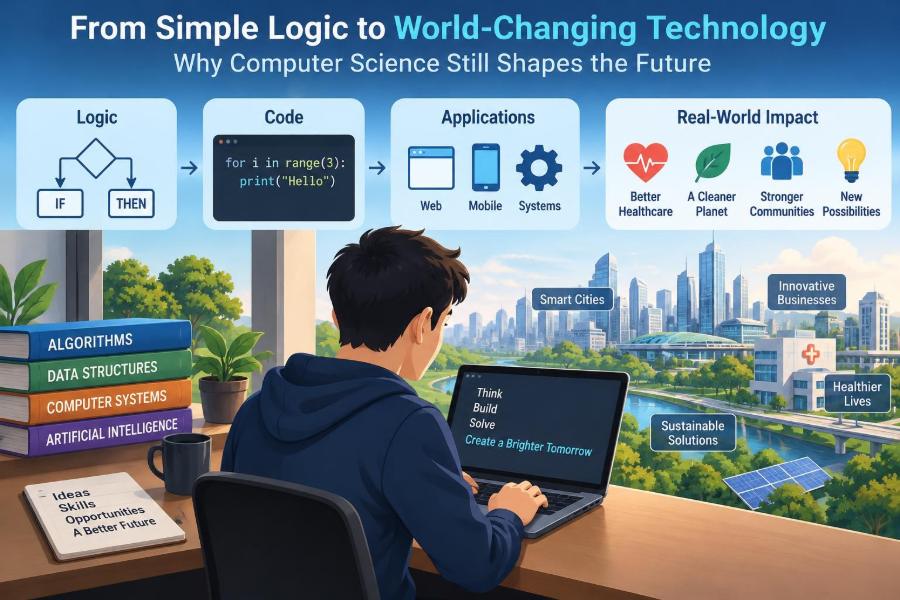
From simple logical rules to global communication networks, computer science continues to shape the future because it gives us methods for turning ideas into reliable, repeatable processes—while reminding us that every technical choice affects real people.
🧠 Computer Science Is the Study of Computation
Computer science studies computation: what problems can be solved by following precise steps, how efficiently they can be solved, and how computing systems can carry out those steps. A computer is a major tool in the field, but the underlying ideas are broader than any particular device.
For example, a recipe is a sequence of instructions, but it may leave room for human judgment: “season to taste.” An algorithm, by contrast, aims to specify enough detail that the same inputs lead to a predictable result. Designing those instructions, testing their limits, and choosing useful representations are central computer science tasks.
The field connects mathematics, engineering, design, psychology, economics, and many other disciplines. That mix is why computer science can contribute to both a tiny mobile app and a large-scale system for managing transportation or scientific data.
🔣 Logic Is the Small Beginning Behind Big Systems
Digital devices ultimately work with states that can be represented as on or off, often written as 1 and 0. Boolean logic provides rules for combining those states. An AND operation produces a true result only when both conditions are true; an OR operation produces true when at least one condition is true.
Consider a simple access rule: unlock a door if a valid badge is scanned AND the employee is authorized for that area. The idea is small, yet layered logical operations can support calculations, comparisons, memory, and decisions inside modern processors.
Logic alone does not make a system wise or fair. It only applies rules. The difficult human work lies in deciding which rules belong there, what data feeds them, and what should happen when the rules encounter unusual situations.
🧩 Algorithms Turn Problems into Procedures
An algorithm is a finite, well-defined method for completing a task or solving a problem. Sorting a list of names, finding the shortest route between two places, and checking whether a password meets requirements all involve algorithms.
Algorithms are not always mysterious or advanced. A librarian’s method for locating a book by narrowing from category to author to title is algorithmic thinking. A good algorithm breaks a goal into steps that can be followed, checked, and improved.
Different algorithms may reach the same answer with very different costs. Searching each item in an unsorted list is reasonable for a few entries; it becomes wasteful when the collection is huge. Choosing an approach that fits the scale and constraints is often more valuable than writing clever-looking code.
⏱️ Efficiency Determines What Is Practical
Computer scientists analyze time complexity and space complexity: roughly, how the running time and memory needs of an algorithm grow as the input grows. These measures do not predict every second of execution on every machine, but they expose important patterns.
Imagine checking a guest list. Looking through every name one by one grows quickly as the event gets larger. If the list is organized for fast lookup, the work can grow much more slowly. The difference may be barely noticeable for ten names and decisive for millions.
Efficiency also involves trade-offs. Saving time may require more memory; compressing data may save storage but require extra processing to use it. There is rarely a universally best option—only an option that is suitable for a particular purpose.
🗂️ Data Structures Shape What Software Can Do
A data structure is an organized way to store and work with information. A list keeps items in order, a queue processes items in arrival order, a stack handles the most recent item first, and a map associates keys with values.
These choices affect behavior. A customer-support system might use a queue to handle incoming requests fairly. A web browser uses a history-like structure so that the Back button returns to recently visited pages. The visible feature is simple; the underlying organization makes it possible.
Data structures also influence reliability. When information is poorly organized, updates become difficult, duplicates spread, and important relationships are lost. Good structure reduces accidental complexity before a program has even started doing its main job.
💾 Representation Makes Information Computable
Computers do not understand a photograph, a sentence, or a song in the human sense. They store encoded representations: bits arranged according to agreed formats and rules. A digital image may be represented by pixel values, while text uses character encodings that map symbols to numbers.
Representation choices have consequences. Rounding can slightly change numeric results. Limited color depth can affect an image. An encoding that does not support a needed writing system can corrupt names or messages. Technical design therefore intersects with language, culture, accessibility, and accuracy.
When a system appears to “lose” nuance, the issue is often not that computers are incapable of handling the idea. It may be that the chosen representation left too little room for the detail people need.
💻 Programming Is a Way to Express Ideas
A programming language lets people write instructions in a form that can be translated into operations a computer can perform. Languages differ in style and purpose: some are well suited to web interfaces, some to data analysis, some to systems programming, and some to teaching core concepts.
The most durable skill is not memorizing every feature of one language. It is learning to express a problem clearly through variables, conditions, loops, functions, and data structures. Those concepts transfer even when tools change.
Readable code is a practical form of communication. Colleagues—and future versions of yourself—need to understand what it does and why. Clear names, small focused functions, and useful documentation often prevent more trouble than a dense shortcut saves.
🐛 Debugging Makes Failure Informative
Every nontrivial program contains assumptions, and some assumptions will be wrong. Debugging is the disciplined process of finding the cause of incorrect behavior and correcting it. It is not merely fixing typos; it often means revisiting how the problem was understood.
A useful debugging habit is to make the problem smaller. Reproduce the failure with the simplest possible input, inspect intermediate values, and test one hypothesis at a time. Changing many things at once may hide the real cause.
- Read the actual error message rather than guessing from the symptom.
- Check inputs, boundary cases, and assumptions about missing data.
- Use tests to confirm that a fix solves the issue without breaking earlier behavior.
- Record the lesson when the problem could recur.
This mindset applies beyond programming. Careful diagnosis—rather than quick blame—is one of computer science’s most useful habits.
✅ Testing Builds Trust, Not Perfection
Testing checks whether software behaves as intended under selected conditions. A unit test may verify one small function, while integration testing checks whether multiple components work together. Neither approach can prove that a complex system will never fail.
Strong testing includes ordinary cases and awkward ones: an empty list, a very large value, a failed network connection, or a user who enters information in an unexpected order. Many serious failures happen at these boundaries rather than in the happy path demonstrated during development.
Testing also reveals ambiguity. If a team cannot decide what a system should do when a user cancels an action halfway through, the problem is not just technical. The requirement itself needs clarification.
🏗️ Software Engineering Turns Code into Systems
Writing a program is different from sustaining software used by many people over time. Software engineering adds practices for planning, collaboration, version control, deployment, monitoring, maintenance, and change management.
A useful application must survive changing needs. A school may alter reporting requirements; a business may add payment methods; a public service may need clearer accessibility support. Systems designed as a collection of understandable components are generally easier to adapt than one large, tightly tangled program.
Documentation, code reviews, and issue tracking can feel less exciting than building a new feature. Yet they preserve shared understanding, which is essential when the people maintaining a system are not the people who first created it.
🌐 Networks Make Distance Less Relevant
Computer networks allow devices to exchange information through shared rules called protocols. The internet is a network of networks, not one central machine. Data is often broken into smaller packets that can travel through multiple routes before being reassembled.
This design supports resilience and scale, but it also introduces delay, congestion, and possible points of failure. A message sent across a network is not guaranteed to arrive instantly, in order, or at all unless higher-level systems manage those possibilities.
Network knowledge explains everyday experiences: a video call can freeze even when an app is open, a website can be available in one location but slow in another, and synchronizing files across devices can create conflicting versions.
☁️ Cloud Computing Changes Ownership, Not Physics
Cloud computing generally means using computing resources—such as storage, servers, databases, or software—provided over a network. It can make it easier for an organization to scale services without owning every machine directly.
“The cloud” is not an abstract place beyond physical limits. Information still resides on hardware in data centers, uses energy, travels across networks, and depends on contracts and operational decisions. Understanding that helps teams assess availability, cost, privacy, and dependency risks.
For a small project, managed cloud services can reduce administrative work. For a system with strict regulatory, latency, or control requirements, the right arrangement may be more complex. Convenience should be evaluated alongside responsibility.
🔐 Cybersecurity Protects Systems and People
Cybersecurity is the practice of protecting systems, networks, and information from unauthorized access, disruption, or alteration. It is not achieved by a single product. It depends on layers: careful design, access controls, updates, monitoring, backups, and informed users.
A common mistake is to treat security as something added at the end. Decisions about permissions, data collection, logging, and recovery are much easier to make well when considered from the beginning. Security also includes preparing for failure, not just trying to prevent it.
Good security balances protection with usability. If a login process is so difficult that people create unsafe workarounds, the system may become less secure in practice. The goal is to reduce realistic risks without making legitimate work impossible.
🔑 Identity and Access Need Careful Design
Many digital harms begin with compromised accounts. Authentication answers, “Who are you?” Authorization answers, “What are you allowed to do?” Keeping these concepts separate helps prevent a valid user from receiving more access than their role requires.
The principle of least privilege means granting only the permissions needed for a task. A staff member who updates product descriptions, for example, does not necessarily need the ability to change payroll records or delete the entire database.
Multi-factor authentication adds another check beyond a password, but it is not a cure-all. Organizations still need safe account recovery, resistance to deceptive login pages, sensible permission reviews, and a plan for responding when credentials are exposed.
🗄️ Databases Preserve Organizational Memory
A database stores related information so it can be added, updated, searched, and protected consistently. It may hold inventory, appointments, student records, sensor measurements, or messages. Database design determines whether these facts remain useful as the system grows.
For example, recording a customer’s address separately in every order can create inconsistencies after a move. Organizing related information with clear identifiers can reduce duplication, though it may require more careful queries. Design is a balance between clarity, performance, and the realities of use.
Data quality matters as much as data volume. Missing fields, unclear definitions, incompatible formats, and old records can lead to misleading outputs even when the software works exactly as programmed.
📊 Data Science Finds Patterns With Limits
Data science uses computing, statistics, and domain knowledge to explore data and support decisions. It can help identify trends, forecast demand, detect anomalies, or summarize complicated information. Its value depends heavily on the quality and relevance of the data.
A pattern is not automatically an explanation. If two measurements change together, many factors may be involved. A responsible analysis distinguishes correlation from causation and states what the available evidence can and cannot justify.
Visualizations can make large datasets understandable, but they can also mislead through selective ranges, missing context, or poorly chosen categories. A chart should make uncertainty and comparison clearer, not merely make a conclusion look more convincing.
🤖 Artificial Intelligence Extends Pattern Recognition
Artificial intelligence is a broad term for systems that perform tasks associated with aspects of human intelligence, such as perception, language processing, planning, or pattern recognition. Machine learning is one approach in which a model learns relationships from examples rather than receiving every rule explicitly.
A model that classifies images, recommends products, or generates text does not possess human understanding simply because its output sounds fluent or looks plausible. It can make confident errors, reflect patterns in its training data, and perform poorly when conditions differ from those it encountered before.
AI can be useful when its role is defined carefully: assisting review, ranking options, detecting signals, or automating repetitive work. Higher-stakes uses require appropriate human oversight, evaluation in the actual context, and a way to question or correct harmful results.
⚖️ Bias Can Enter at Every Stage
Algorithmic bias does not always come from a malicious rule. It can enter through incomplete data, historical inequalities, labels created under pressure, proxy variables, or a success measure that overlooks some groups. A system may treat inputs consistently while still producing unfair outcomes.
Suppose a hypothetical hiring tool learns from past decisions. If past decisions favored certain backgrounds for reasons unrelated to job performance, the tool may reproduce that pattern. Removing an obvious category may not solve the issue if other information acts as a proxy.
Reducing bias requires more than technical adjustment. Teams need domain expertise, representative evaluation, documentation of choices, routes for appeal, and attention to who bears the cost when the system is wrong.
🔎 Explainability Supports Better Decisions
When software influences an important decision, people often need more than a score or recommendation. They may need to know what information was used, what the result means, how reliable it is, and what can be challenged or corrected.
Explainability does not always require exposing every internal calculation. It means providing meaningful information appropriate to the situation. A medical support tool, for example, should not be treated as a final diagnosis simply because it produces a prediction.
Transparent processes improve accountability. They help users catch errors, help organizations audit outcomes, and discourage the habit of accepting automated output as unquestionable authority.
♿ Accessibility Is Core System Quality
Accessible technology can be used by people with varied abilities, devices, languages, and circumstances. Captions support people who are deaf or hard of hearing, but they also help someone watching a lesson in a noisy room. Clear keyboard navigation supports people who cannot use a mouse and can benefit power users as well.
Accessibility is strongest when built into design and testing rather than patched on later. A color-only warning, an unlabeled form field, or a time limit that cannot be extended can block participation even if the main feature is technically functional.
Designing for a wider range of users frequently improves clarity for everyone. It asks a simple question with far-reaching consequences: who might be excluded by the default assumptions?
🌍 Computing Has Environmental Costs
Digital services use electricity through devices, networks, and data centers. Hardware also requires materials to manufacture and creates waste when it is discarded. The environmental impact of a computing choice depends on many factors, including hardware lifespan, energy sources, workload design, and usage patterns.
Efficiency can reduce unnecessary processing, storage, and data transfer. Extending the useful life of equipment, repairing where practical, and avoiding wasteful features are also meaningful considerations. However, a more efficient system is not automatically environmentally harmless if its use expands dramatically.
Responsible computing considers the physical world behind the screen. “Digital” describes the interface, not an absence of material consequences.
🧑🤝🧑 Collaboration Is a Technical Skill
Most consequential software is created by groups with different roles: developers, designers, testers, operations staff, product specialists, security teams, and people who understand the domain being served. Communication failures can be as damaging as coding mistakes.
Teams work better when they make assumptions visible. What does “active user” mean? Which failure is acceptable, and which is not? Who can change a requirement? Shared definitions prevent different parts of a system from being built around conflicting interpretations.
Version control tools and review processes help teams coordinate changes, but their deeper purpose is social: they create a record of decisions and a safer way to learn from one another.
🧭 Computing Requires Professional Judgment
Technical capability does not answer whether a system should be built, deployed, or connected to a particular decision. Professional judgment includes considering foreseeable misuse, unequal impacts, privacy expectations, and the consequences of being wrong.
For instance, automating a low-risk reminder is different from automating a decision that can affect someone’s housing, education, health, or livelihood. The second situation may need stronger safeguards, clearer responsibility, and meaningful human review.
Ethics is not a final checklist added after development. It is a repeated practice of asking whose needs are being served, what evidence supports the design, and how harm will be noticed and addressed.
📚 Learning Computer Science Builds Transferable Thinking
Learning the subject develops habits that apply far beyond technical careers: decomposing a complicated task, recognizing patterns, testing assumptions, documenting decisions, and revising a process after evidence contradicts a guess.
Students can begin with small projects that solve a real annoyance: organizing study notes, analyzing a simple dataset, building a quiz, or automating a repetitive calculation. Professionals can practice by mapping a workflow, identifying manual handoffs, and asking where data errors or delays originate.
The goal is not to automate every task. Sometimes the best result is a clearer process, a better spreadsheet, or the realization that human judgment should remain central.
🛠️ A Practical Path for Beginners
A sustainable learning path alternates concepts with practice. Start with one beginner-friendly programming language, but do not rush through syntax without understanding variables, conditions, functions, and data structures. Small exercises reveal whether an idea is genuinely understood.
- Learn basic problem decomposition and write steps in plain language.
- Build small programs that accept input, make decisions, and produce useful output.
- Practice debugging deliberately by reading errors and tracing program flow.
- Use a version control system once projects involve meaningful changes.
- Study algorithms, databases, networks, and security as connected foundations.
- Create a project that includes users, constraints, and documentation—not only code.
Progress is rarely linear. Confusion is normal when a new abstraction hides details you previously understood. Return to a smaller example, then rebuild the larger idea from there.
🚫 Common Misconceptions Slow Progress
One misconception is that computer science belongs only to people who were coding very young. Prior exposure can help, but sustained learning depends much more on practice, feedback, and willingness to work through errors.
Another is that a powerful tool removes the need for understanding. Templates, libraries, and AI assistants can accelerate work, yet they can also produce code or conclusions that do not fit the actual problem. Someone must evaluate the result.
A third misconception is that technical correctness is enough. A system can run without errors and still be confusing, inaccessible, insecure, wasteful, or unfair. Real quality is broader than “it works on my machine.”
🔮 The Future Depends on Choices, Not Just Inventions
New hardware, software methods, and AI capabilities will continue to create possibilities. But technology does not arrive with a fixed social outcome. Its effects depend on who designs it, who controls it, which incentives guide it, and whether affected people can question it.
The most valuable future-facing skill is therefore not predicting every new tool. It is learning enough about computation to assess claims, identify trade-offs, and participate in decisions rather than receiving them passively.
That is why foundational ideas remain relevant even as platforms change. Logic, algorithms, data, security, and human-centered design give people a vocabulary for understanding both opportunity and risk.
🌟 The Core Principle: Build With Purpose and Accountability
Computer science shapes the future because it transforms information and instructions into systems that act at scale. Simple logical operations can eventually support communication, research, accessibility tools, public services, creative work, and countless everyday conveniences.
But scale amplifies mistakes as well as benefits. The strongest computing work combines technical skill with careful testing, security, accessibility, ethical reflection, and respect for the people affected by a system.
Learning computer science is ultimately learning to turn a problem into a process without losing sight of the human context around it. That combination—precision in the method and responsibility in the purpose—is what makes the field enduring.
Computer science matters not because every problem needs more technology, but because thoughtful computation helps us decide where technology can genuinely serve people. 💻🧭🌍