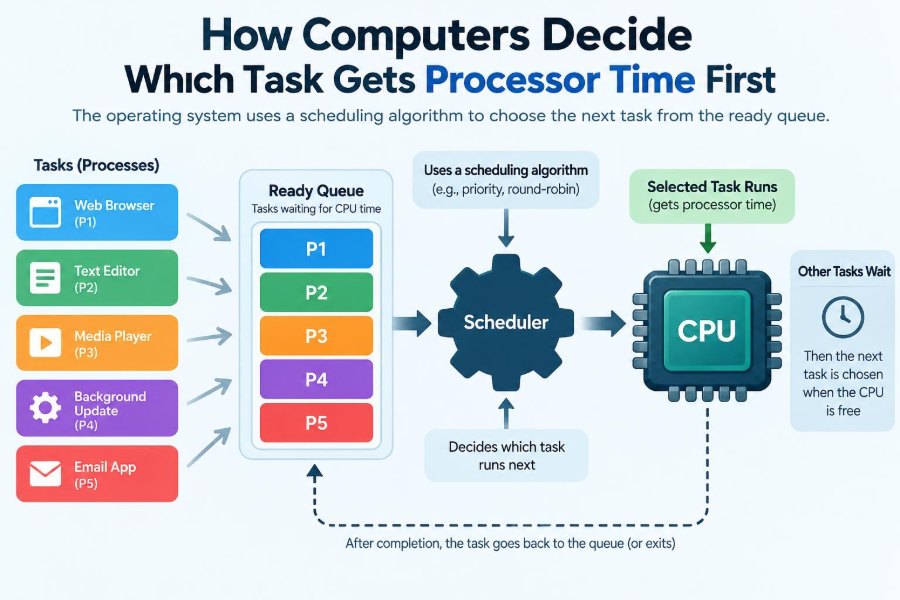

Your computer may be downloading a file, playing music, checking for messages, updating a document, and keeping dozens of browser tabs open at the same time. Yet it usually feels as though everything is happening together.
There is a catch: a typical processor core can actively execute only one instruction stream at a particular instant. The illusion of simultaneous work comes from switching between tasks extremely quickly and, on multi-core systems, from running several tasks on different cores.
Deciding what runs next is the job of CPU scheduling. It affects whether a keypress feels instant, whether audio skips, how long a server request waits, and how fairly programs share a machine.
The decision is more subtle than simply choosing the oldest task. Operating systems balance urgency, fairness, efficiency, predictability, and the physical limits of processor hardware.
🧠 The Basic Scheduling Problem
A computer has more work ready to run than it has processor time. The operating system must select one runnable task for each available CPU core.
A scheduler is the operating-system component that makes this choice. Its central question is simple: among all tasks that could run now, which one should run next?
⚙️ A CPU Does Not Literally Multitask on One Core
On one CPU core, instructions are executed in sequence. A core can change from one task to another, but it does not execute two ordinary software instruction streams at exactly the same instant.
Fast switching creates the experience of multitasking. Modern computers also have multiple cores, so several tasks really can run concurrently, but there can still be more runnable tasks than cores.
🧵 Processes, Threads, and What Actually Gets Scheduled
A process is a running program with its own memory and resources. A browser, a game, and a spreadsheet application are commonly separate processes.
The scheduler usually works more directly with threads. A thread is an execution path within a process. One browser process, for example, may have different threads for a page, network activity, graphics, and background work.
For simplicity, this article uses “task” to mean a schedulable thread unless the distinction matters.
🚦 Runnable Is Different From Running
A task can be in several states. A running task currently owns a CPU core. A runnable task is ready to run but is waiting for a core to become available.
Many tasks are not runnable because they are waiting for something else: disk data, a network reply, a timer, user input, or a lock held by another thread. Scheduling only chooses among tasks that are ready.
📋 The Ready Queue
Operating systems keep track of runnable tasks in one or more structures often called ready queues or run queues. The exact design differs by operating system and processor architecture.
The queue is not always a simple first-in, first-out line. It may be organized by priority, estimated behavior, deadlines, CPU affinity, or groups of users and processes.
⏱️ The Time Slice and Preemption
Many general-purpose systems give a task a limited opportunity to run, called a time slice or quantum. When the slice expires, the scheduler can allow another task to run.
This ability to interrupt a running task is preemption. Preemption prevents a computation-heavy program from keeping the processor indefinitely while other ready tasks wait.
A task may also lose the CPU before its slice ends if a more urgent task becomes runnable.
🔄 What Happens During a Context Switch
When the CPU changes tasks, the operating system performs a context switch. It saves enough state from the old task to resume it later, then restores the saved state of the new one.
This state includes details such as instruction position, register values, and stack-related information. Context switches are necessary, but they are not free: they consume time and can disturb useful data in processor caches.
🎯 The Goals a Scheduler Must Balance
No single rule is best for every workload. A scheduler commonly tries to balance several competing goals:
- Responsiveness: interactive actions should receive quick attention.
- Throughput: the system should complete useful work efficiently.
- Fairness: one task should not unjustly monopolize CPU time.
- Low overhead: scheduling itself should not consume excessive CPU time.
- Predictability: time-critical work may need reliable timing.
Improving one goal can harm another. Very frequent switching may improve perceived responsiveness while increasing overhead.
📥 First-Come, First-Served Scheduling
First-come, first-served (FCFS), also called first-in, first-out, runs tasks in arrival order. It is easy to understand and can be reasonable for simple batch workloads.
Its weakness is that one long task can delay many short tasks behind it. This is sometimes called the convoy effect: short jobs end up queued behind a slow “leader,” much like cars trapped behind a slow truck on a single-lane road.
🔁 Round Robin and Equal Turns
Round Robin gives each runnable task a turn for a fixed time slice, then moves on to the next. It is a classic approach for time-sharing systems.
It feels fair because each task gets recurring access to the processor. However, the chosen slice length matters. A very short slice creates many context switches; a very long slice can make interactive tasks feel delayed.
🏃 Shortest-Job Ideas
In theory, running the shortest tasks first can reduce average waiting time. A short task finishes quickly instead of sitting behind a much longer calculation.
The practical problem is that an operating system cannot perfectly know how much CPU time a task will need in the future. Systems can estimate behavior from past bursts of CPU activity, but estimates can be wrong.
⭐ Priority Scheduling
With priority scheduling, tasks with higher priority are generally selected before lower-priority tasks. Priorities may reflect system importance, administrator policy, or the scheduler’s estimate that a task is interactive.
A task handling an active window or audio playback may receive more favorable treatment than a background indexing task. Priority affects scheduling opportunity; it does not magically make instructions execute faster.
🕳️ Starvation: When a Task Waits Too Long
Priority scheduling can create starvation. If higher-priority work keeps arriving, a low-priority task may receive little or no processor time.
Schedulers reduce this risk with techniques such as aging, where a waiting task gradually gains scheduling advantage. The goal is not always equal time at every moment, but a reasonable chance to make progress.
📈 Dynamic Priorities and Interactive Work
Many desktop and server operating systems adjust priorities dynamically. A task that frequently waits for input or I/O and then runs briefly may be treated as interactive.
This helps a text editor respond quickly after a keypress while a background compilation continues. The scheduler is reacting to observed behavior, not reading the program’s intentions.
💤 Why Waiting for I/O Changes the Picture
Suppose a program asks for data from storage or a network. Instead of occupying a CPU while the device works, the program usually blocks and becomes non-runnable.
The scheduler can then run another task. This overlap is one reason a computer can remain useful while one application waits for a slow operation. It is also why “CPU usage” and “how busy the computer feels” are not always the same thing.
🎵 A Simple Desktop Example
Imagine a laptop playing music while you type, a browser loads a page, and a backup tool compresses files. The audio-related work needs regular, timely CPU access; typing needs short bursts with low delay; the backup can often wait briefly.
A general-purpose scheduler tries to make those choices without permanently abandoning the backup. If the backup competes heavily for CPU, the system may reduce its practical impact through priority rules, time sharing, or application-level limits.
🧮 CPU-Bound and I/O-Bound Tasks
A CPU-bound task spends much of its time calculating: rendering video, compiling code, simulating a model, or compressing large files. An I/O-bound task often runs briefly and then waits for input or output.
This distinction matters because an I/O-bound interactive task may need only small, prompt CPU bursts. A scheduler that recognizes this pattern can improve responsiveness without giving it the processor continuously.
🧭 Multilevel Feedback Queues
A multilevel feedback queue organizes tasks into multiple queues with different priorities or time-slice rules. Tasks that use CPU for long stretches may move toward lower-priority queues, while short, waiting-heavy tasks can remain favored.
The “feedback” part means behavior influences future treatment. This approach can approximate the benefits of short-job scheduling without requiring perfect knowledge of how long each task will run.
🧩 Multiple Cores Add Another Decision
On a multi-core processor, the scheduler must decide both which task runs and which core runs it. It may keep separate queues per core to avoid excessive coordination.
If one core has many runnable tasks while another is idle, the system may move work between them. This is called load balancing.
📌 CPU Affinity and Cache Locality
A task often runs more efficiently when it returns to a core it used recently. That core may still have useful program data in its caches, which are small, fast memories close to the processor.
CPU affinity means preferring to keep a task on the same processor or a related set of processors. Too much movement can hurt cache locality, but too little movement can leave some cores overloaded. Schedulers balance both concerns.
🌡️ Power, Heat, and Modern Processors
Scheduling decisions can interact with energy use. Keeping work on fewer cores may allow other cores to rest, while spreading work can improve performance or reduce concentration of heat, depending on hardware and workload.
Modern systems also adjust processor frequency and power states. The scheduler does not control every hardware decision alone, but its placement and timing choices influence how effectively power-management policies work.
⏰ Real-Time Scheduling Is a Different Promise
General-purpose scheduling aims for good overall behavior, not a guarantee that a task will run at an exact instant. Real-time systems care about deadlines: a result may be useless if it arrives too late.
A hard real-time system may control equipment where missing a deadline is unacceptable. Soft real-time work, such as media playback, benefits from timing but can sometimes tolerate an occasional delay. These needs require specialized policies and careful system design.
🚨 Interrupts Can Trigger Urgent Work
Hardware devices can signal the CPU through an interrupt, requesting attention for events such as incoming network data or timer expiry. The operating system may handle part of that work promptly.
An interrupt is not exactly the same as an ordinary application task, but it can affect when scheduling decisions occur. Systems must handle urgent device events without allowing them to overwhelm normal work.
🔒 Locks, Dependencies, and Priority Inversion
Tasks often share data and use locks to avoid changing it simultaneously. A high-priority task can be forced to wait if a low-priority task holds a lock it needs.
The situation becomes worse if a medium-priority task repeatedly runs while the low-priority lock holder does not get enough CPU time to release the lock. This is priority inversion.
One response is priority inheritance: temporarily raising the priority of the lock holder so it can finish the protected work and unblock the higher-priority task.
🧑💻 User Priorities and “Nice” Values
Many operating systems let users or administrators influence scheduling priority. On Unix-like systems, a “nice” value commonly expresses how willing a process is to yield CPU time relative to others.
These controls should be used carefully. Raising the priority of a demanding program may make it finish sooner, but it can also make the system less responsive for everyone else. Permission rules often limit who can request highly favorable priorities.
🧪 Why Benchmarks Can Mislead
A benchmark usually measures a particular task under particular conditions. It can show how quickly a workload completes, but it may not reveal how usable the machine feels while other work is happening.
For example, maximizing a computation benchmark might favor long uninterrupted CPU runs. A desktop scheduler must also protect short interactive tasks. Performance always depends on the workload and the goal being measured.
🪟 What You Can Observe on Your Own Computer
System monitoring tools can show CPU use per process, per core, and sometimes thread-level activity. These views are helpful, but they are snapshots rather than a full explanation of every scheduling decision.
If a computer feels slow, check whether a program is consuming CPU continuously, whether storage or memory pressure is the actual bottleneck, and whether many applications are competing at once. A scheduler cannot fix a task that is blocked on slow hardware or a system that lacks enough memory.
🛠️ Practical Ways to Reduce CPU Contention
Most people do not need to tune the scheduler directly. Better results usually come from managing workload rather than forcing extreme priorities.
- Close or pause unnecessary CPU-heavy applications during demanding work.
- Schedule large backups, scans, or conversions for less active periods.
- Use application settings that limit background processing when available.
- Keep the operating system and important drivers updated through trusted channels.
- Investigate persistent high CPU usage rather than assuming it is normal.
For developers, responsive design matters too: avoid long work on a user-interface thread, break large jobs into manageable units where appropriate, and use concurrency only when it truly helps.
⚠️ Common Misunderstandings About Scheduling
One mistake is assuming that high CPU use always means a problem. A video export is expected to use substantial CPU time; the question is whether it interferes with work that needs quick response.
Another mistake is believing that priority creates extra processor capacity. It only changes who gets existing capacity first. If all cores are fully busy for long periods, some work must wait.
It is also misleading to assume that more threads always improve speed. Extra threads can help when work can run in parallel, but they can add coordination, memory, and scheduling overhead.
🧠 The Core Principle Behind the Decision
CPU scheduling is a controlled compromise. The operating system observes which tasks are ready, applies policies about urgency and fairness, considers available cores, and changes its choices as tasks wait, block, wake, and finish.
There is no universally “first” task in a simple human sense. A keypress-related thread, a timer event, a background calculation, and a server request may each be treated differently because the system is optimizing for different consequences of delay.
The result is the familiar experience of a computer that can keep many activities moving forward, even though processor time remains finite.
Computers decide which task gets processor time first by continually balancing readiness, priority, fairness, timing needs, and the cost of switching—not by following one fixed rule. Understanding that balance makes slowdowns, smooth interfaces, and multi-core performance much easier to explain. 💻⏱️🧠