
You are building a contact list. At first, a simple list of names feels perfect: add a name, scroll through it, and pick one. Then users want instant search, alphabetical browsing, frequent deletions, and categories that expand into subcategories.
The data has not changed much. It is still names, phone numbers, and labels. What changed is the work your program must do with that data.
This is the practical reason data structures matter. An array, linked list, hash table, and tree can all store information, but they organize it differently. That organization determines which operations feel effortless and which become expensive.
Choosing well does not mean memorizing a winner. It means recognizing access patterns, ordering needs, update frequency, and the trade-offs hiding behind familiar operations.
🧱 Data Structures Are Organizational Plans
A data structure is a method for arranging data in memory so a program can retrieve, change, or traverse it efficiently. Think of it as the layout of a physical workspace: drawers, labeled bins, a filing cabinet, and a hierarchy can hold the same papers but support different habits.
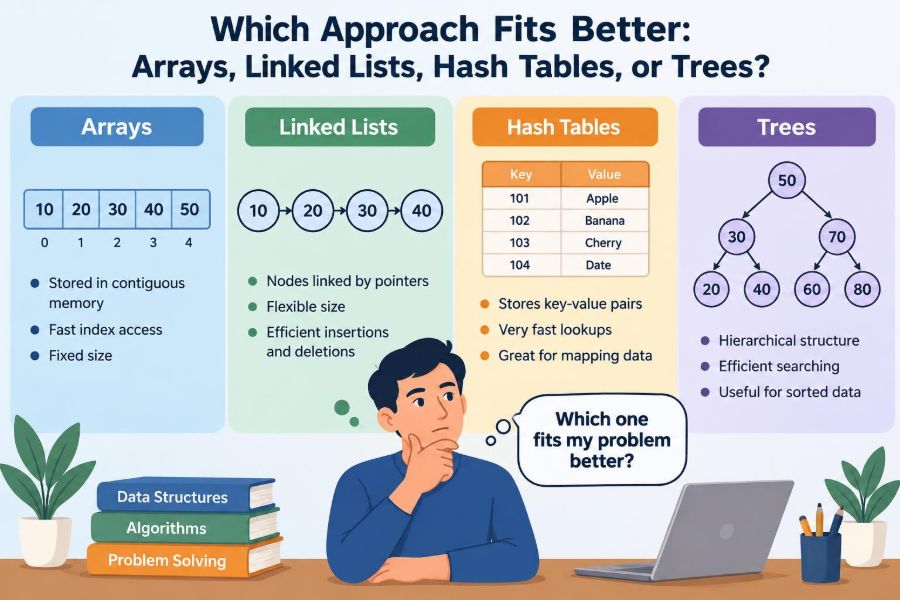
The four structures in this article solve different organizational problems. An array emphasizes positions, a linked list emphasizes connections, a hash table emphasizes lookup by key, and a tree emphasizes relationships or ordered searching.
🎯 Start With Operations, Not Names
Before selecting a structure, ask what the program does most often. “Store items” is too broad to guide a useful decision.
- Do you need the item at a numbered position?
- Do you usually find an item using an identifier, such as an email address?
- Must items remain sorted for range queries?
- Are insertions and removals concentrated at the beginning, middle, or end?
- Does the data naturally form parent-child relationships?
A structure that is fast for one operation may be slower for another. The best choice supports the operations that dominate real use, not an imaginary average use case.
⏱️ A Gentle Guide to Big O
Big O notation describes how the amount of work tends to grow as the number of items, usually written as n, grows. It does not predict an exact runtime in seconds; machine hardware, language runtime, and implementation details still matter.
O(1) means work that generally does not grow with the collection size, such as reading a known array index. O(n) means potentially examining every item. O(log n) grows slowly by repeatedly narrowing a search space, as in a well-balanced search tree.
These categories are useful for comparing scalable behavior, but they are not the entire decision. A small collection may work perfectly with a straightforward linear scan.
📦 Arrays Store Items by Position
An array holds elements in a sequence of neighboring memory locations, conceptually like numbered lockers in one long row. Each item has an index: commonly 0 for the first item, 1 for the second, and so on.
Because the locations are predictable, the program can calculate where a particular index belongs. Arrays are the natural choice when position is meaningful: pixels in a row, monthly values, game-board cells, or a fixed sequence of settings.
⚡ Why Array Indexing Is Fast
To read array[500], a program does not need to inspect items 0 through 499. It uses the starting location and the size of each element to jump directly to the needed position.
This is called random access. Accessing an item by index is typically O(1), which makes arrays excellent for repeated positional reads and updates.
Finding an item by value is different. If you ask whether an unsorted array contains “Mina,” the program may need to check items one by one, making that search O(n).
🚚 The Cost of Inserting Into an Array
Inserting near the front or middle of an array often requires shifting later elements right to make room. Removing an item has the reverse problem: elements after it may need to move left to close the gap.
For example, adding a new task at position 2 in a 10,000-task ordered array can require moving nearly all remaining tasks. The insertion itself is simple; preserving contiguous positions causes the extra work.
Appending to the end is often efficient, particularly in dynamic arrays with unused capacity. But occasionally the array must grow into a larger memory block and copy its contents, creating a more expensive individual append.
🧠 Arrays and Memory Locality
Items stored together are often friendly to a computer’s cache, a small fast memory area that keeps recently used nearby data. When code processes an array from start to finish, the next items are likely close to items already loaded.
This practical advantage is called memory locality. It helps explain why arrays can perform very well even when another structure has a similar Big O result on paper.
Exact behavior varies by language and runtime. Still, compact storage and simple traversal make arrays a strong default for many sequential workloads.
🔗 Linked Lists Connect Separate Nodes
A linked list stores each element in a separate node. Along with the value, a node stores a reference or pointer to another node. In a singly linked list, it points to the next node; a doubly linked list also points back to the previous node.
Instead of one continuous row of lockers, imagine a scavenger hunt where each note tells you where to find the next note. The nodes need not sit beside each other in memory.
🧭 Walking a Linked List
A linked list begins at a head node. To reach the item at position 500, the program follows 500 links from the head. It cannot directly calculate the location of the 500th node.
Therefore, accessing an arbitrary position takes O(n). Searching for a value also takes O(n) in the usual case, because nodes must be visited in sequence until a match appears or the list ends.
This makes linked lists a poor fit for interfaces that constantly jump to arbitrary numbered positions.
✂️ Where Linked Lists Can Shine
If your code already has a reference to the correct node, inserting or removing nearby nodes can be O(1). The links are adjusted without shifting a long block of values.
For example, a music queue represented as a doubly linked list can remove the currently selected song efficiently when the application already holds its node. It does not need to move every later song.
The important condition is easy to miss: finding the location may still cost O(n). Fast local editing does not automatically make a linked list fast for arbitrary insertion by value or index.
🪶 The Overhead of Linked Lists
Each linked-list node stores at least one additional reference. A doubly linked list stores two. This uses more memory than an array of the same values, especially when the values themselves are small.
Nodes can also be scattered through memory, reducing locality during traversal. In many everyday programs, dynamic arrays outperform linked lists despite linked lists having attractive insertion complexity in textbooks.
Use a linked list because its connection model matches a real need, not simply because it is known for “fast insertion.”
🗝️ Hash Tables Find Values by Keys
A hash table stores key-value pairs. A key is a unique identifier, such as a username, product code, or file path; the value is the associated information.
When you ask for a customer record using an account ID, you do not care about the record’s position in a sequence. You want the matching record quickly. That is the central problem hash tables are designed to solve.
🧮 How Hashing Chooses a Location
A hash function converts a key into a number. The table uses that number to select a bucket or an internal position where the key-value pair belongs.
When looking up the same key, the program hashes it again and checks the corresponding area. With a well-designed hash table and a sensible number of buckets, lookup, insertion, and deletion are typically O(1) on average.
Hashing is not encryption. Its goal here is consistent, efficient placement and lookup, not secrecy.
💥 Collisions Are Expected, Not Failures
Different keys can produce the same bucket location. This is a collision, and every practical hash table must handle it.
One approach stores several entries in the same bucket, often in a small list or another compact structure. Another approach searches for another available slot according to a defined probing rule. The details vary, but the table still compares actual keys so it does not confuse two different entries.
Too many collisions slow operations down. Good implementations manage capacity and distribution to keep average lookup efficient.
📈 Load Factor and Resizing
The load factor roughly describes how full a hash table is relative to its available buckets. As the table becomes crowded, collisions become more likely.
Many hash-table implementations resize when the table reaches a chosen threshold. They allocate more space and redistribute existing entries according to the new capacity. A resize can be expensive at that moment, but spreading that occasional cost across many insertions keeps average insertion performance favorable.
Capacity planning can still matter for very large or latency-sensitive workloads, where a resize at an inconvenient moment may be noticeable.
🔀 The Limits of Hash Table Order
A basic hash table does not naturally maintain keys in sorted order. Iteration order may depend on internal buckets, insertion history, language guarantees, or resizing behavior.
Some languages offer ordered or insertion-preserving hash-map variants. Those are useful features, but they are distinct from using a hash table for sorted range queries. Asking for all dates between two values is usually not a natural hash-table operation.
Hash tables are strongest when the question is “Do you have this exact key?” rather than “What comes next after this key?”
🌳 Trees Represent Branching Structure
A tree organizes nodes through parent-child relationships. One node is the root; nodes below it may have children; nodes with no children are leaves.
Trees naturally model folders, organization charts, page elements in a document, menu categories, and family-like classifications. Unlike a list, a tree can branch, letting one item lead to several related items.
Not every tree is designed for searching. The rules governing a tree determine what it is good at.
🔍 Binary Search Trees Keep an Order Rule
A binary search tree (BST) allows each node up to two children. Under the usual rule, values smaller than a node go in its left subtree, and larger values go in its right subtree.
Searching compares the target with the current node and then discards one whole side. To find 42, you do not inspect every stored value; you repeatedly choose left or right based on the ordering rule.
That makes a BST useful when data must remain searchable in sorted order while still accepting updates.
📐 Balanced Trees Versus Skewed Trees
A balanced search tree keeps its height relatively small, so searches, insertions, and deletions are commonly O(log n). Each comparison eliminates a substantial part of the remaining search area.
An ordinary BST can become skewed. For example, inserting already sorted values into a simple unbalanced BST may create a long one-sided chain. In that case, operations degrade toward O(n), much like a linked list.
Self-balancing tree families use rotations and other rules to avoid extreme shape. Many language libraries provide ordered maps or sets built on such balanced structures.
📚 Tree Traversal Produces Useful Orders
Traversal means visiting tree nodes in a deliberate order. The best traversal depends on the question your program needs to answer.
- In-order traversal of a binary search tree visits values in sorted order.
- Pre-order traversal visits a parent before its descendants, which can help serialize or display hierarchy.
- Post-order traversal visits children before a parent, useful when child work must finish first.
- Level-order traversal visits by depth, such as examining all top-level categories before subcategories.
This is a major advantage of trees: their structure can express both relationships and meaningful ways to explore them.
🗂️ Trees Are More Than Binary Search Trees
Real systems use many specialized trees. A file hierarchy is usually a general tree because folders can have many children. Database indexes often use multiway balanced trees designed to work efficiently with storage pages. Prefix trees, often called tries, organize strings by shared prefixes.
The lesson is not to memorize every kind. It is to recognize that “tree” describes a branching pattern, while particular tree types add rules for searching, balancing, prefixes, ranges, or storage constraints.
📊 A Side-by-Side Comparison
| Structure | Typical strength | Typical lookup | Ordering | Common caution |
|---|---|---|---|---|
| Array | Direct access by index | O(1) by index; O(n) by value | Sequence order | Middle inserts and removals shift items |
| Linked list | Local inserts/removals with node reference | O(n) | Sequence order | No fast random access; pointer overhead |
| Hash table | Exact lookup by key | O(1) average | Not inherently sorted | Collisions and resizing; range queries are weak |
| Balanced search tree | Ordered search and ranges | O(log n) | Sorted key order | More structural complexity than a hash table |
These are useful general patterns, not rigid promises. Specific implementations can add features and costs that alter the details.
🛒 Example: An Online Store Catalog
One application may use several structures at once. A product page can use a hash table mapping product IDs to product records for quick exact lookup.
A displayed row of recommended products may use an array because the interface reads item 0, item 1, and item 2 in order. A category hierarchy, such as Home → Kitchen → Appliances, fits naturally in a tree.
If the site must retrieve products in a price interval, an ordered tree-based index may help more than a simple hash table. There is rarely one “data structure for the application.”
🔎 Exact Search and Range Search Are Different
An exact search asks for one known key: “Find employee ID E-482.” A hash table is often ideal because it can locate that exact mapping quickly.
A range search asks for a span: “Show invoices dated from Monday through Friday” or “list scores between 80 and 90.” Ordered trees are more suitable because neighboring keys remain arranged by order.
Trying to force range queries into a hash table often means scanning many entries, which loses its main lookup advantage.
🧩 Duplicates, Keys, and Identity
Decide whether repeated values are allowed and how an item is identified. Arrays and linked lists can easily hold several identical values because each item occupies a position or node.
In a hash table, keys are ordinarily unique. Adding the same key again may replace the old value or be rejected, depending on the implementation. A tree can support duplicates, but it needs an explicit policy, such as storing a count or consistently placing equal values on one side.
Clarifying identity early prevents subtle bugs, particularly when data arrives from forms, files, or external services.
🧪 Measure Real Workloads When It Matters
Big O tells you how algorithms scale, but it cannot fully predict your workload. A collection with 20 items has different priorities from one with millions, and a task run once differs from one executed for every keystroke.
When performance is genuinely important, measure representative operations: realistic data sizes, expected key patterns, read-to-write ratios, and memory use. Avoid benchmarks that test only a tiny synthetic loop while ignoring parsing, network delays, or database access.
Profile before replacing a clear structure with a more complex one.
⚠️ Common Selection Mistakes
- Choosing from a complexity chart alone: constant factors, memory layout, and actual operations still matter.
- Assuming O(1) means instant: hash tables can resize, collide, and consume substantial memory.
- Using a linked list for frequent indexing: every distant position requires a walk through links.
- Using a hash table when sorted output is required: sorting afterward may erase the perceived benefit.
- Building a custom tree too early: a standard library collection is usually safer and better tested.
Complexity notation is a decision aid, not a substitute for understanding the program’s behavior.
🛠️ Let Standard Libraries Do the Hard Parts
Most languages provide arrays or dynamic lists, maps or dictionaries, sets, and sometimes ordered maps and sets. These library structures handle resizing, collision strategies, memory management, and edge cases that are easy to get wrong in a first implementation.
Learning how the structures work internally is valuable. In production code, however, use a standard implementation unless you have a clear requirement it cannot meet.
Read the language documentation for guarantees about ordering, null values, duplicate keys, iterator behavior, and thread safety. Names such as “map” or “list” do not guarantee identical behavior across languages.
🧭 A Practical Choice Checklist
Use this short decision process before reaching for a familiar collection:
- Write down the dominant operations: indexed reads, exact key lookup, range queries, traversal, inserts, or deletes.
- Determine whether order means insertion order, sorted order, or no meaningful order.
- Estimate collection size and how often it changes.
- Check whether the data is naturally linear or hierarchical.
- Consider memory limits and whether references or extra indexes are acceptable.
- Choose the simplest standard structure that meets the requirements, then measure if a bottleneck appears.
This approach turns data-structure selection from a quiz question into an engineering habit.
🧠 The Core Principle: Match Structure to Access
Arrays are compelling when positions and compact sequential processing matter. Linked lists help with local structural changes when node references are already available. Hash tables excel at average-case exact lookup by key. Balanced trees earn their complexity when sorted order, ranges, or hierarchy matter.
No structure is universally better because no application asks only one kind of question. A well-chosen design often combines structures, allowing each part of a system to answer its most common questions efficiently and clearly.
The right data structure is the one whose organization matches the way your program needs to find, change, and interpret its data.
Start with the questions your software asks most often, then choose the structure that makes those questions natural rather than fighting the data’s shape. That habit leads to code that is easier to reason about now and easier to scale later. 💻🧠🌳