
You tap an app icon, switch between browser tabs, save a document, connect headphones, and put your laptop to sleep—often without thinking about the machinery behind those actions. The screen feels immediate, even when dozens of programs are active at once.
That smooth experience is the job of an operating system, or OS. Windows, macOS, Linux distributions, Android, iOS, and many embedded systems all solve a similar challenge: making complicated hardware usable, shared, and reasonably safe.
An operating system is not merely the desktop, settings app, or command line you can see. Much of its work happens underneath: allocating processor time, protecting memory, moving data to storage, handling network packets, and responding to hardware interrupts.
Understanding that architecture makes many everyday computer behaviors less mysterious. It also gives students and working professionals a practical way to reason about performance, permissions, crashes, containers, cloud machines, and security.
🧩 The Operating System as a Coordinator
At its core, an operating system coordinates resources that many programs want to use at the same time. Those resources include the CPU, memory, disks, network interfaces, displays, cameras, and input devices.
Applications should not need to know the electrical details of every SSD or graphics chip. Instead, the OS provides stable abstractions: files rather than disk sectors, processes rather than raw CPU registers, and sockets rather than individual network frames.
This arrangement makes software portable and hardware manageable. An application asks for a service through an OS interface; the operating system decides how to perform that request safely on the current machine.
🏗️ Layers Make Complexity Manageable
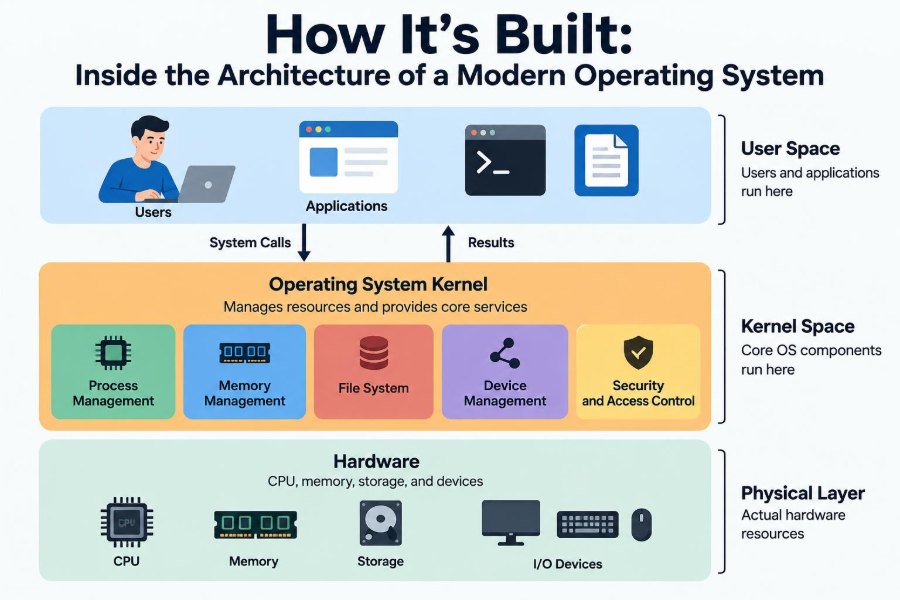
Modern operating systems are often described as layered systems. The layers are not always perfectly separated, but the model is useful: hardware sits at the bottom, privileged kernel code controls core resources, and ordinary applications run above it.
Each layer hides details from the one above. A text editor can request that bytes be written to a file without knowing whether the device is an SSD, hard drive, network share, or virtual disk.
Layers also create boundaries for testing and security. If an application has no direct permission to program a storage controller, an application bug is less likely to overwrite arbitrary parts of a disk.
🛡️ Kernel Mode and User Mode
Most general-purpose operating systems use at least two processor privilege levels. Kernel mode can execute sensitive instructions and access protected hardware resources. User mode is where ordinary applications normally run with restricted privileges.
This separation is fundamental. A word processor should not be able to disable memory protection, inspect another program’s private memory, or directly reconfigure a network device simply because it has a bug.
Moving from user mode into kernel mode is controlled and deliberate. The boundary cannot eliminate every vulnerability, but it substantially limits the damage that ordinary application failures can cause.
📞 System Calls: The Door into the Kernel
A system call is a controlled request from an application to the operating system. Opening a file, creating a process, allocating memory, sending data through a socket, and reading keyboard input all eventually involve system calls.
For example, when a program asks to read a file, the kernel checks the supplied handle, verifies access permissions, finds the relevant data, and returns bytes or an error. The application does not directly command the disk hardware.
System calls are intentionally narrower than unrestricted kernel access. Their design matters: every input must be validated, and every requested operation must respect ownership and policy.
⚖️ Processes Give Programs Their Own World
A process is a running instance of a program together with its resources. It has an identity, a virtual address space, security credentials, open files, and execution state.
Opening two separate windows of the same application may create two processes, though exact behavior depends on the application. Running processes separately helps isolate their memory and permissions.
If one process crashes, the OS can often terminate that process while leaving others running. This is not absolute protection—shared services and drivers can still affect the wider system—but process isolation is a major source of desktop stability.
🧵 Threads Create Concurrent Work
A process may contain one or more threads. A thread is an execution path scheduled by the CPU. Threads in the same process usually share the process’s memory and open resources.
A web browser might use different threads for rendering a page, responding to input, playing media, and performing network work. This can keep the interface responsive while a slower task continues in the background.
Sharing memory is efficient, but it creates coordination problems. If two threads change the same data at once without proper synchronization, the program can produce inconsistent results or crash.
⏱️ Scheduling Decides What Runs Next
The CPU can execute only a limited number of threads simultaneously—typically one active thread per logical CPU at a particular instant. The scheduler chooses which runnable thread receives CPU time next.
It weighs factors such as priority, fairness, responsiveness, processor availability, and power use. Interactive work often benefits from short waits, while background work can tolerate longer delays.
Scheduling is why a machine can appear to run many programs at once even with fewer CPU cores than active threads. The OS rapidly switches execution between tasks, creating practical concurrency.
🔄 Context Switches Have a Cost
When the scheduler moves a CPU from one thread to another, it performs a context switch. It saves enough state from the outgoing thread and restores state for the incoming one so each can continue correctly.
Context switches are necessary, but they are not free. They consume CPU work and can disturb fast processor caches, which store recently used instructions and data.
That is why creating enormous numbers of short-lived threads is rarely a performance strategy. Well-designed software uses concurrency where useful, often with thread pools, asynchronous I/O, or work queues rather than one thread per tiny task.
🧠 Virtual Memory Separates Addresses from RAM
Programs use addresses as if each has a large, continuous private memory space. Virtual memory maps those addresses to physical RAM through hardware support managed by the OS.
This gives each process a cleaner illusion: its own addresses can start in familiar locations without colliding with other processes. The kernel controls which mappings exist and what access is allowed.
Virtual memory is not just a way to use more memory than RAM. Its most valuable role is isolation. A process normally cannot read or write another process’s mapped memory without an explicitly allowed mechanism.
📄 Pages Are Memory’s Working Units
Operating systems generally manage virtual memory in fixed-size blocks called pages. The CPU’s memory-management hardware translates a virtual page address into a physical location and checks permissions such as readable, writable, or executable.
Pages make mapping flexible. The OS can map program code, shared libraries, file contents, and private data into different regions of a process’s address space.
If a program touches a page that is valid but not currently resident in RAM, the processor raises a page fault. The term sounds fatal, but many page faults are ordinary events that the OS resolves by locating or preparing the required page.
💾 Swapping Extends Capacity, Not Speed
When memory pressure becomes high, an OS may move less-active memory contents to secondary storage or reclaim memory that can be reconstructed. This behavior is often called swapping or paging out, although implementation details vary by platform.
Storage is dramatically slower than RAM. If a machine repeatedly moves active data between RAM and storage, users may experience pauses, sluggish switching, and heavy disk activity.
The practical lesson is simple: virtual memory prevents some immediate failures, but it cannot make an under-provisioned machine feel like it has unlimited fast RAM. Closing memory-hungry work or adding memory can help more than restarting repeatedly.
🔒 Memory Protection Limits Damage
Memory pages can carry permissions. Code pages may be executable but not writable; data pages may be writable but not executable; kernel pages are generally unavailable to user-mode programs.
These rules make common programming mistakes harder to exploit and help catch invalid behavior early. Attempting to access an unmapped or forbidden address commonly causes an access violation or segmentation fault.
Protection is a defense in depth, not a promise that all attacks fail. Software bugs, unsafe interfaces, and kernel vulnerabilities still matter, but memory permissions remove many easy paths to arbitrary execution.
🗃️ File Systems Turn Blocks into Files
A disk stores blocks of data, not folders and filenames by itself. A file system defines how the OS organizes those blocks into files, directories, metadata, permissions, timestamps, and free space.
Different file systems make different design choices around reliability, features, compatibility, and performance. What users see as a simple folder hierarchy is backed by data structures that track where content resides and who may access it.
When you rename a file, the OS may update directory metadata rather than move all of the file’s content. That distinction explains why some operations that look similar to users have very different costs.
🧾 Metadata Is Data About Data
A filename and its contents are only part of a file’s story. Metadata can include ownership, access rules, size, creation or modification times, file type information, and references to storage locations.
Applications depend on metadata constantly. A file manager uses names and timestamps; the OS uses permissions; backup tools use change information; an executable loader needs information about how a program should be prepared for execution.
Metadata can be security-sensitive. A copied file may preserve, alter, or lose permissions depending on the file system and copying method, so “the bytes copied successfully” does not always mean the result behaves identically.
✅ Caching Makes Storage Feel Faster
The OS keeps recently used file data and metadata in memory caches when possible. If a program reads the same file again, the data may already be in RAM rather than requiring another device read.
Writes can also be buffered temporarily and flushed later. This improves throughput because the OS can combine or reorder work, but it introduces a trade-off: data not yet committed to stable storage can be vulnerable to a sudden power loss.
Applications with strict durability needs may request stronger write guarantees. Those requests can cost performance, which is why databases and file systems carefully balance speed, ordering, and recovery behavior.
🧰 Journaling Helps Recovery After Failure
Many file systems use a journal or similar mechanism to record planned metadata changes before treating them as complete. After an unexpected shutdown, the file system can use that record to recover a consistent structure.
Journaling does not mean every recent user edit is guaranteed to survive. Its primary aim is often to prevent structural corruption, such as directories pointing to impossible locations or allocation records disagreeing with one another.
Reliable storage still depends on hardware health, available space, application behavior, and backup practices. A journal is valuable protection, but it is not a substitute for copies of important data.
🔌 Device Drivers Translate Hardware Differences
A device driver is software that helps the OS communicate with a particular class of hardware. Drivers translate general requests—draw pixels, send packets, read blocks—into commands that a device understands.
Without drivers, each application would need detailed knowledge of every printer, Wi-Fi adapter, display controller, and USB device. Centralizing that work gives applications a more consistent interface.
Drivers operate close to hardware and may run with significant privileges. A faulty or malicious driver can destabilize or compromise a system, which is why operating systems place strong controls around driver installation and signing where possible.
🚨 Interrupts Let Hardware Get Attention
Hardware cannot wait for the CPU to ask about every event. An interrupt is a signal that tells the processor something needs attention, such as a key press, network arrival, timer event, or completed disk transfer.
The CPU temporarily pauses normal execution and runs an appropriate handler. The handler does only the urgent work first, then often defers longer processing so the system can return quickly to other tasks.
Interrupts are one reason a computer can react to asynchronous events efficiently. They are also a reason low-level timing and concurrency are difficult: events may arrive in an order software did not predict.
🚌 Buses and Controllers Move Information
Components communicate through hardware interconnects, controllers, and buses. The precise technologies differ across devices, but the architectural idea is consistent: the CPU, memory, storage, graphics, and peripherals need defined ways to exchange commands and data.
For large transfers, devices may use direct memory access, allowing data to move between a device and RAM with limited CPU involvement. The device then signals completion through an interrupt.
This arrangement improves efficiency, but it requires careful coordination. The OS must ensure a device receives valid memory buffers and that one component cannot casually overwrite memory belonging to another task.
🌐 The Network Stack Organizes Communication
Networking is built as a stack of responsibilities. Applications use high-level concepts such as connections or datagrams; lower layers handle transport behavior, addressing, local delivery, and physical transmission.
A browser does not normally construct radio signals or Ethernet electrical patterns. It asks the OS to send data through a socket, and the network stack packages that data for the selected interface.
Layering lets many programs share one network connection while using separate ports and protocols. It also provides places to enforce policies, such as firewall rules, routing decisions, and interface-specific configuration.
🔗 Sockets Give Applications Network Endpoints
A socket is an OS-managed endpoint for network communication. Programs use sockets to listen for incoming connections, connect to remote services, send messages, and receive responses.
From an application’s perspective, a socket often resembles a file-like stream or message channel. Underneath, the OS must track buffers, protocol state, addresses, timing, retransmissions in some protocols, and errors.
Network operations are often slower and less predictable than memory operations. Good programs avoid assuming that one send equals one receive, that a connection stays alive forever, or that remote data arrives immediately.
🪟 The Graphical Interface Is a Client of the OS
The desktop, windows, menus, touch gestures, and notifications are visible parts of an operating system experience, but they are not the whole operating system. On many platforms, graphical services run partly outside the core kernel.
A windowing system coordinates input, focus, drawing surfaces, and display composition. It decides which application receives a click and combines application output into the final image shown on screen.
This separation has practical value. A graphical shell can restart or change without redesigning file systems, scheduling, or device control. It also explains why a machine may remain reachable over a terminal even when its desktop interface fails.
🔐 Identity, Authentication, and Authorization Differ
Security discussions become clearer when three terms are separated. Identity answers who an account or process is. Authentication establishes that claim, perhaps through a password, key, or biometric check. Authorization determines what that identity may do.
After you sign in, the OS attaches credentials to your processes. When a program opens a protected file or tries to install software, the system checks whether those credentials have the necessary authority.
Administrative access is powerful because it changes the authorization decision, not because it magically makes software trustworthy. Running unfamiliar programs with elevated privileges remains a serious risk.
👥 Permissions and Access Control
File permissions, application sandboxes, access-control lists, and capability systems are ways an OS limits access to resources. The goal is least privilege: give a program only the permissions it genuinely needs.
A photo-editing application may need access to images you explicitly select, but it does not necessarily need unrestricted access to every document, microphone recording, or system setting. Modern platforms increasingly ask for permissions at meaningful moments.
Permission prompts can still be confusing. Users should consider whether a request matches an application’s purpose, while developers should request narrow permissions and explain why they are needed.
🏖️ Sandboxing Shrinks the Blast Radius
A sandbox restricts an application or component to a limited set of resources. It may constrain file access, network use, device access, system calls, or communication with other processes.
Browsers commonly isolate web content into separate processes because web pages execute complex, untrusted content. If one renderer fails or is compromised, the design aims to contain the effect rather than granting immediate access to the entire user account.
Sandboxing has trade-offs. Restrictions can complicate integrations, plug-ins, debugging, and workflows that legitimately need broad access. Good security design balances usable capability with the consequences of misuse.
📦 Virtual Machines Emulate a Whole Computer
A virtual machine, or VM, presents a software-defined computer to a guest operating system. The guest can have virtual CPUs, memory, disks, and network adapters while a host OS or hypervisor manages the actual hardware.
VMs are useful for testing, server consolidation, legacy software, and isolation. A guest OS behaves much like it would on physical hardware, including managing its own processes, memory, and file systems.
Virtualization introduces overhead and additional layers to configure, but modern processor support makes it practical for many workloads. Isolation is strong when correctly configured, though shared infrastructure still requires careful security management.
📦 Containers Package Processes, Not Full Kernels
Containers are often compared with virtual machines, but the architecture differs. A container usually packages an application and its dependencies while sharing the host operating system’s kernel.
OS features such as namespaces and resource controls can give containerized processes separate views of files, networking, process IDs, or resource limits. This makes containers lighter than running a complete guest OS for every application.
Because the kernel is shared, containers and VMs have different isolation properties. Containers are excellent for repeatable deployment, but they are not automatically a replacement for every security boundary or operating system requirement.
📊 Resource Limits Prevent One Workload from Taking Over
An operating system must prevent one program from consuming every available resource whenever possible. CPU shares, memory limits, disk quotas, process limits, and network controls help maintain service for other users and tasks.
On a shared server, a runaway process that creates too many threads or opens too many files can affect unrelated applications. Limits turn some catastrophic failures into contained failures, often with clearer diagnostics.
Limits must be chosen thoughtfully. Setting them too low can cause legitimate work to fail under peak load; setting them too high may provide little protection. Monitoring real workload behavior is more useful than guessing once and forgetting.
⚠️ Deadlocks and Races Are Coordination Failures
Concurrency introduces bugs that may appear only under particular timing. A race condition happens when a result depends on the unpredictable order of operations. A deadlock happens when tasks wait indefinitely for resources held by one another.
Imagine two threads each holding one lock and waiting for the other lock. Neither can continue. The OS can provide synchronization tools, but it cannot automatically infer every application’s intended order of work.
Developers reduce these risks with clear ownership rules, consistent lock ordering, short critical sections, message passing, timeouts where appropriate, and careful testing under concurrent load.
🧯 What a Crash Actually Means
A program crash usually means that one process reached an unrecoverable state, such as executing invalid instructions, violating memory access rules, or encountering an unhandled exception. The OS records or reports the failure and may terminate that process.
A whole-system crash is different. It often indicates that the kernel, a privileged driver, or critical hardware interaction could not safely continue. Continuing after corrupted kernel state could risk data integrity or security.
Restarting can restore a working state, but it does not diagnose the cause. Repeated crashes deserve investigation through logs, recent changes, driver updates, hardware checks, or reproducible steps.
🔍 Observability Turns Symptoms into Evidence
Task managers, system monitors, logs, tracing tools, and crash reports expose different views of OS behavior. A slow machine may be CPU-bound, out of memory, waiting on storage, blocked on a network request, or affected by a misbehaving background service.
Start with the symptom and gather evidence. Which process is consuming CPU? Is memory pressure high? Is storage busy? Did the problem begin after a software or configuration change?
Changing several things at once can hide the real cause. A disciplined approach—observe, form a hypothesis, make one targeted change, and verify—works for personal computers as well as production systems.
🧑💻 Practical Habits for Everyday Users
You do not need to write a kernel to benefit from OS architecture. A few habits align directly with how these systems work:
- Install updates from trusted sources, especially for the OS, browsers, and drivers.
- Use standard accounts for ordinary work and elevate privileges only when necessary.
- Keep backups separate from the device; file-system recovery cannot replace a lost or damaged drive.
- Check resource monitors before force-quitting applications or buying new hardware.
- Be cautious with software that asks for broad permissions unrelated to its stated purpose.
These steps do not eliminate failures, but they reduce common risks and make failures easier to recover from.
🎯 The Core Principle: Controlled Sharing
A modern operating system succeeds by allowing many programs and people to share one machine without treating the machine as an unguarded common space. It schedules scarce CPU time, maps memory safely, organizes persistent data, mediates hardware access, and applies security policy.
Every major architectural feature reflects that balancing act. Isolation improves safety but can add overhead. Caching improves speed but complicates durability. Virtualization improves flexibility but introduces more layers. Permissions protect resources but can create friction.
The most useful mental model is not “the OS runs programs.” It is that the OS creates controlled, useful illusions: each process appears to have a CPU, private memory, files, devices, and network access, while the system coordinates the real shared resources underneath.
A modern operating system is the layer that turns shared physical hardware into reliable, protected environments where software can do useful work. Once you see that role, slowdowns, permissions, crashes, and virtual machines become parts of one coherent design rather than unrelated computer mysteries. 💻🧠🔧