
A student finishes a project minutes before a deadline, saves the file, and closes the laptop. The next morning, the device will not start. A working professional opens a shared folder only to find that a spreadsheet was overwritten the night before.
These situations feel similar because the result is the same: needed information is suddenly unavailable. But the technical causes can be very different—hardware failure, accidental deletion, a software bug, a cyberattack, a power problem, or an entire service outage.
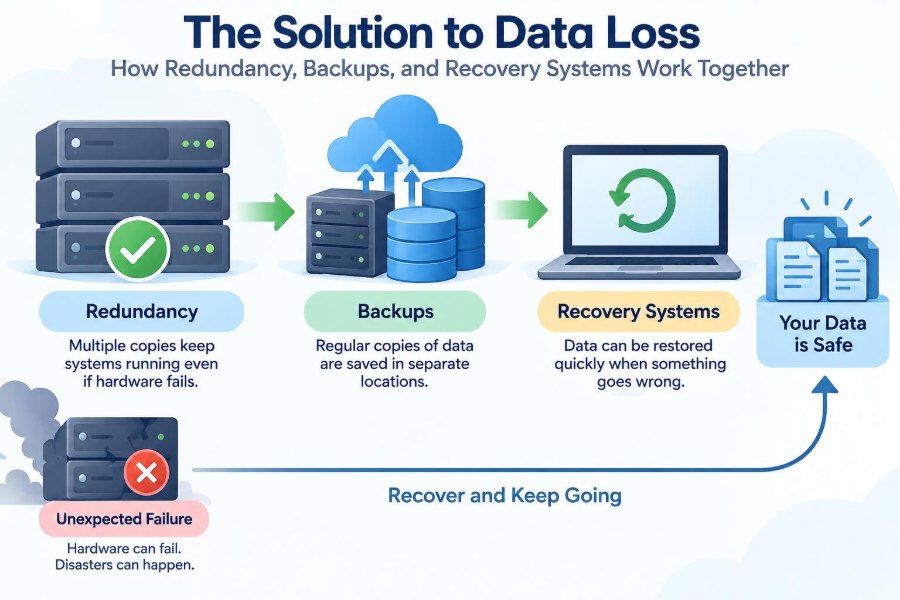
Preventing data loss is not a matter of finding one perfect tool. Reliable systems combine several ideas that solve different parts of the problem: redundancy keeps services running, backups preserve earlier copies, and recovery systems restore useful operation after disruption.
Understanding how those layers fit together helps you protect everything from personal photos to a business database. It also explains why a system with duplicate hardware can still lose data, and why a backup can exist yet still be unusable when it is needed most.
🧩 What Data Loss Actually Means
Data loss is broader than a deleted file. It occurs whenever data becomes unavailable, corrupted, inaccessible, or unusable for the people and applications that need it.
A file may still physically exist on a drive but count as lost in practice if encryption keys are missing, the database structure is damaged, access permissions fail, or the only server holding it is offline. Availability and usability matter alongside storage.
There is also a useful distinction between temporary unavailability and permanent loss. A failed server that can be restarted causes downtime; a deleted record with no recoverable copy causes lasting loss.
⚠️ Where Data Loss Comes From
Hardware eventually fails. Drives wear out, power supplies break, cables loosen, and storage controllers can malfunction. Cloud services reduce some local hardware work, but they do not remove the possibility of outage, deletion, or configuration error.
Human actions are another major source of risk. Someone might delete the wrong folder, run an incorrect database command, overwrite a document, or misconfigure a storage policy.
Other causes include:
- Software defects that write incorrect data or corrupt files
- Malware and ransomware that encrypt or destroy accessible files
- Power failures, fires, flooding, and other physical incidents
- Network failures that interrupt access or replication
- Account compromise and malicious insiders
Each cause requires a somewhat different defense. That is why one copy, one location, or one protective mechanism is rarely enough.
🛡️ The Three Jobs: Availability, Preservation, and Restoration
Data protection is easier to design when its goals are separated. Availability means a system can keep serving users. Preservation means an older, correct version remains safe. Restoration means people can rebuild operations after an incident.
Redundancy primarily supports availability. Backups primarily support preservation. Recovery systems coordinate the restoration process, including infrastructure, software, data, people, and procedures.
These layers overlap, but they are not interchangeable. A mirrored disk may keep an application online after one disk fails, yet it may instantly mirror a mistaken deletion too.
🔁 Redundancy: More Than Having a Duplicate
Redundancy means deliberately providing extra components, paths, or copies so that one failure does not stop the entire system. The duplicate may be a second disk, server, network connection, power source, or data center.
The key idea is that the components should not fail for the same reason. Two servers connected to the same failing power supply are technically duplicated, but they share a critical weakness.
Well-designed redundancy removes single points of failure: individual components whose failure would halt a service. It is often built into systems that must remain responsive, such as transaction platforms, communications services, and shared business applications.
💾 Disk Redundancy and RAID
RAID, short for Redundant Array of Independent Disks, combines multiple drives into one logical storage system. Some RAID arrangements copy the same data to more than one drive; others distribute data and extra recovery information across drives.
A mirrored arrangement can continue operating after a drive fails because another drive holds the same information. Parity-based arrangements use calculated information that can help reconstruct data after certain drive failures.
RAID is useful for uptime and for replacing a failed drive without immediately stopping a service. However, RAID is not a backup. It does not normally retain a historical version that existed before an accidental deletion, corruption event, or ransomware infection.
🖥️ Server and Application Redundancy
Applications can run on multiple servers rather than depending on one machine. A load balancer distributes requests across the available servers, and health checks can stop sending traffic to a server that is not responding correctly.
For example, an online service might run identical web servers in a group. If one fails, remaining servers can handle requests, perhaps with reduced capacity but without a complete outage.
This design only works if the application state is considered. Web servers are often easier to duplicate when they are stateless, meaning user session data and important files are stored elsewhere rather than only in one server’s memory or local disk.
🌐 Network and Power Redundancy
A reliable service needs more than redundant computing hardware. It may need alternate network paths, multiple internet providers, spare switches, backup power supplies, battery systems, and generators.
Consider an office server with duplicated drives and a second server. If both depend on one network switch, a switch failure can still isolate users. If both sit in the same room, a local fire or flood can affect them together.
This is a reminder that resilience is a property of the whole system. Protecting the most visible component while ignoring its dependencies leaves hidden single points of failure.
🔄 Replication: Copying Data Between Systems
Replication is the process of copying data from one system to another. It is common in databases, storage platforms, and cloud services, where a primary system sends changes to replicas.
Synchronous replication waits for another system to confirm a write before reporting success. It can reduce the amount of confirmed data lost during a failure, but it may add delay and requires reliable, low-latency connections.
Asynchronous replication lets the primary system continue before the replica receives every change. It can work over longer distances, but a sudden primary failure may leave the replica behind by some amount of recent data.
⏱️ Why Replication Can Repeat Mistakes
Replication copies changes, whether those changes are helpful or harmful. If a user deletes a folder and the deletion replicates, every replica may soon reflect that deletion.
The same problem appears with corrupted data and ransomware. If malicious encryption reaches a synchronized folder or database, replication may efficiently distribute the damaged version.
This does not make replication a bad idea. It means replication solves an availability and location problem, not a history problem. Versioned backups or snapshots are needed to return to an earlier clean state.
📦 What a Backup Is Designed to Do
A backup is a separate copy of data retained so it can be restored after loss, corruption, deletion, or disaster. Its main value is that it preserves a recoverable point from the past.
A useful backup is more than copied bytes. It must be complete enough for the intended restore, protected from unauthorized change, discoverable by the people who need it, and readable by the necessary tools.
A copied document on the same laptop is convenient, but it is a weak backup because theft, disk failure, or malware may affect both copies. Separation is central to backup design.
🗂️ Full, Incremental, and Differential Backups
Backup methods balance storage use, backup speed, and restore complexity. The names describe how much data is copied during each backup job.
| Type | What it copies | Typical trade-off |
|---|---|---|
| Full | All selected data | Simple to restore, but can require more time and storage |
| Incremental | Changes since the latest backup of any type | Efficient to create, but restoration may require several backup sets |
| Differential | Changes since the latest full backup | Grows over time, but restoration usually needs fewer sets than incremental backups |
Modern backup products may use snapshots, deduplication, and other techniques that make the implementation more complex than this basic model. The underlying question remains simple: what data must be available to reconstruct a chosen point in time?
📸 Snapshots and Version History
A snapshot records the state of a storage volume, virtual machine, or dataset at a particular moment. Some snapshots initially store only changes, making them fast and space-efficient.
Version history performs a similar role for files. It lets a user retrieve an earlier version after an accidental edit or overwrite, which is especially useful for collaborative documents.
Snapshots are valuable for quick recovery, but their protection depends on where and how they are stored. A snapshot on the same compromised system may be deleted or damaged by an attacker with sufficient access. Treat snapshots as one layer, not automatically as the only backup.
🏠 The 3-2-1 Principle
A practical rule of thumb is the 3-2-1 backup principle: keep at least three copies of important data, on two different kinds of storage, with one copy kept offsite.
The point is not that every situation must follow these exact numbers rigidly. The principle encourages independence. A local copy supports fast recovery, while an offsite copy can survive a theft, building incident, or local equipment failure.
For critical data, organizations often extend the idea with an offline or immutable copy—one that cannot be easily altered or deleted during normal operations.
🔒 Offline and Immutable Backup Protection
An offline backup is disconnected from the systems it protects, at least for part of its life. Because it is not continuously reachable, malware and compromised accounts have a harder time modifying it.
An immutable backup is designed to resist alteration for a defined retention period. Depending on the technology, even administrators may be unable to delete or change protected backup data before that period ends.
These protections have limits. They do not help if bad data was backed up before the problem was discovered, and they require careful retention planning. Still, they provide a meaningful barrier against attacks that target both production data and backups.
🧠 Backing Up Databases Correctly
Databases are not just collections of separate files. While a database is active, data may be changing in multiple places, and transactions may be partly completed. Copying raw files at an arbitrary moment can create an inconsistent backup.
Database-aware backups use the database system’s tools or a coordinated snapshot process. They capture data in a recoverable state and may include transaction logs, which record changes over time.
For example, a database restore may begin with a full backup, then apply later log records to reach a point shortly before an error occurred. The exact options vary by product, so restore planning should match the specific database platform.
🎯 RPO: How Much Data Can You Lose?
The Recovery Point Objective, or RPO, describes the maximum acceptable age of recovered data. If a system has an RPO of four hours, a recovery plan aims to limit lost work to no more than roughly four hours.
RPO is a business decision expressed technically. A personal photo library might tolerate a daily backup, while a system recording ongoing transactions may need much more frequent protection.
A smaller RPO usually requires more frequent backups, replication, or log capture. That can add cost, storage demands, and operational complexity, so the goal should reflect the value and change rate of the data.
🚀 RTO: How Fast Must Service Return?
The Recovery Time Objective, or RTO, is the target maximum time to restore a service after disruption. It includes more than copying data back: replacement infrastructure, network configuration, application setup, validation, and communication can all consume time.
Two systems can have the same RPO but very different RTOs. A monthly archive might be restored manually over a day, while a customer-facing application may need automatic failover within a much shorter window.
RTO is a target, not a magical property of a backup product. It must be tested under realistic conditions to be credible.
🧭 Disaster Recovery Is a Whole Plan
Disaster recovery, often shortened to DR, is the organized process of restoring technology services after a major disruption. It includes backups, but also the environment in which restored data will run.
A DR plan should identify systems in priority order, responsible people, communication paths, dependencies, and the steps required to bring services back safely. A database may be useless until its identity service, network rules, application servers, and encryption keys are also available.
The plan should be understandable under pressure. A long document full of untested assumptions is less valuable than clear procedures maintained alongside the actual systems.
🏢 Site Failover and Geographic Separation
Site failover moves workloads from an affected location to another location. The alternate site may be a second office, a data center, or a separate cloud region.
Geographic separation helps when a local event affects power, connectivity, or physical access. But distance introduces trade-offs: data replication may be slower, operations may be more expensive, and legal or organizational requirements can affect where data is stored.
Failover also needs a plan for failback—the controlled return to the primary location after it is repaired. Returning too quickly or without reconciling changed data can create a second incident.
☁️ Shared Responsibility in Cloud Services
Cloud providers often supply durable infrastructure, redundant hardware, and managed service features. Those capabilities can reduce certain risks, but they do not automatically protect every customer action or every type of data.
For many services, customers remain responsible for identity security, permissions, configuration, retention settings, and deciding whether application data needs an independent backup. The precise division depends on the service model and contract.
A helpful question is: if an authorized user permanently deletes this data, or an account is compromised, what copy and recovery path remains? Do not assume provider redundancy answers that question.
🧑💻 Human Error Needs Its Own Defenses
Many incidents begin with ordinary mistakes rather than dramatic disasters. A rushed command, an unclear folder name, or an overly broad permission can affect large amounts of data.
Good design reduces the blast radius—the amount of damage one error can cause. Role-based access, approval steps for destructive actions, least-privilege permissions, clear naming, and version history all help.
Backups are the safety net, not permission to ignore careful working practices. The best recovery is often the one made unnecessary by a small preventive control.
🦠 Ransomware Changes the Recovery Problem
Ransomware commonly tries to make data inaccessible and may also target backups, administrative accounts, and recovery tools. Its impact depends not only on what was encrypted, but on whether clean copies and trusted credentials still exist.
Defenses include separating backup credentials from everyday accounts, limiting access, maintaining protected copies, monitoring unusual activity, and rehearsing restore procedures. No individual control is sufficient in every case.
During a suspected incident, recovery should be deliberate. Restoring immediately into an unsafe environment can allow the same threat to spread again. Investigation and containment affect whether recovery actually succeeds.
✅ Backup Verification Is Not Optional
A backup job that reports success has shown that a process completed; it has not necessarily shown that the data can be restored correctly. Backup files can be incomplete, encrypted with unavailable keys, or inconsistent with the application they were meant to protect.
Verification may include checking backup integrity, confirming expected files or records exist, and running automated validation. The strongest evidence comes from a real restore to a safe test environment.
Test both small and large recoveries. Restoring one document answers a different question from rebuilding an application, database, and access configuration after a full outage.
🧪 Recovery Drills Reveal Hidden Gaps
A recovery drill is a planned exercise that tests people, procedures, and technology. It turns assumptions into observable results: how long restoration takes, which instructions are missing, and which dependencies were forgotten.
A simple drill might restore a sample folder and confirm files open normally. A more advanced exercise may simulate loss of a server, switch to an alternate environment, and validate that users can complete essential tasks.
Document what failed and update the plan. Recovery capability decays when systems change but documentation, permissions, and backup selections do not.
📋 Building a Data Classification Plan
Not every file deserves the same level of protection. A data classification plan groups information by its value, sensitivity, legal obligations, and operational importance.
For example, a team might distinguish between temporary downloads, working documents, financial records, customer data, software source code, and system configuration. Each category can then receive an appropriate backup frequency, retention period, access policy, and recovery target.
Classification prevents two common failures: spending heavily to protect disposable data, and underprotecting data whose loss would halt work or harm people.
🗓️ Retention: Keeping Copies for the Right Length of Time
Retention determines how long backup versions are kept. Short retention saves storage but may leave no clean copy when a slow-moving problem is discovered weeks later. Very long retention increases cost and can complicate privacy and records-management obligations.
A useful policy considers several recovery needs: recent versions for ordinary mistakes, older versions for delayed corruption, and long-term archives where there is a genuine business or legal reason.
Backups and archives are related but different. Backups support restoration after loss; archives preserve information for extended reference. Treating one as the other can lead to unsuitable storage, search, or retention decisions.
🔑 Protecting Keys, Credentials, and Configuration
Encrypted backups are valuable only if authorized recovery personnel can obtain the required keys. Likewise, restoring a server may be difficult without configuration files, software licenses, network settings, domain information, and administrator access.
Protect these assets carefully, but avoid making them known to only one person. Document secure recovery access and establish appropriate emergency procedures.
Configuration backups deserve special attention. A restored application can still fail if firewall rules, DNS settings, infrastructure definitions, or service accounts are missing or incorrect.
📱 A Practical Setup for Personal Data
For an individual, a sensible approach can be much simpler than enterprise disaster recovery. Identify irreplaceable files first: photos, personal documents, creative work, financial records, and project files.
- Keep active files on a device you use regularly.
- Maintain an automatic backup to a separate local drive.
- Keep another protected copy in a separate location or reputable storage service.
- Turn on version history where available.
- Periodically open restored files, not just the originals.
Sync services are convenient, but synchronization alone should not be treated as full backup protection. A deletion or bad edit can synchronize just as conveniently.
🏗️ A Practical Approach for Small Teams
Small organizations should begin with an inventory: what systems hold important data, who owns them, what depends on them, and how costly downtime would be. This often reveals overlooked data on employee devices, shared drives, and third-party applications.
Then define realistic RPO and RTO targets, automate backups, protect administrative access, and document restoration steps. Start with the most critical services rather than trying to build a perfect solution everywhere at once.
Managed providers can help, but responsibility cannot be outsourced completely. Someone inside the organization should understand what is protected, where copies reside, how long they are retained, and how restoration is requested or performed.
🚫 Common Assumptions That Cause Trouble
Several reassuring statements hide serious gaps in data protection:
- “It is in the cloud.” The data may be highly available, but deletion recovery and retention still need checking.
- “We have RAID.” RAID helps tolerate drive failure, not most logical errors or disasters.
- “The backup ran last night.” A successful job does not prove a usable restore.
- “Someone knows how to fix it.” Knowledge held by one person is fragile during an emergency.
- “We will decide later.” Recovery choices made during a crisis are slower and more error-prone.
Replacing these assumptions with documented, tested answers is one of the highest-value improvements a team can make.
⚖️ Balancing Cost, Complexity, and Risk
Maximum resilience is not free. More copies, more locations, faster recovery targets, and stronger isolation all require money, time, skills, and ongoing maintenance.
The right design is therefore proportional. A personal notes folder does not need the same architecture as a system that supports essential services, but neither should its only copy live on an aging device.
Focus on the consequences of loss. Ask what would happen if this data vanished, if it were wrong, or if it were unavailable for a day. Those answers guide sensible investment better than buying features by default.
🧱 Designing Layers Instead of Seeking One Tool
Reliable data protection is a layered system. Redundant components reduce interruptions from failures. Replication provides alternate copies for continuity. Versioned backups preserve earlier states. Recovery plans coordinate the return of services.
Each layer has blind spots, and the layers compensate for one another. A backup may take time to restore; redundant servers can bridge that time. Redundancy may copy a mistake; an immutable backup can provide a clean point to return to.
Thinking in layers also improves troubleshooting. When an incident occurs, teams can ask separate questions: Is the service still available? Is there an intact copy? What is required to restore safe operation?
🌟 The Core Principle: Recoverability Must Be Designed
Data protection is not achieved when copies exist somewhere. It is achieved when the right data can be recovered, in a usable form, by the people who need it, within an acceptable amount of time.
That requires deliberate choices about failure modes, independent copies, retention, access, testing, and priorities. The details differ between a student laptop and a large organization, but the logic is the same.
Redundancy keeps systems moving, backups preserve the past, and recovery systems turn protected data into restored work. Together, they provide a practical answer to data loss rather than a false promise that loss can never happen.
The strongest protection is not a single product but a tested set of layers designed for the data you cannot afford to lose. Start with your most valuable information, make an independent copy, and prove that you can restore it. 💾🛡️✅