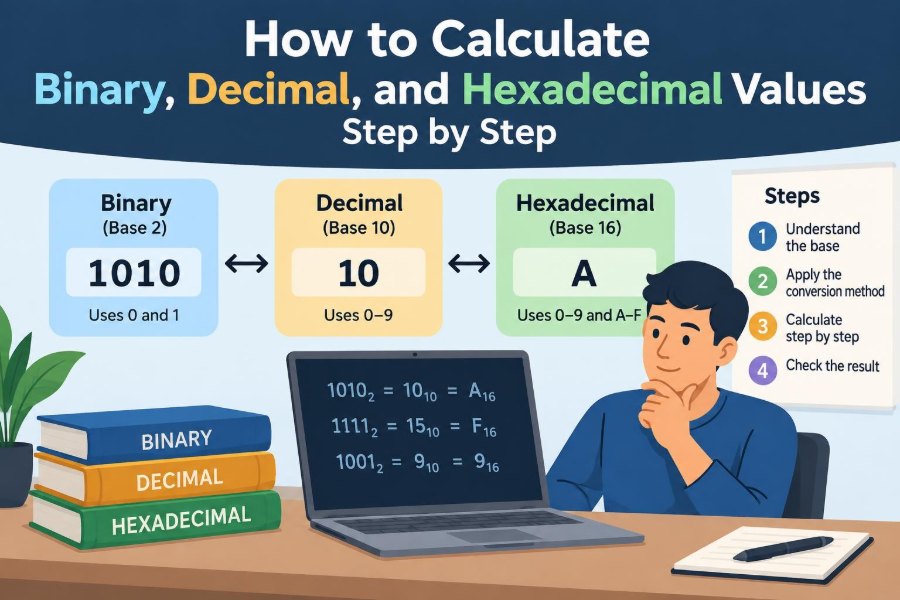

You open a file’s properties and see a size measured in bytes. A programming tutorial shows 0xFF. A network tool reports an address in bits. These values can look like separate technical languages, even though they describe the same underlying idea: a quantity written with different symbols.
Decimal feels natural because people normally count in tens. Computers, however, use electronic states that are conveniently represented by two values, so binary is fundamental to how data is stored and processed. Hexadecimal gives humans a compact way to read long binary patterns.
Learning to convert among these systems is more than a classroom exercise. It helps when reading code, understanding colors, checking permissions, working with memory, or diagnosing why a value is not what you expected.
The arithmetic is systematic. Once you understand place value and follow a few repeatable methods, binary, decimal, and hexadecimal calculations become much less mysterious.
🔢 Start with the idea of a number base
A number base, also called a radix, tells you how many digit symbols a system uses before it carries into a new position. Decimal is base 10, so its digits are 0 through 9. After 9 comes 10, which means one group of ten and zero ones.
Binary is base 2 and uses only 0 and 1. Hexadecimal is base 16, using 0 through 9 and then A through F. The letters represent values that need extra single-character symbols: A is 10, B is 11, through F, which is 15.
🧱 See place value in every system
Each position in a numeral has a value based on powers of its base. In decimal, the number 347 means 3×10² + 4×10¹ + 7×10⁰. Reading from right to left, the place values are ones, tens, hundreds, and so on.
For binary, positions are powers of 2: 1, 2, 4, 8, 16, 32. For hexadecimal, they are powers of 16: 1, 16, 256, 4096. The symbols change, but the place-value rule does not.
🗂️ Compare decimal, binary, and hexadecimal digits
| Decimal value | Binary | Hexadecimal |
|---|---|---|
| 0 | 0 | 0 |
| 1 | 1 | 1 |
| 9 | 1001 | 9 |
| 10 | 1010 | A |
| 15 | 1111 | F |
| 16 | 10000 | 10 |
The row for 16 is especially useful. In hexadecimal, 10 does not mean ten decimal; it means one group of sixteen and zero ones. Always identify the base before interpreting a numeral.
🏷️ Recognize common base prefixes
Programming languages and tools often mark a base with a prefix. Conventions vary by language, but common forms include 0b1011 for binary, 0x2F for hexadecimal, and an ordinary 47 for decimal.
Some contexts use subscripts, such as 1011₂ or 2F₁₆. The prefix or subscript is not part of the numerical value; it tells the reader how to interpret the digits.
💡 Read binary as powers of two
To convert binary to decimal, label each bit with its power-of-two place value and add the places containing 1. A bit is one binary digit. Consider 101101₂:
1×32 + 0×16 + 1×8 + 1×4 + 0×2 + 1×1 = 45
Therefore, 101101₂ = 45₁₀. Zeros are still meaningful because they hold a position, even though they add nothing.
🧮 Use a running-total method for binary
You do not need to write every power of two. Scan digits from left to right: multiply the current total by 2, then add the next bit. For 1101₂, start at zero: 0×2+1=1, then 1×2+1=3, then 3×2+0=6, then 6×2+1=13.
This method works for any base. For hexadecimal, multiply the running total by 16 before adding the next digit’s value.
🪜 Convert decimal to binary by division
For a nonnegative whole number, repeatedly divide by 2 and record each remainder. Read the remainders from bottom to top. To convert 45:
45 ÷ 2 = 22 remainder 1
22 ÷ 2 = 11 remainder 0
11 ÷ 2 =  5 remainder 1
 5 ÷ 2 =  2 remainder 1
 2 ÷ 2 =  1 remainder 0
 1 ÷ 2 =  0 remainder 1
Reading upward gives 101101₂. The final quotient of zero tells you to stop.
🎯 Convert decimal to binary by subtracting powers
For smaller numbers, choose the largest power of 2 that does not exceed the number, subtract it, and continue. For 45, the largest usable power is 32. The remainder is 13; then use 8, leaving 5; then 4, leaving 1; then 1.
The selected places are 32, 8, 4, and 1. Across the positions 32, 16, 8, 4, 2, 1, that becomes 101101. This approach makes the meaning of each 1 very visible.
➕ Add binary values carefully
Binary addition follows familiar column arithmetic, but a carry happens whenever a column reaches 2. The core facts are simple:
0 + 0 = 00 + 1 = 11 + 1 = 10— write 0 and carry 11 + 1 + 1 = 11— write 1 and carry 1
For example, 1011₂ + 0110₂ = 10001₂, which is 11 + 6 = 17 in decimal. Align the rightmost digits before adding.
➖ Understand binary subtraction and borrowing
Binary subtraction also uses borrowing. Since the base is 2, borrowing one from the next column gives the current column a value of 2, written as 10₂. Thus, 10₂ − 1₂ = 1₂.
For instance, 10000₂ − 00001₂ = 01111₂. The borrow travels across the zeros, much like subtracting 1 from 1000 in decimal produces 999. Leading zeros may be omitted, so the answer is normally written 1111₂.
🧩 Group bits to move between binary and hex
Hexadecimal is convenient because one hexadecimal digit represents exactly four bits. Four bits have 16 possible patterns, from 0000 through 1111, matching hexadecimal values 0 through F.
To convert binary to hex, group bits in sets of four from the right. Add leading zeros to the left only if the first group is short. For example, 10110110₂ becomes 1011 0110, or B6₁₆.
🔤 Memorize the hexadecimal digit map
The letters in hexadecimal are values, not variables, unless a programming context says otherwise. The essential map is:
A = 10 B = 11 C = 12 D = 13 E = 14 F = 15
For a useful mental reference, 1111₂ equals 15 decimal and F₁₆. Once this correspondence is familiar, binary-to-hex conversion becomes pattern matching rather than repeated arithmetic.
🔄 Convert hexadecimal to binary directly
Replace each hex digit with its four-bit binary equivalent. Do not treat the entire hex number as one large block first. For 3A7₁₆:
3 = 0011   A = 1010   7 = 0111
3A7₁₆ = 001110100111₂
The leading zeros can be removed if no fixed width is required, giving 1110100111₂. In storage formats, though, those zeros may matter because values are often expected to occupy a set number of bits.
📐 Convert hexadecimal to decimal with place values
Multiply each hexadecimal digit by a power of 16 and add the results. For 2F₁₆, F means 15:
2×16¹ + 15×16⁰ = 32 + 15 = 47
For longer values, positions continue as 16², 16³, and beyond. A calculator can check the result, but doing a few by hand builds confidence in what the notation means.
🚶 Convert decimal to hexadecimal by division
Repeatedly divide a decimal integer by 16, recording remainders. When a remainder is 10 through 15, write A through F. Convert 254:
254 ÷ 16 = 15 remainder 14 (E)
 15 ÷ 16 =  0 remainder 15 (F)
Read upward: FE₁₆. A quick check confirms that 15×16 + 14 = 254.
🎨 Recognize hexadecimal in color codes
Many web colors are written as three pairs of hexadecimal digits, such as #RRGGBB. Each pair commonly represents the intensity of red, green, and blue on a scale from 00 to FF.
For example, #FF0000 represents full red with no green or blue in the conventional RGB model. Hex is compact here: a pair such as FF is 255 decimal, while still corresponding neatly to eight bits.
💾 Connect bits, nibbles, bytes, and words
Four bits are often called a nibble. Eight bits make a byte, which is commonly shown as two hexadecimal digits. Thus 7F₁₆ is one byte: 01111111₂.
A word is a processor-sized unit, but its exact size depends on the architecture and context. Avoid assuming that “word” always means a fixed number of bits; bytes and nibbles are more consistently defined for everyday conversions.
📏 Respect fixed-width binary values
The value 5 can be written 101₂, but in an 8-bit field it may appear as 00000101₂. Both represent positive five, yet the fixed-width form communicates how much storage is allocated and which bit is in which position.
Leading zeros are especially significant in binary masks, hardware registers, byte-oriented data, and grouped hexadecimal output. Dropping them casually can make a correctly valued number look structurally wrong.
➕ Add hexadecimal without converting everything
Hexadecimal addition uses base-16 carrying. If a column total reaches 16, write its remainder after division by 16 and carry 1. For example, A + 7 = 17 decimal, which is 11₁₆: write 1 and carry 1.
So 2A₁₆ + 17₁₆ = 41₁₆. In the right column, A + 7 is 11 hex; write 1 and carry 1. Then 2 + 1 + carried 1 is 4.
⚠️ Avoid mixing digits with values
A frequent error is treating the hex symbol A as if it were a decimal digit. In calculations, replace it with its value, 10. For example, A×16 means 10×16, not an unknown quantity multiplied by 16.
Another mistake is reading 10₁₆ as decimal ten. Its value is 16 decimal. A subscript, prefix, or clear label prevents ambiguity.
🧭 Keep digit order under control
Repeated-division conversions produce remainders from least significant to most significant. That is why the remainders must be read in reverse order. Reading them top to bottom is one of the most common conversion errors.
When grouping binary into nibbles, start from the right, where the ones place lives. Grouping from the left without accounting for the final group can shift place values and yield the wrong hex result.
🧪 Verify a conversion two ways
A reliable check is to convert back using a different method. If you turn 45 decimal into 101101₂, add its active place values: 32 + 8 + 4 + 1. If the total returns to 45, the result is consistent.
For hexadecimal, binary grouping offers a fast check. If B6₁₆ becomes 1011 0110₂, calculate 128 + 32 + 16 + 4 + 2 to confirm 182 decimal.
🧠 Use mental anchors instead of memorizing long lists
Memorize powers of 2 through at least 128: 1, 2, 4, 8, 16, 32, 64, 128. For hex, remember that 10₁₆ = 16₁₀, 100₁₆ = 256₁₀, and FF₁₆ = 255₁₀.
These anchors make estimates easier. A hexadecimal byte beginning with C is at least 192 decimal because C is 12 and 12×16 = 192.
🖩 Know when calculators and code help
Calculators, debuggers, spreadsheets, and programming-language functions can convert bases quickly and reduce arithmetic slips. They are appropriate for long values, routine work, and verification.
Still, tools can hide assumptions. Check whether input is treated as decimal by default, whether a prefix is required, and whether leading zeros or signed values are being displayed in a particular format. Understanding the manual method helps you spot a misleading result.
🔐 Understand signed binary at a basic level
So far, the examples have represented nonnegative integers. Computers often store negative integers with two’s complement, a fixed-width convention. In an 8-bit two’s-complement value, the leftmost bit contributes to whether the stored pattern represents a negative number.
For example, 11111111 is 255 if interpreted as an unsigned byte, but commonly represents −1 when interpreted as an 8-bit two’s-complement integer. The bit pattern is the same; the interpretation rule differs.
🌊 Remember that fractions need a radix point
Whole-number conversion methods do not fully handle fractions. A binary fraction uses negative powers of 2: the places after the point are 1/2, 1/4, 1/8, and so on. Thus 0.101₂ = 1/2 + 1/8 = 0.625₁₀.
Some decimal fractions, such as 0.1, do not have a finite binary representation. Computers often approximate them in floating-point formats, so small rounding effects can occur. That is a representation limitation, not necessarily a calculation mistake.
🛠️ Practice with a repeatable workflow
Before converting, write the source base and desired base. Then choose the shortest dependable route:
- Binary to decimal: add powers of 2 or use a running total.
- Decimal to binary: divide by 2 or subtract powers of 2.
- Binary to hexadecimal: group four bits from the right.
- Hexadecimal to binary: replace each digit with four bits.
- Hexadecimal to decimal: expand powers of 16.
- Decimal to hexadecimal: divide by 16.
Finally, verify with a reverse conversion or an estimate. This small habit catches reversed digits, missing carries, and mistaken letter values.
🚀 Bring the systems together
Binary, decimal, and hexadecimal are not competing kinds of mathematics. They are different notations for quantities, governed by the same place-value principle. Decimal is convenient for everyday counting, binary maps directly to two-state digital hardware, and hexadecimal makes binary data easier for people to scan.
The core skill is to identify the base, assign each position its correct power, and use a method that preserves digit order. Once those steps are automatic, values in code, memory displays, and technical documentation become readable rather than opaque.
Every base conversion becomes manageable when you treat it as place value, not as a trick to memorize. Practice a few short examples, check them in reverse, and the patterns will start to feel natural. 💻🔢🧠