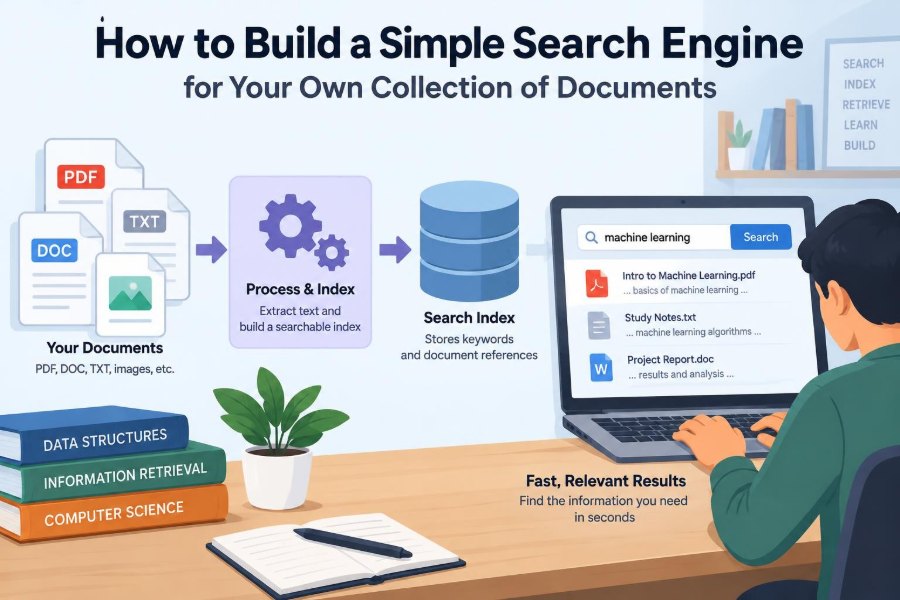

You have a folder full of lecture notes, project reports, meeting minutes, saved articles, and PDFs. You remember reading a useful sentence somewhere—but the filename is unhelpful, and opening documents one by one is slow.
That is the small, everyday problem a search engine solves. It does not need to be a giant web service. A search engine can be a focused tool that helps you find information inside a collection you control.
Building one is also an excellent way to understand how search works behind the familiar search box. You will turn documents into searchable data, interpret a person’s query, rank possible matches, and present useful results.
A simple version can run locally on your computer, use straightforward data structures, and still teach the core ideas behind much larger information-retrieval systems.
🔎 Define the Search Problem First
Before writing code, define what your engine should search and what a good result means. “Search documents” could mean finding files whose names match a query, finding pages that contain a phrase, or ranking documents by how relevant they seem.
For a first project, choose a narrow goal: search plain-text documents and return the most relevant filenames with a short preview. This boundary prevents useful learning from being buried under file-format and interface complications.
📚 Choose a Manageable Document Collection
Start with a collection of perhaps dozens or hundreds of documents rather than an entire hard drive. Course notes, exported knowledge-base pages, personal writing, or public-domain text files are practical choices.
Plain text is easiest because the content is already readable by your program. PDFs, Word documents, spreadsheets, and scanned pages need separate extraction steps, and scanned pages may require optical character recognition (OCR).
- Keep one document per file when possible.
- Use stable filenames or assign each document a unique identifier.
- Store basic metadata such as title, path, and last modified time.
- Exclude private material you do not intend to index.
🧭 Understand the Search Engine Pipeline
A document search engine usually has two main phases: indexing and querying. Indexing prepares the collection in advance. Querying uses that prepared structure to answer a search quickly.
The overall pipeline is simple:
- Read each document and extract its text.
- Normalize and split the text into searchable terms.
- Build an index that records where terms occur.
- Process the user’s query in the same way.
- Find, score, sort, and display matching documents.
The key idea is that you do the expensive organizational work before a person starts searching.
📥 Extract Text From Each File
Your index can only search text that your program can obtain. For plain-text files, read the file using a known character encoding such as UTF-8. For structured formats, use an appropriate parser rather than treating the file as arbitrary bytes.
Extraction deserves care because it affects every later stage. A PDF extractor may return text in an odd reading order. A document may contain headers, repeated footers, tables, or navigation text that should not influence relevance.
Save the original path and extracted text separately. If something looks wrong in a result, you can inspect the extraction rather than guessing whether ranking caused the problem.
🧹 Normalize Text Consistently
Normalization changes equivalent-looking text into a consistent form. A basic version lowercases letters, replaces punctuation with spaces, and collapses repeated whitespace.
For example, “Search-Engine,” “search engine,” and “SEARCH engine” should usually become the same searchable terms. Apply the same normalization rules to documents and user queries, or a query may fail to match text that appears visibly identical.
Do not remove punctuation blindly in every domain. Hyphens, programming symbols, version numbers, email addresses, and product names may carry meaning. Your rules should suit your collection.
✂️ Tokenize Text Into Terms
Tokenization is the process of splitting text into units called tokens, often words. A basic tokenizer might split normalized text wherever it sees whitespace.
That approach works well enough for an introductory English-language project, but it has limits. “Don’t,” “C++,” “data-driven,” and “2024-05-01” raise decisions about what should count as one term.
Write down your tokenizer’s behavior and test it with unusual input. Search quality often depends more on these small text-processing choices than beginners expect.
🛑 Decide How to Handle Stop Words
Stop words are extremely common words such as “the,” “and,” or “of.” Removing them can make an index smaller and reduce noise in some searches.
However, removal also changes meaning. A query such as “to be or not to be” depends on common words, and phrases can break if those words disappear. For a simple personal engine, keeping stop words is often the clearest initial choice.
If you later remove them, do so consistently at indexing and query time, and make phrase-search behavior explicit.
🌱 Consider Stemming and Lemmatization Carefully
Users may search for “connect” when a document uses “connected” or “connection.” Stemming reduces words to rough shared forms, while lemmatization tries to map words to dictionary base forms.
Both can improve recall—the chance of finding relevant material—but may introduce surprising matches. A simple stemmer can merge words that are not truly related.
For a first engine, exact normalized word matching is easier to explain and debug. Add word-form handling only after you can evaluate whether it helps your documents.
🗂️ Build an Inverted Index
The central data structure is an inverted index. Instead of storing each document followed by its words, it stores each word followed by the documents containing it.
If three documents mention “compiler,” an index might map that term to their identifiers and occurrence information. A search for “compiler” can then jump straight to those documents rather than reading every file again.
"compiler" → {doc_2: [14, 89], doc_7: [3], doc_9: [41, 42]}The number lists are token positions. They are optional for a minimal engine, but they enable phrase and proximity features later.
🔢 Store Term Frequencies and Document Frequencies
Two counts make ranking much more useful. Term frequency is how often a term appears in one document. Document frequency is the number of documents that contain that term at least once.
A term repeated several times may be central to a document. But a term found in nearly every document is less helpful for distinguishing results. These counts support practical ranking methods such as TF-IDF and BM25.
Also store document length. Without that information, a long document can appear more relevant merely because it contains more words.
💾 Keep the Index Separate From the Source Files
Reading and tokenizing every document for every query is wasteful. Once built, save your index and document metadata to disk so the search engine can load them quickly.
For a small project, a JSON file, SQLite database, or language-native serialized structure can work. The best choice is one you can inspect and update safely.
Think about freshness too. When a file changes, the old index entry is no longer accurate. A simple solution is a full rebuild; an advanced solution updates only changed documents.
⌨️ Process Queries Using the Same Rules
A query is just a short piece of text, but it should pass through the same lowercase, normalization, and tokenization process as documents. Otherwise “Networks” in a query may not match “networks” in the index.
Keep the original query as well. It is useful for displaying what was searched and for interpreting quoted phrases or operators later.
An empty query, punctuation-only query, or query made entirely of excluded terms should return a clear message rather than an error or a misleading list of every document.
🔗 Start With AND and OR Matching
For multi-word queries, decide how terms combine. An AND query returns documents containing every term. An OR query returns documents containing at least one term.
AND is precise but can return nothing when a user chooses one uncommon word. OR is forgiving but can produce many weak matches. A useful basic behavior is to gather OR matches, then rank documents containing more query terms above partial matches.
| Query style | Useful when | Main trade-off |
|---|---|---|
| AND | The user needs all concepts present | May miss relevant partial matches |
| OR | The user is exploring a topic | Can return broad, noisy results |
| Ranked OR | General-purpose document search | Needs a scoring method |
⚖️ Rank Results Instead of Listing Them Arbitrarily
Matching is not the same as usefulness. If fifty documents contain “project,” users need the most relevant ones near the top.
A simple score can reward each query term found in a document and add a small bonus for repeated occurrences. This is easy to implement, but it can favor long documents and common words.
Even a modest ranking model makes the interface feel far more capable because it treats search as a question of relevance, not merely membership.
📈 Use TF-IDF for a Strong First Ranking Model
TF-IDF stands for term frequency–inverse document frequency. It gives more weight to terms that occur often in one document but occur in relatively few documents across the collection.
In plain language, a rare technical term is usually more informative than “document.” A common expression of the idea is term frequency multiplied by an inverse-document-frequency value based on the term’s document frequency.
TF-IDF is a useful learning model, not a universal answer. Its exact calculation has variations, and good results depend on the collection and preprocessing choices.
📏 Account for Document Length
Imagine a two-page note and a 400-page manual both contain the query words five times. The repeated words may be more concentrated and meaningful in the short note.
Length normalization reduces the advantage that very long documents gain from having more opportunities to contain any term. BM25, a widely used family of ranking functions, includes this idea along with term frequency and rarity.
You do not need to implement BM25 immediately. The lesson is more important: a raw word count is rarely a fair relevance score.
🗣️ Add Exact Phrase Search With Positions
A search for “binary search tree” often means the words should appear together in that order. An ordinary inverted index knows that all three words occur; it does not necessarily know that they form the phrase.
If each posting records token positions, phrase matching checks whether “binary,” “search,” and “tree” appear at consecutive positions in the same document. This is why position lists were useful earlier.
Use quotation marks as a simple interface convention, such as "binary search tree". Explain that exact phrases may miss variations like punctuation or plural forms.
➕ Support Simple Query Operators Gradually
After basic ranked search works, small operators give users more control. Useful examples include a required term, an excluded term, and quoted phrases.
network security          ordinary ranked search
"network security"        exact phrase
network -wireless         include network, exclude wireless
Do not build a complex query language before the basics are reliable. Operators need clear parsing rules, useful error messages, and tests for conflicting or incomplete input.
📝 Create Useful Result Snippets
A filename alone does not tell a user why a result matched. A snippet shows a short piece of text near a matching term, ideally with the query words emphasized in the interface.
For a basic implementation, find the first occurrence of a matched token and show a limited number of surrounding characters or words. Avoid cutting through multibyte text or displaying raw markup as though it were content.
Snippets help users decide whether to open a document, reducing the cost of an imperfect ranking.
🏷️ Treat Metadata as Searchable Information
Document text is not the only searchable field. Titles, authors, tags, dates, file types, and folders can dramatically improve a personal collection.
For example, a query for “budget” may return a meeting note because the word appears once, while a title search for “Budget Planning” is likely a better signal. You can give title matches more weight than body matches.
Field-aware search also allows useful filters, such as searching only PDFs or only documents created within a chosen project folder.
🧪 Build a Small Test Set
Search quality is hard to judge from a single lucky query. Create a modest list of realistic queries and write down which documents you expect near the top.
Include easy queries, ambiguous words, phrases, words absent from the collection, mixed capitalization, and punctuation. When you change tokenization or ranking, rerun the same set.
This is not a claim of perfect measurement. It is a disciplined way to notice regressions, such as a change that improves one query while making several common searches worse.
🐞 Debug by Inspecting Intermediate Data
When a result is missing or oddly ranked, inspect each stage rather than guessing. Print the normalized query, its tokens, the posting lists, document statistics, and final score contributions.
A document may be absent because extraction failed, a hyphen was tokenized unexpectedly, or the index was built before the file changed. Ranking issues often become obvious when each term’s contribution is visible.
Small, inspectable data structures are a major advantage of building your own first search engine.
🔄 Plan for Updates and Deletions
A static index is enough for a demonstration, but real collections change. Adding a document means adding its postings and updating corpus-level counts. Deleting a document means removing its postings as well.
Incremental updates are more complicated than a full rebuild because document frequencies and ranking statistics can change. For small collections, rebuilding on demand may be the safer and simpler engineering decision.
Whichever approach you use, avoid showing results from files that no longer exist.
🔐 Protect Privacy and Control Access
A local search engine can be privacy-friendly because documents and queries stay on your machine. That advantage disappears if logs, indexes, or extracted text are copied to a shared location without clear permission.
The index itself can reveal sensitive vocabulary and document names. Apply access controls to both source files and index files, and be careful when displaying snippets in a shared interface.
If you index workplace material, follow your organization’s policies. Technical capability does not automatically grant permission to collect or expose information.
⚡ Know When a Simple Design Stops Scaling
An in-memory index is excellent for learning and for modest personal collections. Larger collections introduce concerns such as memory use, disk-based indexes, concurrent searches, update queues, and fault recovery.
At that point, a dedicated search library or service may be a better choice. Using established tools does not mean abandoning understanding; the concepts in this project help you configure and diagnose those tools intelligently.
Scale is not only document count. Very long files, frequent updates, complex queries, and strict response-time requirements can also change the design.
🧰 Choose a Simple Implementation Architecture
Keep components separate so you can improve one without rewriting everything. A practical structure has a document reader, text processor, index builder, query parser, ranker, and result formatter.
Each component should have a clear input and output. For example, the tokenizer accepts text and returns tokens; it should not also write files or decide ranking policy.
This separation makes testing easier and prevents a small project from becoming one large function with hidden assumptions.
🖥️ Start With a Command-Line Interface
A command-line interface is often the fastest way to verify that search works. It can accept a query, print ranked filenames, show scores during development, and display snippets.
Once results are trustworthy, you can place the same search logic behind a desktop or web interface. The interface should not determine whether your index is correct.
Useful early commands include rebuilding the index, reporting the number of documents, and searching with a maximum number of results.
🚧 Avoid Common First-Version Mistakes
- Searching raw files on every query: this becomes slow as the collection grows.
- Using different preprocessing for documents and queries: obvious matches can disappear.
- Ranking only by raw counts: long documents and common terms dominate.
- Ignoring encoding and extraction errors: silently corrupted text creates confusing gaps.
- Adding features before tests: phrase search and operators become difficult to trust.
- Returning only filenames: users lack enough context to judge a result.
These are normal design lessons, not failures. A simple engine becomes reliable through visible assumptions and repeated testing.
🧩 A Practical Build Order
A staged plan keeps the project moving while giving you a working tool early:
- Index a small folder of UTF-8 text files.
- Implement lowercase token matching and show filenames.
- Add an inverted index and persistent storage.
- Rank results with basic counts, then try TF-IDF.
- Add snippets and metadata such as titles.
- Add phrase search, exclusions, and update handling if they solve real needs.
At every stage, search for a few known facts in your collection. A feature that cannot be checked is difficult to improve responsibly.
🎯 The Core Principle: Organize Before You Search
The essential trick behind document search is not a mysterious algorithm. It is preparing information in a form that lets queries find candidate documents quickly, then using reasonable signals to put the best candidates first.
An inverted index provides fast lookup. Consistent text processing prevents accidental mismatches. Ranking, snippets, and metadata turn raw matches into results people can actually use.
From there, every improvement is a trade-off: more flexible matching can increase recall but add noise; stricter matching can improve precision but miss useful variations. Good search design starts with the needs of the people and documents involved.
A simple search engine succeeds when it helps someone reliably rediscover information they already have. Build the smallest version that does that, observe where it falls short, and improve it with evidence from real searches. 🔎📚💻