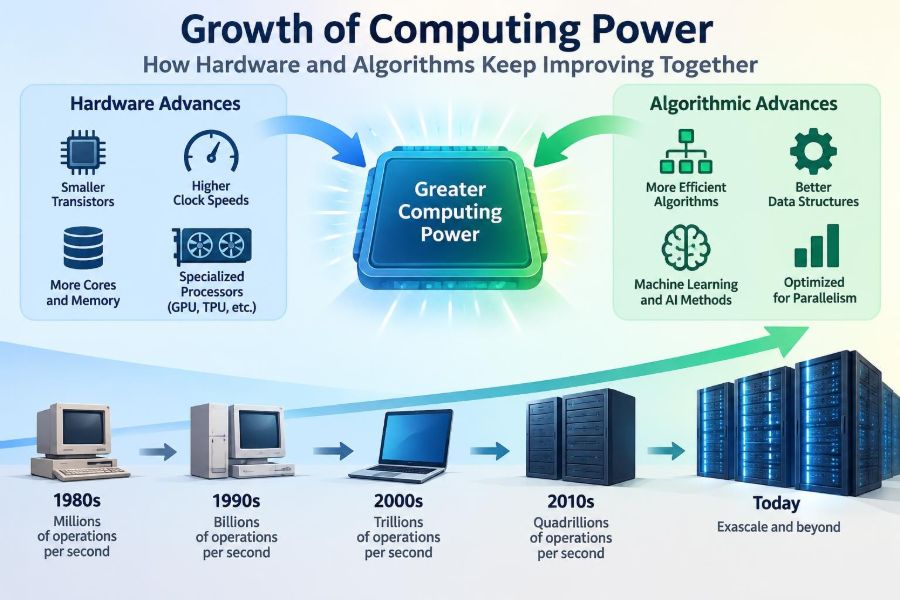

A navigation app can recalculate your route in moments after traffic changes. A laptop can remove noise from a video call while running a presentation. A search engine can scan an enormous collection of pages and return useful results before you finish typing.
It is tempting to explain all of this with a simple phrase: computers got faster. That is true, but incomplete. Many improvements come not only from more capable chips, but also from smarter ways of representing problems and doing less unnecessary work.
This partnership between hardware and algorithms shapes nearly every digital tool we use. It also explains why a newer machine is not always faster at every task, and why a better algorithm can sometimes outperform a costly hardware upgrade.
Understanding the relationship helps students choose appropriate techniques, helps professionals build efficient systems, and gives everyone a clearer view of where computing progress comes from.
🧠 Computing Power Is More Than Clock Speed
Computing power is the practical ability of a system to complete useful work. That work may mean processing a spreadsheet, rendering a frame of video, training a machine-learning model, or answering a database query.
A processor’s clock speed measures how many timing cycles it performs per second, but it does not directly tell us how much useful work happens in each cycle. Architecture, memory access, number of processing cores, software design, and the nature of the task all affect real performance.
A computer with a lower clock speed can therefore finish a job sooner if it has a more efficient design or runs better software.
🧩 Hardware and Algorithms Solve Different Parts of the Problem
Hardware is the physical machinery: processors, memory chips, storage devices, graphics processors, networking equipment, and the circuits that connect them. Hardware determines what operations can be carried out and how quickly resources can be delivered.
An algorithm is a precise method for solving a problem. For example, an algorithm may specify how to sort names, find the shortest route, compress a photo, or detect duplicate records.
Hardware supplies capability; algorithms decide how efficiently that capability is used. Faster equipment helps an inefficient method, but a better method often changes the scale of problems that can be handled at all.
📈 Why Progress Often Feels Exponential
For many decades, improvements in semiconductor manufacturing allowed engineers to place more transistors on a chip. Transistors are tiny electronic switches that form the logic and memory structures inside digital devices.
More transistors enabled designers to add features such as larger caches, additional cores, specialized units, and more sophisticated control logic. This created a long period in which ordinary consumer devices became substantially more capable over relatively short intervals.
The pattern was never a magical law, and it has become harder to sustain as components approach extremely small scales. Still, the accumulated effect of many generations of improvement is why a modern phone can perform tasks once reserved for much larger systems.
🔬 Transistors Are the Building Blocks
A transistor can control the flow of electrical current. By arranging huge numbers of transistors into logic gates, engineers create circuits that add numbers, compare values, store bits, and make decisions.
Making transistors smaller can reduce the distance signals travel and allow more components in the same area. But smaller does not automatically mean better: heat, electrical leakage, manufacturing difficulty, and cost all become serious constraints.
Modern chip progress increasingly depends on better transistor structures, packaging, and design techniques rather than simple shrinking alone.
⚡ The End of Easy Frequency Scaling
Earlier processors often gained performance by raising their clock frequency. Eventually, this approach ran into a power problem: switching transistors faster produces more heat, and removing that heat safely is difficult.
A chip that consumes too much power may slow itself down to avoid damage. This protective behavior, commonly called thermal throttling, is one reason sustained performance can differ from a brief benchmark result.
Since unlimited clock increases are impractical, designers looked for other routes: doing more per cycle, running several tasks at once, and assigning work to specialized processors.
🧵 Multicore Processors Changed Software Priorities
A multicore processor contains multiple processing units on one chip. Instead of waiting for one core to finish every instruction, software can divide suitable work among several cores.
Video encoding, scientific simulations, software builds, and large data-processing jobs can often benefit greatly. A web browser can also keep its interface responsive by placing different activities on separate threads.
However, a program does not become eight times faster simply because it runs on an eight-core system. Parts that must happen in sequence still limit the total speedup.
🔗 Parallelism Has a Coordination Cost
Parallelism means performing multiple operations at the same time. It is powerful when work can be split into largely independent pieces, such as applying the same image filter to many pixels.
Parallel programs also need coordination. Threads may compete for the same data, wait for one another, or produce errors when updates happen in an unexpected order.
Good parallel design balances the amount of work assigned to each processor against the overhead of splitting, communicating, and combining results. More workers are useful only when the work is organized well.
🎮 GPUs Excel at Repeated Calculations
A graphics processing unit, or GPU, was originally designed to perform many graphics-related calculations in parallel. Rendering a scene involves similar mathematical operations across large groups of pixels, vertices, or fragments.
That same structure can help with other highly parallel tasks, including some scientific calculations and machine-learning workloads. GPUs are not general replacements for CPUs; they are particularly effective when many operations follow similar instructions on different data.
Moving work to a GPU also has costs, including data transfer, memory limits, and programming complexity. The best processor depends on the workload.
🛠️ Specialized Chips Trade Flexibility for Efficiency
Some tasks are common enough to justify dedicated hardware. Examples include video decoding, encryption operations, image processing, signal processing, and portions of machine-learning inference.
A specialized accelerator can complete its target operation with less energy or greater speed than a general-purpose CPU. The trade-off is flexibility: hardware built for one category of computation may be poorly suited to a different one.
This is why many modern devices combine several kinds of processors rather than relying on a single universal chip.
🧮 Algorithms Determine How Work Grows
When a problem grows, the amount of work required by an algorithm may grow slowly, steadily, or extremely quickly. Algorithmic complexity describes this relationship.
For a list of items, a simple search may inspect items one by one. Its running time grows roughly in proportion to the list size. A well-organized search structure can reduce the number of checks dramatically.
Complexity does not predict every real-world detail, but it gives developers a way to recognize designs that will fail as data becomes larger.
📊 Big O Describes Scaling, Not Stopwatch Time
Big O notation summarizes how an algorithm’s work grows for large inputs. It deliberately ignores fixed details such as a particular processor model or programming language runtime.
| Pattern | Typical meaning | Example |
|---|---|---|
| O(1) | Work stays roughly constant | Reading an array item by known position |
| O(log n) | Work rises slowly as data grows | Binary search in sorted data |
| O(n) | Work grows with each item | Scanning a list once |
| O(n²) | Work can grow rapidly | Comparing every pair of items |
An O(n²) method can be perfectly reasonable for a tiny list. The problem appears when the input becomes large enough that the number of comparisons overwhelms available computing time.
🔎 A Search Example Shows the Difference
Imagine looking for a word in a printed, alphabetized dictionary. Checking every page from the front is a linear search. Opening near the middle and repeatedly choosing the relevant half is analogous to binary search.
Binary search is fast because each comparison discards about half of the remaining possibilities. But it requires sorted data and efficient access to the middle.
The lesson is practical: a faster algorithm often depends on a different data organization. Keeping information well structured can be as valuable as the search procedure itself.
🗃️ Data Structures Shape Performance
A data structure is a method of organizing data so operations can be performed efficiently. Arrays, linked lists, hash tables, trees, graphs, and queues each support different patterns of access and updates.
A hash table can often locate a value quickly using a computed key, while a balanced tree can preserve sorted order and support ordered queries. Neither is universally best.
Choosing a data structure means asking what the system does most often: lookups, inserts, deletions, range queries, sequential scans, or relationships between objects.
💾 Memory Access Can Be the Real Bottleneck
Processors can perform arithmetic far faster than they can retrieve data from some forms of memory. This difference is often called the memory wall: computation improves rapidly, while moving data remains comparatively costly.
Processors use small, fast stores called caches to keep recently used information nearby. Programs that access data in predictable, compact patterns often benefit because needed values are more likely to be in cache.
An algorithm with fewer calculations is not always faster if it causes scattered, expensive memory accesses. Performance depends on both operations and data movement.
🚚 Moving Data Consumes Time and Energy
Data may travel between storage, main memory, cache, CPU cores, GPUs, and networked machines. Each transfer adds delay and consumes energy.
Database systems therefore try to avoid reading unnecessary columns or rows. Machine-learning systems often arrange data in batches to reduce transfer overhead. Distributed applications may move computation closer to the data rather than repeatedly sending huge datasets across a network.
A useful performance question is not only “How many calculations are needed?” but also “Where is the data, and how often must it move?”
🧱 Storage Improvements Change What Applications Can Do
Storage technology influences responsiveness and system design. Faster solid-state storage reduces the delay of many file operations compared with older mechanical designs, although performance varies by device and workload.
More affordable storage also makes it feasible to retain logs, media, backups, and large datasets that would once have been impractical. Yet capacity creates responsibilities: data must be indexed, protected, backed up, and governed.
Adding storage does not solve a poorly designed data pipeline. Reading and processing unnecessary data can still make a system slow.
🌐 Networks Extend Computing Beyond One Machine
Many services rely on multiple computers communicating across local networks or the internet. This makes it possible to serve many users, store replicas for reliability, and distribute large tasks.
Network latency—the delay before a message travels and returns—cannot be eliminated by a faster local CPU. A system that makes many small remote requests may feel slow even when every server is powerful.
Efficient distributed design reduces needless round trips, batches related work, and plans for temporary communication failures.
☁️ Cloud Computing Makes Capacity More Accessible
Cloud platforms let organizations rent computing, storage, and specialized hardware instead of purchasing all equipment upfront. This can help a team scale a service during high demand or experiment with a workload that needs unusual hardware.
Cloud resources do not remove engineering decisions. Data transfer costs, security configuration, regional latency, software architecture, and long-running resource usage all matter.
The cloud changes access to hardware; it does not make inefficient algorithms inexpensive by default.
🧪 Better Algorithms Can Beat Faster Machines
Suppose a program compares every customer record with every other record to find duplicates. Doubling the number of records can roughly quadruple the comparisons. Replacing that approach with grouping or hashing can avoid most unnecessary pair checks.
That change may produce a much larger improvement than replacing the computer with a modestly faster model. It also lowers energy use and can reduce the cost of operating the system.
This does not mean hardware upgrades are unhelpful. It means algorithmic improvement is often the first question when a workload scales badly.
📦 Compression Is an Algorithmic Hardware Multiplier
Compression algorithms represent data using fewer bits. A compressed file may take less storage space and less network bandwidth, which can make transfers faster.
Compression also requires processor time to encode and decode information. For many workloads, spending a small amount of compute time to avoid moving much more data is worthwhile.
The best choice depends on the data, compression method, CPU availability, and whether fast access or maximum size reduction matters most.
🖼️ Software Can Exploit Hardware Features
Compilers translate source code into instructions for a specific processor family. Modern compilers may optimize instruction ordering, use vector instructions, and remove calculations that cannot affect the result.
Vector instructions let one instruction operate on several values at once, which can help with audio, images, scientific arrays, and other regular data. Libraries often contain highly tuned implementations that use these features safely.
Writing everything by hand in low-level code is rarely necessary. Choosing mature libraries and measuring real bottlenecks is usually more productive.
🧑💻 Programming Languages Involve Trade-Offs
Different languages offer different balances among development speed, safety, control, portability, and runtime performance. A managed runtime may automatically handle memory, while a lower-level language may offer more direct control over layout and allocation.
No language is automatically fast or slow for every purpose. An inefficient database query, repeated network call, or poor algorithm can dominate performance regardless of language choice.
Teams should evaluate the whole system: correctness, maintainability, operational needs, and the performance requirements that actually matter.
🧹 Efficiency Also Means Avoiding Wasted Work
Many improvements are straightforward once a bottleneck is found. A program may recompute the same result, load data that no screen uses, write logs excessively, or refresh an entire page when only one field changed.
Caching stores the result of expensive work so it can be reused. It can make applications much faster, but cached data can become outdated and must be invalidated or refreshed carefully.
The goal is not to optimize every line. It is to identify repeated or expensive work that does not provide proportional value.
📏 Measurement Prevents Guesswork
Performance intuition is useful, but it can be wrong. A feature that seems computationally heavy may be insignificant compared with a slow database query or a waiting network request.
Profilers measure where a program spends CPU time. Tracing tools can reveal delays across services. Load tests show how a system behaves when many users act at once.
Measure a representative workload, form a hypothesis, make one meaningful change, then measure again. This approach prevents “optimizations” that add complexity without improving the user experience.
🚧 Premature Optimization Creates Its Own Problems
Premature optimization means complicating code before there is evidence that a performance problem exists. It can make software harder to read, test, and change.
For example, replacing a clear data structure with a complicated custom implementation may save little time while increasing the chance of defects. The maintenance cost can outlast the original performance concern.
Start with a sound algorithm and clean design. Optimize the measured bottleneck when requirements show that it matters.
🔒 Security Work Has a Performance Cost—and a Purpose
Encryption, input validation, authentication, access checks, and auditing all consume resources. Removing them merely to improve a benchmark can create serious risk.
Good engineering considers performance and security together. Hardware acceleration may improve cryptographic operations, while careful system design can reduce repeated checks without weakening protection.
A fast system that exposes sensitive data or fails under malicious input is not a successful system.
🌡️ Energy Efficiency Is Now a Core Constraint
Computing uses electricity not only for calculation but also for memory, storage, networking, and cooling. Battery-powered devices must balance responsiveness against battery life, while large installations must manage power and heat at scale.
Efficient algorithms reduce unnecessary operations. Specialized hardware can complete selected tasks with lower energy use. Better scheduling can allow idle components to use less power.
Performance per watt is therefore a meaningful measure, not a secondary concern. It affects device design, operating cost, and environmental impact.
🤖 AI Workloads Highlight the Partnership
Many machine-learning tasks require extensive matrix operations, which is why GPUs and dedicated accelerators have become useful. But hardware alone does not produce a practical model.
Algorithmic choices such as model architecture, numerical precision, batching, pruning, and data pipeline design influence memory use, training time, and inference latency. Some methods reduce computation, but may affect accuracy or require careful validation.
AI systems are a clear example of co-design: advances arise when models, software frameworks, hardware, and deployment constraints are considered together.
🧭 Not Every Task Needs Maximum Performance
A payroll system may value correctness, auditability, and predictable operation more than raw speed. An interactive game may prioritize low latency. A research simulation may prioritize total throughput over several days.
Performance requirements should be stated in terms of the user or business need: response time, jobs completed, battery life, cost, or reliability. “Make it faster” is not a complete requirement.
Defining the goal prevents teams from optimizing the wrong metric.
🧰 A Practical Workflow for Performance Problems
- Describe the slow behavior in observable terms, such as page response time or batch completion time.
- Collect representative measurements and identify the dominant delay.
- Check algorithmic complexity and data structure choices before assuming more hardware is needed.
- Examine data movement: database reads, memory layout, storage access, and network calls.
- Make a targeted change, test correctness, and measure the effect under realistic conditions.
- Document the trade-off so future maintainers understand why the design exists.
This workflow works for a student assignment, a mobile app, and a large service because it begins with evidence rather than assumptions.
🎓 What Learners Should Practice
Students benefit from learning both abstract analysis and hands-on observation. Implement a simple search, then compare it with binary search on sorted data. Try different data structures for the same task and measure how behavior changes as input grows.
Working professionals can apply the same habit to production systems: read profiler output, inspect database query plans, understand concurrency limits, and learn the performance characteristics of the platforms they use.
The aim is not to memorize every optimization trick. It is to develop a reliable way to reason about work, data, and constraints.
🔮 Future Gains Will Come From Many Directions
Future computing improvements are likely to combine advances in chip fabrication, three-dimensional packaging, memory technologies, interconnects, accelerators, compilers, algorithms, and system design.
Some emerging approaches may be highly valuable for particular workloads while remaining unsuitable for ordinary programs. New hardware often takes time to gain mature tools, standards, and programming practices.
Progress will not depend on one single breakthrough. It will continue through many linked improvements, each addressing a different limitation.
🤝 The Core Principle: Co-Design Beats One-Dimensional Thinking
Hardware and algorithms improve computing power together because each exposes opportunities for the other. Faster hardware makes new techniques practical; better algorithms make limited hardware capable of more useful work.
When a system is slow, the right answer may be a better chip, a different data structure, fewer network requests, improved parallelism, a more suitable accelerator, or simply less work. The answer depends on evidence and context.
The most durable approach is to treat performance as a system property. Processors, memory, storage, networks, software, energy, and human requirements all belong in the same conversation.
Computing advances most effectively when capable hardware and thoughtful algorithms are designed to reinforce one another. That idea turns “faster” from a vague wish into a practical engineering goal. 💻🧠⚙️