
You download a software update, copy family photos to an external drive, or send a large file to a colleague. A progress bar reaches 100%, so it is tempting to assume the data arrived perfectly.
But digital data can be damaged in small, hard-to-see ways. A noisy network connection might flip one bit. A failing storage device might return an incorrect block. An incomplete download may still look like a normal file until someone tries to open it.
Computers need a quick way to ask a practical question: “Is this still the same data that was originally sent or saved?” A checksum is one of the most widely used answers.
Checksums do not repair data, and they do not prove who created it. What they do is provide a compact fingerprint-like value that lets systems detect many accidental errors before those errors cause larger problems.
🧩 What a Checksum Is
A checksum is a small value calculated from a larger collection of data. The collection might be a network packet, a file, a disk block, or the contents of a memory region.
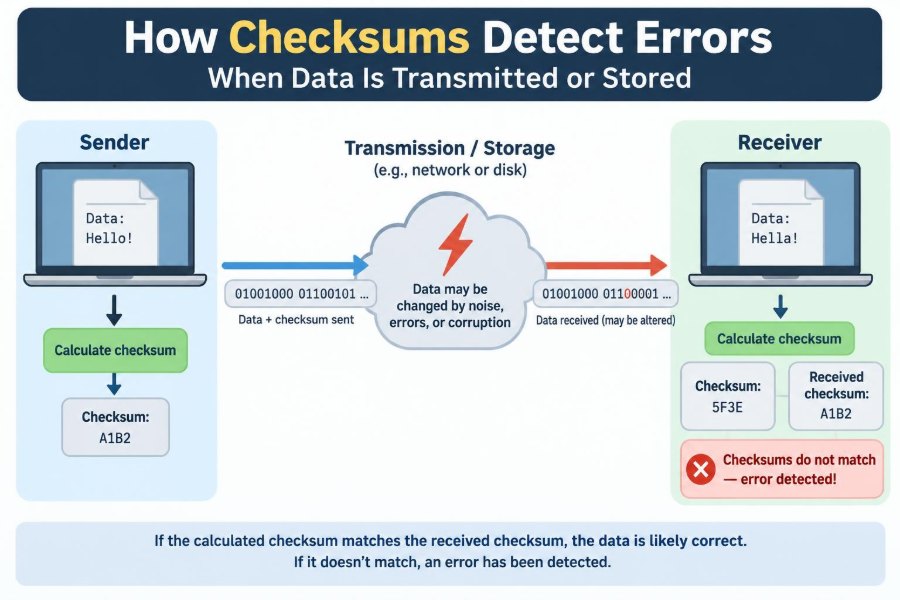
The sender or storage system calculates the checksum from the original data. Later, a receiver calculates a new checksum from the data it received or read back. If the two values differ, something changed.
The word “check” describes the comparison, while “sum” comes from early methods that literally added pieces of data together. Modern checksums are not always ordinary sums, but the historical name remains.
📦 Why Data Needs Error Checks
Computers represent everything as bits: zeros and ones. A single wrong bit can change a letter, a number, an instruction, or part of a compressed file structure.
Many failures are not dramatic. A file may copy successfully but contain a damaged byte; a message may traverse several network devices; or a disk may have difficulty reading an aging area of its surface.
Error checking makes these faults visible. Rather than silently accepting questionable data, a system can reject it, request it again, or restore a clean version.
🔢 Bits, Bytes, and Tiny Changes
A bit has two possible values: 0 or 1. Eight bits commonly form a byte. Changing even one bit changes the numerical value of that byte.
For example, if a byte changes from 01000001 to 01000000, its value changes by one. In text encodings, that may turn one character into another; in program data, it may have a much larger effect.
Checksums are designed so that changes in the input data will usually produce a different check value. The receiver does not need to know which bit changed to know that the data should not be trusted.
✉️ The Basic Send-and-Check Process
At its simplest, checksum checking follows four stages:
- The sender calculates a checksum from the original data.
- The sender transmits the data along with that checksum.
- The receiver calculates a checksum from the received data.
- The receiver compares the calculated value with the transmitted value.
A match means the data passed that particular integrity check. A mismatch means the receiver detected corruption and should treat the data as invalid.
🧮 A Simple Addition Example
Imagine a toy checksum that adds the values of several bytes and keeps only the final limited-size result. If the data bytes are 10, 20, and 30, the checksum could be 60.
If a transmission error changes 20 to 21, the receiver gets a sum of 61 instead. The mismatch reveals the error.
Real systems use more careful rules because simple addition has blind spots. For instance, changing one value up by one and another down by one can preserve an ordinary sum. The example is useful because it shows the central idea: derive a small check value from a larger message.
🔄 What Happens After a Mismatch
A checksum mismatch is an alarm, not a diagnosis. It says the receiver’s data does not match the expected result, but it does not necessarily identify the damaged location.
Different systems respond differently:
- A network protocol may request retransmission.
- A download manager may discard a damaged chunk and download it again.
- A storage system may try another copy or report a read error.
- An application may warn the user that a file is corrupt.
The appropriate response depends on whether a clean replacement is available and how costly it is to retry.
📡 Checksums in Network Packets
Network data is normally divided into manageable units called packets or frames. Each unit can include error-detection information, allowing problems to be found close to where they occur.
If interference, faulty hardware, or another transmission problem changes bits in transit, a device can discard the affected unit instead of passing damaged data onward. Higher-level protocols may then arrange for replacement data.
This layered approach is useful because different network layers protect different parts of communication. A local link may detect a bad frame, while transport or application software may validate a complete message or file.
📁 Checksums for Downloaded Files
When a website publishes a large installer or archive, it may also publish a checksum value. After downloading the file, you can calculate the same kind of value locally and compare it with the published one.
If they match, the downloaded file is consistent with the published value. If they do not, the file may be incomplete, corrupted, or different from the intended file.
This practice is especially useful for files that are large, important, or obtained through a mirror. It is also a reminder that a checksum only has value if the reference checksum comes from a source you can trust.
💾 Checksums in Storage Systems
Stored data is not automatically permanent or flawless. Drives, cables, controllers, memory, and software can all contribute to errors under some conditions.
Some file systems and storage systems keep checksums for data blocks or metadata. When data is read later, the system can verify that the block still matches its recorded checksum.
If the system also stores redundant copies or parity information, it may be able to recover a correct version. Without redundancy, a checksum can still detect the issue, but detection alone cannot reconstruct the original bytes.
🧠 Memory and Silent Corruption
Data is also vulnerable while it is being processed in memory. A program can calculate a checksum over data that has already been altered, so the timing and placement of checks matter.
The phrase silent data corruption describes corruption that is not immediately reported by hardware or software. It is concerning because incorrect data may continue through a workflow and be saved, copied, or used in decisions.
Checks at boundaries—when reading, writing, receiving, or handing data to another component—help expose inconsistencies. They are one part of a broader reliability strategy, not a substitute for sound hardware and backups.
🛡️ Error Detection Is Not Error Correction
It is easy to confuse discovering an error with fixing one. A checksum usually tells a system that the data is wrong, but not enough to determine the correct original data.
Error correction requires additional information. For example, a system might keep duplicate copies, use parity across multiple disks, or use an error-correcting code that can infer certain damaged bits.
Detection is still extremely valuable. Once an error is known, a system can retry, recover from a known-good copy, or stop before producing an unreliable result.
📏 Why Checksum Length Matters
A checksum has a fixed number of bits, while the protected data may be huge. That compression means different inputs can sometimes produce the same checksum.
Suppose a checksum is only 8 bits long. It can represent 256 possible values, regardless of whether it describes a short message or a large file. Two different data sets must sometimes share a result; this is called a collision.
Longer checksum values provide more possible results and make accidental undetected changes less likely. They also require a little more space and computation, though the cost is often modest on modern systems.
🎲 Why a Match Is Not Absolute Proof
A matching checksum is strong evidence that no error was detected by that method. It is not a mathematical guarantee that two data sets are identical, because collisions are possible.
For ordinary accidental transmission errors, a well-chosen checksum can offer very effective practical protection. But the level of assurance must match the risk: a quick local check and a high-value software verification process do not necessarily need the same algorithm.
The key distinction is between “no difference was found” and “a difference is impossible.” Computing often works with carefully managed probabilities rather than absolutes.
🚦 Parity Bits: The Simplest Relative
A parity bit is a very simple error-detection technique. It adds one extra bit so that the total number of 1 bits is either always even or always odd.
For example, with even parity, data containing an odd number of 1s receives a parity bit of 1. If one bit flips, the total becomes odd and the receiver can notice the problem.
Parity is inexpensive, but it misses errors that change an even number of bits. Checksums and stronger methods were developed to catch a wider range of realistic error patterns.
🧷 CRCs and Burst Errors
A cyclic redundancy check, usually called a CRC, is a checksum-like method widely used in storage and communications. It treats data as a mathematical bit pattern and performs a specialized division operation.
CRCs are particularly good at detecting many structured error patterns, including burst errors: groups of nearby changed bits. Burst errors can occur when a disturbance affects a segment of a signal or a block of stored data.
Different CRC variants use different parameters and produce different results for the same data. That is why “CRC” alone is not enough to reproduce a check; both sides must use the same defined variant.
🔐 Cryptographic Hashes and Their Different Goal
A cryptographic hash also turns data into a fixed-length value, but it is designed for a tougher setting. It aims to make deliberate manipulation computationally impractical to hide.
Modern cryptographic hash functions are often used to verify downloaded software, identify content, and support digital signatures. They are intended to resist attackers trying to construct a different file with the same result.
A CRC may be excellent for detecting accidental line noise but is not designed to resist a person who can deliberately modify both data and its CRC. Choosing between them depends on the threat, not merely on the file size.
🧭 Checksums, Hashes, and Signatures Compared
| Method | Primary purpose | Best suited to | Key limitation |
|---|---|---|---|
| Simple checksum | Catch basic accidental changes | Low-cost integrity checks | Can miss some patterns; easy to forge |
| CRC | Detect transmission or storage errors | Networks, frames, blocks, devices | Not designed against malicious changes |
| Cryptographic hash | Detect changes, including deliberate attempts | File verification and content identity | Does not itself identify the publisher |
| Digital signature | Verify integrity and signer control of a key | Trusted software distribution and documents | Requires key management and trust decisions |
These tools can be combined. For example, a transfer protocol may use a CRC for routine transmission errors while a downloaded installer is checked with a cryptographic hash and a signature.
👤 Why a Published Hash Can Be Misleading
Imagine an attacker can replace both a downloadable file and the webpage that displays its hash. The altered file can be paired with its own matching hash, so a comparison succeeds without proving the file is genuine.
This is not a failure of the comparison process. It shows that integrity information needs a trustworthy delivery path.
Digital signatures help address this by allowing a recipient to verify that someone controlling a particular private key signed the data. The recipient must still decide whether that public key is associated with the expected publisher.
🧪 A File Verification Example
Consider a hypothetical case: an organization downloads an operating-system image and receives an official hash value through a trusted channel. It calculates a hash locally using the same algorithm.
If the values differ, the organization should not use the image. It may download again, check whether the algorithm was selected correctly, and confirm that the file was not changed by a local process.
If the values match, the image matches the reference at the time of checking. When the source also provides a valid signature, verification can add evidence about where that reference came from.
⚙️ Algorithms Must Be Specified Exactly
“The checksum is different” can result from using different rules rather than damaged data. Algorithms may differ in byte order, starting values, final transformations, or how text is encoded.
Even a trailing newline in a text file changes the bytes and therefore the result. Copying text through a program that converts line endings can create an unexpected mismatch.
Reliable systems specify the algorithm and format precisely. For a user verifying a file, the published algorithm name and the exact file being checked both matter.
🧾 The Data Boundary Matters
A checksum protects only the bytes included in its calculation. If a protocol checks the payload but not a header field, corruption in that unprotected field may require a separate check.
Likewise, a file hash says nothing about a description next to the file, a filename, or an instruction that tells software how to interpret the file—unless those items are included in the protected data.
When designing a system, ask: what exact object must remain unchanged? The answer determines where checksums belong and what they need to cover.
🪜 Layered Checks Give Better Coverage
Data often travels through several stages: application memory, a network stack, a router, a storage device, a backup service, and a later restore process. One check at only one stage cannot observe every possible failure.
Layered integrity checks place validation at useful boundaries. A lower-level check can catch a bad packet quickly, while an end-to-end file hash can catch an error introduced anywhere along the full path.
This does not mean every layer should duplicate every expensive operation. Good design balances overhead, recovery options, and the consequences of accepting wrong data.
🔁 Retransmission Makes Detection Useful
On a network, detecting a damaged unit is helpful because the sender can often provide another copy. The receiver rejects the bad unit, and the protocol or application arranges a retry.
Retries must be managed carefully. A system needs time limits, duplicate handling, and a clear point at which it reports a persistent failure instead of retrying forever.
Checksums therefore work alongside sequence numbers, acknowledgments, and timeouts. Each mechanism solves a different part of reliable delivery.
🗄️ Redundancy Enables Recovery
A checksum can identify that a stored copy is wrong. To recover automatically, the system needs another source of truth: a mirrored copy, parity data, a backup, or a remote replica.
When one copy fails its check and another passes, software may be able to return the valid data and replace the damaged copy. This is sometimes described as self-healing, but it depends on having intact redundant information.
Redundancy is not identical to backup. A backup is also designed to preserve recoverable historical copies, which matters if incorrect data is written and then faithfully replicated.
🧰 Where Developers Use Checksums
Developers use checksums in many places beyond file downloads. Common examples include validating archive records, detecting changed build inputs, checking serialized messages, and identifying whether cached content is still current.
A checksum can also serve as an efficient change indicator. Rather than comparing every byte of two large objects repeatedly, software can first compare their check values, then perform deeper work only when needed.
That shortcut must be chosen carefully. If correctness requires certainty or protection from hostile input, a weak checksum is not an adequate identity test.
⚠️ Common Misunderstanding: Encryption Does Not Replace Checking
Encryption hides data from people who do not have the key. It does not automatically provide all the integrity guarantees an application needs.
Many modern secure communication designs combine confidentiality with authentication and integrity protection. But simply encrypting data with an unsuitable or incomplete scheme should not be assumed to detect tampering reliably.
Similarly, a checksum does not make data secret. It can often be calculated by anyone who has the data, so it is an integrity tool rather than a privacy tool.
🛑 Common Mistake: Treating CRCs as Security
Because a CRC detects many accidental errors, it may feel reassuring. Yet its rules are public and intentionally efficient, so someone modifying data can generally calculate a new matching CRC.
Use CRCs where accidental corruption is the main concern: device communication, data frames, and routine storage checks. Use authenticated cryptographic mechanisms when an adversary may intentionally alter data.
Security design also considers who controls the reference value, how keys are protected, and what happens when verification fails. No single number answers all of those questions.
🔍 Practical Steps for Verifying a Download
When a publisher provides a verification value, a careful workflow is straightforward:
- Download the file completely from the intended source.
- Obtain the published checksum or hash through a trusted channel.
- Use a tool that calculates the same named algorithm on the downloaded file.
- Compare every character of the resulting value, not just its beginning.
- If it differs, do not use the file until you understand why.
A mismatch can be caused by a damaged download, the wrong file, a changed release, or a comparison error. Downloading again is reasonable, but do not dismiss repeated mismatches.
🧑💻 Reading Checksum Tools Carefully
Command-line and graphical utilities often print a long hexadecimal value followed by a filename. Hexadecimal uses digits and letters to represent binary data compactly.
Make sure the tool processed the intended file. Two similarly named downloads, an old copy in another folder, or an extracted file instead of the original archive can lead to confusing results.
Also avoid manually retyping long values when copying safely is possible. One transcription mistake can produce a false mismatch.
📉 The Cost of Integrity Checking
Checksums require processing time and a small amount of extra storage or network bandwidth. For very large data sets or high-speed systems, those costs influence engineering choices.
Hardware support, streaming algorithms, and incremental checks can reduce the burden. A streaming checksum processes data piece by piece, so a program does not need to hold an entire large file in memory.
The trade-off is usually worthwhile when undetected corruption would be expensive, unsafe, or difficult to diagnose. For low-risk temporary data, a lighter check may be sufficient.
🧱 Checksums Cannot Catch Every Failure
Checksums have limits beyond collisions. If a program calculates a checksum after bad data has already been accepted as the new expected value, later comparisons may not reveal the original problem.
A valid checksum also cannot tell you whether the data is meaningful, current, authorized, or appropriate for a business decision. It verifies a relationship between bytes and a check value, not the quality of the underlying content.
Reliable systems pair integrity checks with validation rules, access controls, monitoring, versioning, backups, and clear recovery procedures.
🎯 Choosing the Right Tool for the Risk
Start with the question, “What kind of failure am I trying to catch?” Accidental noise, a faulty disk, an interrupted transfer, and deliberate tampering have different threat models.
- For simple accidental errors, a basic checksum may be enough.
- For structured communication and storage errors, CRCs are often appropriate.
- For trustworthy file identity where tampering is possible, use a modern cryptographic hash.
- For proof tied to a publisher or sender, use digital signatures or authenticated protocols.
The best choice is not the strongest-sounding term. It is the mechanism that addresses the real risk while fitting the system’s performance and operational needs.
✅ The Core Principle of Checksums
A checksum gives data a compact companion value derived from its contents. By recalculating and comparing that value later, a system can detect that something changed during transmission, storage, or processing.
Its strength lies in enabling action: reject a bad packet, retry a transfer, restore a clean block, or prevent a corrupted file from being used. Its limitation is equally important: a checksum alone does not repair data, establish trust, or defeat intentional tampering.
Understanding that boundary makes checksums easier to use well. They are a foundational reliability mechanism—small in size, fast to calculate, and most effective when combined with the right recovery and security controls.
Checksums help computers notice when data is no longer the data they expected, giving people and systems a chance to respond before a small error becomes a larger one. 💻🔍🛡️