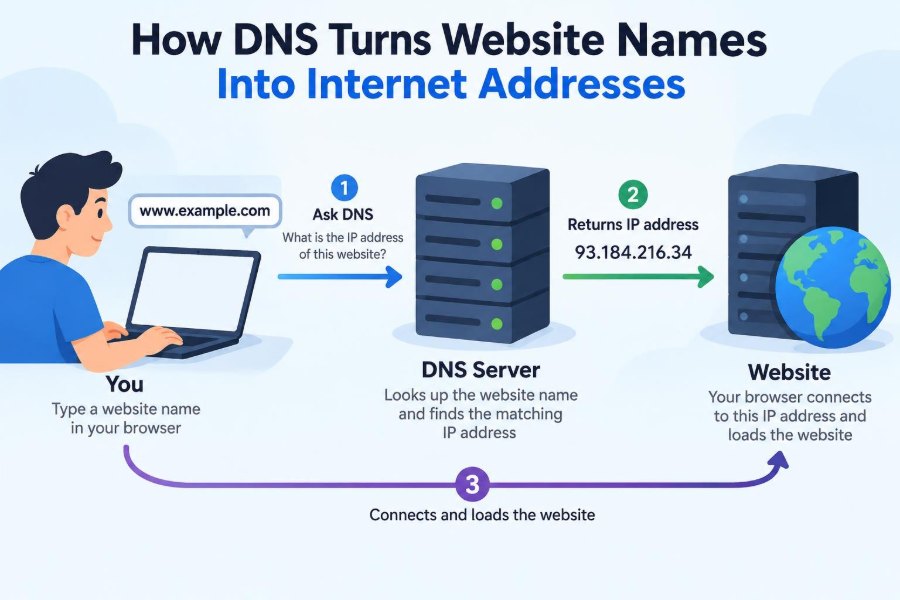

You type a familiar name such as www.example.com into a browser and expect a page to appear almost immediately. You do not need to remember a string of numbers, ask which server holds the site, or manually choose a route across the internet.
That convenience depends on the Domain Name System, usually called DNS. DNS is the internet’s naming system: it translates human-friendly domain names into the network addresses computers use to communicate.
DNS is working during far more than web browsing. Email delivery, video calls, cloud applications, software updates, and many mobile apps all rely on name lookups before they can reach a service.
Understanding DNS helps students see how the internet is organized and helps professionals diagnose everyday problems such as “the Wi-Fi works, but this site will not open.” 🌐
🗺️ 1. The Basic DNS Problem
Computers send traffic to IP addresses, not to names such as basiccomputerscience.com. An IP address identifies a destination on an IP network, much like an address identifies a place in a delivery system.
Names are better for people because they are readable, memorable, and can express purpose or ownership. DNS connects these two needs: human-readable names and machine-routable addresses.
📖 2. DNS Is Like a Distributed Directory
A useful comparison is a very large directory service. You ask for the address associated with a name, and DNS returns an answer or directs your request to the right place to find one.
It is not one giant database on one computer. DNS is distributed, meaning responsibility is divided among many servers and organizations around the world.
This design allows the system to scale while letting each domain owner manage information for its own part of the namespace.
🔢 3. What an IP Address Does
An IP address lets routers forward packets toward the correct network and host. Two major versions are used today: IPv4 and IPv6.
| Version | Example format | General purpose |
|---|---|---|
| IPv4 | 203.0.113.25 |
Older, widely deployed addressing format |
| IPv6 | 2001:db8::25 |
Newer format with a much larger address space |
DNS can return either type of address. A modern device may use IPv6 when it is available and suitable, while retaining IPv4 compatibility where needed.
🏷️ 4. Reading a Domain Name
Domain names are arranged as labels separated by dots. In shop.eu.example.com, each label narrows the name from a broad part of the DNS hierarchy to a specific one.
comis a top-level domain.example.comis a domain under that top-level domain.eu.example.comandshop.eu.example.comare more specific names.
People often casually call everything before a domain “a subdomain,” but DNS administration depends on which part of the name is delegated, not merely on how many dots it contains.
🌳 5. The DNS Hierarchy Starts at the Root
At the top of DNS is the root, represented conceptually by an empty label after the final dot. A fully qualified name can be written as www.example.com., though browsers normally omit that final dot.
Root servers do not usually provide the final address for a website. Instead, they know where to find the name servers responsible for top-level domains such as .com, .org, or country-code domains.
🧭 6. Top-Level Domains Point the Way
A top-level domain, or TLD, is the label immediately below the root. Common examples include .com, .edu, .net, and country-code TLDs such as .uk or .jp.
When a resolver asks the appropriate TLD server about example.com, the TLD server generally responds with a referral to the authoritative name servers for that domain.
That answer moves the search closer to the owner-managed part of DNS.
🏛️ 7. Authoritative Servers Hold the Official Answer
An authoritative name server publishes DNS data for a particular zone. It is the source that can give the official answer for records under that zone, subject to DNS delegation rules.
For example, the authoritative servers for example.com may provide the address for www.example.com, the mail routing information for the domain, and verification records used by other services.
Organizations commonly operate multiple authoritative servers so that one outage or network problem does not make their DNS information unreachable.
🧑💻 8. Your Device Usually Asks a Resolver First
Your laptop or phone usually does not contact root, TLD, and authoritative servers for every lookup. Instead, it sends a request to a recursive resolver, sometimes called a DNS resolver.
This resolver may be run by an internet provider, workplace, school, router, operating system, or a chosen DNS provider. Its job is to find an answer on the client’s behalf.
The resolver can use cached information or perform the necessary steps through the hierarchy.
🔍 9. A Lookup Happens in Stages
Suppose no one involved has recently looked up www.example.com. The resolver begins with a query that is often called recursive from the user’s perspective: the client wants a finished answer.
- The resolver asks a root server where to find information for
.com. - It asks a
.comTLD server which servers are authoritative forexample.com. - It asks an authoritative server for the record for
www.example.com. - It returns the final answer to the device and saves it temporarily when caching rules permit.
The resolver’s own questions to the hierarchy are commonly iterative: each server can refer it to the next, more specific source.
⚡ 10. Caching Makes DNS Faster
DNS caching stores answers for a limited time. A browser, operating system, local network device, or recursive resolver may all keep cached DNS data.
When a valid answer is already cached, the resolver can reply without repeating the full hierarchy walk. This reduces delay and lowers traffic to authoritative infrastructure.
Caching is one reason a first visit to a service can sometimes feel different from a later visit. ⚡
⏳ 11. TTL Controls How Long an Answer Can Be Reused
DNS records normally include a time to live, or TTL. The TTL tells caching systems how long they may reuse the record before they should seek fresh information.
A shorter TTL can help changes take effect sooner after caches expire, but it can cause more frequent queries. A longer TTL reduces query volume but means old answers may remain in caches longer.
TTL is not a magical global update timer. Different caches can receive and store an answer at different moments.
📇 12. DNS Records Store Different Kinds of Information
A DNS zone is not limited to website addresses. It contains resource records, often simply called records, with different types for different purposes.
Common record types
- A: maps a name to an IPv4 address.
- AAAA: maps a name to an IPv6 address.
- CNAME: makes one name an alias for another canonical name.
- MX: identifies mail servers for a domain.
- NS: identifies authoritative name servers.
- TXT: stores text used by many verification and policy systems.
Each type answers a different question, which is why “DNS” supports much more than opening websites.
🅰️ 13. A and AAAA Records Reach Web Servers
When a browser needs a direct IP address for a host name, it commonly requests an A record, an AAAA record, or both. The returned address is then used to start a network connection.
A single name can have multiple A or AAAA records. This can support redundancy, load distribution, or service delivery from more than one location.
DNS provides address information; it does not itself transfer the web page. After resolution, other protocols handle the connection and content.
🔗 14. CNAME Records Create Aliases
A CNAME record says that one DNS name is an alias for another name. For instance, a service name might point to a provider-managed canonical host name.
A resolver follows the alias and then looks up the target name’s relevant records. This lets administrators change a target without requiring users to learn a new public name.
CNAME rules have important restrictions. In particular, a name that is a CNAME generally cannot also hold other ordinary record types, because its identity is defined as an alias.
✉️ 15. MX Records Help Route Email
Email servers use MX records to discover where mail for a domain should be delivered. An MX record names a mail server and includes a preference value used to order choices.
The receiving mail server name must then be resolved to an IP address through A or AAAA records. DNS therefore provides the discovery step, while email protocols perform the actual delivery.
Mail-related DNS can also include TXT records used for domain verification and email authentication policies.
🧱 16. Zones Define Administrative Boundaries
A DNS zone is the portion of the namespace for which a set of authoritative servers provides data. A zone is an administrative unit, not necessarily the same thing as a domain name.
The owner of example.com might keep all names in one zone, or delegate research.example.com to separate name servers. In the second case, that child name becomes its own zone.
Delegation lets large organizations divide responsibility among teams, systems, or locations.
🤝 17. Registrars, Registries, and DNS Hosts Have Different Jobs
Several organizations may be involved in making a domain work. A registrar is a company through which a person or organization registers a domain name.
A registry operates the authoritative registration database for a TLD. A DNS hosting provider runs authoritative name servers and stores the domain’s DNS records.
One company can provide several of these services, but the roles are conceptually distinct. Knowing the difference helps when configuring or troubleshooting a domain.
🌍 18. Anycast Helps DNS Stay Nearby and Available
Many major DNS services use anycast. With anycast, multiple servers in different locations advertise the same IP address, and internet routing generally sends a query to a suitable nearby or reachable instance.
This can reduce network distance and provide resilience when a particular location has trouble. The client still sees one DNS server address even though many physical servers may be involved.
Anycast is a networking technique, not a DNS record type, but it is important to modern DNS operations.
📦 19. DNS Traditionally Uses Port 53
Traditional DNS commonly uses UDP port 53 for ordinary queries because it is efficient for small request-and-response exchanges. DNS can also use TCP port 53, especially when a response is too large for the available UDP exchange or when a protocol operation requires it.
Zone transfers, which copy DNS zone data between authoritative servers, use TCP. Firewalls that permit only one transport without understanding the need for the other can cause confusing failures.
Modern encrypted DNS transports use additional mechanisms and ports rather than replacing the role of DNS itself.
🔒 20. Traditional DNS Is Not Normally Private
Classic DNS queries can often be observed or altered by parties on the network path, depending on the network and configuration. That matters because requested names can reveal information about the services a user is trying to access.
DNS over HTTPS (DoH) and DNS over TLS (DoT) encrypt communication between a device and a recursive resolver. They protect that segment of the lookup, although they do not make all internet activity anonymous.
Privacy, network management, and security policies can influence which resolver and transport an organization chooses.
🛡️ 21. DNSSEC Protects the Authenticity of DNS Data
DNS Security Extensions, or DNSSEC, add digital signatures to DNS data. A validating resolver can use these signatures to check whether an answer is authentic and has not been altered in a way DNSSEC can detect.
DNSSEC focuses on data integrity and origin authentication. It does not encrypt ordinary DNS queries, so it is not a privacy system.
Its chain of trust begins at signed higher levels and extends through properly configured delegations to signed zones.
🚫 22. DNS Failures Do Not Always Mean the Internet Is Down
If a name cannot be resolved, an application may be unable to reach its destination even when the network connection itself works. This is why a person might load one service by IP address in a test but fail to open it by name.
However, an error message mentioning DNS is not proof that DNS is the only issue. A web server, firewall, proxy, certificate, routing path, or application configuration might also be responsible.
Good troubleshooting separates name resolution from later connection steps.
🩺 23. A Practical DNS Troubleshooting Sequence
When a site or service appears unreachable, test the problem in a deliberate order. Avoid changing many settings at once, because that makes the real cause harder to identify.
- Check whether the device has a working network connection.
- Confirm the exact domain name and look for spelling errors.
- Try resolving the name with a system tool such as
nslookupordig, where available. - Compare results from the configured resolver and a known permitted alternative resolver.
- Inspect returned record types, addresses, aliases, and TTL values.
- Test whether a connection to the returned address and required service port succeeds.
In a managed workplace, follow security policy before changing DNS settings or using external resolvers.
🧪 24. Reading a Simple Lookup Result
A command-line DNS tool can reveal more than a browser error page. The exact output varies by tool and operating system, but a conceptual result may look like this:
Question: www.example.com A
Answer:   www.example.com  300  IN  A  203.0.113.25
The name after Answer is the queried host, 300 is a TTL in seconds at the time of the response, A is the record type, and the final value is the IPv4 address.
Documentation examples use reserved addresses such as the one above; they should not be assumed to host a real public website.
📱 25. Applications May Resolve Names Differently Than You Expect
Operating systems usually provide a resolver service that applications use, but software can have its own behavior. Browsers, security products, virtual private network clients, and container platforms may apply additional DNS settings or policies.
A company VPN may direct internal names to an internal resolver while public names use another path. This is often necessary for private services, but it can make DNS behavior look different inside and outside the VPN.
Modern applications may also prefer IPv6 or use encrypted DNS depending on configuration.
🏠 26. Local Names and the Hosts File
Before asking DNS, a device may check local naming sources. One familiar example is the hosts file, which can map a name directly to an address on that device.
This is useful for testing and emergency overrides, but old entries can cause a device to reach the wrong destination while everyone else reaches the correct one. Local caches can create a similar effect.
Home routers may also offer local names for devices, while workplaces commonly use internal DNS zones for computers, printers, and private applications.
🚀 27. DNS and Content Delivery Networks
Many websites use a content delivery network, or CDN, to serve material from distributed infrastructure. DNS can help direct a user toward an appropriate service endpoint based on the requested name and the resolver’s network location.
The answer may change over time as capacity, maintenance, or network conditions change. This is one reason a domain need not have one permanent, universal IP address.
DNS-based steering is helpful, but the final route and performance still depend on the broader network path and application design.
🧠 28. The Core Principle: Names Are Flexible, Addresses Enable Delivery
DNS works because it separates a stable, meaningful name from the changing technical details of where a service is currently hosted. A company can move servers, add IPv6, use a CDN, or introduce backups while keeping a familiar domain name.
The hierarchy, delegation model, authoritative servers, resolvers, and caches cooperate to make that translation efficient at internet scale. Security tools such as DNSSEC and encrypted resolver connections address different risks in the process.
DNS is the internet’s distributed system for turning the names people use into the addresses networks need. Once you understand that translation, many web and network behaviors become easier to explain. 🌐🔍⚡