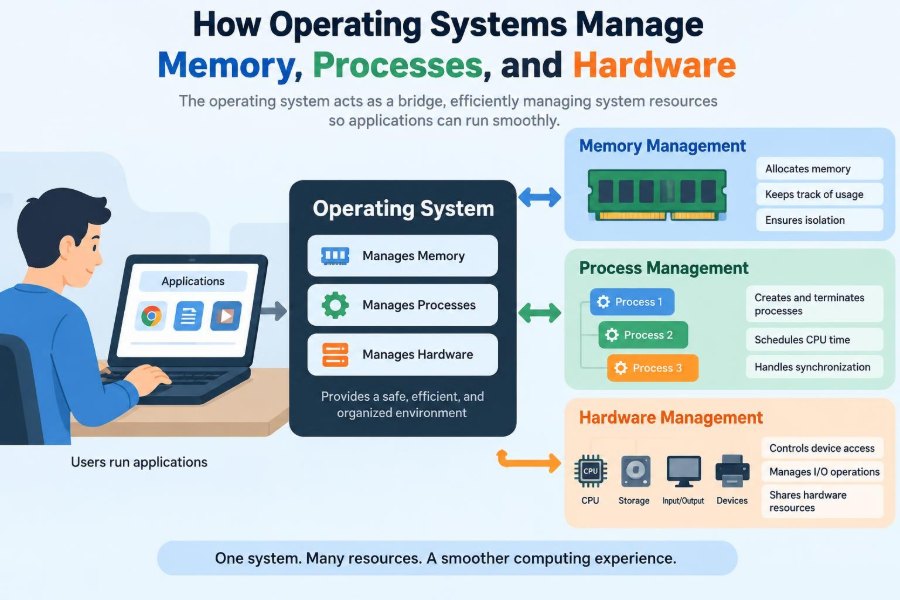

You open a browser, join a video call, save a document, and start a download. To you, these actions seem simultaneous and immediate. Underneath, however, many programs are competing for processor time, memory space, storage access, and network hardware.
Without coordination, one faulty program could overwrite another program’s data, freeze the machine, or take control of a device that other software needs. A computer would be powerful hardware with no dependable way to share it.
The operating system, or OS, is the layer that turns this competition into an orderly experience. It allocates resources, isolates programs, responds to hardware events, and gives applications useful services.
Understanding its core jobs helps students explain how computers work and helps professionals diagnose slowdowns, crashes, permissions problems, and unexpected system behavior. 🖥️
🧭 1. The Operating System’s Central Role
An operating system is system software that sits between applications, users, and physical hardware. Common examples include desktop, server, mobile, and embedded operating systems.
Its central responsibility is resource management: deciding who can use a limited resource, for how long, and under what rules. Resources include CPU cores, RAM, files, disks, network interfaces, displays, and input devices.
The OS also provides stable abstractions. An application can request a file or create a network connection without needing to understand the exact disk controller or network card installed in the machine.
🧩 2. Why Abstractions Matter
Hardware is varied and changes over time. Different processors, storage devices, and graphics adapters expose different low-level controls, but applications need a more consistent programming environment.
An abstraction hides unnecessary detail while preserving useful behavior. The OS presents concepts such as processes, files, virtual memory, windows, sockets, and users.
- A program sees a file, not disk sectors and controller commands.
- A program sees memory addresses, not necessarily physical RAM locations.
- A program sees a process, not direct ownership of a CPU core.
These abstractions make software easier to build, move, and protect.
🔐 3. Kernel Mode and User Mode
Most modern systems separate execution into at least two privilege levels. User mode is where ordinary applications run with restricted authority.
Kernel mode is where the core OS runs with permission to perform sensitive operations, such as configuring hardware, changing memory mappings, or accessing protected data structures.
This boundary limits damage from mistakes. If a text editor contains a bug, it should not be able to directly rewrite the memory of the OS or command a disk controller without checks.
Moving from user mode into kernel mode is controlled, not casual. That controlled entry is usually made through a system call. 🔒
☎️ 4. System Calls: Asking the OS for Help
A system call is a defined interface through which a program asks the operating system to perform a protected service. Opening a file, creating a process, allocating memory, and sending data all involve OS-managed operations.
The application supplies arguments, such as a file name or requested memory size. The OS validates the request, checks permissions and resource limits, then either performs the work or reports an error.
This design matters because applications cannot be trusted to make unrestricted hardware changes. System calls provide both functionality and a point for enforcement.
📦 5. Programs, Processes, and Threads
A program is passive code stored in a file. A process is a running instance of that program, along with its memory, open resources, execution state, and security identity.
A process may contain one or more threads. A thread is an execution path that the scheduler can run. Threads in the same process normally share much of the process’s memory and resources.
Two people can launch the same application and create separate processes. Each process has its own protected address space, even though both began with the same program file.
🧾 6. What a Process Contains
The OS maintains records describing every process. These records track information needed to pause, resume, schedule, secure, and eventually clean up the process.
Typical process state
- Code: the machine instructions being executed.
- Data and heap: global data and dynamically allocated objects.
- Stack: function calls, local variables, and return information.
- Registers: the CPU’s immediate execution context.
- Handles or descriptors: references to open files, sockets, and other OS objects.
Keeping this state lets the OS stop a process temporarily and later continue it as though it had never left the CPU.
⏱️ 7. CPU Scheduling Creates the Illusion of Simultaneity
On a system with more runnable threads than CPU cores, the OS scheduler chooses which thread runs next. It switches rapidly among eligible threads, creating the practical impression that many tasks run at once.
A scheduler considers goals such as responsiveness, fairness, throughput, deadlines, and power use. There is no single policy that is ideal for every computer.
Interactive work often benefits when the system quickly runs the thread handling keyboard input or a window update. Background work can wait longer without making the computer feel unresponsive.
🔄 8. Context Switching Has a Cost
When the CPU changes from one thread to another, the OS performs a context switch. It saves enough state from the outgoing thread and restores the state of the incoming thread.
Switching is essential, but it is not free. It requires OS bookkeeping and can disturb useful CPU caches, which hold recently used instructions and data.
Too many runnable threads can therefore reduce performance rather than improve it. Concurrency should be designed around useful parallel work, not simply around creating more threads. ⚙️
🚦 9. Process States Explain Waiting
A process is not always actively using a CPU. It can move among states such as running, ready, blocked or waiting, and terminated.
A ready thread could run but is waiting for a CPU. A blocked thread is waiting for an event, perhaps disk input, network data, a timer, or a lock held by another thread.
This distinction is useful when troubleshooting. A system can have little CPU activity while an application appears stuck because it is waiting on slow input or another resource.
🧵 10. Why Threads Need Coordination
Threads make it possible to perform related tasks concurrently, such as receiving network data while keeping an interface responsive. But shared memory also introduces race conditions.
A race condition happens when the result depends on an unpredictable timing order. For example, two threads incrementing the same counter can lose an update if both read its old value before either writes the new one.
Operating systems provide synchronization tools, and programming languages commonly expose them through libraries. Correct concurrent programs must define which data is shared and how access is coordinated.
🔒 11. Locks, Semaphores, and Deadlocks
A lock allows one thread at a time to enter a critical section that accesses shared state. A semaphore can represent a count of available resources or coordinate events between threads.
Synchronization prevents some races, but careless locking can cause deadlock. In a deadlock, threads wait indefinitely because each is waiting for a resource held by another.
- Keep critical sections small.
- Acquire multiple locks in a consistent order.
- Avoid holding a lock while doing slow input or waiting when possible.
These are design principles, not guarantees; the correct strategy depends on the program’s shared resources.
🗺️ 12. Physical Memory Is a Limited Resource
Random-access memory, or RAM, holds instructions and data that active programs need quickly. Unlike storage, RAM is directly usable by the processor during normal execution.
Physical memory is finite, and the OS must divide it among the kernel, applications, caches, device-related buffers, and other needs. It cannot simply give every program every byte it requests.
Memory management tracks which regions are in use, which are free, and which permissions apply. It also aims to keep one process from reading or changing another process’s private data.
🏠 13. Virtual Memory Gives Each Process Its Own View
Virtual memory gives each process an address space that appears private and continuous. The addresses used by a program are virtual addresses, not direct instructions to access a fixed physical RAM location.
The OS and processor translate virtual addresses into physical locations through page tables and hardware memory-management features. This translation makes isolation practical.
A process can usually use the same familiar address layout regardless of where its data happens to reside in physical memory. Separate processes can even use similar virtual address ranges safely. 🗺️
📄 14. Pages Are the Basic Units of Mapping
Virtual memory is generally managed in fixed-size blocks called pages. Physical RAM is divided into corresponding blocks commonly called page frames.
Rather than mapping every individual byte separately, the OS maps pages. A page-table entry can record a physical location and permissions such as readable, writable, executable, or unavailable.
Page-based management makes allocation and protection more manageable. It also supports sharing: two processes may map the same read-only code page while retaining separate writable data pages.
🚨 15. Page Faults Are Requests, Not Always Failures
A page fault occurs when a process accesses a virtual page that is not currently mapped in the expected way. The processor pauses the access and transfers control to the OS.
The fault may be ordinary. The OS might allocate a new zero-filled page, load needed data from a file, or restore a page from secondary storage.
It can also indicate an error, such as accessing an unmapped address or writing to a read-only page. In that case, the OS normally terminates the offending process or delivers an exception it can handle.
💾 16. Swapping and Memory Pressure
When demand for memory is high, an OS may reclaim pages that are not actively needed. Clean file-backed pages can often be discarded and reread later; changed anonymous data may need a backing location before RAM can be reused.
Systems may use a swap area or page file for this purpose. This extends the amount of virtual memory that can be supported, but storage access is much slower than RAM access.
If the machine constantly moves data between RAM and storage, it can become severely sluggish. This condition is often called thrashing.
🧠 17. Caches Use Memory to Save Time
Not all occupied RAM belongs directly to application heaps. Operating systems often use spare memory as a cache for recently accessed file data and metadata.
This is usually beneficial. If an application needs a file again, serving it from RAM can avoid a slower storage operation.
Cached memory is generally reclaimable when programs need more space, so “memory in use” does not automatically mean the machine has no usable memory left. The useful question is whether memory pressure is forcing expensive reclamation.
🛡️ 18. Memory Protection Supports Reliability and Security
Every memory mapping can carry access permissions. Code pages can be executable but not writable, while data pages can be writable but not executable.
These rules help catch programming errors and raise the difficulty of some attacks. A process attempting an unauthorized access triggers a protection fault rather than silently corrupting unrelated memory.
Isolation is not absolute by itself: bugs in privileged code, unsafe interfaces, and flawed device drivers can still create serious problems. Yet memory protection remains one of the OS’s most important safety boundaries.
🔌 19. Hardware Needs Drivers
A device driver is software that lets the operating system communicate with a specific class of hardware. Drivers translate general OS requests into commands understood by a storage controller, network adapter, printer, graphics device, or other component.
Drivers also report device status and handle unusual conditions. Because they often operate with elevated privileges, driver defects can destabilize or compromise a whole system.
The OS uses drivers to keep applications independent of vendor-specific hardware details. An application requests output or data transfer; it does not usually manipulate device registers itself.
⚡ 20. Interrupts Let Devices Get Attention
Hardware devices do not need the CPU to repeatedly ask whether work is complete. Instead, a device can generate an interrupt to signal that it needs service or has finished an operation.
When an interrupt arrives, the processor temporarily transfers execution to an OS-defined handler. The handler acknowledges the event, records necessary information, and may schedule further work.
Examples include a key press, an arriving network packet, a completed disk operation, or a timer event. Interrupts make systems more efficient than constant polling in many situations. ⚡
🚚 21. DMA Moves Data Without Burdening the CPU
For larger transfers, many devices use direct memory access, or DMA. The OS sets up a transfer, and the device moves data between itself and RAM with limited CPU involvement during the transfer.
When the work is finished, the device typically interrupts the CPU. This lets the processor perform other tasks instead of copying every byte through its own registers.
DMA must be carefully controlled because it touches memory. Modern systems use hardware and OS mechanisms to restrict which regions a device may access.
📁 22. File Systems Organize Persistent Data
RAM loses its contents when power is removed, so operating systems use file systems to organize persistent data on storage devices. A file system provides files, directories, names, metadata, and rules for locating stored content.
Applications interact with logical files rather than manually choosing blocks on a disk. The OS maps file operations to the lower-level storage work needed by the device.
File systems also help manage consistency. A sudden power loss can interrupt writes, so OS and file-system design often includes techniques to reduce the chance of damaged metadata or incomplete updates.
🪪 23. Users, Permissions, and Access Control
Resource management includes deciding who may use a resource. Operating systems associate processes with identities and evaluate permissions when they access files, devices, services, or administrative functions.
Permissions may distinguish reading, writing, executing, modifying settings, or managing other users. The exact model differs across operating systems, but the purpose is consistent: limit authority to what is needed.
This is the principle of least privilege. A standard application should not receive administrator-level power merely because it needs to save a document in its own workspace.
🌐 24. Networking Is Also an OS Service
Network applications need a safe, shared way to send and receive data. The OS provides networking interfaces that let programs use protocol stacks without each application implementing drivers and packet handling from scratch.
A socket is a common abstraction for network communication. The OS manages much of the path between an application’s data and the network hardware.
It also coordinates shared use of the network interface, buffers incoming and outgoing data, and applies security rules such as filtering policies. A slow network operation often places a thread in a waiting state rather than consuming CPU time.
🧪 25. Isolation Supports Virtual Machines and Containers
Operating systems provide the foundation for running workloads with varying degrees of separation. A virtual machine emulates or virtualizes a complete hardware environment so a guest OS can run inside it.
Containers usually share the host kernel while isolating processes, file-system views, network settings, and resource limits through OS features. They are not identical to virtual machines.
| Approach | Primary isolation idea | Typical trade-off |
|---|---|---|
| Virtual machine | Separate guest operating system | Stronger separation model with additional system overhead |
| Container | Separated processes sharing a host kernel | Efficient deployment with shared-kernel considerations |
Both approaches depend on careful resource and permission management.
📊 26. Monitoring Reveals Resource Bottlenecks
When a computer feels slow, the cause is not always the CPU. Useful monitoring separates CPU activity, memory pressure, storage operations, network traffic, and process states.
A high CPU percentage can indicate heavy computation, while a low CPU percentage with slow response may indicate waiting for storage, a network service, or a lock. Repeated page faults combined with storage activity can suggest memory pressure.
Good diagnosis starts with observation rather than guesswork. The OS exposes measurements because it already tracks much of the resource activity it coordinates.
🛠️ 27. Practical Habits for Developers and Users
Developers can cooperate with the operating system by releasing resources, avoiding needless busy-waiting, limiting uncontrolled thread creation, and handling errors from system calls and file operations.
Users can improve stability by keeping sufficient free storage, closing genuinely unneeded heavy workloads, installing trusted updates, and treating unexpected permission prompts carefully.
- Use profiling tools before assuming a performance cause.
- Prefer asynchronous or event-driven waiting where it fits the task.
- Design recovery paths for unavailable files, networks, and devices.
These habits do not replace OS design, but they help applications use shared resources responsibly.
🎯 28. The Core Principle: Controlled Sharing
The operating system’s central achievement is controlled sharing. It gives many programs the useful illusion of private CPUs, private memory, reliable files, and direct device access while safely coordinating the real shared resources underneath.
Processes and scheduling divide processor time. Virtual memory and permissions divide RAM safely. Drivers, interrupts, and DMA connect software to hardware. File systems, networking, and access control extend the same organizing role to data and communication.
Once you view an OS as a resource manager and protection layer, many computer behaviors become easier to explain: a process waits, a page faults, a driver interrupts, and the system decides what happens next.
An operating system makes complex hardware usable by balancing performance, fairness, isolation, and control. 💻🧠⚙️