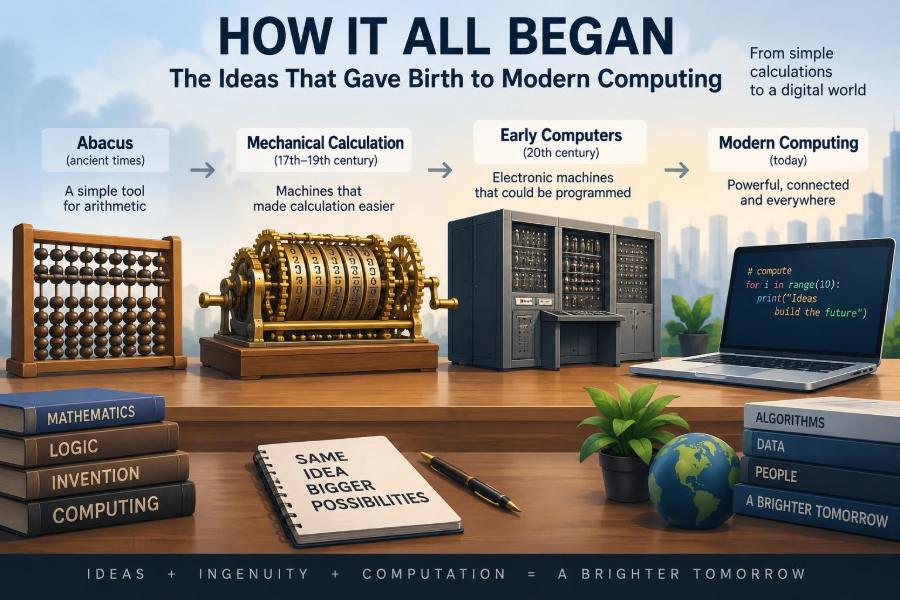

A phone suggests the next word in a message. A navigation app compares routes in seconds. A spreadsheet recalculates an entire budget after one changed number. These ordinary moments feel almost effortless, but each depends on ideas that took centuries to develop.
Modern computers did not arrive because someone suddenly built a fast electronic box. They emerged from a chain of questions: Can calculation be made reliable? Can instructions be represented symbolically? Can a machine follow a procedure? Can information be stored, transmitted, and corrected?
Those questions still shape the systems people write, use, and depend on. Understanding their origins makes programming concepts less mysterious and helps explain why computers have both remarkable strengths and very human limitations.
The story of computing is therefore not only about famous machines. It is about the practical and mathematical ideas that turned repeatable thought into executable instructions.
🧮 Calculation Came Before Computers
Humans have always needed ways to track quantities: harvests, trade, taxes, time, and construction. Early tools such as tally marks and the abacus reduced the burden of remembering and calculating everything mentally.
The crucial idea was external representation: putting information into a physical form that can be inspected and manipulated. A row of beads can stand for numbers; moving them follows rules. That basic separation between a number and its representation remains central to computing.
📜 Written Symbols Made Procedures Shareable
Written numerals and mathematical notation did more than make records permanent. They allowed a calculation method to be described, taught, checked, and repeated by someone else.
A procedure such as long multiplication is an early example of an algorithm: a finite sequence of steps for solving a class of problems. The person following it need not invent the method each time. They only need the right inputs and careful execution.
🔢 Zero Changed What Numbers Could Express
Place-value number systems use a digit’s position to determine its value. In the decimal number 507, the zero is not “nothing” in a casual sense; it preserves the empty tens position and distinguishes 507 from 57.
This approach made arithmetic more systematic than many earlier numeral systems. It also established a powerful theme: a small set of symbols, interpreted according to position and rules, can express a vast range of values.
⚙️ Mechanical Calculators Reduced Routine Errors
By the seventeenth century, inventors built devices with gears and wheels to automate parts of arithmetic. These machines could add and subtract, and some designs supported multiplication or division through repeated operations.
They were not general computers. Still, they showed that a physical mechanism could carry out formal numerical rules. This mattered where repeated manual calculation was slow or vulnerable to transcription mistakes.
🌊 Automation Began With Repeatable Motion
Automation first flourished in machines whose behavior could be mechanically constrained. Clocks, looms, and industrial equipment could produce a repeated pattern when their components were arranged in a particular way.
This revealed an important distinction. A machine can be automatic without being programmable. A clock performs a fixed design; a programmable device can perform different tasks when its instructions are changed.
🧵 Punch Cards Stored Instructions
In early nineteenth-century textile production, the Jacquard loom used cards with holes to control which threads were lifted. A different sequence of cards could produce a different woven pattern.
The cards were not merely settings on a machine; they were a form of stored instruction. This was a major conceptual step because the pattern could be prepared separately, saved, copied, and reused. Later information-processing machines adopted the same broad principle.
🏭 Data and Instructions Can Use the Same Medium
A punched card can describe a weaving pattern, a census record, or a computation step depending on the system reading it. The physical medium does not determine the meaning on its own.
Computers extend this insight. Bits in memory may represent a number, a letter, a pixel, an instruction, or part of a sound recording. Interpretation comes from agreed rules, not from the electrical state alone.
📐 Babbage Imagined a General-Purpose Machine
Charles Babbage designed the Analytical Engine in the nineteenth century. It was never completed at its intended scale, but its architecture anticipated features recognizable in later computers: a processing unit, memory, input, output, and control through instructions.
Its importance lies in the idea of a general-purpose machine. Rather than building one device for navigation tables and another for accounting, a sufficiently flexible machine could be directed to perform many kinds of symbolic work.
📝 Ada Lovelace Saw More Than Arithmetic
Ada Lovelace wrote notes about the Analytical Engine that included a method for processing a sequence of mathematical values. Her lasting contribution was also conceptual: she recognized that a machine operating on symbols could potentially manipulate more than ordinary numbers.
If musical relationships, text, or images can be represented symbolically, a machine can operate on their representations according to rules. The machine does not understand a symphony as a listener does, but it can transform encoded information in useful ways.
🧭 Algorithms Are Precise Recipes
An algorithm is a clear procedure that transforms input into output. A cooking recipe is only a loose analogy, because software instructions must usually remove ambiguity much more carefully.
Consider sorting names alphabetically. A computer needs explicit rules for comparing two names, deciding whether they are out of order, and knowing when no more changes are needed. Vague instructions such as “put them in the right order” are not enough.
🔁 Control Flow Gives Programs Decisions
Programs are useful because they do not simply read instructions from top to bottom once. They can make choices, repeat steps, and jump to another part of a process.
- Sequence: perform actions in a defined order.
- Selection: choose an action based on a condition, such as whether a password matches.
- Iteration: repeat actions, such as checking every item in a list.
These control-flow ideas make it possible to express complex behavior from simple instructions.
🧠 Logic Turned Reasoning Into Operations
Mathematical logic developed ways to express statements that are true or false and to combine them with rules such as AND, OR, and NOT. For example, a door access rule might allow entry only if a badge is valid AND the person is authorized.
Boolean logic gave engineers a bridge between abstract reasoning and physical circuits. A circuit can represent two states, such as on and off, and combine them in ways that correspond to logical operations.
🔌 Binary Fit Electronic Hardware
Binary represents values using only two symbols, commonly 0 and 1. It is not inherently superior for every human task; decimal notation is often easier for people. But two clearly distinguishable physical states are practical in electronic systems.
A voltage range can be interpreted as one state and another range as the other. Real hardware is more complicated than a perfect on/off switch, which is why circuits must tolerate noise and use carefully designed thresholds.
🧱 Logic Gates Build Larger Functions
A logic gate is a small circuit that performs a Boolean operation. Gates can be combined so that simple yes/no decisions produce arithmetic, comparisons, memory control, and communication behavior.
For example, an adder circuit combines bits and carries a value to the next position, much like column addition on paper. The remarkable point is not that a single gate is clever. It is that reliable combinations of simple components can implement elaborate rules.
💾 Memory Made Programs Adaptable
To process information over time, a machine needs memory: a way to retain values and intermediate results. Early systems used physical arrangements, switches, relays, cards, and other mechanisms; later electronic designs made storage faster and denser.
Memory is not one thing. A processor uses very fast, small storage while working, whereas long-term storage keeps files after power is removed. Confusing these roles can lead to a common misconception that every kind of “memory” behaves like a hard drive.
🏗️ The Stored-Program Idea Simplified Design
In a stored-program computer, instructions are held in memory alongside the data they operate on. The processor fetches an instruction, interprets it, carries it out, and then moves to the next instruction or follows a branch.
This arrangement made systems easier to reconfigure. Loading different instructions changes what the same hardware can do. It also creates a security implication: if an attacker changes instructions or persuades a program to run untrusted ones, the machine may carry out harmful actions.
⚡ Electronic Switching Increased Speed
Mechanical parts move slowly and wear down. Early electronic computers used vacuum tubes, which could switch much faster but consumed substantial power and generated heat. Transistors later offered a smaller, more reliable switching element.
Integrated circuits placed many transistors on a small piece of semiconductor material. This reduced the cost and size of building complex logic, helping computers move from specialized rooms into workplaces, homes, and eventually pockets.
🧩 Abstraction Lets Us Manage Complexity
Few programmers design circuits when creating a web application, and few web users think about processor instructions when sending a message. This is possible because computing is built in layers of abstraction.
Each layer hides some details while offering a useful interface. A programming language hides many machine-level operations; an operating system hides device-specific control; an app hides much of the network. The details still matter when troubleshooting, but not every task needs every layer exposed.
🗣️ Programming Languages Made Instructions Human-Friendly
Machine code expresses instructions as binary patterns, which are difficult for people to read and maintain. Assembly language introduced symbolic names, while higher-level languages let programmers describe tasks using structures closer to human reasoning.
A compiler translates one programming language into another form, often machine code. An interpreter generally executes instructions through another program. The boundary is not always absolute, but both approaches show how one representation can be transformed into another.
🧰 Operating Systems Coordinated Shared Resources
As computers became capable of running many programs and serving many users, they needed a coordinator. An operating system manages access to processors, memory, files, devices, and permissions.
Without this layer, every application would have to communicate directly with each keyboard, disk, and display. Operating systems make software development more practical, although they also add complexity and require careful updates and security controls.
📡 Networks Turned Separate Machines Into Systems
A standalone computer can calculate and store information, but a network allows machines to exchange it. Network protocols are agreed rules for addressing, formatting, sending, receiving, and checking data.
When you open a website, many systems may cooperate: a device requests information, routers forward packets, servers respond, and software assembles the result. The visible page is only the final layer of a carefully coordinated exchange.
📦 Packets Make Communication Resilient
Networks often divide a message into smaller units called packets. Each packet carries enough control information to be routed and reassembled, rather than requiring one uninterrupted path for an entire message.
This approach can use available routes efficiently and recover when individual packets are delayed or lost. It also means a networked system must handle disorder: packets can arrive late, arrive out of sequence, or fail to arrive at all.
🛡️ Reliability Requires Detecting Mistakes
Physical signals can be disturbed, storage can fail, and people can enter incorrect data. Computing systems use checks, redundancy, validation, and backups to reduce the impact of these failures.
Error detection does not mean every mistake is automatically fixed. A checksum, for example, can reveal that transmitted data appears altered, while a backup can restore an earlier copy after loss. Good systems identify what they can verify and what remains uncertain.
🔐 Computation Also Created New Risks
The same flexibility that makes software useful makes it vulnerable to misuse. Programs can contain defects, permissions can be configured too broadly, and convincing messages can trick people into revealing credentials.
Security is not a single feature added at the end. It involves design choices, updates, access control, encrypted communication where appropriate, safe defaults, and users who pause before trusting unexpected requests.
🤖 Automation Is Not the Same as Understanding
Computers can follow rules at enormous scale, recognize patterns, and generate convincing outputs. Yet an output that looks intelligent does not automatically show comprehension, intent, or reliable judgment.
This distinction matters with automated recommendations and AI systems. Their results depend on data, objectives, model design, and context. A sensible practice is to check high-stakes outputs against evidence and human expertise rather than treating fluency as proof.
⚖️ Computing Encodes Human Choices
Technical systems are shaped by decisions about what to measure, which errors matter, whose needs are prioritized, and who has access. A scheduling algorithm, for instance, may optimize speed while overlooking fairness or accessibility unless those concerns are deliberately included.
Computing is therefore not neutral simply because it uses mathematics. Mathematical rules can be precise while the goals and assumptions chosen for them remain open to debate.
🧪 Debugging Continues an Old Tradition
From calculation tables to modern software, people have had to find and correct errors. Debugging is not a sign that a programmer has failed; it is a disciplined process of testing assumptions, isolating causes, and checking results.
A useful habit is to make a small test case. If a payroll program gives a surprising total, try a few records whose answer can be calculated by hand. Smaller examples expose faulty rules more clearly than a large, messy dataset.
📊 Efficiency Is About Trade-Offs
Computers have limited time, memory, energy, storage, and network capacity. Algorithms are compared not only by whether they produce the correct result, but by how resources grow as the problem grows.
There is rarely one universally best method. A simple approach may be easiest to audit for a small dataset, while a more sophisticated one becomes worthwhile at large scale. Good engineering matches the method to the real constraints.
🌍 The Foundations Still Shape Everyday Life
When you save a document, you are using representation, memory, encoding, operating-system services, and storage hardware. When you search an online catalog, algorithms, databases, networks, and interface design work together.
Seeing these foundations helps users ask better questions: What data is being collected? What instructions are being followed? What assumptions decide the result? Where could failure occur? Those questions are useful whether you write code or simply rely on it.
🚀 The Core Idea: Computation Is Organized Representation
Modern computing grew from the ability to represent information, define repeatable procedures, and build machines that execute those procedures reliably. Punch cards, logic gates, stored programs, programming languages, and networks are different expressions of that same progression.
The deepest lesson is that computers are powerful not because they “think” in a human sense, but because they can apply explicit rules to encoded information quickly, consistently, and at scale. Their results are only as meaningful as the representations, instructions, data, and goals people provide.
To understand modern computing, start with its enduring recipe: represent information clearly, state procedures precisely, and examine the human choices behind every automated result. 💻🧠🌐