
You record a short video on your phone, attach a presentation to an email, stream a song, or download a game update. In each case, data has to fit through a limited connection and onto a limited amount of storage.
Yet a photo that appears detailed can occupy far less space than the raw sensor data that created it. A long document can shrink to a fraction of its original size. A movie can travel across the internet quickly enough to play while it is still arriving.
That is possible because digital files usually contain patterns, repetition, and detail that people do not need in full precision. Compression finds a more efficient way to represent that information.
The key phrase is “without losing everything.” Some compression restores every original bit. Other methods deliberately discard carefully chosen information to achieve much smaller files. Understanding the difference makes file formats, quality settings, cloud storage, and bandwidth limits much easier to reason about.
🧩 What Data Compression Actually Means
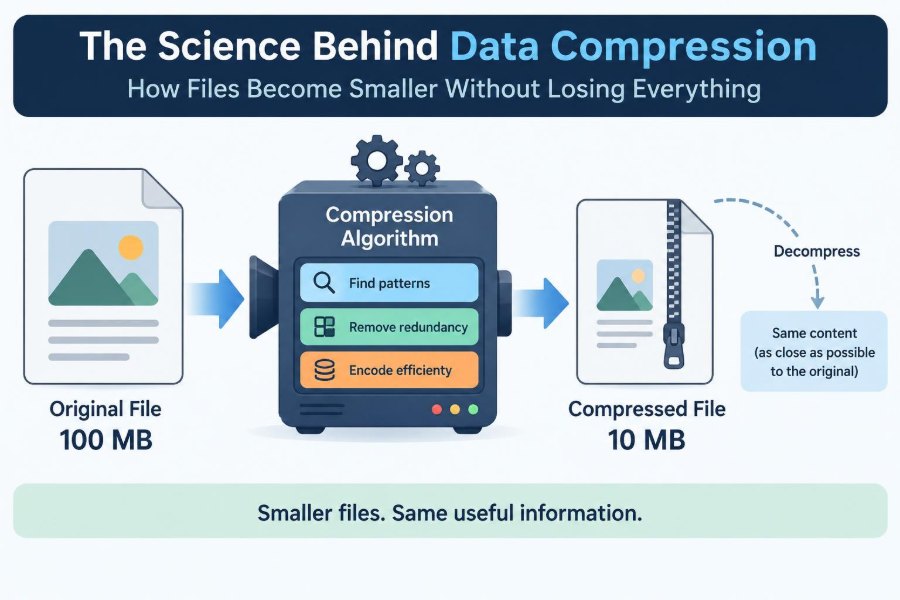
Data compression is the process of representing information with fewer bits than its original form requires. A bit is a binary digit: a 0 or 1. Files are ultimately long sequences of those bits.
Compression does not make information disappear by magic. It replaces a wasteful representation with a shorter one, or it removes information judged less useful for a particular purpose. The decompression process then reconstructs the original data, or an approximation of it.
📦 Why File Size Matters
Smaller files consume less disk space, transfer more quickly, and often cost less to store or deliver. This affects everything from a message attachment to a company backup system.
On a slow or congested network, compression can be the difference between a usable service and a frustrating one. It also reduces the amount of data that devices must read and write, although compression itself requires processing time.
🔢 Bits, Bytes, and Representation
A byte contains eight bits and is a common unit for measuring file size. But file size is not a direct measure of usefulness. Two files can show the same image while using very different numbers of bytes because they encode it differently.
Consider a row of 1,000 identical white pixels. Storing each pixel separately repeats the same instruction many times. Storing “1,000 white pixels” can be much shorter, provided the decoder understands that instruction.
🔁 Repetition Is Compression’s First Opportunity
Many data sources are not random. Text repeats letters, words, punctuation, and common phrases. Images contain regions of similar color. Audio signals change gradually over short periods.
Compression algorithms exploit this redundancy: predictable or repeated structure that can be described more compactly. A truly random sequence has little redundancy, so it is difficult or impossible to compress substantially without losing information.
🗜️ Lossless Compression Preserves Every Bit
Lossless compression lets a decompressed file match the original exactly, bit for bit. It is appropriate when every character, instruction, measurement, or pixel value must remain intact.
A ZIP archive is a familiar example. If you compress a spreadsheet into a ZIP file and later extract it successfully, the spreadsheet should be identical to the file you started with.
- Common lossless uses include documents, program files, databases, source code, and archival copies.
- Lossless image formats can be useful for diagrams, screenshots, and editing workflows.
- Lossless compression ratios vary widely because different files contain different amounts of redundancy.
🎨 Lossy Compression Trades Detail for Size
Lossy compression permanently removes some information. The goal is to remove or simplify details that have less impact on human perception or on the intended use of the file.
JPEG images, many streaming video formats, and common music formats use lossy techniques. When designed and configured well, the missing information may be hard to notice. With aggressive settings, however, the loss becomes visible or audible.
⚖️ The Central Quality-Size Trade-Off
Lossy compression is not simply “good” or “bad.” It is a trade-off between file size, quality, and sometimes encoding or decoding effort. A small preview image may work well at a lower quality setting, while a product photograph intended for print may not.
The correct choice depends on purpose. Ask what users need to see, hear, edit, measure, or preserve—not only how many megabytes can be saved.
🧠 A Simple Analogy: Notes Instead of a Transcript
Imagine describing a two-hour meeting. A lossless record is a complete transcript: every word and pause remains available. A lossy record is a concise set of notes that keeps decisions and main ideas but omits repetitions and minor phrasing.
Both may be useful, but they serve different needs. You cannot reconstruct the exact conversation from brief notes. Similarly, a lossy file cannot restore detail that was discarded during compression.
📚 Dictionary Coding Finds Repeated Pieces
One lossless strategy builds a dictionary of repeated strings or byte patterns. Instead of writing the same sequence again, the compressed data can refer back to its earlier occurrence.
For example, repeated fragments in a web page or document might be represented by a reference such as “copy the next characters from a previous location.” ZIP-style methods commonly combine this idea with other coding techniques.
🏃 Run-Length Encoding Counts Repeated Values
Run-length encoding, often shortened to RLE, stores a value and the number of times it repeats consecutively. A sequence like “AAAAAA” can become “6 A.”
It works especially well for simple graphics, scanned material with large flat areas, or data containing long runs of the same value. It performs poorly when values change constantly, because the count information can add overhead rather than save space.
🌲 Huffman Coding Gives Common Symbols Short Codes
In ordinary text, some characters occur more often than others. Huffman coding assigns shorter bit patterns to frequent symbols and longer patterns to rare ones, reducing the average number of bits used.
This is a lossless technique. The decoder can still tell where one code ends and another begins because the code set is constructed to avoid ambiguity. Modern formats may use Huffman coding or related entropy-coding methods as one stage of a larger system.
🎲 Entropy Sets a Practical Limit
Entropy is an information-theory concept describing uncertainty or average information in a data source. Highly predictable data has lower entropy; unpredictable data has higher entropy.
In practical terms, entropy explains why no universal compressor can make every file much smaller. If a file is already well compressed or resembles random data, there may be no repeated structure left to exploit. A second compression pass may produce almost no gain and can even increase size slightly because of format headers.
📝 Why Text Often Compresses Well
Human language contains patterns at many levels. Certain letters, word endings, spaces, and phrases recur. Structured text such as CSV, HTML, JSON, and log files also repeats field names, punctuation, and layout conventions.
That is why sending a plain-text report inside a compressed archive can save substantial space. The exact result depends on language, content, and format, so no fixed reduction should be assumed.
🖼️ How Image Compression Uses Spatial Patterns
Neighboring pixels in a photograph are often similar. Image compressors can describe changes between nearby pixels instead of storing each pixel as an unrelated value. They may also transform image blocks into components representing broad color changes and fine detail.
For lossy images, fine details can be represented less precisely than broad shapes. This reflects a useful property of human vision: viewers often notice large contrast changes more readily than tiny, high-frequency texture changes.
🔍 JPEG Artifacts Explain “Blocky” Photos
JPEG commonly processes images in small blocks. At low quality settings, boundaries between blocks may become visible, especially around sharp edges or areas with smooth gradients. Ring-like distortions can also appear near high-contrast lines.
These effects are called compression artifacts. They are evidence of information loss, not necessarily a damaged file. Re-saving the same JPEG repeatedly can make artifacts worse because each save may discard more detail.
🎭 Why PNG and JPEG Serve Different Jobs
PNG is generally lossless and handles sharp edges, flat colors, transparency, and text-like graphics well. JPEG is lossy and often efficient for photographs with many gradual color changes.
| Format type | Typical strength | Common limitation |
|---|---|---|
| PNG | Lossless graphics, screenshots, transparency | Photographs can be relatively large |
| JPEG | Compact photographic images | Lossy artifacts; no standard full transparency |
| ZIP archive | Lossless packaging for many file types | Usually offers little gain on already compressed media |
Format choice should follow the content and the task. A screenshot full of small text saved as a heavily compressed JPEG may become difficult to read, even if the file is small.
🎵 Audio Compression Models Hearing
Audio codecs can take advantage of limitations in human hearing. A loud sound can mask a quieter nearby sound, making the quieter component harder to perceive. Some lossy codecs use such psychoacoustic principles when deciding what to simplify.
This does not mean all discarded audio is inaudible in every situation. Speakers, headphones, listening environment, source material, and listener sensitivity all matter. Critical audio work often keeps an uncompressed or lossless master.
🎬 Video Compression Reuses Time as Well as Space
Video is a sequence of images, so it contains patterns within each frame and across adjacent frames. If most of a scene remains still, a codec can store a complete reference frame occasionally and then encode changes for later frames.
This is why a moving camera, fast action, smoke, water, or visual noise can be harder to compress cleanly than a stationary interview shot. More change between frames usually requires more information.
🧮 Codecs Are Rules for Encoding and Decoding
A codec is a method or software component that encodes and decodes media. The term combines “coder” and “decoder.” A file extension alone does not always reveal every technical detail; a container may hold streams produced by different codecs.
For users, the practical question is compatibility. A file can be well compressed yet inconvenient if the intended device or application cannot decode its codec.
🗂️ Containers Package Streams and Metadata
A container format organizes one or more streams, such as video, audio, subtitles, and metadata, into a single file. It may include timing information that tells a player how to synchronize them.
Think of a container as a labeled box and codecs as the methods used to pack individual items inside. Confusing the two leads to common compatibility problems: two video files may share an extension while requiring different decoding support.
🧷 Metadata Can Survive Compression
Files often carry metadata: camera settings, creation dates, location information, author names, color profiles, or editing history. Compression is not the same as metadata removal.
Before sharing an image or document, check what information travels with it. Some tools offer an option to strip metadata, but this can also remove useful details such as orientation or color-management information.
🔐 Compression and Encryption Do Different Things
Compression reduces redundancy. Encryption deliberately transforms data so it appears unpredictable to anyone without the key. As a result, encrypted data is normally difficult to compress effectively.
The usual order is compress first, then encrypt. If you encrypt first, the compressor sees data designed to look random and finds little to shorten. Compression also provides no confidentiality by itself; a ZIP file is not automatically private.
⚙️ Compression Costs CPU Time and Memory
Compression saves storage and network capacity, but encoding and decoding require computation. Some methods prioritize fast decompression for web pages or applications that must open quickly. Others spend more time encoding to achieve a smaller archive.
There is no single “best” algorithm. A backup made once and stored for years may justify slower, stronger compression. A live video call must prioritize low delay, even if that limits how much compression can be performed.
📡 Streaming Balances Quality, Delay, and Bandwidth
Streaming services often provide multiple versions of the same content at different bit rates. A player can select or switch among them based on the connection, screen, and playback conditions.
A bit rate describes how much data is used per unit of time. Higher bit rates can preserve more detail, but only if the network and device can handle them. A low bit rate is not automatically poor; its adequacy depends on resolution, motion, and content complexity.
💾 Why Compressing a Compressed File Often Fails
JPEG images, MP3-like audio files, many videos, PDFs with compressed assets, and archive files have often already had their redundancy removed. Putting them inside another ZIP archive may help only minimally.
This is not a failure of ZIP. It is a consequence of the entropy limit: the first specialized format already did much of the available compression work. The archive can still be useful for bundling files or preserving folder structure.
🧪 Measuring Compression Ratio Correctly
A compression ratio compares original size with compressed size. If a 100 MB file becomes 25 MB, the compressed file is one quarter of the original size, often described as a 4:1 ratio.
Be careful with wording. “Reduced by 75%” and “compressed to 25% of its original size” describe the same result. Ratios are meaningful only when the original file, method, settings, and target quality are clear.
🛑 Common Mistakes That Damage Files or Expectations
Many compression problems come from using the wrong workflow rather than the wrong algorithm. The following habits cause avoidable trouble:
- Re-saving a lossy image or video repeatedly instead of editing from an original master.
- Assuming a format extension guarantees quality or compatibility.
- Using aggressive compression for text-heavy diagrams, screenshots, or files that need future editing.
- Expecting a ZIP archive to dramatically shrink already compressed media.
- Deleting originals before confirming that an archive can be opened and restored.
🛠️ Choosing Settings for Everyday Work
Start with the use case. For an email preview, a resized image with moderate lossy compression may be sensible. For a legal record, engineering source file, or editable design, preserve a lossless original and share a separate derivative when needed.
When quality matters, inspect the result at the size and on the device where it will be used. A flaw invisible in a phone thumbnail may be obvious on a large display or in print.
🗄️ Archiving Requires More Than a Small File
Long-term preservation is not just a compression decision. You need reliable storage, checks for corruption, sensible file naming, and formats that future software is likely to support.
Keep important originals when feasible, especially if a compressed derivative was created for delivery. A lossy export is useful as a copy for a purpose; it is not always a substitute for the source.
🔭 Compression Keeps Evolving
New codecs and compression methods try to improve quality, speed, compatibility, or file size. Some are optimized for particular data types, hardware, or network conditions. Better results in one category can involve trade-offs elsewhere, such as higher computation requirements or limited device support.
The durable idea is not memorizing a list of formats. It is learning to ask what kind of data you have, what detail must survive, how quickly it must travel, and what devices need to open it.
✅ The Core Principle: Remove Waste, Protect What Matters
Compression works because digital data is often represented less efficiently than necessary for a given task. Lossless methods remove redundancy while preserving every bit. Lossy methods go further by simplifying information that may be less noticeable or less valuable to the intended audience.
The best choice is therefore contextual. Preserve exactness when correctness, editing, or evidence matters. Accept controlled loss when faster delivery and smaller storage are worth more than retaining every tiny detail.
Data compression is the art of representing the same useful message with fewer bits—while making deliberate choices about what, if anything, can safely be left behind. Once you see files as patterns rather than opaque objects, format and quality decisions become much more practical. 💻🗜️📁