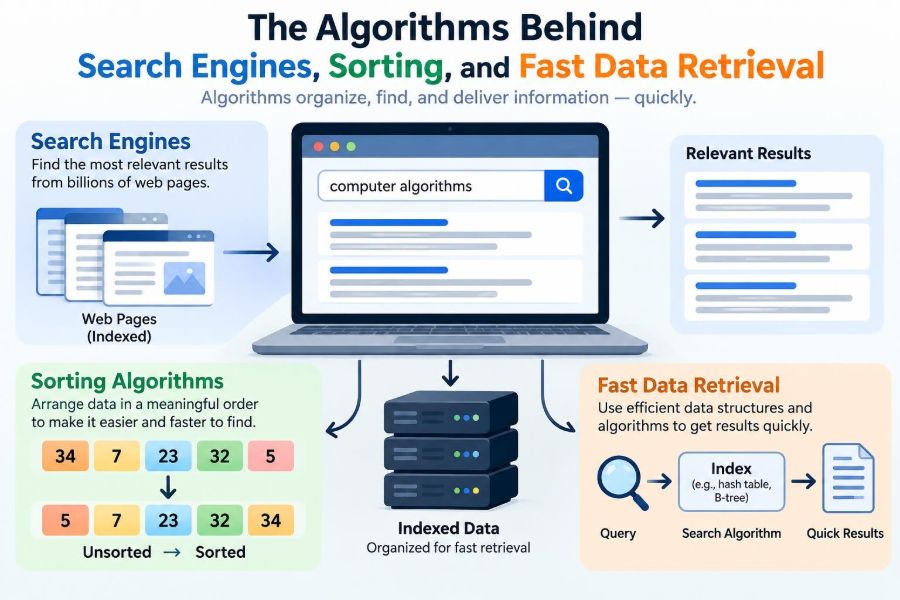

You type a few words into a search box and expect useful results almost immediately. You sort a spreadsheet by date before a meeting. You open a music app and find a song from a library far larger than you could browse by hand.
These actions feel simple because the difficult work is hidden. Behind each one is a set of algorithms: precise methods for organizing information, narrowing choices, and returning an answer without examining every possible item.
Algorithms do not make computers magically fast. They make computers systematic. The difference between checking one item at a time and choosing a smart route through data can turn an unusable task into an ordinary interaction.
Search engines, sorting tools, and databases solve different problems, but they rely on several shared ideas: representation, ordering, indexing, ranking, and trade-offs. Understanding those ideas makes many everyday systems easier to reason about.
🧭 What an Algorithm Actually Is
An algorithm is a finite, well-defined sequence of steps for completing a task. A recipe is an everyday algorithm: it specifies inputs, actions, and an expected result. In computing, the steps must be detailed enough for a machine to carry out exactly.
For example, “find a contact” is a goal, not an algorithm. “Compare the requested name with each contact until a match is found” is an algorithm. “Keep contacts alphabetically ordered, repeatedly divide the remaining range in half, and compare the middle name” is a different algorithm for the same goal.
The second approach is often much faster, but only because the contacts have been kept in order. That dependency is a recurring theme: speed usually comes from work done earlier.
📦 Data Structure Comes Before Speed
An algorithm works with a data structure, the way information is arranged in memory or storage. A list, table, tree, graph, and hash table can all store data, but they make different operations convenient.
A simple array is useful when items need to be accessed by position. A tree is useful when values must remain ordered. A graph represents connections, such as roads between places or links between web pages.
There is no universally best structure. The right choice depends on what happens most often: reading, inserting, deleting, sorting, filtering, or finding related records.
⏱️ Measuring Work with Time Complexity
Computer scientists often describe growth in running time with Big O notation. It does not predict the exact number of milliseconds on a particular laptop. Instead, it describes how the amount of work grows as the input becomes larger.
A linear search through a list may need to inspect every item, so it is written as O(n). If the list doubles in size, the worst-case work roughly doubles. A binary search is O(log n): each comparison discards about half the remaining candidates.
Big O intentionally ignores many details, including hardware speed and small constant costs. Those details matter in real software, but growth rate is a powerful first comparison for large collections.
📊 A Useful Complexity Reference
| Growth pattern | Typical example | What happens as data grows |
|---|---|---|
| O(1) | Looking up a known array position | Work stays roughly constant |
| O(log n) | Binary search in sorted data | Grows slowly by repeatedly halving choices |
| O(n) | Scanning a list | Work grows with the number of items |
| O(n log n) | Efficient comparison sorting | Usually practical for large sortable lists |
| O(n²) | Comparing every pair in a simple sort | Can become expensive quickly |
These labels are not grades. An O(n) scan over a small list may be clearer and faster in practice than building a complicated index. Complexity helps ask the right question: what will happen when the workload changes?
🔎 Linear Search: The Straightforward Baseline
Linear search checks items one after another until it finds a match or reaches the end. Looking for a misplaced key in an unsorted drawer is a physical version of it.
It needs no preparation and works on unsorted data. That makes it sensible for short lists, one-time checks, or data that changes constantly. Its weakness appears when a large collection receives many repeated searches.
If a product catalog contains many records and every query starts at the first one, most of the same comparisons are repeated. Indexes exist largely to avoid this waste.
✂️ Binary Search: Elimination by Halves
Binary search works only when values are sorted. It checks the middle value, determines whether the target belongs before or after it, then repeats on that half.
Imagine finding a word in a printed dictionary. Opening near the middle tells you which half contains the word; opening in the middle of that half narrows the range again. You never need to turn every page.
The requirement is strict: if the data is not ordered according to the comparison being used, binary search can discard the correct answer. Sorting or maintaining order is the price of its efficient lookup.
🧮 Sorting Is More Than Making Lists Neat
Sorting arranges records according to a key, such as price, timestamp, surname, or priority. It improves readability, but it also enables other operations: binary search, range queries, duplicate detection, and ordered reporting.
A store might sort transactions by time to process them in sequence, or sort products by category and price to generate a useful display. A database may maintain an ordered index so that records in a date range can be found without scanning every record.
Sorting has a cost. Systems must decide whether to pay it once when data arrives, repeatedly when data changes, or only when a user asks for ordered output.
🫧 Bubble Sort and the Value of Simple Examples
Bubble sort repeatedly compares neighboring values and swaps them when they are in the wrong order. Large values gradually “bubble” toward the end of the list.
It is easy to visualize, which makes it useful for teaching comparisons and swaps. But its typical O(n²) behavior is poor for large unsorted collections, because it may make many passes through the data.
Simple algorithms are still valuable as baselines. They show why better designs matter, and they can be adequate when a list is tiny or nearly ordered. Production software, however, generally uses more efficient library sorting methods.
🧩 Merge Sort: Divide, Sort, Combine
Merge sort splits a collection into smaller halves until each piece has one item, which is already sorted. It then merges pairs of sorted pieces by repeatedly taking the smaller next item.
Because merging ordered sequences is efficient, merge sort runs in O(n log n) time in its standard form. It is also typically stable: records with equal sort keys keep their original relative order.
Stability matters when sorting in stages. Suppose a list is first sorted by name and then stably sorted by department. Within each department, the name order is preserved. Merge sort often uses extra memory for the merge process, so its strengths come with a storage trade-off.
⚡ Quicksort: Partitioning Around a Pivot
Quicksort selects a pivot value and rearranges the collection so smaller values fall on one side and larger values on the other. It then sorts the two partitions recursively.
With well-balanced partitions, quicksort has O(n log n) behavior and is often very fast in practice. Unfortunate pivot choices can create highly uneven partitions, leading to O(n²) worst-case work.
Real implementations reduce that risk through pivot-selection strategies, safeguards, or hybrid designs. The larger lesson is that average-case performance and worst-case performance are both worth understanding.
🛠️ Why Built-In Sorting Is Usually the Right Choice
Most programming languages provide carefully engineered sorting functions. They may use hybrids that adapt to partially sorted input, protect against bad cases, or choose methods based on data type and memory constraints.
Writing a sort by hand is excellent practice when learning. In application code, a standard library is usually safer because it has been tested on edge cases involving duplicates, empty collections, custom comparisons, and unusual values.
The important decision is often not which sorting algorithm to implement. It is choosing a sensible sort key and ensuring the comparison rule is consistent.
🗂️ Indexes: The Shortcut Layer for Retrieval
An index is an additional structure that points from a searchable value to the relevant data. A book index does not contain every sentence; it maps selected terms to page locations.
Database indexes work similarly. Rather than scan every customer row for a particular account number, the database can use an index to locate likely matches quickly. Many indexes are based on balanced tree structures, which preserve order while supporting updates.
Indexes improve reads, but they add work during inserts, updates, and deletions. Every change to an indexed field may require updating the index too.
🌳 Trees Keep Ordered Data Navigable
A tree organizes values as nodes with parent-child relationships. In a binary search tree, values smaller than a node are placed on one side and larger values on the other.
If the tree stays balanced, a search can move from the root toward a leaf in roughly logarithmic time. If values arrive in an unlucky order and the tree becomes a long chain, the advantage disappears and lookup approaches linear search.
Balanced tree variants are designed to prevent that degeneration. They may perform small restructurings after changes so no branch becomes excessively deep.
🔐 Hash Tables: Fast Lookup by Computed Location
A hash table uses a hash function to convert a key, such as an email address or product code, into a location in an internal array. Instead of searching alphabetically, it calculates where the associated value should be stored.
This provides expected near-constant-time lookup for many common uses. It is why dictionaries or maps are popular for tasks such as counting words, caching results, and looking up settings by name.
Different keys can produce the same location; this is called a collision. Hash tables handle collisions through techniques such as storing multiple entries in a bucket or probing for another available location.
⚖️ Hash Lookup Versus Ordered Lookup
Hash tables are excellent for exact-match questions: “Do we have this ID?” or “What value belongs to this key?” They are less suitable when ordering matters.
An ordered tree can answer “Which orders fall between these two dates?” by walking a continuous region of sorted keys. A hash table does not naturally keep nearby values together, so range queries usually require additional work.
This distinction prevents a common mistake: choosing a hash table solely because its average lookup is fast. The best structure follows the query pattern, not a single complexity label.
🗄️ Databases Plan Queries, Not Just Searches
A database query may request filtering, joining, grouping, and sorting at once. The database engine must decide how to execute those operations: which index to use, which table to read first, and whether sorting is necessary.
This decision process is called query planning or optimization. For example, filtering a small set of customers before joining them to orders can require far less work than joining every customer to every order first.
Query planners rely on stored information about data distribution, but they cannot predict every workload perfectly. A query that is efficient for one pattern of data may behave differently after the database grows or changes.
🧾 The Cost of Scanning and Filtering
A full scan reads every record and applies a condition. It can be appropriate when a large portion of a table is needed, when the table is small, or when no useful index exists.
For selective searches, an index can be much better. If only a few records match a specific identifier, locating those records first avoids reading unrelated data.
Not every filter benefits equally from indexing. A condition that matches almost every row may still lead the database to scan the table, because following index pointers for nearly every record can add overhead rather than remove it.
🔤 Full-Text Search Is Not Ordinary Keyword Matching
Searching documents is more complex than checking whether a raw string appears in each page. Search systems commonly build an inverted index: a mapping from terms to the documents containing them.
For a query such as “wireless keyboard,” the engine retrieves the posting lists for both terms and combines them. It may also normalize text by handling case, punctuation, common word forms, or language-specific rules.
These choices affect results. Treating “run” and “running” as related can help some searches, while removing common words can make indexing smaller but may weaken phrase queries. Text processing always involves context-sensitive trade-offs.
🕸️ Crawling Builds the Searchable Collection
A web search engine cannot rank pages it has not discovered and processed. Crawlers fetch accessible pages, follow links, and revisit known pages over time to detect changes.
They must manage duplicates, redirects, inaccessible content, and pages that should not be crawled or indexed. The web is also constantly changing, so no index can be a perfectly current copy of everything at every moment.
This process is separate from query handling. Crawling and indexing prepare data in advance; the user-facing search step tries to answer quickly from that prepared structure.
🏷️ Parsing Documents into Searchable Signals
Before indexing, a search system extracts signals from a document. These may include visible text, headings, document language, publication details, links, and structural information.
The system also identifies individual terms or tokens. Tokenization is not trivial: hyphenated words, code identifiers, dates, emojis, and languages without spaces all require deliberate handling.
A good index preserves enough information to support the intended searches. For phrase search, it may store term positions so it can distinguish documents containing “data retrieval” as a phrase from documents where the words occur far apart.
🏁 Ranking Decides Which Matches Appear First
Retrieval finds candidate documents; ranking orders them. A search for “sort a list” might match thousands of pages, but readers need the most relevant results near the top.
Ranking can consider how well terms match the query, where those terms occur, the document’s language, freshness, and signals related to usefulness or authority. Search providers use complex systems, and their exact signals and weights can change over time.
Ranking is not the same as proving truth. A high-ranked result can still be incomplete, outdated, or unsuitable for a particular purpose. Search remains a starting point for evaluation, not a substitute for judgment.
🎯 Query Intent Changes the Best Answer
The same words can express different needs. Someone searching “jaguar” may want information about an animal, a car brand, a sports team, or a software name. This ambiguity is called query intent.
Search systems infer likely intent from the wording, language, location settings, current events, and aggregated patterns, while trying to offer options when uncertainty remains. A query containing “repair manual” has a different likely goal from one containing “habitat.”
For users, adding useful context often improves retrieval: model numbers, dates, locations, file types, or quoted phrases can make a broad request more precise.
🧠 Autocomplete, Spelling, and Query Rewriting
Search boxes often assist before the main retrieval step. Autocomplete suggests likely completions; spell correction offers alternatives; query rewriting may expand abbreviations or account for equivalent terms.
These features can reduce friction, especially when users do not know exact terminology. But they can also introduce errors if a system “corrects” a rare technical term, name, or code incorrectly.
Well-designed interfaces keep the original query visible and make suggestions easy to override. Assistance should support the user’s intent, not silently replace it.
🧠 Caches Make Repeated Work Cheaper
A cache stores the result of expensive work so it can be reused. A browser cache may store an image; a database cache may keep frequently read data in memory; a search service may retain results for popular queries.
Caching improves response time because memory access is generally quicker than recomputing or rereading data from slower storage. It also reduces repeated load on underlying systems.
The hard part is freshness. If stock availability, prices, or account information changes, a cached answer may become stale. Cache policies balance speed against the acceptable age of a result.
📍 Locality Explains Why Memory Access Matters
Modern computers do not treat all memory access equally. Data already close to the processor, often in a cache, can be accessed far more quickly than data that must be fetched from main memory or storage.
Algorithms that read data sequentially often benefit from locality, because nearby values are likely loaded together. Data structures that jump unpredictably between many locations can suffer even when their theoretical complexity looks attractive.
This is one reason practical performance cannot be reduced to Big O alone. Hardware behavior, memory use, input shape, and implementation details all matter.
🔄 Updates Create a Read-Write Trade-Off
Precomputed structures make lookup fast because they contain extra organization: sorted order, index entries, hash buckets, or cached results. Maintaining that organization makes writes more costly.
A live chat system, for example, may favor rapid inserts and accept that some analytics are computed later. A reference catalog that is searched constantly but updated infrequently can justify substantial indexing.
This is a core design question: should the system optimize for reading now, writing now, or calculating later? There is rarely one answer for every part of a product.
⚠️ Common Performance Mistakes
- Searching repeatedly through the same unsorted collection: build an index, sort when appropriate, or store lookups in a map.
- Adding indexes to every field: indexes consume storage and slow writes; add them for real query patterns.
- Sorting data that does not need an order: an unnecessary sort can dominate a task’s cost.
- Trusting average-case claims blindly: consider worst cases, skewed data, and hostile or unexpected input.
- Optimizing before measuring: first identify whether searching, sorting, network delays, or storage access is actually the bottleneck.
Clear code is also a performance tool. A simple design with measured bottlenecks is easier to improve safely than a clever but opaque system.
🧪 Benchmarking Tests Real Workloads
Benchmarking measures a program under controlled conditions. It is essential when several reasonable algorithms or data structures are available, because theory alone may not settle the choice.
A useful benchmark includes realistic data sizes and shapes. Testing only random inputs can hide problems caused by duplicate values, nearly sorted records, long strings, or uneven key distributions.
Measure more than elapsed time when relevant. Memory use, allocation pressure, disk activity, tail latency, and performance during updates may all matter to the people using the system.
🛡️ Correctness and Security Come First
A fast answer that is wrong is not a successful retrieval system. Sorting comparisons must be consistent; indexes must be updated correctly; caches must not expose one user’s private data to another.
Algorithms can also face adversarial inputs. Poorly designed hash functions or predictable quicksort pivots may be stressed by specially crafted data. Robust implementations use protections rather than assuming all inputs are friendly.
Access control belongs alongside retrieval design. An efficient search index must still enforce who is allowed to discover, view, or download each record.
🧑💻 Practical Choices for Everyday Developers
Start by naming the dominant operation. Are you checking membership, finding a record by ID, displaying records by date, searching text, or retrieving a numeric range? The answer narrows the appropriate tools.
- Use a list for small collections or sequential processing.
- Use a hash-based map or set for frequent exact-key lookup.
- Use ordered structures or database indexes for ranges and sorted traversal.
- Use a full-text search system when users need flexible document search.
- Use built-in sort functions unless implementing a sorting method is the learning goal.
Then validate the decision with realistic measurements. Good engineering combines algorithmic reasoning with evidence from the actual workload.
🌟 The Core Principle: Organize Before You Search
The shared idea behind fast sorting and retrieval is simple: systems do less work at request time because they have organized information in advance. Sorting creates order. Indexing creates shortcuts. Hashing creates direct routes. Caching preserves useful prior work.
Every shortcut has a maintenance cost in memory, write time, complexity, or freshness. Strong system design does not chase the fastest isolated operation; it selects trade-offs that match how data is used.
Once you see that pattern, search engines and databases become less mysterious. They are not merely “looking through data quickly.” They are using carefully prepared representations to eliminate irrelevant possibilities.
Fast retrieval is usually the result of choosing the right organization for the questions people will ask. That principle applies whether you are sorting ten rows in a spreadsheet or designing a service that searches millions of records. ⚙️🔍💻