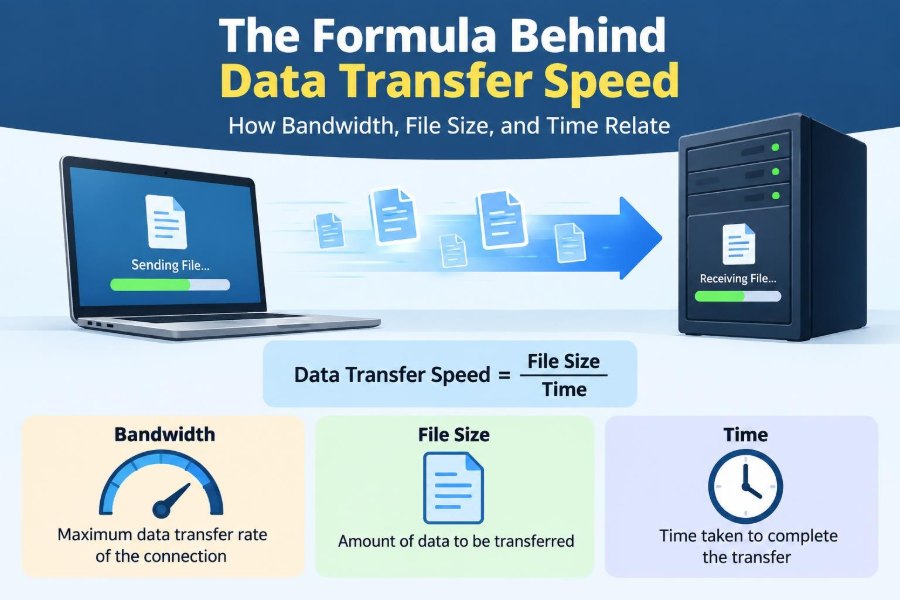

You click “download,” watch a progress bar creep forward, and wonder why a small document arrives almost instantly while a game update seems to take forever. The difference is not mysterious, but the numbers shown by devices and internet plans can make it feel that way.
A connection may be advertised in megabits per second, while a file manager reports megabytes. A video call can remain usable on a modest connection, yet a cloud backup may slow everything else down. Understanding the relationship between bandwidth, file size, and time turns these everyday experiences into problems you can estimate.
The central idea is simple: moving data is like moving a quantity of water through a pipe. The amount to move, the pipe’s capacity, and the time available are connected. Real networks add complications, but the basic formula remains an extremely useful starting point.
Whether you are choosing a home plan, sending a large project file, troubleshooting a slow transfer, or studying networking fundamentals, these calculations help you ask better questions about speed.
📦 What Data Transfer Speed Actually Describes
Data transfer speed is the rate at which data moves from one place to another. The places may be a website and your browser, a phone and cloud storage, two computers on a local network, or a storage drive and a laptop.
Speed is a rate, so it always combines an amount and a period of time: bits per second, megabits per second, or gigabits per second. It does not describe the total amount of data a connection can move without a time interval.
🧮 The Core Formula
The basic relationship can be written in three equivalent ways:
Transfer time = File size ÷ Transfer speed
Transfer speed = File size ÷ Transfer time
File size = Transfer speed × Transfer time
Use consistent units before calculating. If the file is measured in megabytes, convert the speed to megabytes per second. If the speed is in megabits per second, convert the file to megabits first.
🚰 A Pipe-and-Water Analogy
Imagine a tank of water that must pass through a pipe. The tank represents the file size, the pipe’s width represents available bandwidth, and the filling time represents transfer time.
A wider pipe can carry more water each second. But a wide pipe does not make a large tank smaller, and it cannot exceed the capacity of a narrow pipe farther along the route. Networks work similarly.
🔤 Bits and Bytes Are Not the Same
A bit is the smallest common unit of digital information, represented conceptually as a 0 or 1. A byte is usually eight bits. Network speeds are commonly stated in bits; files and storage are commonly stated in bytes.
This is why 100 Mbps does not mean a 100 MB file downloads in one second. The lowercase b means bit, while the uppercase B means byte.
✖️ The Essential Conversion: Eight Bits per Byte
To convert bytes to bits, multiply by 8. To convert bits to bytes, divide by 8.
- 25 MB/s equals 200 Mb/s.
- 80 Mb/s equals 10 MB/s.
- A 1 GB file is roughly 8 Gb before considering the decimal-versus-binary detail.
This factor of eight is the most common reason a quick transfer-time estimate is wildly optimistic.
📏 Decimal and Binary File Units
Storage terminology has a second source of confusion. Network providers generally use decimal prefixes: 1 megabit is 1,000,000 bits. Operating systems and software may use binary-based quantities, where a mebibyte is 1,048,576 bytes.
For everyday estimates, treating 1 GB as 1,000 MB is usually close enough. For technical work, documentation, capacity planning, or comparing displayed sizes precisely, check whether the tool uses MB/GB or MiB/GiB.
⚡ Bandwidth Means Capacity, Not a Promise
Bandwidth is the maximum amount of data a communication path can carry per unit of time under stated conditions. It is often described as the width of the pipe.
A plan labelled 300 Mbps indicates an upper access-link rate, not a guarantee that every website will send data at 300 Mbps. The server, route, Wi-Fi link, device, and network traffic all influence the rate you actually receive.
📊 Throughput Is the Speed You Really Observe
Throughput is the useful data rate achieved during a real transfer. It is what a download window or file-copy tool typically reports.
Throughput is often below advertised bandwidth because some capacity is consumed by network protocol information, and because other parts of the path may be slower. For estimating a particular download, measured throughput is more useful than the plan’s headline speed.
🧱 The Slowest Link Becomes the Bottleneck
A transfer crosses multiple links: your device, Wi-Fi or Ethernet, router, internet provider, intermediate networks, and the remote server. The slowest relevant component is the bottleneck.
A computer connected at 1 Gbps cannot download a file faster than a server that sends only 20 Mbps. Likewise, a fast fiber connection cannot overcome a weak Wi-Fi signal or a crowded wireless channel.
🧾 A Simple Download Calculation
Suppose a hypothetical file is 800 MB and the observed download rate is 20 MB/s. The estimate is straightforward:
800 MB ÷ 20 MB/s = 40 seconds
Because both values use megabytes, no conversion is needed. This is an idealized estimate; the visible time may be somewhat longer if the rate changes during the download.
🔁 Calculating When Speed Is Given in Mbps
Now imagine the same 800 MB file on a connection delivering 160 Mbps. Convert the file to megabits first:
800 MB × 8 = 6,400 Mb
6,400 Mb ÷ 160 Mb/s = 40 seconds
Alternatively, divide 160 Mbps by 8 to get 20 MB/s, then use the previous calculation. Either method works if units remain consistent.
🕒 Estimating Large Transfers in Minutes and Hours
Larger files are easier to reason about in minutes or hours. A 60 GB backup at an effective 25 MB/s takes approximately:
60,000 MB ÷ 25 MB/s = 2,400 seconds
2,400 seconds ÷ 60 = 40 minutes
This uses decimal units for a practical estimate. A backup application may show a different final value because its file-size convention and actual rate can differ.
⬆️ Upload Speed Deserves Separate Attention
Many connections provide much less upload capacity than download capacity. This design, called an asymmetric connection, suits households that mostly stream and download but can make cloud backups, large attachments, and live broadcasting slower.
Always use the upload figure when estimating a transfer from your device to the internet. A fast download plan does not imply equally fast uploads.
↔️ Download and Upload Use Different Directions
A download travels from a remote system to your device. An upload travels from your device to a remote system. During an ordinary request, small amounts of data travel in both directions, but the main file direction determines which capacity matters most.
This distinction matters for remote work. Sending a presentation to a colleague, synchronizing raw photos, and sharing a screen can depend heavily on upload throughput.
📡 Why Wi-Fi Changes the Result
Wi-Fi is a shared radio connection, not a fixed cable. Distance, walls, interference, router placement, connected devices, and the wireless standard can affect its usable speed.
The link rate displayed by a device is not necessarily the application’s throughput. Testing a large transfer over Ethernet, when possible, helps separate an internet limitation from a wireless limitation.
🚦 Network Congestion Reduces Available Capacity
Congestion occurs when a network component has more traffic to handle than it can forward immediately. Packets may wait in queues, and in more severe cases they may be dropped and retransmitted.
Congestion can happen in a home network, at an internet provider, near a busy service, or on a shared office connection. It explains why the same file can transfer quickly in the morning and slowly in the evening.
🌍 The Remote Server Has Limits Too
A service may deliberately limit each user’s download rate, or it may be busy serving many people. Its storage system, processor load, network connection, and geographic distribution can all affect delivery.
When one website is slow but several unrelated services are fast, the remote service or its route is a plausible limiting factor. Repeatedly restarting the same download rarely fixes that underlying constraint.
📬 Protocol Overhead Uses Some Capacity
Data is sent in structured units called packets. Alongside the file’s content, packets include addressing, error-checking, and control information so data can be routed and reconstructed reliably.
This protocol overhead means that a 100 Mbps link does not normally deliver exactly 100 Mbps of application file data. Secure encryption, tunneling, and retransmissions can add further overhead.
🧭 Latency Is Different From Transfer Speed
Latency is the delay before data or a response begins to arrive, often discussed as round-trip time. It strongly affects responsiveness in gaming, remote desktops, voice calls, and interactive applications.
Latency and bandwidth are related only in the sense that both shape user experience. A high-bandwidth connection can have noticeable latency, while a low-bandwidth connection can respond quickly to tiny requests.
🚚 Why Large Transfers Feel Latency Differently
For a large download that runs for several minutes, sustained throughput usually matters more than a small initial delay. For loading a simple web page with many requests, delay can be much more visible.
Modern transport protocols are designed to manage data in transit, but long-distance paths, packet loss, and congestion can still prevent a connection from reaching its theoretical capacity.
📈 Speed Tests and File Transfers Measure Different Things
A speed test measures performance to selected test servers over a brief period, often using several simultaneous connections. A file transfer measures one specific application path, server, protocol, and moment in time.
Both can be useful, but neither is a universal verdict on your connection. A good speed-test result and a slow single download can coexist if the download server limits its output.
🧠 Multiple Transfers Share the Connection
If several devices download, stream, update, or back up data at once, they share finite capacity. The division is not always equal: applications, routers, and protocols may compete differently.
A video stream may need only a steady moderate rate, while an operating system update tries to use as much as possible. Pausing a large background transfer can improve the experience of a time-sensitive task.
🎥 Streaming Is Not the Same as Downloading a File
Streaming delivers enough data to maintain playback, usually while keeping a buffer ahead of the current moment. A service may change video quality to fit changing available throughput.
A full file download, by contrast, normally aims to retrieve all bytes as soon as possible. Streaming can appear smooth even when the connection would take a long time to download the complete high-quality media file.
🗜️ Compression Changes the Amount That Must Move
Compression reduces file size by representing information more efficiently. Text documents, some image formats, and software packages may shrink substantially; already compressed media such as many videos and JPEG images often changes little.
Because time equals size divided by speed, reducing the number of bytes can reduce transfer time directly. Compression can require processor work, however, so it is not automatically helpful for every small or time-critical transfer.
🔐 Encryption Protects Data but Is Not Magic Speed Loss
Encryption protects data from being read by unauthorized parties while it moves across a network. It adds processing and protocol work, but capable modern devices often handle ordinary encrypted web traffic efficiently.
If encrypted transfers are unusually slow, the cause may be the device, a security product, a VPN route, server behavior, or congestion—not encryption alone. Diagnose the entire path rather than assuming one explanation.
🧮 A Quick Reference for Unit Conversion
| Given value | Useful conversion | Typical use |
|---|---|---|
| Mbps | Divide by 8 for approximate MB/s | Turn a network speed into file-transfer speed |
| MB/s | Multiply by 8 for Mbps | Compare a download display with a plan |
| GB | Multiply by roughly 1,000 for MB | Estimate large file sizes in decimal units |
| Minutes | Multiply by 60 for seconds | Use seconds in rate calculations |
These are estimation-friendly conversions. Use the exact unit system required by a technical specification or software report when precision matters.
🧪 A Practical Estimation Method
- Identify the file size and the direction of transfer.
- Find a realistic observed rate, not only an advertised maximum.
- Convert bits and bytes so both values use compatible units.
- Divide file size by rate.
- Add reasonable allowance for rate changes, overhead, or setup time.
For a job with a deadline, do not schedule around the theoretical minimum. Start early enough to absorb a slower server, a Wi-Fi problem, or a competing transfer.
⚠️ Common Calculation Mistakes
- Using MB and Mb as if they were identical.
- Dividing a gigabyte value by Mbps without converting either one.
- Assuming the plan’s maximum speed is sustained throughput.
- Using download speed to predict an upload.
- Ignoring other users, devices, and background synchronization.
- Treating a single speed test as permanent network behavior.
Most mistakes are not advanced networking failures. They come from skipped unit conversion or from confusing a maximum capacity with the rate currently available.
🛠️ Ways to Improve a Slow Transfer
Start with the simplest checks: move closer to the router, use Ethernet for an important large transfer, pause competing uploads or downloads, and try again at a different time. Confirm that the device has enough free storage and is not overloaded.
If one service remains slow, try another legitimate source or check whether the service reports an outage. If all services are consistently slow across wired devices, recording measured results can help when discussing the issue with a network administrator or provider.
🏢 Local Networks Follow the Same Rule
The formula applies beyond the internet. Copying a file between network-attached storage and a workstation depends on file size and actual local throughput.
A gigabit Ethernet link has a theoretical signaling rate of 1 Gbps, but the transfer may be limited by drive speed, switch capability, cabling, device processing, or protocol overhead. Faster network hardware does not help if storage is the bottleneck.
📱 Mobile Networks Add More Variation
Cellular performance can change with signal strength, distance from equipment, building materials, movement, weather conditions, radio spectrum availability, and nearby users. A result measured in one location may not predict another location well.
For large mobile transfers, pay attention to data allowances and whether the connection is being shared through a hotspot. The arithmetic is unchanged, but the available throughput can vary more than on a stable wired link.
🎯 Choosing the Right Metric for the Job
Different tasks need different measurements. Large backups benefit from sustained upload throughput. Online games and remote control tools care greatly about latency and packet loss. Video conferencing needs steady bidirectional capacity as well as low enough delay for natural conversation.
“Fast internet” is therefore incomplete shorthand. Ask whether the task needs high capacity, low delay, stable performance, or a combination of all three.
🧩 The Core Principle to Remember
The relationship behind every basic transfer estimate is stable: more data takes more time, and more available throughput reduces time. In compact form, time equals file size divided by actual transfer speed.
Accuracy depends on disciplined units and realistic assumptions. Convert bytes and bits correctly, use observed throughput when available, and remember that the slowest part of the path controls the result.
When you match the units and identify the real bottleneck, data-transfer timing becomes a practical calculation rather than a guess. 💻📡⏱️