
A phone can translate a sign, guide a trip, recognize a face in a photo, and stream a high-resolution video while fitting into a pocket. A few decades ago, tasks of that scale would have required rooms of equipment, specialized operators, or simply could not be done at all.
It is tempting to describe that change as “computers got better.” But the real story is more interesting. Progress came from a chain of discoveries in physics, mathematics, electronics, manufacturing, and software—each solving a different bottleneck.
Some breakthroughs made signals more reliable. Others let engineers place more components in less space, move data more efficiently, or teach machines to find useful patterns. Not every advance made every computer faster, but together they transformed what computers could be.
Understanding this history also helps with modern questions: Why does a fast processor still feel slow sometimes? Why do AI systems need so much hardware? And why can a small design decision affect everything from battery life to scientific research?
🔢 Computing Began as a Problem of Representation
Before a machine can calculate, it needs a way to represent information. A number, letter, image, or instruction must be converted into a form that a physical device can store and manipulate.
The crucial simplification was binary: representing information with two states, usually written as 0 and 1. In electronic hardware, those states can correspond to low and high voltage. Two dependable states are easier to distinguish than many finely graded ones, especially when noise is present.
⚙️ Boolean Logic Made Switching Useful
In the nineteenth century, George Boole developed an algebra for statements that are true or false. Boolean logic uses operations such as AND, OR, and NOT. Much later, engineers recognized that electrical switches could implement those operations.
If two signals must both be on to produce an output, that is an AND operation. By combining many such simple operations, a circuit can add numbers, compare values, choose between options, and follow program instructions.
🧮 Algorithms Separated Method from Machine
An algorithm is a precise sequence of steps for solving a problem. The idea is older than electronic computers, but it became foundational because it separated the solution method from the specific machine carrying it out.
For example, sorting a class list alphabetically is not one action; it is a method with comparisons and repeated steps. A faster machine helps, but a better sorting algorithm can reduce the amount of work far more dramatically for a large list.
📝 Programmability Changed What a Computer Could Be
Early calculating devices were often built for one narrow purpose. Programmable machines introduced a different model: change the instructions, and the same hardware can perform a different job.
This flexibility turned computers from specialized calculators into general-purpose tools. Payroll, weather modeling, document editing, games, design, and control systems became possible on related hardware because programs could be changed without rebuilding the machine.
📋 Stored Programs Removed a Major Bottleneck
A stored-program computer keeps instructions in memory alongside the data they operate on. This principle, associated with early computer architecture, meant that a program could be loaded, modified, and executed electronically rather than wired by hand.
There is a trade-off: instructions and data can compete for access to memory. Still, the stored-program approach made computers far easier to operate and became the basis for most general-purpose systems.
🔧 Vacuum Tubes Proved Electronic Speed
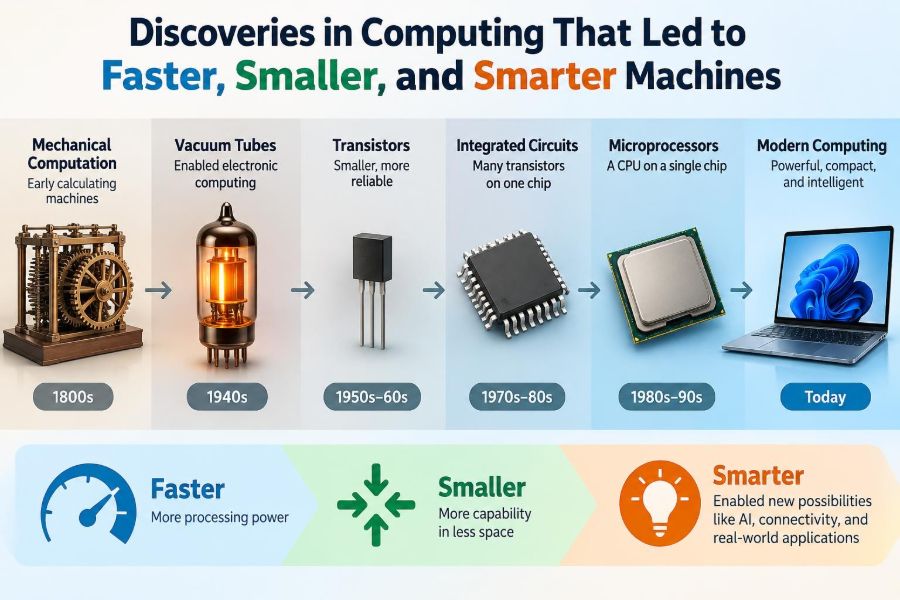
Vacuum tubes could act as electronic switches and amplifiers. They enabled early electronic computers to operate much faster than mechanical machines, because electrical signals move without gears, levers, or rotating shafts.
However, tubes were large, consumed substantial power, generated heat, and eventually failed. A machine containing thousands of them needed careful maintenance. They proved electronic computing was practical, but they were not a route to compact personal devices.
🌱 The Transistor Made Electronics Smaller and Tougher
The transistor replaced many jobs previously done by vacuum tubes. Made from semiconductor materials such as silicon, a transistor can control current with another electrical signal. It functions as a tiny switch or amplifier.
Transistors were smaller, more durable, and more energy-efficient than tubes. This was not merely a matter of convenience: lower heat and improved reliability allowed systems to contain more active parts without becoming impossible to power or repair.
🧪 Semiconductor Doping Enabled Control
Pure silicon is not automatically the perfect electronic switch. Engineers alter its electrical behavior by adding extremely small amounts of selected impurities, a process called doping. These additions create regions that carry charge differently.
By arranging those regions carefully, manufacturers create transistors whose current can be controlled predictably. The discovery was scientific, but its value depended on manufacturing processes precise enough to reproduce the same behavior millions or billions of times.
🧩 Integrated Circuits Solved the Wiring Problem
As computers gained more transistors, connecting separate components became a serious problem. Individual wires took space, added cost, introduced failure points, and could slow signals.
An integrated circuit, or chip, fabricates many transistors and their connections on one piece of semiconductor material. This sharply reduced physical size while improving consistency. The chip was as much a breakthrough in packaging and interconnection as in switching.
📏 Miniaturization Was a Manufacturing Achievement
Smaller features do not appear simply because engineers draw smaller designs. Chip fabrication uses photolithography, deposition, etching, and other controlled processes to build microscopic patterns in layers.
At tiny scales, a small defect can ruin a chip. Clean rooms, material purity, inspection, and yield management therefore became central to progress. A brilliant circuit is not useful at scale if it cannot be manufactured reliably.
📈 Moore’s Law Described a Trend, Not a Physical Law
Moore’s Law is the observation that the number of transistors on commercially important chips increased rapidly over time, historically often described as roughly doubling at a regular interval. It captured an industry pattern of design and manufacturing improvement.
It was never a guarantee that progress would continue forever. As features shrink, leakage, heat, fabrication complexity, and cost become harder to manage. Modern progress increasingly comes from architecture, packaging, and specialization rather than simple shrinking alone.
🔥 Heat Became the Limit on Raw Clock Speed
A processor’s clock coordinates operations. For many years, raising clock frequency was a direct route to faster execution. Eventually, the power required and heat produced made continuous frequency increases impractical for ordinary chips.
Heat is not just uncomfortable; it can reduce reliability or force a device to slow down, a behavior called thermal throttling. This is why a thin laptop under sustained work may perform differently from a larger desktop with stronger cooling.
👥 Multicore Processors Took a Different Path
Instead of making one processing core indefinitely faster, designers began placing multiple cores on a chip. A multicore processor can work on different tasks at once or split suitable work across cores.
More cores do not automatically make every program faster. A task with unavoidable sequential steps still has a limit. Video rendering, compiling code, and processing many independent requests often benefit more than a simple program that must do one step after another.
🔀 Parallel Computing Scales Work Across Many Units
Parallel computing divides a problem into pieces that can be processed simultaneously. The key question is whether those pieces are sufficiently independent and whether the cost of coordinating them outweighs the benefit.
Consider applying the same visual effect to millions of pixels. Many pixels can be handled independently, which makes the task a good candidate for parallel hardware. In contrast, a calculation in which each result depends on the previous one is harder to parallelize.
🎮 GPUs Turned Repetition into Throughput
Graphics processing units, or GPUs, were developed to perform many similar graphics calculations efficiently. Their design favors high throughput: completing a large amount of parallel work, even if a single operation is not optimized like a CPU operation.
This made GPUs useful beyond graphics. Scientific simulation, image processing, and many machine-learning workloads involve repeated operations on large arrays of numbers. A GPU is not universally better than a CPU; the workload determines the appropriate tool.
🧠 Specialized Chips Reduce Wasted Work
Some tasks are common enough to justify dedicated hardware. Examples include video encoding, cryptographic operations, signal processing, and machine-learning inference. An accelerator can perform a narrow operation with less energy or greater speed than a general-purpose processor.
The limitation is flexibility. A specialized chip may be excellent at one class of work but unsuitable when requirements change. Good system design balances dedicated accelerators with programmable components that can adapt over time.
💾 Memory Turned Speed into Useful Work
A processor needs instructions and data continuously. If it has to wait for memory, its theoretical speed does not matter much. This difference between processor speed and memory access speed is often called the memory wall.
Modern systems use a hierarchy: small, very fast registers; caches close to the processor; main memory; and much larger, slower storage. Frequently used data is kept nearer to the processor when possible, much like keeping active notes on a desk rather than in a distant archive.
🗂️ Caches Reward Locality
A cache stores recently used or nearby data so it can be accessed quickly. Programs run faster when they show locality: they reuse the same data soon, or access nearby locations in sequence.
For instance, scanning an array in order is usually friendlier to caches than jumping unpredictably among far-apart entries. This is a practical reason why two programs with similar algorithms can behave differently on real machines.
💽 Solid-State Storage Reduced Waiting
Hard disk drives store data on rotating magnetic platters. They can hold large amounts of data, but moving a mechanical head to the right location takes time. Solid-state drives store data in flash memory without that movement.
Replacing a hard drive with an SSD often makes a computer feel much more responsive during startup, application loading, and file searches. It does not make the processor calculate faster, but it removes a frequent source of waiting.
🌐 Networks Made Computers More Capable Together
A computer connected to a network can communicate with people, databases, services, and other machines. Networked computing made email, the web, remote collaboration, cloud services, and distributed scientific work possible.
Network speed is only one factor. Latency—the delay before a response begins—can matter greatly for interactive tasks. A large file transfer may tolerate delay, while a video call or online game can feel poor even when advertised bandwidth is high.
☁️ Cloud Computing Changed Access to Scale
Cloud computing allows organizations and individuals to rent computing, storage, and services from remote data centers instead of owning all the hardware. This can make short-term experiments and variable workloads easier to support.
It also introduces dependencies: network availability, ongoing costs, data governance, and the provider’s service design. The cloud is not a magical location; it is someone else’s physical infrastructure, connected through networks and managed by software.
🧱 Operating Systems Made Hardware Shareable
An operating system manages hardware resources and offers common services to applications. It decides which program runs, allocates memory, handles files, and provides controlled access to devices.
Without this layer, every application would need to manage hardware details directly. Operating systems made computers more usable and safer to share, though they also add complexity that can influence performance and security.
🗣️ Programming Languages Made Ideas Portable
Machine code is the processor’s direct instruction format, but writing large systems entirely in it is difficult and error-prone. Higher-level languages let programmers express operations using clearer abstractions such as functions, data structures, and types.
A compiler or interpreter translates those instructions into forms the machine can execute. This development made software faster to build and easier to move between systems, which multiplied the practical value of improving hardware.
🧹 Better Algorithms Often Beat Faster Hardware
Hardware improvement is powerful, but unnecessary computation is still wasteful. An algorithm that checks every possible pair in a large collection may become impractical long before a smarter method that uses sorting, indexing, or a suitable data structure.
When software is slow, ask what it is waiting for and what work it is doing. The cause may be disk access, network delay, memory allocation, an inefficient query, or an algorithmic mistake—not a weak processor.
🤖 Machine Learning Made Pattern Recognition Practical
Traditional programs typically follow rules written explicitly by people. In machine learning, a system adjusts model parameters using examples, allowing it to detect patterns that would be difficult to describe as fixed rules.
Modern machine learning became more practical through the combination of useful algorithms, large data collections in some domains, and hardware able to perform many numerical operations in parallel. It is not human-like understanding; it is statistical pattern processing with strengths and limits.
📊 Data Quality Sets a Ceiling for Smart Systems
A model learns from the data it receives. If training data is incomplete, mislabeled, unrepresentative, or shaped by past bias, the model can produce unreliable or unfair outputs.
More computing power cannot automatically repair poor assumptions. For high-stakes uses, such as hiring, lending, healthcare support, or public services, teams need careful evaluation, monitoring, privacy protection, and appropriate human oversight.
🔐 Security Became Part of Computer Performance
Faster, more connected systems create more opportunities for misuse. Security work includes protecting identities, encrypting data, isolating software, applying updates, and designing hardware that resists certain forms of attack.
Security can add computational work or operational friction, but treating it as optional is costly. A system that is fast yet easily compromised does not reliably serve its users. Practical computing always involves trade-offs among speed, convenience, privacy, and protection.
🔋 Energy Efficiency Defines Mobile and Large-Scale Computing
Battery-powered devices cannot rely on unlimited electricity or cooling. Data centers also care deeply about energy because power delivery and heat removal constrain how much equipment can operate in one place.
That is why modern designs emphasize performance per watt, not merely maximum speed. Efficient chips, power-aware software, and hardware accelerators can make a device last longer on battery or let a service process more work within its power budget.
♻️ Smaller Devices Still Have Material Costs
Miniaturization made computing portable, but it did not make hardware consequence-free. Devices require mined materials, energy-intensive manufacturing, packaging, transport, and eventual disposal or recycling.
Repairable designs, longer software support, responsible recycling, and buying only what is needed can reduce waste. The fastest upgrade cycle is not always the best technical or environmental choice.
🧭 A Practical Way to Diagnose “Slow” Computing
When a system feels slow, avoid assuming that the CPU is the problem. Observe when the slowdown occurs: opening files, loading web pages, switching applications, exporting video, or handling many users can point to different bottlenecks.
- Check storage activity when startup and application loading are slow.
- Check memory pressure when programs pause or the system swaps data to storage.
- Check network delay for cloud applications and remote services.
- Check cooling and sustained workload behavior for performance drops over time.
- Profile software before optimizing it; measured evidence is better than guesswork.
This approach reflects a broad lesson from computing history: progress comes from identifying the actual constraint, not simply increasing the most visible specification.
🚀 The Core Principle Behind Faster, Smaller, Smarter Machines
Computing advanced because discoveries reinforced one another. Binary representation enabled reliable logic; transistors enabled compact switching; integrated circuits enabled dense systems; improved architecture, memory, software, and networks made those systems useful at a larger scale.
There is no single invention called “the computer.” A modern machine is a layered result of physical science, manufacturing discipline, mathematical methods, and human design choices. Its apparent intelligence also depends on data, objectives, and the people who decide where it should be used.
The next advances will likely continue this pattern: not one dramatic replacement for everything, but new ways to reduce bottlenecks while managing energy, cost, reliability, security, and social consequences.
Faster, smaller, and smarter machines emerge when improvements in hardware, software, and problem-solving methods work together rather than in isolation. That is the enduring discovery behind computing progress. 💻🧠⚙️