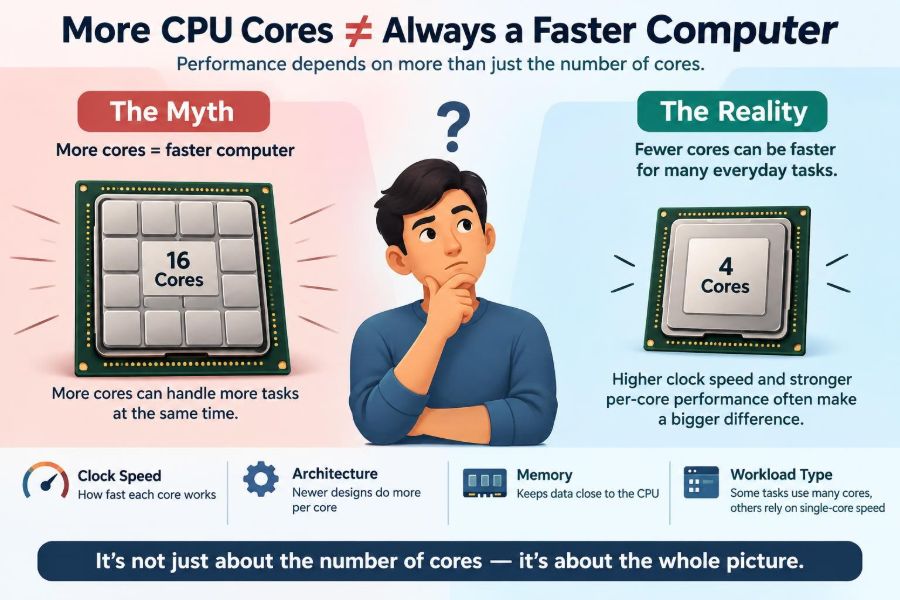

You compare two laptops. One has a 6-core processor, while the other advertises 16 cores. The second number looks like an obvious win, so it seems reasonable to expect everything—documents, games, web browsing, and startup time—to be dramatically faster.
Then the 16-core machine opens a spreadsheet at about the same speed, or a newer 8-core desktop feels more responsive than an older workstation with far more cores. That result is not a contradiction. It is a reminder that a CPU is more than one number on a product page.
Core count matters, sometimes enormously. But it only helps when the software, operating system, memory, cooling, and workload can all make useful use of those extra workers.
Understanding that distinction makes it easier to buy sensible hardware, diagnose slow computers, and avoid paying for performance you will rarely use.
🧠 What a CPU Core Actually Is
A CPU, or central processing unit, carries out the instructions that make programs run. A core is an individual processing unit inside that CPU, capable of executing instructions independently.
A processor with four cores can work on several streams of instructions at once. In a simplified analogy, think of cores as cooks in a kitchen. More cooks can prepare more dishes simultaneously, but they cannot automatically make one carefully sequenced recipe finish faster.
Modern processors also include caches, control logic, and sometimes integrated graphics. Core count describes only one part of their design.
🔢 Why Core Counts Became a Popular Selling Point
Core count is easy to state, easy to compare, and easy to remember. “More cores” resembles familiar comparisons such as more storage space or more seats in a vehicle.
For many demanding tasks, it is a meaningful specification. Video rendering, software builds, scientific simulations, and running several virtual machines can benefit substantially from additional cores.
The trouble begins when that useful rule is turned into an absolute rule. A core is not a standardized unit of speed; two CPUs with the same number of cores can perform very differently.
⚙️ One Fast Task Is Not the Same as Many Tasks
Computer work can be broadly divided into single-threaded and multi-threaded work. A thread is a sequence of instructions a program can schedule for execution.
If an application has one critical thread, it may mainly use one core. Faster performance then depends more on how quickly that core executes instructions, rather than on the total number of cores elsewhere in the chip.
If the application can divide a job into many independent threads, several cores may work at the same time. The difference between these situations explains most confusion about CPU core counts.
🧵 Threads Determine Whether Cores Can Help
Programs must be designed to split work safely. A photo editor might process different image regions in parallel, while a video encoder may assign frames or sections of frames to different threads.
Some work cannot be split until an earlier step finishes. For example, a program may need to read a file, interpret its contents, and make a decision before the next operation is known.
Extra cores cannot remove those dependencies. They can only run work that is ready and independent.
📐 The Limits of Parallel Work
Even highly parallel programs usually contain a serial portion: setup, coordination, file access, or a final combining step. That portion creates a ceiling on the speedup available from adding cores.
Imagine a hypothetical task that spends most of its time processing independent data but still requires one sequential preparation stage. Adding workers reduces the parallel portion, yet the preparation stage remains. Eventually, more workers spend increasing time waiting.
This is why performance gains from more cores often diminish instead of rising in a straight line.
🚀 Single-Core Performance Still Shapes Everyday Speed
Opening an application, responding to a click, navigating many web pages, and progressing through parts of a game often depend on the speed of one or a few busy threads.
Single-core performance reflects more than clock speed. It includes the processor’s architecture, its ability to predict upcoming instructions, cache behavior, and how much useful work it completes in each clock cycle.
A newer CPU with fewer cores can therefore feel quicker in ordinary interactive use than an older many-core CPU.
⏱️ Clock Speed Is Helpful but Incomplete
Clock speed, measured in gigahertz (GHz), indicates how many timing cycles a processor performs each second. It is relevant, but GHz alone is not a universal speed rating.
Different CPU designs accomplish different amounts of work per cycle. A processor with a lower stated clock can outperform another at a higher clock if its architecture processes the same workload more efficiently.
Boost clocks also vary with temperature, power limits, and how many cores are active. The number printed on a specification sheet may not describe sustained behavior.
🏗️ CPU Architecture Changes the Meaning of a Core
Architecture is the underlying design of a processor generation. Improvements can make each core decode instructions more effectively, access data faster, or avoid stalled work more often.
This is why comparing core counts across old and new systems is especially unreliable. Eight modern cores and eight much older cores are not equivalent simply because the count matches.
Within the same product family, core count is often more comparable. Across generations and manufacturers, benchmark results for the intended workload are more informative.
🧩 Performance Cores and Efficiency Cores
Some modern processors use different kinds of cores. Performance cores are designed for demanding, latency-sensitive work, while efficiency cores focus on completing lighter or background work with lower power use.
This design can improve battery life and multitasking, but it makes a raw core total harder to interpret. A processor with twelve mixed cores does not necessarily behave like one with twelve identical high-performance cores.
The operating system’s scheduler decides where threads run, and well-designed software can benefit from that arrangement.
🪢 Logical Processors Are Not Extra Physical Cores
Many CPUs can expose more logical processors than physical cores through simultaneous multithreading, often called hyper-threading on certain products. One physical core can keep two instruction streams in flight when resources would otherwise sit unused.
This may improve throughput in suitable workloads, but it does not double the core’s execution hardware. Two logical processors share important resources inside the same physical core.
When reading specifications, distinguish physical cores from threads. A “16-thread” CPU might have eight physical cores rather than sixteen.
🗓️ Everyday Office Work Rarely Needs Many Cores
Word processing, email, online forms, and light spreadsheets generally place short bursts of demand on a small number of threads. More cores can keep background tasks from interrupting those bursts, but the benefit reaches a point of diminishing returns.
For these tasks, adequate memory, a responsive solid-state drive, and good single-core performance often affect the experience more visibly than moving from a moderate core count to a very high one.
A slow office computer is often slowed by something other than a shortage of cores.
🌐 Web Browsing Uses Cores, but Not Infinitely
Modern browsers use separate processes or threads for tabs, rendering, media, and security isolation. Multiple cores can make a browser more comfortable when many sites, video calls, and extensions run together.
Yet one complicated page may still have a main thread that limits its responsiveness. Browser performance can also be constrained by slow network connections, overloaded websites, low memory, or a graphics issue.
Twenty idle tabs do not necessarily demand twenty CPU cores. They often demand memory first.
🎮 Games Need Balance, Not Just Core Count
Games commonly use several CPU threads for game logic, audio, asset loading, physics, networking, and background tasks. Additional cores can help, particularly when recording, streaming, or running other software alongside the game.
However, a game’s frame rate may be limited by one heavily used thread, the graphics card, or the game engine’s design. When the GPU is already rendering as fast as it can, adding CPU cores may change little.
For gaming, balanced CPU performance, a suitable GPU, sufficient RAM, and cooling are usually more meaningful than choosing by core count alone.
🎬 Content Creation Can Reward Extra Cores
Video encoding, 3D rendering, batch photo processing, and compiling large software projects often divide work into many pieces. These are classic cases where more capable cores can shorten long jobs.
The exact gain depends on the application and settings. Some stages may use the GPU, some may be limited by storage, and some effects may not scale well across many threads.
Professionals should test or consult workload-specific benchmarks rather than assuming every creative application responds identically.
🖥️ Virtual Machines Multiply the Demand
A virtual machine runs an operating system inside a software-defined computer. Developers, IT students, and administrators may run several virtual machines at once for testing or lab environments.
Each active virtual machine needs CPU time, memory, and storage access. More cores can be genuinely valuable here because several operating systems may be performing unrelated work simultaneously.
But assigning too many virtual CPU cores to every guest can create scheduling overhead. The host machine still needs resources for itself.
🔄 Multitasking Is Where Extra Cores Feel Natural
Extra cores are often most noticeable when you do several things at once: a file export runs while a browser, meeting app, music player, and security scan remain active.
The operating system can place runnable threads on different cores, reducing the chance that one lengthy task monopolizes the CPU. This does not make every individual task faster, but it can make the whole system feel less congested.
That distinction matters: throughput is total work completed, while responsiveness is how quickly the system reacts to you.
🧠 RAM Can Be the Real Bottleneck
Random access memory (RAM) holds active programs and data close to the CPU. When RAM is insufficient, the operating system must move data to slower storage and retrieve it later.
That process can cause pauses, tab reloads, and sluggish switching between applications. A powerful many-core CPU cannot efficiently process data that is continually being moved in and out of memory.
If a system slows down mainly when many applications are open, checking memory usage may be more useful than shopping for a higher core count.
💾 Storage Speed Affects Waiting Time
Starting applications, loading large files, installing updates, and searching through data can involve storage. A solid-state drive generally responds much faster than a mechanical hard drive for many common operations.
During a storage wait, a CPU core may have little useful work to do. Adding cores cannot make a slow drive deliver data faster.
This is one reason an older computer can sometimes feel substantially better after a storage upgrade, even though its processor has not changed.
📦 Cache Keeps Data Near the Core
CPU cache is small, fast memory built into or very near the processor. It stores recently used data and instructions so the CPU does not always need to wait for RAM.
Cache size and design can affect performance, especially in workloads that repeatedly access related data. It is another reason two processors with similar clocks and core counts may perform differently.
Cache is not a specification to optimize in isolation, but it is part of the complete performance picture.
🌡️ Cooling and Power Limits Can Reduce Sustained Speed
Processors generate heat when they work. If a laptop or compact desktop cannot remove that heat effectively, it may lower clock speeds to stay within safe operating conditions. This behavior is often called thermal throttling.
Power limits can have a similar effect. A processor may boost briefly for a quick task but settle at a lower speed during a long render or compile.
More cores can increase sustained heat and power demand. A well-cooled lower-core CPU may outperform a poorly cooled higher-core model in some lengthy workloads.
🔌 Laptops Make Core Comparisons Especially Tricky
Portable computers must balance performance, battery life, fan noise, weight, and charger capacity. Two laptops using related processors can perform differently because their manufacturers choose different cooling systems and power settings.
A thin machine may be excellent for short bursts and everyday work, while a larger model can sustain demanding tasks longer. Neither approach is automatically better; the right choice depends on where and how the device is used.
Read reviews that test sustained workloads when long exports, engineering tools, or development builds are part of your routine.
🧮 The GPU May Be Doing the Heavy Lifting
A graphics processing unit (GPU) is designed to handle many similar calculations in parallel. It often dominates performance in games, 3D graphics, and applications that support GPU acceleration.
If a video editor uses the GPU for effects or encoding, changing CPUs may have less impact than expected. Conversely, a CPU-only export may benefit much more from additional CPU cores.
Check which hardware an application actually uses. “Fast computer” is a system-level outcome, not a CPU-only property.
🧪 Benchmarks Need Context
Benchmarks measure a defined workload under defined conditions. A multi-core rendering test is useful for comparing rendering throughput, while a single-core test may better indicate performance in lightly threaded tasks.
No single score summarizes every experience. Synthetic benchmarks can reveal architectural differences, but application benchmarks are usually more valuable when you have a specific program in mind.
| Question | More relevant CPU characteristic |
|---|---|
| Will a long render finish sooner? | Multi-core performance, cooling, software scaling |
| Will menus and light apps feel quick? | Single-core performance, storage, RAM |
| Will a game run faster? | Game engine, GPU, CPU speed, memory |
| Can I run several virtual machines? | Core count, RAM capacity, storage speed |
🛒 Compare CPUs by Your Actual Workload
Before comparing specifications, list the tasks you perform most often and the tasks that consume the most waiting time. A student writing reports has different needs from a developer compiling code or an editor exporting high-resolution video.
- Choose strong all-around responsiveness for browsing, study, office work, and general use.
- Prioritize sustained multi-core performance for frequent rendering, encoding, builds, and virtualization.
- Prioritize a capable GPU where gaming, 3D design, or GPU-accelerated tools dominate.
- Leave budget for enough RAM, fast storage, and a machine with appropriate cooling.
This approach turns a vague “fastest CPU” search into a useful purchase decision.
⚠️ Common Mistakes When Reading Specifications
The first mistake is comparing only the largest number on the page. A 12-core processor is not automatically faster than every 8-core processor in the tasks you care about.
The second is treating advertised maximum boost speed as a permanent operating speed. Third is overlooking memory, storage, graphics, and thermal design while blaming or praising the CPU for every delay.
Finally, avoid assuming an expensive workstation-class processor is a better everyday computer. It may be optimized for large parallel workloads rather than the snappy, lightly threaded behavior you notice most.
🔧 Improve a Slow Computer Before Replacing the CPU
Start by identifying the bottleneck. Task-monitoring tools can show whether CPU use, memory pressure, disk activity, or a particular program is causing the delay.
- Close or remove unnecessary startup applications and browser extensions.
- Keep the operating system, drivers, and important software updated from trusted sources.
- Check available storage space and consider an SSD upgrade where appropriate.
- Add RAM if routine use consistently exhausts installed memory and the machine supports expansion.
- Address dust buildup, failed fans, or unusually high temperatures before expecting sustained CPU performance.
These steps will not turn an old processor into a new one, but they can remove constraints that make a capable CPU appear slow.
🧭 A Better Way to Think About “Fast”
A computer is fast when it completes your tasks quickly and stays responsive while doing them. That outcome depends on the slowest meaningful part of the path: software design, CPU speed, number of useful threads, RAM, storage, graphics, power, cooling, and sometimes the network.
Core count is therefore a capacity measure, not a universal speedometer. It tells you something valuable about how much parallel work a processor may handle, but not whether it is the best processor for every job.
The practical question is not “How many cores are enough?” It is “Which parts of my real workload can run at the same time, and what is currently making me wait?”
✅ The Core Principle to Remember
More CPU cores are valuable when software has enough independent work to distribute and when the rest of the computer can keep those cores supplied with data, power, and cooling. They are particularly useful for heavy multitasking and well-parallelized professional workloads.
For lighter or sequential tasks, single-core performance and overall system balance may matter more. The best choice comes from matching the processor to the workload, not from treating the highest core count as an automatic winner.
A faster computer is not the one with the most cores; it is the one whose components and software are balanced for the work you actually do. 💻⚙️🧠