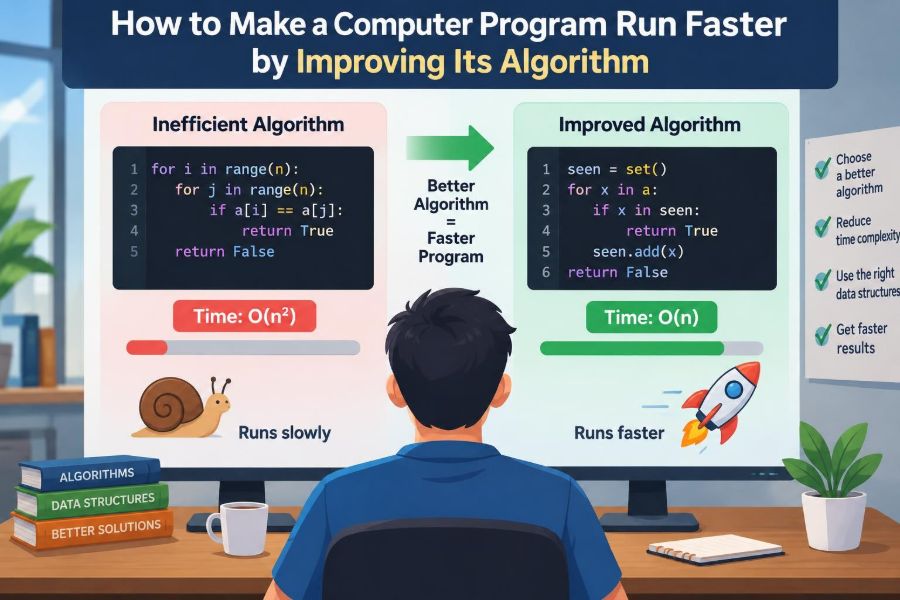

A program can feel perfectly fine when it handles ten records, ten photos, or ten users. Then the data grows, and suddenly a search takes seconds, a dashboard stalls, or a scheduled task runs through the night.
The first instinct is often to look for a faster computer, more memory, or a newer programming language. Those changes can help, but they do not always address the real source of the delay.
Often, the program is simply doing too much work. It may be repeatedly examining the same data, sorting information it does not need to sort, or using a slow method for a problem with a well-known faster solution.
That is where algorithms matter. Improving an algorithm means changing the method of solving the problem so that the computer performs fewer unnecessary operations as the input grows.
⚙️ What “Faster” Really Means
Program speed is usually discussed as running time: how long a task takes from start to finish. But the useful question is not only “How fast was one test?” It is “How does the work change when the input becomes larger?”
A program that checks a list of 100 items may seem quick. If its method becomes dramatically more expensive at 100,000 items, the design—not the machine—is likely the limiting factor.
Algorithm improvement can reduce waiting time, server cost, battery use, and the chance that a system becomes unresponsive under real workloads.
🧠 An Algorithm Is the Method, Not the Code Syntax
An algorithm is a precise sequence of steps for reaching a result. Code is the expression of those steps in a particular language.
Two programs can produce exactly the same answer while using very different algorithms. For example, one program might find a name by inspecting every entry in a contact list, while another uses an organized index to jump close to the right place.
Changing variable names or shortening a line of code rarely changes the algorithm. Replacing a repeated full-list search with a lookup structure often does.
📈 Why Input Size Changes Everything
Small test cases can hide inefficient choices. A nested loop over ten items performs only a modest number of comparisons, so it may not raise concern during development.
With a thousand items, that same pattern may perform roughly a million comparisons. With a million items, the growth can become impractical. The key is not merely that the input got bigger; it is how the amount of work grows in response.
This is why performance planning begins by identifying realistic and possible future input sizes: records, users, requests, files, graph nodes, or transactions.
📏 Understanding Big O Notation
Big O notation describes the general growth rate of an algorithm as input size, commonly written as n, increases. It deliberately ignores small constant details to focus on scaling behavior.
For example, an operation that visits every item once is usually described as O(n). An operation that compares every item with every other item is commonly O(n²).
| Growth pattern | Typical example | What happens as data grows |
|---|---|---|
| O(1) | Read an array item by index | Work stays roughly constant |
| O(log n) | Binary search in sorted data | Grows very slowly |
| O(n) | Scan a list once | Work grows in proportion to input |
| O(n log n) | Efficient comparison sorting | Usually manageable for large lists |
| O(n²) | Compare every pair | Can grow quickly and become costly |
Big O is a planning tool, not a stopwatch. An O(n) method with expensive operations can be slower than an O(n²) method on very small inputs, so measurement still matters.
🔍 Start by Measuring the Actual Bottleneck
Do not optimize based only on a hunch. A program may appear slow because of network requests, database queries, disk access, rendering, or waiting for another service—not because of local computation.
Use a profiler when possible. A profiler reports where a program spends time, often down to individual functions or lines. Timers around major stages can also reveal whether parsing, searching, sorting, or output generation dominates the run.
Optimize the part that consumes meaningful time or resources. Making a rarely called helper twice as fast will not rescue a database query executed thousands of times.
🧩 Identify the Expensive Operation
Once a slow region is known, ask what it repeatedly does. Common expensive operations include scanning collections, comparing strings, allocating objects, sorting, copying large data, and calling remote services.
Look for a costly action inside a loop. Then check whether that loop is inside another loop, whether the same result is recalculated, and whether the work is needed for every item.
A clear description helps: “For each order, the program scans all customers to find its customer.” That sentence already suggests a better data organization.
🔁 Watch for Nested Loops
Nested loops are not automatically wrong. They are necessary for many tasks, such as filling every cell in a small grid or comparing pairs where every pair truly matters.
The warning sign appears when an inner loop repeatedly searches data that could be accessed directly. Consider this hypothetical pattern:
for each order:
  for each customer:
    if customer.id equals order.customerId:
      attach customer to order
If there are many orders and customers, this can approach O(n²) work. Building a lookup table of customers by ID once changes the repeated search into a direct lookup.
🗂️ Choose a Data Structure That Matches the Job
A data structure is a way of organizing data so certain operations become efficient. The same values stored in an array, linked list, hash map, tree, or set can have very different lookup and update costs.
A hash map stores values under keys, such as a customer record under a customer ID. A set stores unique values and is useful for fast membership checks. A sorted array supports binary search but may be costly to update frequently.
The best structure depends on the operations that dominate: lookup, insertion, deletion, iteration, ordering, or range queries.
🧭 Replace Linear Search with Direct Lookup
Linear search checks items one after another until it finds a match or reaches the end. It is simple and entirely reasonable for a short list searched occasionally.
When many lookups are performed against the same collection, create an index. For example, turn a list of products into a map from product code to product information, then retrieve each product by its code.
Building the map takes an initial pass through the data, but repeated lookups are usually much cheaper afterward. This is a common trade: slightly more memory and setup work for substantially less repeated searching.
🔎 Use Binary Search Only on Ordered Data
Binary search works by checking the middle of a sorted collection, discarding half of the remaining possibilities each step. This produces O(log n) search behavior rather than O(n).
It is useful when data is already sorted or when many searches justify maintaining sorted order. It is not a shortcut for an unsorted list; sorting first has its own cost.
If the collection changes constantly, a hash map or tree may be more appropriate than repeatedly sorting an array. The workload determines the right choice.
📚 Avoid Sorting When You Need Only One Answer
Sorting is often used because it makes data easier to reason about, but it can be unnecessary work. If you only need the smallest number in a list, scan once and track the smallest value found.
Likewise, finding the top few items may call for a bounded heap or selection method rather than sorting every item. The difference matters when lists are large or the task runs frequently.
Ask a specific question: do you need the full order, or only a minimum, maximum, threshold, or small group of best results?
♻️ Stop Recomputing the Same Result
Repeated calculation is a common hidden cost. A function inside a loop might calculate the same conversion rate, parse the same configuration, or rebuild the same list for every item.
Move work outside the loop when its result does not depend on the current loop item. This is often called loop-invariant code motion: compute an unchanging value once instead of many times.
Be careful with values that can change during execution. Caching or moving a calculation is correct only when it preserves the program’s required behavior.
🧠 Cache Results That Are Safe to Reuse
Caching stores a previously computed result so later requests can reuse it. For example, a program might remember the parsed form of a file, an expensive transformation, or a result for a repeated query.
Memoization is a focused form of caching in which a function remembers results for particular inputs. It can transform a recursive calculation with overlapping subproblems from repeated work into work done once per distinct input.
Caches introduce responsibilities: memory use, expiration, invalidation, and correctness when the underlying data changes. A stale cached price or permission decision can be worse than a slower calculation.
🌳 Turn Repeated Subproblems into Dynamic Programming
Some problems naturally branch into smaller versions of themselves. A naive recursive solution may solve the same smaller problem again and again.
Dynamic programming records solutions to those smaller subproblems, then reuses them. It can be implemented from the top down with memoization or from the bottom up by filling a table.
For instance, a route-planning, sequence-comparison, or resource-allocation problem may have overlapping intermediate states. Dynamic programming is valuable when those states are clearly defined and reused; it is not necessary for every recursive function.
✂️ Reduce the Amount of Data Processed
The fastest item to process is often the one you never load, copy, parse, or transmit. Before improving a loop, check whether the program can narrow the input earlier.
Filter records at the database rather than fetching everything and filtering in application code. Request only needed columns. Read a file as a stream if the entire file does not need to live in memory.
Early filtering improves more than speed. It can lower memory pressure and make later stages of the algorithm simpler.
🛑 Exit Early When the Answer Is Known
Many loops continue after their objective has already been reached. If you only need to know whether a list contains an invalid entry, stop at the first invalid entry.
Similarly, a search for any matching record should return once it finds one. A validation sequence can fail fast when later checks cannot change the outcome.
Early exit is a small change with a large benefit in common cases, but only if the program does not also need counts, all matches, or side effects from the remaining items.
🪜 Divide Large Problems into Smaller Ones
Divide-and-conquer algorithms split a problem into smaller parts, solve those parts, and combine the results. Merge sort and many geometric algorithms use this strategy.
This approach can reduce unnecessary comparisons or make a problem manageable through parallel work. However, splitting and combining have overhead, so a divide-and-conquer design should be chosen because its structure fits the problem, not because it sounds advanced.
Understanding the structure of the task is more useful than memorizing a catalog of named algorithms.
🕸️ Match Graph Problems to Graph Algorithms
Many practical systems are graphs: road networks, social connections, task dependencies, web links, and service relationships. Treating a graph like an ordinary list can lead to wasteful repeated searches.
Breadth-first search is a natural choice for finding the fewest edges in an unweighted network. Dijkstra-style shortest-path methods are used when connections have nonnegative costs. Topological sorting helps order tasks with dependencies.
The important step is recognizing the model. Once a problem is correctly identified as graph traversal, dependency ordering, or shortest path, an established algorithm may replace improvised nested loops.
🗃️ Let the Database Do Database Work
Applications often become slow by retrieving many rows and processing them one at a time. Databases are designed to filter, join, aggregate, and index stored data efficiently when queries and indexes are well chosen.
A classic issue is the “N+1 query” pattern: fetch a list once, then make one additional query for each item in that list. Replacing it with a suitable join, batched query, or prefetch can eliminate many round trips.
Database behavior depends on schema, indexes, query plans, data distribution, and server load. Inspect the actual query plan rather than assuming that moving all work into a query will always be faster.
📦 Avoid Unnecessary Copying and Allocation
Creating new arrays, strings, objects, or temporary collections can consume time and memory, especially inside hot loops. Frequent allocation may also trigger garbage collection or memory-management overhead.
Use streaming, iterators, reusable buffers, or in-place updates when they remain clear and safe. But do not mutate shared data merely to avoid an allocation if it makes bugs likely.
Algorithmic improvements usually matter more than micro-level allocation savings, yet memory behavior becomes crucial when processing large files, images, or high-volume requests.
🧵 Use Parallelism After Reducing Waste
Parallelism divides work across multiple processor cores or machines. It can reduce elapsed time for independent tasks, such as processing separate images or calculating separate chunks of a large dataset.
It does not fix a poor algorithm. Running an O(n²) process on several cores still leaves O(n²) total work, while adding coordination, synchronization, and debugging complexity.
First eliminate avoidable work. Then parallelize tasks that are independent enough to benefit and verify that shared resources do not become bottlenecks.
⏳ Distinguish CPU Work from Waiting
A slow program is not always CPU-bound. If it spends most of its time waiting for disk, a network, a database, or another API, changing a local sorting algorithm may have little visible effect.
For waiting-heavy programs, useful approaches include batching requests, reducing round trips, using appropriate concurrency, compressing large transfers when suitable, and avoiding duplicate calls.
Measure both CPU time and elapsed time. A function that uses little CPU but waits several seconds can still dominate the user’s experience.
🧪 Benchmark Changes Fairly
A benchmark compares versions of a program under controlled conditions. Use representative inputs, including sizes that resemble real production workloads rather than only tiny demonstrations.
Run tests more than once because background activity, caching, just-in-time compilation, and system load can affect individual timings. Compare the same task, environment, and correctness checks.
- Measure before and after the change.
- Record input size and relevant machine conditions.
- Check memory use as well as elapsed time when it matters.
- Verify that both versions produce the same intended result.
A speedup that quietly drops records, changes ordering, or skips validation is not a valid optimization.
✅ Preserve Correctness While Optimizing
Every algorithm has assumptions. Binary search assumes ordered data; a cache assumes a reused value is still valid; an early return assumes no later work is required.
Create tests for edge cases before and after a performance change: empty input, duplicate values, large input, unusual ordering, missing records, and boundary values. Property-based or randomized tests can be helpful when many combinations are possible.
Performance is a feature, but correctness is the contract. A slightly slower correct solution is preferable to a fast answer that users cannot trust.
⚖️ Understand Time-Space Trade-Offs
Many faster algorithms consume more memory. A hash map uses space to provide quick lookup. Dynamic programming stores intermediate results. Caches preserve data to avoid recalculation.
Conversely, a memory-saving streaming approach may require more passes over data or prevent convenient random access. There is no universal best choice.
Choose based on available memory, expected data size, latency needs, update frequency, and operational constraints. On a memory-limited device, an elegant memory-heavy approach may be unsuitable.
🛠️ Prefer Clear Improvements Over Clever Tricks
Readable code makes performance work sustainable. A well-named map of users by ID and a documented reason for using it are easier to maintain than a compact but mysterious optimization.
Use comments to explain non-obvious choices, especially when an algorithm has constraints or trades memory for speed. Keep a straightforward reference implementation or tests when an optimized version is difficult to verify.
Cleverness has a maintenance cost. An optimization is strongest when future developers can understand when it is safe to change.
🚫 Common Optimization Mistakes
One mistake is optimizing before measuring. Another is focusing on tiny syntax changes while a major repeated query or quadratic loop remains untouched.
Other frequent problems include:
- Choosing a complex algorithm for input sizes that will remain small.
- Using caching without a clear invalidation strategy.
- Adding concurrency to code with shared mutable state.
- Benchmarking unrealistic data that hides the true bottleneck.
- Assuming a library call is always slow or always fast without profiling.
The goal is not to make every line maximally optimized. It is to make important work efficient enough, with acceptable complexity and risk.
🗺️ A Practical Optimization Workflow
A disciplined workflow prevents random tuning. Begin with an observable problem: a report takes too long, an endpoint times out, or memory rises sharply during import.
- Reproduce the issue with representative input.
- Measure where time, memory, or requests are spent.
- Describe the expensive pattern in plain language.
- Select a better algorithm, data structure, or data-access strategy.
- Implement the smallest change that addresses the bottleneck.
- Test correctness, benchmark again, and document the trade-off.
Then reassess. The original bottleneck may disappear and reveal a different limitation, which is normal in performance work.
🎯 The Core Principle: Do Less Work, More Intelligently
The most durable way to make a program faster is usually not a trick. It is recognizing unnecessary work and replacing it with a method whose cost grows more gently with the problem.
That may mean using a map instead of repeated scans, filtering before processing, avoiding a full sort, remembering reusable results, or choosing an algorithm designed for graphs or dependencies.
Hardware, compilers, databases, and parallel processing remain valuable tools. But an efficient algorithm gives all of them less waste to overcome.
When a program is slow, measure the bottleneck, understand how its work scales, and change the method before chasing micro-optimizations. That habit turns performance from guesswork into practical computer science. 💻⚙️🚀