
A phone unlocks with a face scan, starts a navigation app, streams music, and quietly checks for new messages. None of those actions feels dramatic, yet each requires enormous amounts of computation in a very short time.
Inside the device, a chip is carrying out tiny electrical decisions: add these numbers, compare those values, move this data, fetch the next instruction. Modern processors can complete billions of such operations each second, even while using limited battery power and fitting beneath a thin metal or glass case.
This speed is not the result of one magical component. It comes from layers of design decisions, from the microscopic shape of a transistor to the way instructions are arranged, stored, predicted, and shared among processing cores.
Understanding those layers makes computer performance less mysterious. It also helps students, programmers, and technology buyers see why clock speed alone does not tell the whole story.
🧠 What “Billions of Operations” Actually Means
An operation is a small unit of work performed by digital hardware. It may be an addition, a comparison, a bitwise logic action, a memory address calculation, or a step in processing an instruction.
Not every task maps neatly to one operation. Rendering a 3D image, for example, involves many connected calculations and memory transfers. A processor’s advertised capabilities therefore depend on what is being measured: instructions, arithmetic operations, graphics calculations, or AI-oriented matrix operations.
The central idea is simple: chips achieve high throughput by making very small actions extremely fast and by working on many actions at once.
🔢 Starting With Binary Signals
Computer chips use binary values: 0 and 1. Physically, these values are represented by ranges of electrical voltage rather than by literal numbers traveling through a wire.
Binary is practical because electronics can reliably distinguish between low and high voltage states. Those states can represent data, instructions, addresses, and control signals.
More complex information is built from groups of bits. A byte contains eight bits, while a modern processor commonly works with values that are dozens of bits wide. The chip must coordinate all those signals accurately, repeatedly, and at high speed.
🚪 Transistors: The Tiny Electronic Switches
The fundamental building block is the transistor, a device that can control whether current flows along a path. In digital circuits, transistors are combined to form switches and logic gates.
A modern chip contains vast numbers of transistors, each too small to see without specialized equipment. Individually, a transistor does very little. Together, they form circuits capable of storing bits, adding numbers, choosing between values, and directing data around the chip.
Manufacturers do not simply add transistors without limit. Every additional circuit consumes physical area, adds design complexity, and can affect power use, heat, and manufacturing yield.
🧩 Logic Gates Turn Signals Into Decisions
Transistors are arranged into logic gates, such as AND, OR, and NOT gates. An AND gate produces a true output only when its required input conditions are true; a NOT gate reverses a signal.
These basic rules may sound modest, but linked gates create adders, comparators, multiplexers, and control circuits. An arithmetic logic unit, or ALU, uses such circuitry to handle common integer calculations and logical comparisons.
Think of logic gates as a vast set of tiny decision points. Their arrangement determines what a circuit can do, while their electrical quality helps determine how quickly it can do it.
🏭 From Chip Idea to Hardware Blueprint
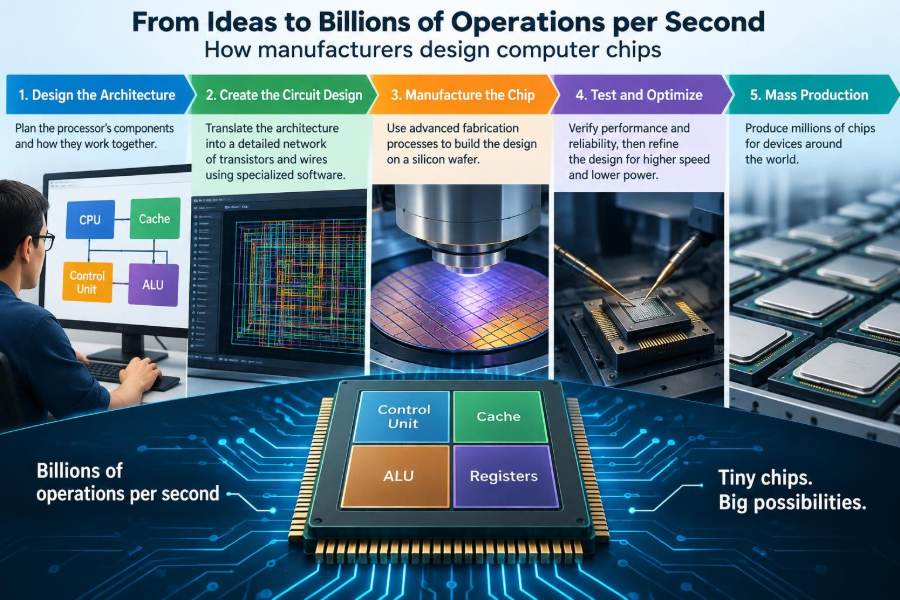
Chip design begins long before a factory makes silicon wafers. Engineers define an architecture: the visible capabilities of a processor, including its instruction set, data formats, memory behavior, and supported features.
They then create a microarchitecture, the internal implementation of that architecture. Two processors can understand the same program instructions while using very different numbers of cores, cache sizes, execution units, and prediction methods.
Specialized software tools describe the circuitry, simulate its behavior, and check whether it meets timing and power goals. The result is eventually translated into an extraordinarily detailed physical layout for manufacturing.
📐 The Instruction Set Is the Chip’s Vocabulary
An instruction set architecture, often shortened to ISA, defines the basic commands software can ask a processor to perform. Typical instructions load data, store data, add values, branch to another part of a program, or perform specialized operations.
Programs written in high-level languages are converted by compilers into machine instructions appropriate for a target processor. The processor then fetches and executes those instructions.
An ISA is not a complete performance description. It tells us what instructions are available, but not how many can be completed simultaneously or how efficiently a particular chip turns them into electrical activity.
⏱️ Clock Signals Keep Work Coordinated
Most processors use a repeating timing signal called a clock. The clock helps circuits agree on when values should be captured, moved, or updated.
Clock rate is measured in hertz. A gigahertz-scale clock has billions of cycles per second, but one cycle is not automatically one useful instruction. Some instructions take multiple cycles, while advanced processors may begin or finish several instructions during a single cycle.
This is why comparing processors only by gigahertz can mislead. A faster clock can help, but the amount of useful work per clock cycle matters just as much.
🔄 The Basic Instruction Cycle
At a high level, a processor repeatedly performs a cycle: fetch an instruction, decode what it means, obtain the needed data, execute the operation, and record the result.
In a simple processor, these stages might occur one after another. That approach is understandable but inefficient because hardware involved in one stage may sit idle while another stage runs.
Modern designs overlap and reorganize these steps extensively. Still, this basic cycle remains a useful mental model for understanding what the hardware is trying to accelerate.
🏗️ Pipelining Keeps Hardware Busy
A pipeline divides instruction processing into stages, much like an assembly line. While one instruction is being executed, another can be decoded and a third can be fetched.
The goal is not necessarily to make one instruction finish instantly. The goal is to increase the number of completed instructions over time, known as throughput.
Pipelines have complications. If one instruction needs the result of an earlier instruction, it may have to wait. Designers add forwarding paths, scheduling logic, and other mechanisms to reduce these pauses without producing incorrect results.
🚦 Branches Create a Major Scheduling Problem
Programs constantly make choices: if a password is correct, continue; otherwise, show an error. These choices create branches, where the processor must decide which instruction path to fetch next.
If the chip waits for every branch to be resolved, its pipeline can become underused. To avoid that, it uses branch prediction, a hardware-based estimate of the path a program is likely to take.
A correct prediction keeps work moving. A wrong one means the chip discards work performed on the incorrect path and starts the correct path, a cost often called a pipeline flush. Prediction improves average performance, but it cannot eliminate uncertainty.
🔮 Speculation Works Ahead, Carefully
When a processor acts on a branch prediction before the final answer is known, it is performing speculative execution. It may begin decoding, scheduling, and calculating instructions that will probably be needed.
If the prediction proves right, useful work is already underway. If it proves wrong, the visible architectural state must be restored so the program behaves as though the incorrect path never changed its results.
Speculation is powerful but complex. It has also required careful security analysis because temporary internal activity can sometimes reveal information through subtle timing or cache effects. Secure system design includes both hardware mitigations and software updates where appropriate.
📥 Decoding Turns Commands Into Internal Work
Fetched instructions are not always sent directly to an execution unit. A decode stage interprets the instruction’s bits, identifies operands, and converts the request into internal control signals or smaller operations.
Complex instructions may be broken into simpler internal steps, sometimes called micro-operations. This can let a processor present a consistent programming interface while using efficient internal machinery.
Decode bandwidth matters because it limits how much new work can enter the processor at once. A highly capable execution engine cannot reach its potential if instructions arrive too slowly.
🧮 Execution Units Divide the Work
A processor has different execution units for different categories of work. Integer arithmetic, floating-point calculations, address generation, branch handling, and vector math may use separate dedicated circuits.
This specialization allows several compatible operations to proceed in parallel. For example, one unit may calculate an address while another performs an addition and another checks a branch condition.
Not every instruction can use every unit. A program heavy in one particular kind of calculation may be limited by the availability of the corresponding hardware, even if other units are idle.
🗂️ Registers Provide the Fastest Storage
Registers are small storage locations located very close to a processor’s execution circuitry. They hold values that instructions need immediately, such as operands, addresses, and intermediate results.
Keeping active data in registers is much faster than repeatedly retrieving it from main memory. Compilers try to assign frequently used program values to registers for this reason.
Registers are scarce compared with memory. When a program has more active values than available registers, some values must be temporarily stored elsewhere, increasing data movement and potentially slowing execution.
🧊 Caches Reduce the Memory Waiting Problem
Main memory is much larger than a processor’s registers but is relatively far away in electrical terms. Even when memory is fast by human standards, a processor can waste many clock cycles waiting for data to arrive.
A cache is a smaller, faster memory placed on or near the processor. It keeps copies of recently used or nearby data because programs often revisit the same information or access sequential locations.
Cache designs usually have multiple levels. The closest levels are very fast and small; later levels hold more data but take longer to access. This hierarchy balances speed, capacity, chip area, and power.
🛣️ Data Movement Can Be the Real Bottleneck
Computing a simple addition may take little hardware effort compared with locating and moving the values to be added. This is why high-performance design pays so much attention to caches, interconnects, and memory controllers.
A spreadsheet with scattered references, a database query scanning a large dataset, and a game loading textures can all become limited by data access rather than by raw arithmetic capacity.
For programmers, the practical lesson is that data layout matters. Code that processes nearby elements in an array often uses cache resources more effectively than code that jumps unpredictably among distant memory locations.
⚡ Parallel Work Happens at Several Levels
Manufacturers increase performance by finding independent work that can occur concurrently. This is called parallelism, and it appears in several forms inside and outside a chip.
| Type of parallelism | What happens | Simple example |
|---|---|---|
| Instruction-level | Independent instructions overlap or execute together | Address calculation alongside arithmetic |
| Data-level | One instruction operates on multiple values | Processing several pixels at once |
| Thread-level | Separate instruction streams run on different cores | Encoding video while another task responds to input |
Each kind has limits. Dependencies, limited memory bandwidth, and coordination overhead can prevent a workload from using all available parallel hardware.
📏 Vector Units Process Many Values Together
Vector or SIMD instructions—short for single instruction, multiple data—apply one operation to several data values packed into a wide register. For example, a single vector addition can add multiple pairs of numbers at once.
This approach is useful for images, audio, scientific calculations, data analytics, and some machine-learning tasks because those workloads often repeat the same calculation across many items.
Vector processing is not a universal shortcut. Code with irregular decisions, unequal data sizes, or complicated dependencies may not map cleanly to wide parallel lanes.
🧵 Multiple Cores Run Separate Streams
A core is a largely independent processing engine within a chip. Multi-core processors can work on multiple threads, which are separate flows of program instructions.
Operating systems distribute tasks across cores: one might manage background services while another runs an application’s main logic. Well-designed software can also split a single demanding job into coordinated threads.
Adding cores helps only when useful parallel work exists. A sequential step that must finish before everything else still limits the overall task, and sharing data between threads can introduce overhead.
🧷 Synchronization Protects Shared Data
When several cores access the same data, they need rules to avoid corrupting it. If two threads update a bank balance or a shared counter at the same time, an uncontrolled sequence can lose one update.
Synchronization tools such as locks, atomic operations, and message passing coordinate access. Hardware supports these tools with special instructions and cache-coherence mechanisms.
Coordination has a performance cost. A program that constantly makes threads wait for one another may gain little from extra cores, even if the processor itself is powerful.
🔗 Interconnects Connect the Chip’s Major Parts
As chips add cores, cache blocks, graphics engines, and AI accelerators, they need internal communication networks. These interconnects carry data and requests between components.
Designers must manage bandwidth, latency, and fairness. If too many components compete for one path, some may wait; if a path is overly elaborate, it can consume more area and power.
In large designs, the movement of signals across the chip can influence timing as much as the logic calculations themselves. Physical distance matters at microscopic scales.
🌡️ Heat and Power Set Hard Boundaries
Switching transistors consumes energy, and much of that energy becomes heat. A chip cannot simply run every circuit at its highest possible speed forever, because excessive temperature can reduce reliability or force protective slowdowns.
Power use depends on factors including voltage, clock frequency, transistor activity, and leakage current. Raising frequency often requires more voltage, which can increase power significantly rather than gradually.
This is one reason efficiency matters. The best design for a laptop, server, phone, or embedded sensor depends on its cooling system, battery limits, workload, and required performance—not on speed alone.
🧊 Power Management Changes Behavior Dynamically
Modern chips use techniques such as clock gating, which stops the clock signal to circuitry that is not currently needed. They may also lower frequency or voltage when a workload is light.
Some systems can temporarily raise speed when thermal and power conditions allow, then reduce it when limits are reached. This behavior explains why real-world sustained performance can differ from a brief benchmark result.
Dedicated accelerators can improve efficiency too. A video decoder or neural-processing block may perform a specific task with less energy than a general-purpose CPU core, though it is useful only for workloads it supports.
🔬 Manufacturing Starts With Silicon Wafers
Once the physical design is complete, manufacturing builds it layer by layer on a thin silicon wafer. Silicon is useful because its electrical behavior can be carefully modified to create transistor regions.
Processes such as deposition, patterning, etching, and implantation create microscopic structures. Lithography transfers extremely detailed patterns onto the wafer, helping define where circuit features will be formed.
Fabrication is demanding because tiny defects can damage a circuit. Manufacturers test completed structures, discard unusable parts, and classify functioning chips according to characteristics such as stable operating behavior.
🪜 Transistors Are Built in Many Layers
A chip is not a flat drawing of switches. Transistors occupy lower layers, while multiple metal layers above them carry electrical connections between different parts of the design.
These layers resemble a dense, multi-level transportation network. Local connections link nearby circuitry, while larger routes connect major blocks such as cache, cores, and input/output controllers.
Routing is a serious engineering constraint. Wires have resistance and capacitance, which affect how quickly signals settle. A design must meet timing requirements after considering both logic gates and the wires joining them.
✅ Verification Catches Errors Before and After Fabrication
A tiny design error can affect millions of devices, so chip teams use multiple verification methods. Simulation tests expected behavior; formal methods can mathematically check specified properties for some parts of a design; emulation and prototypes help run more realistic software.
Engineers test normal cases, unusual instruction combinations, power transitions, and interactions between hardware blocks. They also examine whether the final layout preserves the intended circuit behavior.
Testing continues after fabrication. Chips may include built-in self-test features and diagnostic support so manufacturers and system builders can identify faults and validate operation.
📦 Packaging Makes the Chip Usable
The silicon die is the small piece cut from a finished wafer. Packaging protects it, supplies electrical connections, and helps move heat into a heat spreader, cooler, or device enclosure.
Advanced packaging can place multiple dies close together or stack components, shortening some communication paths and allowing different functions to be manufactured separately. This can be useful when one giant die would be difficult or expensive to produce.
Packaging is part of performance engineering, not merely a protective shell. Its electrical paths, thermal properties, and memory connections influence what the finished product can sustain.
📊 Why Benchmarks Need Careful Interpretation
A benchmark measures performance on a particular test, under particular settings. It can reveal useful differences, but it cannot summarize every workload with one number.
A chip that excels at compiling code may not lead in graphics rendering, machine learning, battery life, or database work. Memory capacity, cooling, storage speed, operating system behavior, and software optimization also affect the experience.
When comparing systems, look for tests close to your real tasks and distinguish short burst results from sustained workloads. A claimed operation rate is most meaningful when its measurement method and workload are clear.
🛠️ What Programmers Can Do With This Knowledge
Application developers do not need to design transistors, but they benefit from understanding hardware limits. Efficient programs reduce unnecessary work, avoid excessive data copying, and choose algorithms that fit the problem.
- Use appropriate data structures so common operations are not needlessly expensive.
- Process data in predictable, nearby patterns when practical to improve cache use.
- Parallelize independent tasks, but measure coordination costs rather than assuming more threads always help.
- Use platform libraries and profilers to find the actual bottleneck before optimizing.
- Consider energy use and responsiveness, especially for mobile, embedded, and large-scale systems.
Premature optimization can make code harder to maintain. The most reliable approach is to establish correctness, measure realistic behavior, and improve the specific constraint that matters.
🚫 Common Misunderstandings About Processor Speed
One frequent mistake is treating clock frequency as a complete ranking. Two chips at the same frequency can complete different amounts of work per cycle and may have very different cache, core, and power designs.
Another mistake is assuming more cores always improve one program. A web browser, a video editor, and an older single-threaded tool can use hardware very differently.
It is also misleading to assume a smaller manufacturing feature automatically makes every chip faster. It can enable design opportunities, but actual results depend on architecture, power targets, memory design, software, and the manufacturing process itself.
🌍 Different Chips Optimize for Different Jobs
A smartphone processor prioritizes energy efficiency, compact integration, and responsive performance. A server processor may prioritize large memory capacity, many cores, reliability features, and high throughput for many users.
Graphics processors emphasize enormous data parallelism, making them well suited to rendering and many numeric workloads. Microcontrollers, in contrast, may use simpler cores because predictable operation, low cost, and very low power matter more than maximum speed.
There is no universally “best” chip. The relevant question is whether its architecture and system design suit the workload and constraints.
🧭 The Core Principle Behind Fast Chips
Manufacturers achieve billions of operations per second by combining fast switching devices with careful organization. They shorten common paths, overlap stages, predict likely work, store active data close by, run independent work in parallel, and manage heat so the system remains stable.
Every improvement involves trade-offs. More prediction logic can use power; more cache uses area; more cores increase coordination demands; higher speed produces more heat. The art of chip design is balancing those choices for a target product.
The processor is therefore best understood as a coordinated system rather than a single fast calculator. Its performance emerges from the interaction of circuitry, memory, software, packaging, and power management.
Computer chips reach extraordinary speed not through one trick, but by turning countless tiny, well-coordinated electrical decisions into useful work with as little waiting as possible. That balance is what lets everyday devices feel immediate while handling remarkably complex tasks. 💻⚡🧠