
You click a link, join a video call, or press a button in an online game. The response feels immediate—until it does not. A small pause can turn a conversation awkward, make a game feel unfair, or leave a checkout page apparently frozen.
Those pauses are often described as “internet speed” problems. Sometimes they are. But a fast connection can still feel slow when the destination is far away, the route is indirect, or a network device has to wait its turn.
Data can travel across oceans and around the world in fractions of a second. The useful question is not whether distance is possible, but how much delay an application can tolerate before people notice or systems behave poorly.
Understanding that distinction helps students diagnose networks, helps developers choose server locations, and helps everyone set realistic expectations for real-time services.
🌐 Latency Is the Time Before a Response Arrives
Latency is the delay between sending data and receiving the result. It is usually measured in milliseconds (ms), where 1,000 ms equals one second.
If you click “send” in a chat app, latency includes the time for your message to reach the service and for a confirmation or reply to come back. High bandwidth does not automatically mean low latency: a connection may transfer a large file quickly while still reacting slowly to small requests.
📏 Distance Creates a Hard Physical Limit
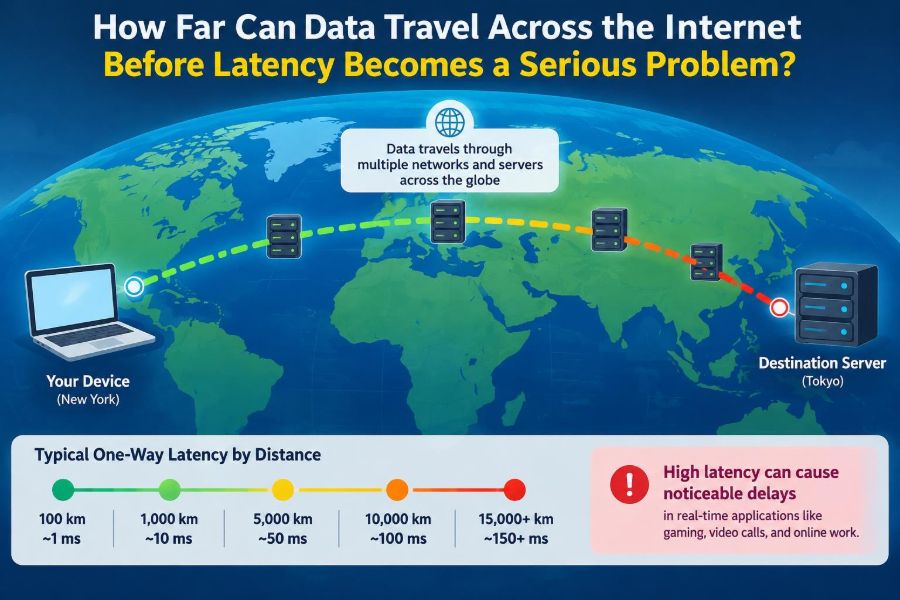
Most long-distance internet traffic travels as light through fiber-optic cable. Light moves very quickly in fiber, but not at its vacuum speed. A useful rule of thumb is that it takes roughly 5 milliseconds for a signal to travel 1,000 kilometers through fiber in one direction.
That is a lower-bound estimate, not a promise. A trip from one continent to another may require thousands of kilometers of cable, so even an unusually direct path has noticeable delay before routers, detours, and processing are considered.
🔁 Round-Trip Time Is Usually What You Feel
Networking tools often report round-trip time, or RTT: the time for a packet to travel to a destination and for a response to return. A 50 ms RTT does not mean data spent 50 ms moving one way; the delay is shared between the outbound and return journeys.
Many user actions require at least one round trip. Some require several, especially when a browser must look up a name, establish a secure connection, request a page, and retrieve supporting files.
🚦 Packets Do Not Take a Perfectly Straight Route
Internet routes follow available network links, commercial agreements, capacity, and fault conditions—not the shortest line on a map. A request to a nearby service can sometimes travel through a distant exchange point before returning.
Network operators choose routes using protocols such as BGP, which helps independent networks exchange reachability information. It is designed for global connectivity and policy control, not for guaranteeing the geographically shortest path.
🧵 Fiber Paths Are Longer Than Maps Suggest
Submarine cables avoid deep trenches, unstable areas, fishing zones, and difficult landing locations. Land routes follow rights-of-way, cities, rail corridors, and existing infrastructure. The physical cable route can therefore be much longer than the straight-line distance.
A connection between two coastal cities may also pass through inland hubs or another country. Geography matters, but the topology of actual networks matters more.
📦 A Packet’s Journey Has Several Delays
Distance is only one component. Engineers commonly break latency into propagation, transmission, processing, and queueing delay.
| Delay type | What causes it | When it stands out |
|---|---|---|
| Propagation | Signal traveling through cable or radio | Long distances |
| Transmission | Putting all packet bits onto a link | Slow links or large packets |
| Processing | Inspecting and forwarding packets | Busy or complex network equipment |
| Queueing | Waiting behind other traffic | Congestion and overloaded links |
On a clear, well-provisioned route, propagation may dominate. During congestion, queueing can become the largest and least predictable part.
🚗 Queueing Is the Traffic Jam of Networking
A router cannot send every arriving packet at the same instant over one outgoing link. When too much traffic wants the same link, packets wait in a buffer. This is queueing delay.
Short bursts are normal. Persistent queues are a problem because delay grows, interactive traffic feels sluggish, and buffers may eventually discard packets. The effect is similar to a road that works well until enough cars arrive to form a sustained line.
📡 Your First Wi-Fi Hop Can Be the Weak Link
A nearby server cannot compensate for an unreliable local connection. Wi-Fi shares radio airtime with other devices and can be affected by walls, interference, weak signal, and crowded channels.
Retries on Wi-Fi add delay and variation. If a video call is choppy only in one room, testing closer to the router or using Ethernet can reveal whether the problem begins before traffic even reaches the wider internet.
📶 Cellular Networks Add Their Own Variables
Mobile networks introduce radio scheduling, changing signal conditions, handoffs between cells, and carrier routing. They can deliver excellent performance, but latency often changes more than on a stable wired connection.
A moving train, a busy event, or a weak indoor signal may increase delay even when a speed test reports enough download capacity. For interactive work, consistency is often as valuable as a high peak speed.
📉 Jitter Means Delay Is Not Steady
Jitter is variation in packet delay. A connection averaging 30 ms can still be difficult for real-time audio if some packets arrive in 15 ms and others in 150 ms.
Voice and video applications use small buffers to smooth these differences. Larger buffers hide more jitter but add delay, which illustrates a recurring trade-off: stability can cost immediacy.
🗑️ Packet Loss Often Hurts More Than the Average Ping
Packet loss occurs when packets are dropped because of congestion, radio errors, faulty equipment, or other failures. Modern protocols can retransmit missing data, but that recovery takes time.
For a web page, a lost packet may cause a brief pause. For live voice, the late replacement may arrive after the moment has passed, producing a clipped word or robotic sound. Average latency alone does not describe this experience.
🧭 How Much Latency Can People Notice?
There is no universal threshold. People notice delay differently depending on the task, feedback design, and whether they are coordinating with another person.
Local actions such as moving a pointer feel best when response is nearly immediate. A pause that is tolerable while loading a news article may be frustrating in a drawing tool, a remote desktop session, or a conversation where both speakers start talking at once.
🎮 Gaming Has Tight Feedback Loops
Fast multiplayer games repeatedly exchange player inputs and game state. Lower latency generally makes controls feel more direct and reduces the gap between what a player sees and what the server has already decided.
Different genres tolerate different conditions. A turn-based game can work well over distant links; a competitive action game is more sensitive. Game design can compensate with prediction and interpolation, but these techniques manage delay rather than eliminate the physical cause.
🎙️ Conversations Become Awkward at Higher Delays
Human conversation depends on quick turn-taking. As end-to-end delay rises, speakers receive feedback later and are more likely to interrupt, pause too long, or repeat themselves.
Call quality also depends on echo control, packet loss, jitter handling, microphones, and codecs. Still, distance creates a real limit: a conversation between far-apart regions can remain understandable while feeling less natural than one hosted nearby.
🖥️ Remote Desktops Need Fast Visual Feedback
Remote desktop software sends keyboard and mouse actions to a remote machine, then returns screen updates. Typing documents can tolerate more delay than dragging windows, editing graphics, or controlling a virtual workstation.
Compression helps reduce bandwidth, but it also adds encoding and decoding work. The best experience usually comes from placing the virtual machine close to the user or using an edge location near the user.
🛒 Ordinary Web Browsing Is More Forgiving
Websites can hide some latency by caching files, reusing connections, preloading likely resources, and showing useful content while other items load. Reading an article does not require every packet to arrive at a precise moment.
However, a page with many sequential requests can expose RTT repeatedly. Reducing unnecessary back-and-forth is often more effective than merely increasing bandwidth.
☁️ Cloud Regions Make Location a Design Choice
Cloud platforms offer data centers in multiple regions because users, data, regulations, and disaster plans are distributed. Choosing a region close to most users reduces the distance-sensitive portion of each request.
But location is not the only criterion. A nearby region with overloaded systems, missing services, or poor connectivity to a necessary database may perform worse than a slightly farther, well-designed deployment.
📍 Edge Computing Moves Work Closer
Edge computing places selected processing or cached content near users instead of requiring every request to reach one central location. A content delivery network, or CDN, is a familiar example: it can serve popular images, scripts, and videos from nearby points of presence.
Edge systems reduce distance for suitable work. They do not magically make a centralized database local, and synchronizing data across many sites introduces complexity and consistency decisions.
🗃️ Data Consistency Can Require Extra Round Trips
Some systems must confirm that copies of important data agree before reporting success. This can require communication among servers in different places, adding unavoidable delay.
For example, an application may accept a nearby read from a cache but require a farther authoritative service for a financial update. That is often a deliberate correctness choice, not simply poor performance.
🔒 Encryption Has a Cost, but Distance Usually Matters More
Secure connections use protocols such as TLS to authenticate servers and protect data in transit. Establishing a new secure connection can involve extra exchanges, although modern protocol improvements and connection reuse reduce that overhead.
Encryption computation is usually small compared with a long network journey on modern hardware. The more common performance issue is creating too many new connections instead of reusing secure ones responsibly.
⚡ Protocol Design Can Reduce Waiting
Protocols determine how often an application must wait for acknowledgments or responses. HTTP/2 and HTTP/3 can reduce some inefficiencies of older web connection patterns, while QUIC—the transport protocol beneath HTTP/3—can help avoid certain delays when network conditions change.
No protocol defeats the speed of light. Their value is practical: fewer avoidable round trips, better recovery behavior, and less interference between independent transfers.
🔍 Measuring Latency Requires More Than One Test
A ping test can provide a quick RTT sample, but it does not perfectly represent an application. Some networks treat diagnostic traffic differently, and a successful ping says little about throughput, loss, DNS delay, or server processing time.
Useful investigation combines several observations:
- Latency to the local router, then to a reliable nearby destination.
- Variation over time, not just one average.
- Packet loss during normal use.
- Route changes shown by traceroute-like tools.
- Application timing, such as page load waterfalls or call diagnostics.
🧪 Test at Different Times and From Different Places
A route that is smooth in the morning may be congested in the evening. Testing from wired and wireless connections can separate home-network problems from upstream ones.
For services used globally, synthetic tests from multiple regions are valuable. They reveal that “fast” is always relative to a user’s location and route, not merely to the server’s own network.
🛠️ Practical Fixes for Home and Small-Office Users
Start with the controllable parts. Use Ethernet for latency-sensitive work when practical, place Wi-Fi equipment sensibly, update router firmware from trusted sources, and avoid saturating an upload connection during calls.
If large backups or uploads create lag, router features often called quality of service (QoS) or smart queue management may prioritize interactive traffic. Results depend on the router and configuration, so test rather than assume.
🏗️ Practical Fixes for Application Builders
Developers should measure where time is spent before optimizing. A slow response may come from a database query, a third-party API, server CPU pressure, or a distant user—not just the network.
- Place latency-sensitive services near their primary users.
- Cache content that can safely be reused.
- Reduce sequential requests and unnecessary redirects.
- Reuse connections where appropriate.
- Keep critical request paths short and observe them in production.
- Design graceful loading states for work that cannot be instant.
The right solution depends on whether the task needs freshness, global consistency, large data transfer, or real-time interaction.
⚠️ Common Mistakes When Talking About “Internet Speed”
The first mistake is treating megabits per second as a complete performance score. Bandwidth measures carrying capacity; latency measures waiting time. They solve different problems.
Another mistake is blaming every slow app on a distant server. A slow database, overloaded browser, weak Wi-Fi signal, or packet loss can dominate the experience. Finally, do not compare one ping result with another as if it were permanent; internet paths change.
🛰️ Satellite Changes the Distance Equation
Satellite internet can reach places without practical terrestrial infrastructure, but the orbital path adds propagation delay. Traditional satellites in high orbits typically involve much longer paths than fiber.
Lower-orbit satellite systems reduce that physical distance, though performance still depends on ground stations, network routing, coverage, weather effects on radio links, and local congestion. They are a reminder that the medium matters as well as the map.
🌍 There Is No Single “Serious” Latency Number
A few hundred milliseconds may be acceptable for an email confirmation, inconvenient for web interaction, and disruptive for a live collaborative task. The seriousness of latency is defined by the application’s feedback loop and the user’s expectations.
Distance becomes especially consequential when an operation requires repeated back-and-forth communication. One long round trip may be manageable; dozens of sequential round trips quickly become visible.
🧠 The Core Principle: Reduce Waiting, Not Just Miles
Data can travel worldwide, and global services are routine. Yet every extra kilometer, network hop, queue, retransmission, and request-response cycle adds an opportunity for delay.
The strongest designs combine sensible server placement with efficient protocols, caching, reliable local networks, and application workflows that avoid needless waiting. Distance sets a floor; engineering determines how much delay is added above it.
Latency becomes a serious problem when the time spent waiting exceeds what a particular human interaction or system control loop can comfortably tolerate—not at one universal distance. Measure the whole path, match the design to the task, and treat responsiveness as an end-to-end property. 🌐⚡💻