
You are signing in to a work account from a new laptop. The site asks for a password, then sends a code to your phone. Another service simply asks you to approve a prompt with your fingerprint. A third lets you use a small security key.
These experiences can feel interchangeable: each is a way to get through a login screen. But they protect accounts in very different ways, and each can fail under different conditions.
For students, a compromised email account can expose coursework, cloud files, and password-reset links. For working professionals, the same problem can reach payroll, customer information, shared systems, or colleagues.
The useful question is not whether one login method is magically safe. It is which method resists the threats you actually face, and how several methods can work together.
🔐 The Short Answer
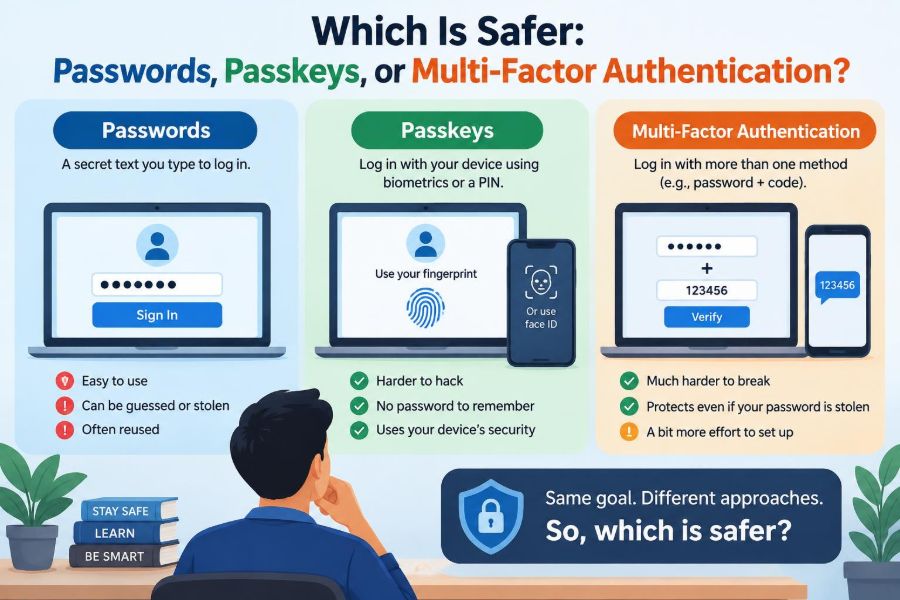
Passkeys are generally safer than passwords alone because they are designed to resist phishing and are not shared with the website as a reusable secret. Multi-factor authentication, or MFA, can greatly strengthen a password-based account, but its protection depends on the second factor you choose.
In practice, a passkey plus sensible account recovery settings is often an excellent everyday option. For high-value accounts, a hardware security key or a strong MFA method may add useful protection.
🧩 What “Safer” Actually Means
Security is not a single score. A method can be strong against stolen-password attacks but weak against a person being tricked into approving a login.
When comparing sign-in methods, consider whether they resist phishing, whether a leaked website database helps an attacker, whether they can be guessed, and what happens if you lose your device. Convenience matters too: a security control people bypass or abandon provides less real protection.
🔑 How Traditional Passwords Work
A password is a secret you know. When you enter it, the service checks whether it matches the credential stored for your account. Well-designed services do not store the original password directly; they store a protected verification value derived from it.
Even with careful storage, passwords remain reusable secrets. You type the same kind of secret into a website each time, which creates opportunities for fake websites, keylogging software, data breaches, and reuse across accounts.
🎲 Why Password Strength Is More Than Complexity
A long, unique password is usually more valuable than a short password with a few predictable substitutions. Attackers can try common words, patterns, and breached password lists very quickly when they obtain password data or attack a login service.
A password manager can create and remember long random passwords, such as a unique string for every account. A memorable multiword passphrase can also be strong when it is genuinely long and not built from a familiar quote or personal detail.
🔄 The Biggest Password Problem: Reuse
Password reuse turns one breach into a chain reaction. If a shopping site leaks a password you also use for email, attackers may try that same email-and-password pair elsewhere. This is called credential stuffing.
Your email account deserves special attention because it often receives password-reset messages. A unique password and strong second factor for email can prevent many other account takeovers.
🎣 Why Passwords Are Vulnerable to Phishing
Phishing is an attempt to persuade someone to reveal a credential or approve an action. A realistic fake login page can copy a university, bank, or collaboration tool closely enough to catch a hurried user.
The browser may show a slightly altered domain name, but visual similarity is often enough to mislead people. Once typed into a convincing fake page, even a very long password has been handed to the attacker.
🧱 What Multi-Factor Authentication Adds
MFA requires evidence from more than one category. The familiar categories are something you know, something you have, and something you are.
For example, a password plus a code from an authenticator app combines something you know with something you have. An attacker who learns only the password should still be unable to sign in.
📱 Common Types of MFA
Not all second factors offer the same resistance to attacks. The table compares common choices in broad terms; actual security also depends on the service’s implementation and your account-recovery options.
| Method | Typical example | Main strength | Key limitation |
|---|---|---|---|
| SMS code | Text message | Widely available | Can be targeted through phone-number attacks and phishing |
| Authenticator code | Time-based one-time code | Does not rely on mobile service | Codes can still be entered into phishing sites |
| Push approval | Approve a phone prompt | Fast and simple | Repeated prompts may pressure users into approving |
| Security key | USB, NFC, or Bluetooth key | Strong phishing resistance | Requires a compatible key and backup plan |
📨 SMS Codes: Better Than Nothing, Not the Finish Line
Text-message verification is usually safer than using a password alone. It can stop an attacker who merely has a password and does not control your phone number.
However, SMS is not ideal for sensitive accounts. Fraud involving a transferred phone number, weaknesses in phone account recovery, and phishing pages that ask for a just-received code can defeat it. Use it when it is the only option, but prefer stronger choices where available.
⏱️ Authenticator Apps and One-Time Codes
Authenticator apps generate short-lived codes, often using a secret established when you scan a setup QR code. The app can work without a cellular signal, making it more resilient than SMS in many situations.
But a one-time code is still a number you can give away. A phishing site can ask for the current code and immediately relay it to the real service. Treat authentication codes like passwords: never provide them in response to an unexpected message or call.
🔔 The Risk of Push Fatigue
Push-based MFA asks you to approve or deny a login on a registered device. It can be convenient, but an attacker with a password may repeatedly trigger prompts and hope you accept one to make them stop.
This is sometimes called MFA fatigue or prompt bombing. Never approve an unexpected request. Number matching, where you enter a number shown on the login screen into the phone prompt, adds useful context and makes accidental approval less likely.
🛡️ Hardware Security Keys
A hardware security key is a dedicated device used during sign-in, often through USB or near-field communication. It can confirm that you are talking to the legitimate site before completing authentication.
This property makes properly implemented security keys highly resistant to ordinary phishing. They are especially useful for administrators, journalists, developers with production access, and anyone protecting valuable accounts. Their practical drawback is physical loss, so registering a backup key is wise.
🔓 What a Passkey Is
A passkey is a modern sign-in credential based on public-key cryptography. Instead of memorizing a shared secret, your device creates a matched pair of keys. The private key stays protected on your device; the public key is registered with the service.
During sign-in, the service asks your device to prove it holds the private key. You unlock that action with a device method such as a PIN, fingerprint, or face recognition.
🧮 Public-Key Cryptography Without the Math
Imagine a special lock and key. You can give the lock to a website, but only your key can open it. More precisely, the website can issue a unique challenge, and your device can produce a valid response without revealing its private key.
If the website’s stored public key is exposed in a breach, it is not a reusable sign-in secret. That is a major difference from a password database, where weak or reused passwords can create substantial risk.
🌐 Why Passkeys Resist Phishing
Passkeys are tied to the legitimate website or app identity. If you visit a lookalike domain, the passkey for the real site generally will not authenticate there. The fake site cannot simply collect a passkey response and use it at the real one.
This does not eliminate every kind of social engineering. Someone might still persuade a user to change recovery details or install malicious software. But it removes a common path: typing a reusable password into a fake login form.
📲 Where Passkeys Live
A passkey may be stored on a phone, computer, password manager, or hardware security key. Some ecosystems can synchronize passkeys securely between a person’s devices, which makes them easier to use after a device replacement.
Storage design affects recovery and portability. Before relying on passkeys for critical services, understand whether you can use them on another device, add another passkey, or retain access if you change platforms.
🧑💻 Biometrics Are Not the Credential
It is easy to say “my fingerprint is my passkey,” but that is not quite correct. Your fingerprint or face usually unlocks the device’s protected private key locally. The website receives cryptographic proof, not a copy of your biometric data.
This distinction matters. A biometric is convenient for local verification, while the passkey is the actual credential used in the online authentication process.
⚖️ Passwords, Passkeys, and MFA Compared
These terms describe different ideas. A password is a credential. A passkey is a cryptographic credential. MFA describes a requirement for multiple factors, and can be built from several technologies.
- Password only: familiar, but vulnerable to reuse, guessing, breaches, and phishing.
- Password plus MFA: a substantial improvement; phishing resistance varies by factor.
- Passkey: usually strong against phishing and avoids reusable shared secrets.
- Passkey plus additional verification: may be appropriate for particularly sensitive actions or accounts.
A passkey unlocked with your device biometrics can involve both possession of the device and local user verification. Services and policies may describe this differently, so do not assume every passkey deployment meets every formal MFA requirement.
🏦 When Extra Verification Still Makes Sense
Some actions deserve more scrutiny than a routine login: changing a recovery email, adding a new payment destination, downloading sensitive records, or granting administrator privileges. A service may ask for another confirmation even after you use a passkey.
This is not necessarily a sign that passkeys are weak. It is an example of layered security: the more damaging the action, the more useful it is to request fresh proof of intent or identity.
🧯 Account Recovery Is the Hidden Weak Point
An account can have an excellent sign-in method and still be vulnerable through recovery. If an attacker can convince support to reset access, intercept a recovery email, or answer weak security questions, they may bypass the normal login path.
Review recovery email addresses, phone numbers, backup codes, and trusted devices. Remove details you no longer control. For important accounts, store backup codes offline in a secure place rather than in an unprotected note.
📧 Protect Your Email First
Email often acts as the control center for digital identity. Password resets, purchase confirmations, shared-file invitations, and security alerts frequently arrive there.
Use a unique password or passkey for email, enable the strongest available MFA, and check forwarding rules periodically. An unexpected forwarding rule can allow an intruder to quietly receive sensitive messages.
🧠 Password Managers Remain Useful
Passkeys do not make password managers obsolete. Many websites still require passwords, and a password manager can generate unique credentials, store recovery codes, and sometimes manage passkeys as well.
The goal is not to memorize dozens of secrets. The goal is to avoid reusing them while keeping access manageable. Secure the password manager itself with a strong primary credential and its available MFA options.
🧳 Plan for a Lost Phone or Laptop
Device loss is a usability problem and potentially a security problem. Ensure your device has a screen lock, supports remote location or erasure where appropriate, and is kept updated.
Also plan access before an emergency occurs. Add a second trusted device or backup authenticator where supported, keep recovery codes safe, and avoid making a single phone the only route into every important account.
👥 Shared Accounts Create Different Risks
Sharing one password among a team makes it difficult to know who accessed an account and difficult to remove access when someone changes roles. It also encourages insecure messaging of credentials.
Choose named individual accounts, role-based permissions, or a business credential-sharing system when possible. These approaches support auditing and allow access to be revoked for one person without disrupting everyone else.
🚫 Common Mistakes That Weaken Good Security
- Approving a push notification you did not initiate.
- Entering a code or password after following an unexpected message link.
- Saving recovery codes in the same unprotected place as the account password.
- Using personal information in passwords or security-question answers.
- Ignoring device and browser updates that fix known weaknesses.
- Leaving old phones, former email addresses, or departed employees on account recovery lists.
None of these errors means someone is careless or incapable. Many attacks are designed to create urgency and confusion. A short pause to verify the request is an effective habit.
🔍 How to Spot a Suspicious Login Request
Pause when a message claims your account will be closed, a payment failed, or a manager needs an urgent document. Open the official app or type the service address yourself instead of using the message link.
Check what you are approving. A legitimate sign-in prompt should align with an action you just started, the device and location you recognize, and the service you intended to use.
🏢 Guidance for Workplace Accounts
Organizations should choose authentication methods based on the value of systems and the likely threats, not just on ease of deployment. Phishing-resistant methods are particularly valuable for administrators and accounts that can approve payments, access customer data, or change security settings.
Clear recovery procedures matter as much as the login screen. Staff need a safe way to report a lost device or suspicious prompt without being pressured to improvise around security controls.
🎓 A Practical Setup for Students and Individuals
Start with the accounts that can reset other accounts: primary email, mobile provider, password manager, banking, cloud storage, and school or work identity. Use passkeys when supported and convenient; otherwise use unique passwords generated by a manager.
Turn on MFA everywhere it is offered. Prefer a security key or authenticator app over SMS for important accounts, register backup methods, and record recovery codes somewhere protected offline.
🧭 Choosing the Right Method for Each Account
There is no requirement to use one method everywhere. A low-risk forum account may be adequately protected with a unique manager-generated password and MFA if available. Your email, financial accounts, and work identity warrant stronger, phishing-resistant options.
Compatibility and recovery are legitimate considerations. The best choice is a method that meaningfully raises the cost of attack without leaving you locked out during an ordinary device change.
✅ The Core Principle: Layered, Phishing-Resistant Access
Passwords are not inherently useless; unique, long passwords remain necessary on many services. But passwords alone are a weak foundation because people can reuse, leak, guess, or be tricked into entering them.
Passkeys address several of those structural problems by using device-held cryptographic credentials tied to the real service. MFA adds another barrier, with security keys and well-designed passkey systems offering stronger phishing resistance than codes alone.
The most reliable approach combines strong sign-in technology with protected recovery routes, updated devices, and the habit of questioning unexpected requests.
Choose passkeys where practical, use unique passwords where needed, add strong MFA to important accounts, and treat account recovery as part of security—not an afterthought. Small setup decisions now can prevent a stressful takeover later. 🔐📱🛡️