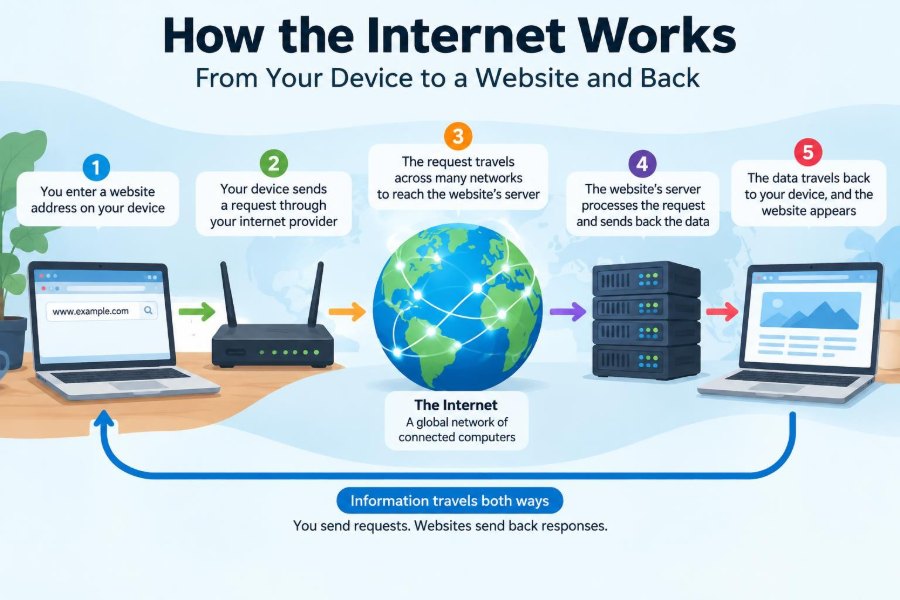

You type a website address, tap Enter, and a page appears so quickly that it feels almost local. A video starts, a search result loads, or your bank shows an account balance. Most of the complicated work is invisible.
But that ordinary action may involve your phone or laptop, a home router, an internet provider, name servers, several networks, a distant server, and security checks—all exchanging carefully formatted data in fractions of a second.
Understanding this path makes everyday problems less mysterious. It explains why Wi-Fi can be connected while a website is unavailable, why a VPN can change what services see, and why HTTPS matters when you sign in.
The internet is not a single machine or one magical cloud. It is a worldwide system of independently operated networks that agree on methods for finding one another and moving data.
🌐 The Internet Is a Network of Networks
The internet is the infrastructure that connects networks: home networks, university networks, mobile carrier networks, company networks, and data-center networks. These networks exchange data by following shared technical rules called protocols.
The web is one service built on top of the internet. Websites, web browsers, and web pages are part of the web, but email, online games, voice calls, and many messaging systems also use the internet without being the web.
📱 Your Device Starts with a Request
A browser begins when you request a resource, perhaps by entering example.com, selecting a bookmark, or clicking a link. The browser first checks whether it already has useful information stored locally, such as a recent copy of a page or a remembered address.
If it cannot satisfy the request from its cache, it needs to locate the website and ask a server for the needed content. The familiar web address is convenient for people, but networks need a numerical destination.
🏠 Your Local Network Provides the First Hop
Your device usually reaches the internet through a local network. At home, this is commonly Wi-Fi or Ethernet connected to a router; on a phone, it may be a cellular network instead.
The router moves traffic between your private local network and another network, usually your internet service provider. It is often the first device outside your laptop or phone involved in the journey.
Wi-Fi is only the short-range connection between a device and an access point or router. Strong Wi-Fi does not guarantee that the router has a working path to the broader internet.
🔢 IP Addresses Identify Network Destinations
An IP address is a network address used to deliver traffic. Internet Protocol, or IP, provides the addressing and forwarding foundation that lets routers move packets toward a destination.
Two versions are widely used. IPv4 addresses look like 203.0.113.10 and have a limited address space. IPv6 addresses are longer, such as 2001:db8::10, providing far more possible addresses.
| Address type | Typical use | What it looks like |
|---|---|---|
| Private IP address | Inside a home, office, or campus network | 192.168.1.25 |
| Public IP address | Reachable across the public internet | 203.0.113.10 |
| IPv6 address | Modern global addressing, often alongside IPv4 | 2001:db8::10 |
The addresses shown here are examples reserved for documentation. A website may have multiple public IP addresses, and one address may serve many websites.
🧭 DNS Turns Names into Addresses
Domain Name System, or DNS, translates human-friendly names into IP addresses. When you ask for a domain, your device usually sends a DNS query to a resolver configured by your network, provider, organization, or chosen DNS service.
The resolver may already have a recent answer cached. If not, it can consult the distributed DNS hierarchy until it finds the authoritative information for that domain. It returns an address, often along with a time period indicating how long the result may be cached.
📚 DNS Is Distributed Rather Than One Giant Directory
No single computer contains every DNS record. The system is arranged in layers, including root servers, top-level domain servers such as those for .com, and authoritative servers responsible for particular domains.
This delegation makes administration practical. A domain owner can arrange its own DNS records while the larger system knows where to ask for them. Caching also reduces repeated lookups and avoids making every visit travel through the full hierarchy.
🚪 The Default Gateway Sends Traffic Outward
Once a device knows an IP destination, it decides whether that destination is on the same local network. For a remote website, it sends the traffic to its default gateway, usually the local router.
Before sending a local Ethernet or Wi-Fi frame, the device must identify the local hardware address associated with the gateway. That local delivery detail is separate from the website’s IP address, which remains the broader destination.
📦 Data Travels as Packets
Internet data is divided into manageable units called packets. Think of a long document sent as many numbered envelopes rather than one enormous parcel. Packets carry addressing information and a portion of the overall data.
Packet switching lets links carry traffic from many users interleaved together. A router forwards one packet at a time based on its destination, rather than reserving a permanent physical circuit for one web visit.
Packets belonging to one request can be delayed differently or occasionally lost. Higher-level protocols help applications cope with that reality.
🛣️ Routers Choose the Next Step
Every router examines enough addressing information to decide the next hop: the next router or directly connected network on the route. It does not need a complete map of every cable and device on Earth.
Large networks share reachability information through routing systems. Routes can change when a connection fails, becomes congested, or when operators adjust their network policies. The path out and the path back need not be identical.
🏢 Your ISP Connects You to Larger Networks
An internet service provider gives a household or organization a path beyond its local network. ISPs connect with other providers, content networks, and exchange points where different networks exchange traffic.
Distance still matters, but the route is shaped by network agreements, capacity, resilience, and engineering decisions—not simply the shortest line on a map. A nearby-looking service may use a distant server, while popular content may be served from a location close to you.
🔀 Network Address Translation Shares IPv4 Addresses
Many home devices use private IPv4 addresses that are not directly routed across the public internet. A router often uses network address translation, or NAT, to let several devices share one public IPv4 address.
The router records which internal device and temporary connection correspond to outgoing traffic. When a reply arrives, it can send that reply to the correct device. NAT helps address sharing, but it is not a substitute for a complete security strategy.
🚚 TCP and UDP Serve Different Delivery Needs
IP gets packets toward an address, while transport protocols help applications communicate with the right program. TCP creates a reliable ordered byte stream: it tracks received data and retransmits data when necessary.
UDP has less built-in overhead and does not promise delivery or order. It can suit real-time uses where waiting for an old audio or game update is worse than skipping it. Modern web traffic may also use QUIC, which runs over UDP and provides features web applications need.
- TCP: commonly used where complete, ordered delivery is valuable.
- UDP: useful for low-latency communication when the application handles loss.
- QUIC: a modern transport foundation frequently used with HTTP/3.
🔌 Ports Direct Traffic to the Right Service
An IP address identifies a network destination, but one machine can run many services at once. A port number helps identify the application endpoint, much like an apartment number within a street address.
Web servers commonly use port 80 for HTTP and port 443 for HTTPS. A browser also uses temporary source ports so the operating system can keep separate connections from separate browser tabs and applications.
🤝 A Connection Establishes Shared Context
Before sending ordinary HTTP data over TCP, a client and server establish a connection. TCP uses a short handshake to confirm that both ends can communicate and to prepare sequence information for reliable delivery.
This does not mean every web interaction starts completely from scratch. Browsers and servers can reuse connections, resume secure sessions, and keep useful information cached. Those optimizations reduce repeated setup work.
🔒 TLS Protects HTTPS Traffic
HTTPS is HTTP carried through TLS, Transport Layer Security. TLS encrypts data in transit between your browser and the site endpoint, helping prevent observers on the path from casually reading or altering the traffic.
During setup, the server presents a digital certificate. Your browser checks whether the certificate is valid for the site and whether it chains to a certificate authority the browser trusts. It also verifies cryptographic proof that the server possesses the relevant private key.
HTTPS protects the connection, not every risk surrounding a website. A legitimate encrypted site can still contain misleading content, and malware on a device can create problems before data is encrypted or after it is displayed.
🪪 Certificates Help Confirm Website Identity
The padlock indicator is best understood as evidence of an encrypted connection to a domain whose certificate validation succeeded. It is not a general endorsement of the organization, product quality, or safety of every action on the site.
Careful users still inspect the domain name, especially before entering credentials or payment information. Lookalike names, deceptive messages, and phishing pages can use HTTPS too.
📨 HTTP Defines the Web Conversation
HTTP, Hypertext Transfer Protocol, defines how browsers request resources and how servers respond. A request includes a method, a path, headers, and sometimes a body; a response includes a status code, headers, and usually content.
A simple request might ask for /products. The response may say 200 OK and provide HTML. A response of 404 Not Found means the server did not find the requested resource, while a 500-series response generally indicates a server-side failure.
🧾 Headers Carry Instructions and Context
HTTP headers communicate details around the main content. They can describe content type, preferred language, caching rules, compression, authentication, and browser capabilities.
For example, Content-Type tells a browser whether it received HTML, an image, JSON data, or another format. Caching headers tell browsers and intermediary caches when a stored response may be reused or when it should be checked again.
🍪 Cookies Preserve State Between Requests
HTTP requests are independent by design. A server does not automatically remember that two requests came from the same person. Cookies are small pieces of data that a browser can store and send back under rules set by a site.
A site may use a cookie to maintain a signed-in session, remember a language preference, or keep items in a shopping cart. Cookies also have privacy implications, especially when used for tracking across contexts, which is why browsers and regulations have increasingly limited some forms of cross-site tracking.
🧠 The Web Server Runs Application Logic
The server receiving your request may be a single machine, but production websites are often a collection of services. A web server can handle the network request and pass it to application code that decides what response to create.
For a news site, the application might identify the requested article, check permissions, obtain content, and build a response. For an online store, it may validate a session, calculate availability, and apply business rules before returning a page or data.
🗃️ Databases and Internal Services Supply Data
Dynamic sites often retrieve information from databases: product records, account details, comments, or inventory. They may also call internal services for search, recommendations, payment processing, or email delivery.
Each extra dependency can add useful capability and another possible delay or failure point. Well-designed systems set time limits, monitor failures, and avoid making a whole page unusable because one nonessential feature responds slowly.
⚖️ Load Balancers Spread Requests
Popular services rarely depend on one server. A load balancer distributes incoming requests among healthy servers so one machine does not receive all the work.
It can also check whether servers are responding correctly and stop sending new requests to an unhealthy instance. This improves capacity and resilience, although the load balancer itself must be designed to avoid becoming a single point of failure.
📍 CDNs Bring Content Closer
A content delivery network, or CDN, keeps copies of commonly requested static files—such as images, style sheets, scripts, and video segments—at multiple locations. A request can be served from a nearby cache rather than always from the website’s origin infrastructure.
This can reduce delay and reduce load on origin servers. It does not mean every piece of a site is duplicated everywhere: personalized account data and frequently changing information may still come from an origin service.
🧩 The Browser Builds What You See
When HTML arrives, the browser parses it into a document structure. It discovers references to CSS for appearance, JavaScript for behavior, fonts, images, and other resources, then makes additional requests as needed.
The browser combines page structure, styles, and layout calculations before painting pixels on the screen. JavaScript may later fetch more data and alter the page, which is why a page can appear in stages rather than all at once.
🗜️ Compression and Caching Avoid Repeated Work
Text-based files such as HTML, CSS, JavaScript, and JSON can often be compressed before transmission. Compression reduces bytes sent, though it requires processing at both ends.
Caching stores reusable results close to where they are needed: in the browser, on a CDN, or within a service. It can make repeat visits faster, but stale caches can also cause a user to see an older version until the cache expires or is updated.
⏱️ Latency and Bandwidth Are Different Limits
Latency is the delay before data can travel and return; bandwidth is the amount of data a connection can carry over time. A connection can have high bandwidth but still feel slow for many small, sequential requests if latency is high.
For a large download, bandwidth often dominates. For an interactive page that needs several round trips before it can respond, latency can dominate. Web performance work usually considers both, along with server processing time and the amount of data transferred.
📤 The Response Takes a Return Journey
After the server creates a response, it is divided into packets and sent back through networks toward your public address. Your router uses its NAT mapping, when applicable, to forward the reply to the original device on the local network.
The return route may traverse different routers from the outgoing route. To the browser, the essential result is that the right data arrives on the right connection and can be reassembled, checked, decrypted, and processed.
🧯 What a Failure Can Mean
“The internet is down” describes many different failures. The device may have a weak Wi-Fi signal, the router may lack an upstream connection, DNS may return no answer, a certificate may fail validation, or the website’s application may be overloaded.
- If one site fails but others work, the problem may be with that site, its DNS, or its route.
- If every device on one Wi-Fi network fails, check the router and provider connection.
- If a page loads without styling or images, some supporting resource requests may be failing.
- If a browser shows a certificate warning, do not bypass it casually—especially for sign-in or payment pages.
🛠️ Simple Troubleshooting Follows the Path
A sensible troubleshooting method is to test one layer at a time. First confirm whether the device is connected to the local network, then try more than one website, then test another device on the same network.
Restarting a router can help with a temporary local issue, but it is not a universal cure. A service-status message, a DNS configuration issue, an expired login session, or an outage beyond your network needs a different response.
For workplace systems, report what you observed: the time, exact error, affected site or application, whether other sites work, and whether the problem occurs on another network. Those details help support teams narrow the failure point.
🛡️ Safe Habits Matter Along the Whole Path
Use current browsers and operating system updates, because they include security fixes for the software handling network data. Prefer HTTPS, use unique passwords stored in a reputable password manager, and enable multi-factor authentication where available.
Public Wi-Fi deserves extra care. HTTPS substantially protects web traffic in transit, but avoid treating an unfamiliar network as trusted. Verify domains, avoid accepting unexpected certificate warnings, and be cautious with sensitive work on shared devices.
🧭 A Complete Visit in One Sequence
Suppose you enter a hypothetical address, https://learn.example/lesson. The browser checks caches, asks DNS for an address if needed, and sends packets through your local network and provider toward a server or CDN.
It establishes secure communication, sends an HTTP request for /lesson, and receives a response. The server may consult application code and a database; the browser then fetches referenced styles, scripts, and images before rendering the lesson.
That sequence happens quickly because every participant has a narrow job: DNS finds names, routers forward packets, TLS protects a session, HTTP structures messages, servers provide content, and browsers turn received resources into an interface.
🧠 The Core Principle: Layers Make the Internet Work
The internet works because complex responsibilities are separated into layers. Your browser does not need to know which fiber link crosses an ocean, and a router does not need to understand the meaning of a shopping cart or a video frame.
That separation allows enormous variety. New websites, devices, networks, and applications can interoperate as long as they follow the relevant protocols. It also gives us a practical way to reason about problems: identify which layer is failing before guessing at a fix.
A website visit is not one action but a coordinated exchange of addresses, packets, security checks, requests, responses, and rendering work. Once you see those pieces, the internet becomes less like a mystery and more like a remarkably organized delivery system. 🌐💻✨