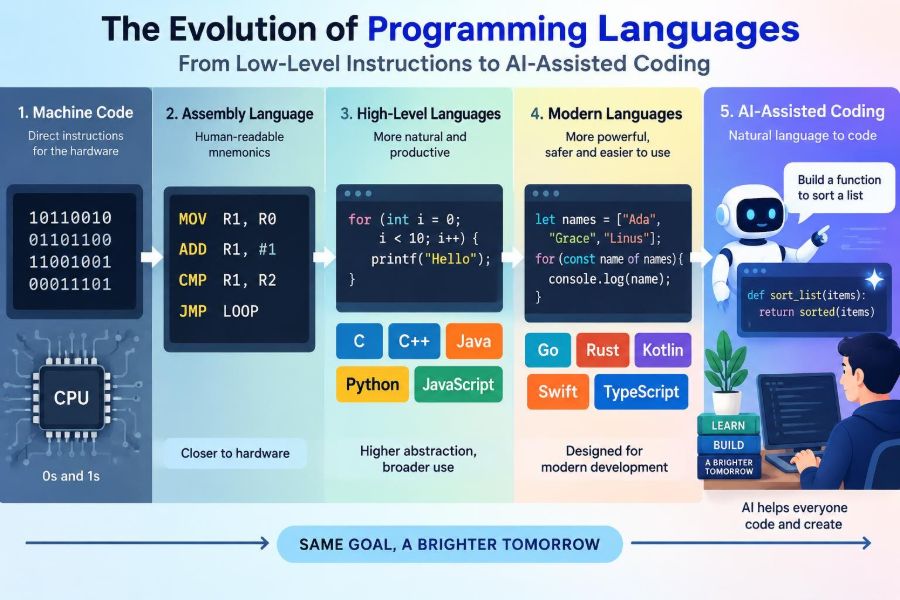

A payment terminal confirms a purchase in seconds. A navigation app recalculates a route after one wrong turn. A spreadsheet turns a few numbers into a budget. Behind each experience is software—and behind that software is a language used to express instructions to a computer.
Programming languages have changed because computers, problems, and programmers have changed. Early programmers worked close to the machine’s physical operations. Modern developers may describe a task in a high-level language, rely on extensive libraries, and increasingly ask AI tools to draft part of the code.
This history is not simply a march from “old” languages to “better” ones. Each stage involved trade-offs between control, speed, safety, clarity, portability, and convenience. Understanding those trade-offs helps students learn more effectively and helps professionals choose tools with better judgment.
The path from binary instructions to AI-assisted coding also reveals a lasting truth: computers still need precise instructions. What evolves is the layer of abstraction—the distance between a human idea and the operations a machine can execute.
⚙️ A Computer Ultimately Executes Machine Instructions
At its lowest practical level, a processor executes machine code: numeric bit patterns that represent operations such as loading data, adding values, comparing values, or jumping to another instruction.
A simplified instruction might mean “add the contents of two processor registers,” where registers are tiny, very fast storage locations inside the CPU. The actual binary form varies by processor family, so code built for one architecture may not run on another.
Machine code gives direct control over hardware behavior, but it is difficult for people to read, write, and maintain. A single mistaken bit can change an instruction completely.
🔢 Why Binary Was a Difficult Programming Medium
Early programming often meant working with numbers, switches, punched media, or memory addresses. The programmer had to remember both the intended algorithm and the exact numerical representation of each operation.
This created several practical problems:
- Instructions were hard to inspect for mistakes.
- Changing one part of a program could require recalculating addresses elsewhere.
- Programs were tied closely to one machine design.
- Collaboration was difficult because the code carried little human-readable meaning.
Binary remains essential beneath modern software, but writing large applications directly in it is usually an inefficient use of human attention.
🧩 Assembly Language Added Human-Readable Symbols
Assembly language replaced raw numeric operation codes with short symbolic names, often called mnemonics. Instead of remembering a numeric code for an addition, a programmer could write an instruction such as ADD.
Assembly also allows labels for locations in a program. A label such as LOOP is far easier to understand than manually counting a memory address every time a branch instruction needs it.
An assembler translates this symbolic source into machine code. Assembly is still closely tied to a particular processor architecture, but it made low-level programming substantially more manageable.
🔧 Where Assembly Language Still Makes Sense
Assembly did not disappear when higher-level languages arrived. It remains useful when a program needs exceptionally direct access to a processor, memory layout, or special hardware instructions.
Examples include parts of operating systems, device startup code, embedded systems with very limited resources, and performance-critical routines. Developers may also inspect generated assembly to understand why compiled code performs a certain way.
Still, assembly has costs. Programs tend to be longer, less portable, and easier to break during maintenance. Using it only where its control is genuinely needed is usually a more durable choice than treating it as a default.
🏗️ High-Level Languages Changed the Unit of Thought
A high-level programming language lets programmers express operations using concepts closer to human problem-solving: variables, functions, records, conditions, loops, and modules.
Rather than specifying individual register movements, a developer can state that a list should be sorted or that a customer total should be calculated. Translation tools handle much of the machine-specific detail.
“High-level” does not mean that a language is vague or incapable of serious work. It means the language hides more hardware detail so programmers can focus on the problem being solved.
🧮 FORTRAN and the Rise of Scientific Programming
FORTRAN, short for Formula Translation, was developed for scientific and engineering calculations. It helped programmers express mathematical formulas more naturally than assembly could.
Its emergence demonstrated a major idea: a compiler could turn readable source code into efficient machine instructions. That mattered because scientific users needed both productivity and performance.
Modern scientific computing has many more language choices, but numerical programming still reflects this heritage. Arrays, matrix operations, and carefully optimized calculations remain central in fields from physics to data analysis.
🏢 COBOL Brought Programming Into Business Workflows
Business computing needed a different vocabulary. Programs had to process records, invoices, payrolls, inventories, and reports—not only numerical formulas.
COBOL was designed with relatively English-like statements and an emphasis on structured business data. Its long-lived use in some established systems illustrates a useful lesson: software can outlast the assumptions of its era when it supports valuable operations reliably.
Older code is not automatically bad code. A mature system may encode years of business rules, integrations, and exceptional cases that are expensive and risky to replace.
📚 ALGOL, Blocks, and Structured Program Design
ALGOL influenced the design of many later languages by popularizing ideas such as block structure. A block groups statements and creates a clear scope for names, making it easier to see where a variable is valid.
These ideas support structured programming: organizing logic with clear control structures instead of relying heavily on unrestricted jumps. The goal is not merely prettier code; it is code whose flow can be understood, tested, and changed.
Today’s braces, indentation conventions, local variables, and nested functions all reflect the broader movement toward readable program structure.
🚦 Control Flow Made Programs Expressive
Most useful programs must make decisions and repeat work. Conditions select one path or another, while loops repeat a task until a condition changes.
For example, an online store might loop through items in a cart, calculate each line total, then apply a discount only if the order meets stated conditions. Those basic patterns appear in nearly every general-purpose language.
Clear control flow reduces errors. Deeply tangled logic may technically work, but it becomes difficult to reason about when requirements change or a failure occurs.
🧱 C Connected High-Level Code to Systems Programming
C became highly influential because it offered a compact high-level language while preserving substantial control over memory and machine behavior. It was especially well suited to systems software, including operating system development.
Its influence is visible in the syntax and design of many later languages. C also introduced generations of programmers to concepts such as pointers, which store memory addresses and enable powerful but potentially hazardous operations.
C’s flexibility can be valuable, but it puts significant responsibility on the programmer. Accessing invalid memory or mishandling data can produce failures that are difficult to diagnose.
🧠 Abstraction Lets Developers Build on Previous Work
Abstraction means presenting the useful parts of something while hiding unnecessary internal detail. A developer can call a function to save a file without needing to understand every disk operation performed underneath.
Abstraction is a practical survival tool. Modern applications depend on layers: hardware, operating systems, runtimes, libraries, frameworks, network services, and user interfaces.
The trade-off is that hidden details can still matter. When a program becomes slow, insecure, or unreliable, developers may need to look beneath an abstraction to identify the real cause.
🧬 Object-Oriented Programming Organized Software Around Objects
Object-oriented programming, often shortened to OOP, organizes software around objects that combine data with operations that act on that data. A BankAccount object, for example, might hold a balance and provide methods for deposits or withdrawals.
Classes can serve as templates for related objects, while encapsulation limits direct access to internal state. These mechanisms can help large programs model real concepts and keep responsibilities grouped.
OOP is not a universal solution. Excessive class hierarchies can make simple tasks harder to follow. Good design depends more on clear boundaries than on using a fashionable pattern.
🪜 C++, Java, and Managed Runtime Environments
C++ extended C with additional abstraction tools while retaining close hardware control. It became common in areas where performance and resource management are important, such as game engines and systems software.
Java popularized a different balance for many applications: source code is compiled into bytecode that runs on a virtual machine. This runtime environment can provide services such as memory management and portability across supported platforms.
Neither model eliminates complexity. Native code may offer predictable low-level control, while managed environments can reduce certain memory errors but add runtime behavior developers still need to understand.
🧹 Garbage Collection Reduced a Common Source of Errors
Programs create data while they run. If unused data is never released, memory consumption can grow until the program slows down or fails. If memory is released too early, a program may try to use something that no longer exists.
Garbage collection automates the recovery of objects that are no longer reachable by a program. Languages such as Java, C#, Python, and many JavaScript environments use forms of automatic memory management.
This reduces some categories of bugs, not all resource problems. Files, database connections, and network sockets may still need explicit cleanup, and garbage collection can affect timing and performance.
🧪 Functional Programming Emphasized Data Transformations
Functional programming treats computation largely as the evaluation and composition of functions. It often emphasizes immutable data—data that is not changed after creation—and functions with predictable outputs for given inputs.
These ideas can make concurrent code easier to reason about because fewer parts of a program compete to modify the same shared state. Functions such as mapping, filtering, and reducing collections are now familiar well beyond traditionally functional languages.
Functional techniques are not restricted to one language family. Developers can apply them in JavaScript, Python, Java, C#, and many other environments when they clarify a problem.
🌐 The Web Made JavaScript a Core Language
As the web grew from mostly static documents into interactive applications, JavaScript became the main programming language executed by web browsers. It responds to user actions, updates pages, communicates with servers, and supports rich interfaces.
JavaScript later expanded beyond the browser through server-side runtimes. This made it possible for some teams to use one language across both client-facing and server-side work.
Web development also highlighted the importance of compatibility, security, and asynchronous operations. A web page should not freeze while waiting for a network response, so developers need patterns for handling work that completes later.
🐍 Python Prioritized Readability and Rapid Development
Python became widely used because its syntax is relatively approachable and its ecosystem supports automation, web services, education, data work, and machine learning. Its emphasis on readability makes code easier to discuss with new programmers and collaborators.
Python is not automatically the best tool for every workload. Programs that require very low latency, strict memory limits, or intensive CPU performance may use other languages for critical components.
In practice, language ecosystems matter as much as syntax. Libraries, documentation, deployment tools, and experienced communities strongly influence whether a language is productive for a given project.
📦 Libraries and Frameworks Accelerated Application Development
A library is reusable code that an application calls for a particular capability, such as parsing data or encrypting a message. A framework provides a larger structure that calls parts of the application according to its rules.
These tools save teams from repeatedly solving routine problems. A web framework might supply routing, database access patterns, form validation, and security features that would otherwise require substantial custom work.
Convenience has a boundary. Adding a dependency means accepting its updates, limitations, and potential vulnerabilities. Teams should understand what important dependencies do rather than treating them as invisible magic.
🔄 Version Control Made Collaboration Safer
The evolution of programming is also an evolution in how people build code together. Version control records changes over time, lets contributors work on separate branches, and makes it possible to review or restore earlier versions.
A system such as Git does not prevent every mistake, but it creates an auditable history and supports careful collaboration. Instead of emailing folders of source files, teams can merge reviewed changes into a shared codebase.
Good version-control habits include meaningful commits, small focused changes, and clear messages explaining why a change was made. These practices help future maintainers, including the original author.
✅ Testing Turned Code Into More Reliable Software
A program can compile successfully and still be wrong. Testing checks whether software behaves as intended under normal, boundary, and failure conditions.
Different tests answer different questions:
- Unit tests check small components in isolation.
- Integration tests check whether components work together.
- End-to-end tests simulate a user-facing workflow.
- Manual exploratory testing helps uncover surprising behavior that scripted checks may miss.
Tests are evidence, not proof of perfection. Their value depends on the cases they cover and whether they reflect the real requirements of the system.
🚀 DevOps Shortened the Path From Code to Running Service
Historically, development and operations were often treated as separate stages. Modern delivery practices bring them closer together through automation for building, testing, deploying, monitoring, and responding to incidents.
This approach is commonly associated with DevOps, a set of technical and cultural practices rather than one product or language. Its central goal is to make software delivery repeatable and observable.
Frequent releases can be useful only when paired with safeguards. Automated checks, staged rollouts, backups, monitoring, and rollback plans reduce the risk that a small code change becomes a major user problem.
🔐 Safer Languages Address Entire Bug Categories
Some modern language designs aim to prevent common failures before a program runs. Strong type systems can catch mismatched data expectations, while memory-safe designs can limit dangerous access to invalid memory.
Rust is a prominent example of a language designed to provide low-level performance while enforcing strict rules around memory ownership and borrowing. These rules can feel demanding at first, but they make certain unsafe patterns harder to express.
Language safety is valuable but incomplete. A memory-safe program can still contain flawed business logic, weak authentication rules, insecure configuration, or unsafe use of external data.
📱 Domain-Specific Languages Solve Narrow Problems Well
Not every language is intended for building an entire application. Domain-specific languages, or DSLs, focus on a particular task or field.
SQL expresses database queries. Regular expressions describe text patterns. HTML describes document structure. Configuration formats and build languages can also act like DSLs when they provide a focused vocabulary for a narrow job.
A DSL can make common domain tasks concise, but it may become awkward when used beyond its intended scope. Choosing the smallest suitable language often improves clarity.
☁️ Cloud Services Changed What Application Code Needs to Do
Many applications now rely on remotely managed databases, storage, queues, authentication services, and computing platforms. This shifts some work away from writing infrastructure from scratch and toward integrating services reliably.
Networked systems introduce new realities: requests can be delayed, duplicated, rejected, or lost; services can be temporarily unavailable; and data may arrive in an unexpected order. Code must account for these possibilities rather than assuming a local function call.
Convenient cloud services can speed delivery, but they also create dependencies on configuration, access controls, costs, and provider-specific behavior. Architecture choices should be documented, not merely assumed.
🤖 AI-Assisted Coding Added a New Interface for Developers
AI coding assistants can suggest completions, explain unfamiliar code, generate tests, draft documentation, translate between languages, and propose a starting point for routine functions. They work as an additional interface between an intention expressed in natural language and formal code.
Used thoughtfully, these tools can reduce friction—especially when a developer needs to recall an API pattern or create repetitive scaffolding. They can also support learning by offering alternative explanations of a concept.
However, generated code is not automatically correct, secure, efficient, or suitable for a specific codebase. It should be treated as a proposal that needs the same engineering scrutiny as code from any other source.
🔍 Why AI Output Requires Careful Review
An AI assistant may produce plausible-looking code that misunderstands the requirement, calls an unavailable library function, misses an edge case, or quietly introduces a security problem. Confidence in tone is not evidence of correctness.
Review generated code by asking concrete questions:
- Does it meet the stated requirement, including unusual inputs?
- Can the developer explain the logic and maintain it later?
- Does it expose sensitive data, mishandle permissions, or trust unvalidated input?
- Does it fit the project’s language version, dependencies, and conventions?
- What tests would reveal a wrong assumption?
Never paste confidential source code, credentials, personal data, or proprietary information into a tool unless the organization has explicitly approved that use and the relevant protections are understood.
🧭 Prompting Is Not a Replacement for Specification
Clear requests usually lead to more useful AI assistance, but prompting does not replace defining a problem. “Make a login system” leaves unresolved questions about identity providers, password rules, account recovery, authorization, audit needs, and threat models.
A better request supplies context, constraints, examples, and expected behavior. For instance, a developer might ask for a function that validates a specific input format and request tests for valid, invalid, and boundary cases.
The underlying skill is still specification: converting a vague goal into behavior that can be implemented and verified. That skill was necessary before AI tools and remains necessary with them.
🧑💻 The Developer’s Role Is Shifting, Not Vanishing
As languages and tools automate more routine work, the human role increasingly centers on understanding requirements, designing systems, checking trade-offs, reviewing outputs, and taking responsibility for consequences.
Writing syntax remains useful, because it builds intuition about types, control flow, data structures, and debugging. But professional value also comes from asking whether a feature should exist, how it can fail, and how it fits into a wider system.
AI assistance may change the speed of drafting code. It does not remove the need for judgment about correctness, security, accessibility, reliability, and user needs.
🎓 A Practical Learning Path Through Language History
Beginners do not need to learn every language in chronological order. A more useful path is to learn one approachable language deeply while gaining a conceptual map of the layers beneath it.
- Learn variables, types, conditions, loops, functions, and data structures.
- Practice debugging, testing, and reading error messages.
- Use version control on even small projects.
- Learn basic command-line, networking, database, and security concepts.
- Explore a lower-level language or inspect compiled output to understand what abstractions hide.
- Use AI tools to explain, test, and review work—not to bypass understanding.
A small completed project teaches more than many copied fragments. Build something with input validation, stored data, tests, and clear documentation, then improve it after receiving feedback.
⚖️ Choosing a Language Means Choosing Trade-Offs
No language is objectively best in every context. A good choice depends on the problem, existing systems, team skills, performance constraints, security needs, available libraries, deployment environment, and long-term maintenance plans.
| Need | Useful language characteristics | Example consideration |
|---|---|---|
| Hardware control | Predictable performance and low-level access | Embedded or systems components |
| Rapid automation | Readable syntax and broad libraries | Data cleanup or internal tools |
| Large business application | Maintainable structure, tooling, and team support | Long-lived services and integrations |
| Interactive web interface | Browser compatibility and asynchronous programming | User-facing web applications |
Choosing a familiar language can be sensible when it reduces operational risk. Choosing a new one can be justified when it solves a concrete problem that the existing stack handles poorly.
🌟 The Lasting Principle Behind Language Evolution
Programming languages evolved by raising the level at which people can express intent. Assembly replaced raw numeric codes with symbols. High-level languages introduced human-oriented structures. Libraries and frameworks packaged recurring solutions. AI assistants now help draft and explain code.
Yet every layer depends on the ones below it, and every layer can introduce new assumptions. Strong programmers know when to use abstraction, when to inspect its behavior, and when to slow down for testing and review.
The central lesson is not to worship a particular language or tool. It is to use each one deliberately, with a clear understanding of what it makes easier and what responsibility it leaves behind.
From machine instructions to AI-assisted coding, progress in programming is ultimately about helping humans express reliable ideas while preserving the judgment needed to verify them. Learn the layers, question convenient answers, and keep building with care. 💻🧠🚀