
Every day, billions of digital files move across the internet: photos are uploaded to social media, videos are streamed, documents are emailed, apps are downloaded, and music is stored on phones. Without data compression, many of these activities would require far more storage space, bandwidth, and time. 💾🌐
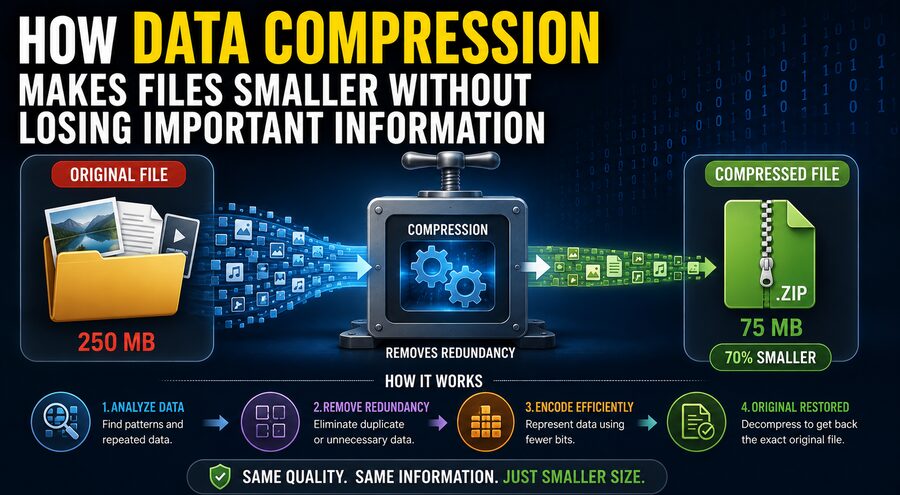
Data compression is the process of representing information using fewer bits than the original data requires. In simple terms, compression finds more efficient ways to store the same information—or, in some cases, to store a carefully simplified version of it.
The goal is straightforward:
Smaller file size ➡️ less storage ➡️ faster transfer ➡️ lower bandwidth usage.
However, compression is not just about shrinking files randomly. Good compression techniques identify patterns, repetitions, and less important information so that data can be represented more efficiently.
There are two major types of compression:
- Lossless compression, which preserves every piece of original information.
- Lossy compression, which removes some information that is considered less important.
Understanding how these methods work reveals why a ZIP archive can restore files perfectly, while a JPEG photograph may become smaller by discarding visual details most people are unlikely to notice. 🧠📦
💾 Why Do Files Take Up Space?
Computers store information using bits, which are binary digits represented as 0s and 1s.
Eight bits typically form one byte.
A file may contain thousands, millions, or billions of bytes depending on its complexity.
For example, a digital image consists of many pixels. Each pixel may store information about red, green, and blue color values. A high-resolution photograph can contain millions of pixels, so storing every pixel directly can require a large amount of data. 🖼️
Similarly, digital audio records many measurements of sound over time, while video consists of a sequence of images accompanied by audio.
Compression attempts to reduce the number of bits needed to represent this information.
🧩 Compression Begins by Finding Patterns
One of the most important ideas behind compression is that real-world data often contains repetition and predictability.
Imagine a text file containing:
AAAAAAAAAAAAAAAAAAAA
Instead of storing the letter “A” 20 separate times, a compression system might represent it conceptually as:
20 × A
The same information can now be described much more efficiently.
This simple idea forms the basis of a technique known as Run-Length Encoding, or RLE.
RLE works particularly well when identical values appear repeatedly.
For example:
WWWWWWBBBBRRRR
could be represented conceptually as:
6W4B4R
Instead of recording every character separately, the system stores the value and the number of repetitions.
Real compression algorithms are usually much more sophisticated, but the principle is similar: find redundancy and represent it more efficiently. 🔍
📦 What Is Lossless Compression?
Lossless compression reduces file size without permanently removing any original information.
When a losslessly compressed file is decompressed, the reconstructed file is bit-for-bit identical to the original.
This is essential for many types of information.
Imagine compressing a software program and randomly removing a few instructions. The application might stop working completely.
The same applies to financial spreadsheets, databases, source code, and legal documents.
Lossless compression is therefore commonly used for:
- Text documents 📄
- Software files 💻
- Databases 🗄️
- Program code
- ZIP archives
- PNG images
- Certain audio formats
- Scientific data
Common lossless compression methods include algorithms such as DEFLATE, Lempel-Ziv techniques, and Huffman coding.
🔤 How Repeated Patterns Can Be Replaced
Many lossless compression systems search for sequences of data that have appeared previously.
Consider this sentence:
THE CAT SAT ON THE MAT AND THE CAT SLEPT
The phrase “THE CAT” appears twice.
Instead of storing the entire phrase again, a compression algorithm can store a reference saying, in effect:
“Repeat the earlier sequence found at this location.”
This technique can dramatically reduce file size when large patterns repeat frequently.
Algorithms from the Lempel-Ziv family, which influence formats such as ZIP and gzip, use variations of this concept.
The more repetition a file contains, the more effectively it may compress.
This is why a plain text file containing repeated words may shrink dramatically, while a file already containing highly compressed data might shrink very little.
🌳 Huffman Coding: Short Codes for Common Data
Another important compression technique is Huffman coding.
The basic idea is to use shorter binary codes for symbols that appear frequently and longer codes for symbols that occur rarely.
Imagine a document where the letter “E” appears extremely often while the letter “Z” appears only occasionally.
Instead of assigning both letters codes of equal length, Huffman coding might use a very short pattern for “E” and a longer pattern for “Z.”
Because common characters use fewer bits, the overall file becomes smaller.
It is similar to creating abbreviations for words you use constantly. ✍️
If someone repeatedly writes “information technology,” they might shorten it to “IT.”
Compression algorithms apply this efficiency mathematically to digital data.
📊 Why Some Files Compress Better Than Others
Not all files contain the same amount of redundancy.
Suppose you create a document containing the same sentence repeated 10,000 times.
A compression algorithm can identify the repetition and store it very efficiently.
Now compare that with a file containing highly random data.
Random information has fewer predictable patterns, so there may be little opportunity for compression.
This is why some file types shrink dramatically inside a ZIP archive while others barely change.
For example, formats such as JPEG, MP3, and MP4 are already compressed. Compressing them again with ZIP may produce only a small reduction.
The easiest data to compress is usually data containing structure, repetition, or statistical predictability.
🖼️ What Is Lossy Compression?
Lossy compression works differently.
Instead of preserving every bit of information, it intentionally removes some data to achieve much smaller file sizes.
The key is deciding which information can be removed while having minimal impact on human perception.
Lossy compression is commonly used for:
- Photographs 📷
- Music 🎵
- Streaming video 🎬
- Online calls
- Digital television
- Some web graphics
Popular lossy formats include:
JPEG for images
MP3 and AAC for audio
H.264, H.265/HEVC, AV1, and similar codecs for video
Unlike lossless compression, lossy compression usually cannot perfectly reconstruct the original file.
Once information is discarded, it is generally gone permanently.
👁️ How JPEG Makes Photographs Smaller
JPEG compression is designed around the characteristics of human vision.
A digital photograph can contain millions of individual color values.
But humans are not equally sensitive to every kind of visual detail.
JPEG compression takes advantage of this.
Instead of treating every pixel independently, JPEG divides the image into small blocks and mathematically transforms those blocks into combinations of visual frequencies.
The compression process can then preserve important visual structures while reducing the precision of details that the human eye is less likely to notice.
One important technique is quantization.
Quantization reduces the precision of certain image information.
This is where much of JPEG’s file-size reduction occurs—and where information is permanently lost.
At moderate compression levels, the differences may be almost invisible.
At extreme compression levels, however, obvious artifacts may appear, including:
- Blocky patterns
- Blurred details
- Color distortion
- Ringing around edges
So lossy compression involves a trade-off:
Smaller file size ↔ lower fidelity.
🎵 How Audio Compression Removes Less Noticeable Sounds
Lossy audio formats such as MP3 use ideas from psychoacoustics, the study of how humans perceive sound.
Our ears do not hear every sound equally well.
For example, a very quiet tone may become difficult to hear when a much louder sound occurs at a nearby frequency.
This phenomenon is called auditory masking.
Audio compression algorithms can identify some sounds that are unlikely to be noticed and allocate fewer bits to them—or discard them entirely.
The remaining audio can still sound remarkably similar to the original while requiring far less storage.
This is one reason thousands of songs can fit on devices that would hold far fewer tracks if every recording were stored as uncompressed audio. 🎧
🎬 Video Compression Saves Even More Data
Video files can be enormous because they contain many images every second.
A 30-frame-per-second video contains 1,800 frames every minute.
If every frame were stored as a complete high-resolution image, video storage requirements would become massive.
Video compression uses an important observation:
Most neighboring video frames are similar.
Imagine a video of someone speaking while standing in front of a wall.
The wall may remain almost unchanged for hundreds of frames.
Instead of storing the entire wall repeatedly, a video codec can store one complete reference frame and then record only the changes occurring afterward.
This process uses techniques such as:
- Intra-frame compression, which compresses information inside an individual frame.
- Inter-frame compression, which stores differences between frames.
- Motion estimation, which predicts how objects move.
- Transform coding, which represents visual information efficiently.
- Quantization, which reduces less important detail.
This combination can reduce video size enormously. 📺
🧱 I-Frames, P-Frames, and B-Frames
Many video-compression systems organize frames into different types.
An I-frame contains a relatively complete image and can be decoded independently.
A P-frame predicts its content partly from previous frames.
A B-frame may use information from both earlier and later frames.
Imagine a ball moving across a stationary background.
Instead of storing the entire scene repeatedly, the codec can essentially say:
“The background is mostly unchanged, and this object moved several pixels to the right.”
Representing movement can require far fewer bits than storing an entirely new picture.
This is one of the major reasons compressed video streaming is practical.
🗜️ Why ZIP Files Can Restore Everything Perfectly
ZIP archives normally use lossless compression.
A ZIP file does not decide that certain parts of a document or application are unimportant.
Instead, it finds more efficient representations of repeated patterns.
When you extract the archive, the decompression algorithm reverses those representations and reconstructs the original data exactly.
For example:
Original data:
ABCABCABCABCABCABC
Compressed representation might conceptually say:
Store “ABC” once and repeat it six times.
During decompression, the repetition instructions are expanded again.
Nothing needs to be guessed.
This reversibility is the defining characteristic of lossless compression. 🔄
🧠 Compression and Entropy
Compression is closely connected to a concept in information theory called entropy.
In simple terms, entropy measures how unpredictable information is.
Highly predictable data usually contains redundancy and can often be compressed substantially.
Highly unpredictable data contains less redundancy and is harder to compress.
Suppose a file contains:
00000000000000000000
The next symbol is easy to predict.
Compare that with:
10110001011010100101
If the sequence is genuinely random, predicting the next bit becomes much harder.
A perfectly random sequence cannot generally be compressed much without losing information because there are no reliable patterns to exploit.
This establishes a fundamental limit: compression algorithms cannot magically make every possible file smaller.
📉 Can Compression Ever Make a File Larger?
Surprisingly, yes.
Compression requires additional information describing how the compressed data should be decoded.
For very small files or highly random data, this extra information may outweigh any savings.
A compression program might therefore produce a file that is slightly larger than the original.
This is also why repeatedly compressing a ZIP file usually does not keep making it smaller.
Once most redundancy has already been removed, there is little left for another compression algorithm to exploit.
🔐 Why Encrypted Files Usually Do Not Compress Well
Encryption is designed to make data appear statistically unpredictable.
Good ciphertext resembles random data.
Because compression algorithms depend on detecting patterns and redundancy, encrypted data generally provides very little structure to exploit.
For this reason, systems usually follow this order:
Compress first ➡️ encrypt second.
Compressing data before encryption removes redundancy while it is still detectable.
Trying to compress strongly encrypted information afterward usually produces little benefit.
⚖️ Choosing Between Lossless and Lossy Compression
The correct compression method depends on the importance of preserving the original data.
Use lossless compression when exact reconstruction matters.
Examples include:
✅ Program files
✅ Documents
✅ Databases
✅ Source code
✅ Medical or scientific measurements where precision must be preserved
✅ Archival master files in certain workflows
Use lossy compression when very small file sizes are more important and limited perceptual changes are acceptable.
Examples include:
✅ Streaming music
✅ Online photographs
✅ Video streaming
✅ Video calls
✅ Social media uploads
A photographer might keep a lossless or RAW master image but publish a compressed JPEG online.
Similarly, a music producer may archive an uncompressed master while listeners receive a compressed AAC stream.
🌐 Compression Makes the Internet Practical
Imagine watching a high-resolution movie online if every video frame had to be transmitted as an uncompressed image.
The bandwidth requirements would be enormous.
Compression makes modern digital communication practical.
It enables:
🌐 Faster websites
📱 Smaller mobile downloads
☁️ Lower cloud-storage requirements
🎧 Streaming music
🎬 Streaming movies
📧 Smaller email attachments
💾 More efficient backups
🎮 Reduced game-download sizes
Video platforms, cloud services, messaging apps, and operating systems all rely heavily on compression.
Without it, the modern internet would require vastly more networking and storage infrastructure.
⚙️ Compression Is a Trade-Off Between Size, Quality, and Computing Power
Modern compression systems often balance three major factors:
File size
Quality
Processing complexity
A sophisticated algorithm may create smaller files but require more computational power to encode and decode.
This matters enormously for phones, cameras, streaming services, and battery-powered devices.
For example, a newer video codec may provide better compression than an older one, but older devices might not have hardware capable of decoding it efficiently.
Engineers therefore select compression systems based not only on maximum compression but also on compatibility, speed, power consumption, and acceptable quality.
🏁 Conclusion
Data compression works because digital information often contains patterns, repetition, predictability, or details that humans do not perceive equally.
Lossless compression finds more efficient ways to represent data while preserving everything. When the file is decompressed, the original can be reconstructed perfectly.
Lossy compression goes further by permanently discarding selected information that is considered less important. This allows photographs, music, and videos to become dramatically smaller, although some original detail is sacrificed.
The basic idea can be summarized as:
Find redundancy ➡️ describe it more efficiently ➡️ store fewer bits. 🗜️💾
For multimedia, another step may be added:
Identify less noticeable information ➡️ reduce or remove it ➡️ save even more space.
Whether you download a ZIP archive, send a photo, stream a song, watch an online movie, or back up files to the cloud, compression is working quietly behind the scenes.
It is one of the fundamental technologies that allows enormous amounts of digital information to fit into our devices and travel efficiently around the world. 🌍⚡📦