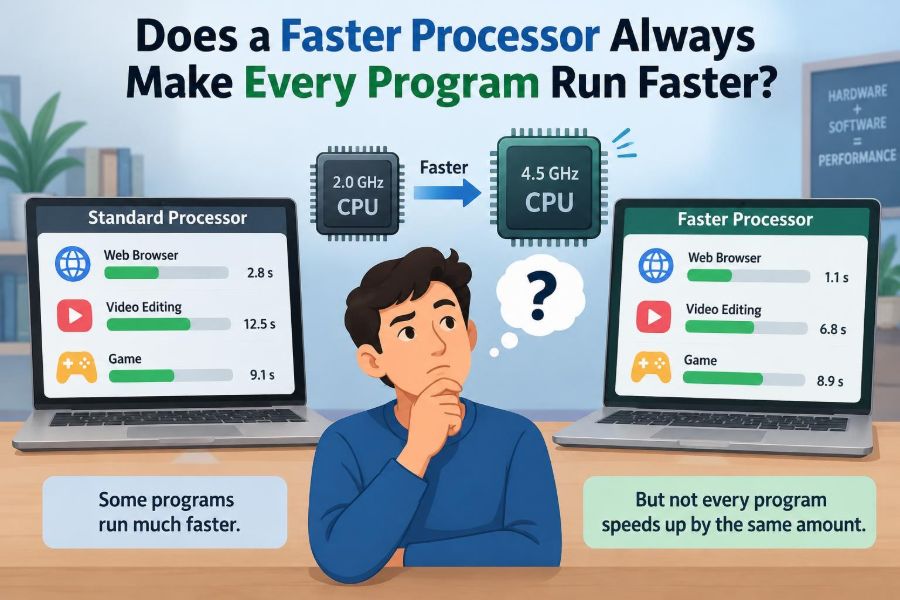

You buy a laptop with a newer, faster processor. Opening a web browser feels snappier, a spreadsheet recalculates more quickly, and a video call may run more smoothly. Then you start one particular program—and it seems almost exactly as slow as before.
That experience can feel confusing. If the processor is faster, shouldn’t every task finish sooner? The answer is sometimes, but not always.
A computer is a system of cooperating parts: processor cores, memory, storage, graphics hardware, networks, and software. A program only becomes faster when its slowest limiting part improves.
Understanding those limits helps students explain performance correctly and helps professionals make better upgrade, design, and troubleshooting decisions.
🧠 The Short Answer: It Depends on the Bottleneck
A faster processor, or CPU, can execute more instructions per second. That clearly helps programs whose main delay comes from CPU calculations.
But many programs spend substantial time waiting: for data from a disk, a response from a server, input from a user, or work from another component. In those situations, a better CPU may have little visible effect.
The key question is not “How fast is the processor?” It is “What is preventing this program from finishing sooner?” That limiting factor is called a bottleneck.
⚙️ What a Processor Actually Does
The CPU is the general-purpose calculation and control unit of a computer. It follows program instructions: adding values, comparing data, making decisions, moving small pieces of data, and coordinating other hardware.
For example, when a program sorts a list of names, calculates a formula, compresses a file, or interprets code, the CPU may perform most of the active work. Faster execution can reduce the time needed for those tasks.
However, the CPU does not store all data permanently, draw every pixel, or deliver information across the internet. Those jobs involve other hardware and software layers.
⏱️ Clock Speed Is Only One Part of CPU Performance
Clock speed, measured in gigahertz (GHz), describes how quickly a processor’s clock cycles occur. A higher clock speed can be useful, but it is not a complete measure of performance.
Different processor designs can accomplish different amounts of work during each cycle. Cache size, instruction design, branch prediction, memory access, power limits, and cooling can all affect real results.
That is why comparing two CPUs by GHz alone can be misleading. A newer processor with a lower listed clock speed may still complete a particular workload faster.
📋 A Program Is More Than Its Calculations
Most programs alternate among several kinds of work. They calculate, read and write data, wait for input, communicate over a network, and ask the operating system for services.
Consider opening a large presentation file. The program may read the file from storage, unpack images, calculate layout positions, load fonts, and draw content on screen. Only some of those stages are primarily CPU work.
A processor upgrade speeds up only the stages where CPU capability is the meaningful constraint. The rest of the process may remain unchanged.
🔍 CPU-Bound Programs Benefit Most
A CPU-bound program spends most of its time actively using one or more processor cores. Its speed is limited mainly by how quickly the CPU can execute its instructions.
Examples can include compiling source code, encoding some media formats, calculating scientific models, processing large datasets, encrypting files, or running a complex simulation. The exact result still depends on how the software is written.
For CPU-bound workloads, a faster processor can produce a clear improvement. A task that needs billions of calculations may finish sooner because each core completes its assigned instructions more efficiently.
💾 Storage Can Be the Real Delay
Storage-bound work is limited by reading or writing data. Traditional hard disk drives have moving parts and are generally much slower at random access than solid-state drives, or SSDs.
If an application repeatedly loads many small files, searches a large archive, or writes extensive logs, storage speed can dominate the experience. During these waits, the CPU may be mostly idle.
Replacing a hard drive with an SSD can therefore make booting, launching applications, and loading projects feel dramatically faster—even if the processor stays the same.
🧮 Memory Capacity Can Slow Everything Down
Random-access memory, or RAM, holds the programs and data currently in use. When a computer has enough RAM, active data can remain readily available for the CPU.
When RAM is insufficient, the operating system may move some data to storage and retrieve it later. This process is often called paging or swapping. It is far slower than using RAM directly.
A faster CPU cannot eliminate the delays caused by constant swapping. Adding sufficient RAM may help more, especially when many browser tabs, large documents, virtual machines, or creative applications are open at once.
🏎️ Memory Speed and Cache Also Matter
Even with enough RAM, the CPU cannot access main memory as quickly as it can perform its own internal operations. Processors use small, fast memory areas called caches to keep frequently needed data nearby.
When required data is already in cache, the CPU can continue efficiently. When it is not, the processor may pause while data arrives from a slower level of memory.
This is one reason two programs with similar amounts of arithmetic can behave differently. A program that accesses data in a predictable, nearby order often uses the memory system more effectively than one that jumps around a huge dataset.
🌐 Network Delays Ignore Your CPU Upgrade
Many familiar applications depend on remote services. A web page may wait for a server response, a cloud drive may wait for data to download, and an online game may wait for information to travel across the network.
Network latency is the time required for data to make a trip between systems. More processor speed at your computer cannot shorten a distant server’s processing queue or the physical travel time across network connections.
A newer CPU can still help render a complex page after its data arrives. But if the browser is waiting for the page’s server, the connection and service response are the likely bottlenecks.
🎮 Graphics Work Often Belongs to the GPU
A graphics processing unit, or GPU, is designed to perform many visual calculations in parallel. It commonly handles 3D rendering, image effects, video processing, and increasingly some specialized computing tasks.
In a graphically demanding game, the CPU may prepare game logic and instructions while the GPU draws each frame. If the GPU takes longer, installing a faster CPU may not increase the frame rate much.
Likewise, video-editing software may use a GPU for supported effects or exports. Performance depends on the application, the effect being used, driver support, available graphics memory, and the selected export settings.
🧩 Software Must Be Able to Use Extra Cores
Modern CPUs often contain multiple cores. Each core can work on a separate stream of instructions, allowing several tasks—or pieces of one task—to progress at the same time.
However, software does not automatically become twice as fast when it runs on twice as many cores. Developers must divide work into pieces that can safely run concurrently. This approach is called parallelism.
A simple older application may rely heavily on one main thread. In that case, strong single-core performance matters more than a large core count. A well-parallelized renderer or compiler can benefit from many cores.
🧵 The Serial Part Sets a Limit
Some steps must happen in a specific order. A program cannot use the result of step three until steps one and two have produced it. This ordered portion is called serial work.
Imagine preparing a report with eight assistants. They can each analyze a different data section, but one person may still need to combine the results and create the final document. That final stage limits the overall speedup.
This principle explains why adding cores eventually gives smaller gains. Parallel hardware helps only the portion of work that can actually be performed in parallel.
🔄 Background Tasks Compete for Resources
Your program rarely has the computer to itself. The operating system, security software, cloud synchronization, browser tabs, updates, and other applications all request CPU time, memory, storage access, and network capacity.
A faster processor can improve responsiveness when several CPU-heavy tasks compete. But it may not solve a system slowed by an active backup writing heavily to storage or by memory pressure caused by too many open applications.
When diagnosing slowness, check whether the slow program is truly responsible. A background process can be the hidden source of delay.
🪟 The Operating System Coordinates the Work
The operating system schedules CPU time, manages memory, controls files, communicates with devices, and protects programs from interfering with one another. Applications request many of these services rather than interacting with hardware directly.
Scheduling means a program may pause briefly while another process runs. Usually this is normal and unnoticeable. Under heavy load, however, scheduling pressure and resource contention can affect responsiveness.
Processor performance matters here, but operating system settings, device drivers, workload priorities, and available memory also influence the final experience.
📦 Algorithms Can Matter More Than Hardware
An algorithm is the method a program uses to solve a problem. Two programs can produce the same answer while requiring vastly different amounts of work.
For instance, searching a sorted collection with a method that repeatedly halves the remaining search area is generally much more efficient than checking every item one by one. No modest CPU upgrade can compensate indefinitely for an inefficient approach as data grows.
Better hardware is valuable, but improved algorithms often provide the largest performance gains. This is especially true for software that handles large files, databases, or repeated calculations.
🗃️ Data Structures Influence Real Speed
A data structure is the way a program organizes information in memory. Lists, queues, hash tables, trees, and arrays support different operations efficiently.
Suppose a program repeatedly checks whether an item exists in a large collection. Choosing a structure designed for fast membership checks can reduce unnecessary work. Choosing the wrong structure can force repeated scans through the collection.
These design choices affect CPU time, memory use, and cache behavior. They illustrate a practical lesson: performance is not solely a property of the machine; it is also a property of the program’s design.
🧪 A Faster CPU May Expose Another Bottleneck
Improving one component often reveals the next slowest component. This is not a failure of the upgrade; it is a normal result of a system becoming more balanced in a different way.
For example, a developer may upgrade a CPU and find that a build now spends most of its time reading dependency files from storage. After an SSD upgrade, the network download stage may become the longest part.
Performance tuning is therefore iterative. Measure the current bottleneck, improve it where reasonable, then measure again rather than guessing.
📊 Why Total Runtime Can Be Misleading
A program’s total runtime combines many kinds of delay. If a task takes ten minutes, a CPU may be busy for only two of those minutes while the program spends the rest waiting for storage, a database, or a remote service.
Even an imaginary CPU that made its calculation phase instantaneous would only remove those two minutes. The task would still take roughly eight minutes because the waiting time remains.
This is why performance claims need context. “Faster” must mean faster at a specific workload, under defined conditions, not simply faster in every possible situation.
🧰 Benchmarks Need Careful Interpretation
A benchmark is a repeatable test used to compare performance. Useful benchmarks represent the work you actually do: perhaps code compilation, photo export, spreadsheet analysis, or a particular game.
A score from an unrelated benchmark may tell you little about your daily tasks. A processor that excels at one kind of computation may have a smaller advantage in another workload limited by memory, graphics, or input/output.
Also consider the rest of the test system. Cooling, power settings, RAM configuration, storage, and software versions can change results. Compare like with like whenever possible.
🌡️ Heat and Power Can Reduce Sustained Speed
Processors generate heat while working. When a laptop or desktop cooling system cannot remove enough heat, the processor may lower its speed to stay within safe operating limits. This behavior is commonly called thermal throttling.
Power limits can have a similar effect, particularly on battery-powered devices. A processor may briefly run at a high boost speed, then settle at a lower sustained level during a long export or compilation.
So a CPU’s advertised peak behavior is not the whole story. Cooling quality, device design, dust buildup, and power mode can affect sustained workloads.
🔋 Battery Modes Change Performance Expectations
Many computers deliberately reduce performance when running on battery power to extend battery life and control heat. The operating system may choose lower processor frequencies or limit aggressive boost behavior.
This is often a sensible trade-off. Writing notes or reading documents rarely needs maximum CPU power, while a long simulation may finish sooner when the computer is plugged in and set to an appropriate power mode.
Before assuming a program has become slower, check whether power settings changed. The same hardware can behave differently under different energy and thermal constraints.
🧑💻 Human Waiting Time Is Not Only CPU Time
Some applications feel slow because of their interaction design rather than their total calculation time. A program may complete work quickly but delay showing progress, freeze its interface during a task, or make users wait for unnecessary confirmation screens.
Responsive software keeps the interface usable where possible, provides clear progress feedback, and moves long-running work away from the main interface thread. These choices improve perceived performance without changing the CPU.
For users, a visible progress indicator does not make the underlying task faster, but it makes the wait understandable. For developers, responsiveness is a performance goal in its own right.
🛠️ How to Find the Actual Bottleneck
Start with observation rather than an upgrade. Most operating systems provide a task or activity monitor showing CPU usage, memory pressure, disk activity, network traffic, and sometimes GPU load.
Look for a pattern while the problem occurs. A single CPU core at high use can suggest a single-threaded CPU limit. Constant disk activity with low CPU use may point to storage or paging. High network use may mean the program is transferring data.
These indicators are clues, not final proof. A professional workflow may require profiling tools, logs, or controlled tests to identify exactly where time is spent.
🧭 Match the Upgrade to the Workload
Choose upgrades based on the tasks that matter most. A student who mainly opens documents and browser tabs may benefit more from adequate RAM and an SSD than from a high-end CPU.
A software developer compiling large projects may value strong CPU performance, multiple cores, fast storage, and sufficient memory. A gamer may need a balanced CPU and GPU. Someone working with remote cloud tools may be constrained mainly by network quality.
- Slow startup or file loading: investigate storage first.
- Many apps cause freezing: check RAM capacity and paging.
- Long calculations or code builds: examine CPU utilization and parallel support.
- Low game frame rates: identify whether CPU or GPU load is limiting.
- Slow cloud-based work: test network and server responsiveness.
⚠️ Common Mistakes When Judging Computer Speed
A common mistake is assuming a high CPU percentage always means the processor is the problem. A program may use CPU while waiting inefficiently, or a single busy core may be the constraint even when the total percentage appears moderate.
Another mistake is treating memory usage as automatically bad. Using available RAM for useful caching is normal. The concern is memory pressure that forces frequent paging or makes applications unresponsive.
Finally, avoid changing many components or settings at once. If performance improves, you will not know which change solved the actual issue.
🧑🔧 What Developers Can Do
Developers should measure before optimizing. Profilers can show which functions consume CPU time, while tracing tools can reveal waits for files, locks, databases, networks, or other resources.
Useful improvements may include selecting better algorithms, reducing unnecessary data movement, batching storage operations, caching carefully, and parallelizing work that is independent. Each change has trade-offs in complexity, memory use, correctness, and maintainability.
Optimization should target real user scenarios. Making one benchmark faster is less valuable if the change harms reliability or does not improve the bottleneck users actually encounter.
🧠 The Core Principle: Speed Is a System Property
A faster processor absolutely can make many programs faster, especially those dominated by calculations that the CPU performs. It can also improve multitasking and make a system feel more responsive under load.
But no processor can bypass a slow disk, create more RAM, accelerate a delayed server response, replace a limited GPU, or fix inefficient software logic. The slowest necessary stage shapes the experience.
The most useful mental model is a production line. Making one worker faster helps only until another station becomes the line’s limiting point. Computer performance works much the same way.
A faster processor makes a program faster only when processor work is the part truly holding that program back. Ask what the program is doing, what it is waiting for, and which component is limiting the workflow before deciding what “faster” should mean. 💻⚙️🔍