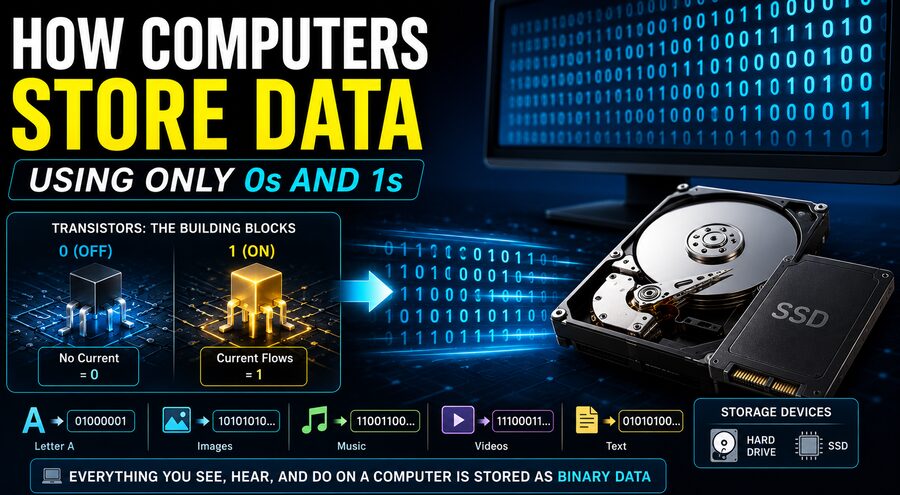

Modern computers can store photographs, music, movies, documents, video games, websites, and enormous scientific databases. Yet underneath all of this complexity, computers fundamentally represent information using just two basic states: 0 and 1. 🔢⚡
At first, this may sound almost impossible. How can two digits represent a high-resolution photograph? How can a song, a movie, or an entire operating system be reduced to nothing more than long sequences such as:
01001000 01100101 01101100 01101100 01101111
The answer lies in binary numbers, electrical states, encoding systems, logic circuits, and digital storage technology. Once these concepts are understood, the way computers store information becomes surprisingly logical.
🔢 What Does “Binary” Mean?
Humans normally use the decimal number system, also called base 10.
Decimal uses ten digits:
0, 1, 2, 3, 4, 5, 6, 7, 8, 9
Computers commonly use the binary number system, or base 2.
Binary needs only two digits:
0 and 1
Each binary digit is called a bit, short for binary digit.
A bit is the smallest basic unit of digital information.
A single bit can represent two possibilities:
0 or 1
Two bits can represent four possibilities:
00, 01, 10, 11
Three bits can represent eight possibilities, and eight bits can represent 256 different combinations.
This exponential growth is what makes binary so powerful. 🚀
⚡ Why Do Computers Use Only Two States?
Computers use binary because electronic hardware can reliably distinguish between two physical states.
Inside a processor or memory device, those states might correspond to things such as:
- High voltage and low voltage
- Current flowing and current not flowing
- A transistor being on or off
- A magnetic region pointing one way or another
- Electrical charge being present or absent
Engineers could theoretically design computers using more than two states, and some specialized technologies do. However, binary is especially reliable because electronic circuits can clearly distinguish between two ranges.
For example, one voltage range can represent 0, while another represents 1.
This makes digital systems resistant to small amounts of electrical noise. 🔌
The exact voltage does not necessarily have to be perfect. The hardware only needs to determine whether the signal belongs to the logical “low” or “high” range.
🧱 Bits and Bytes
A single bit cannot store very much information.
Computers therefore group bits together.
The most common grouping is a byte, which usually contains 8 bits.
For example:
01000001
is one byte.
Eight bits provide:
2⁸ = 256
possible combinations.
That means a single byte can represent one of 256 different values.
Storage capacities are built from increasingly large groups of bytes:
1 byte = 8 bits
1 kilobyte ≈ 1,000 bytes
1 megabyte ≈ 1,000,000 bytes
1 gigabyte ≈ 1,000,000,000 bytes
1 terabyte ≈ 1,000,000,000,000 bytes
In some computing contexts, binary-based units such as kibibytes and mebibytes use powers of 1,024 instead. 📦
🔢 How Binary Represents Numbers
Binary represents numbers using powers of two.
In decimal, the number 352 means:
3 × 100 + 5 × 10 + 2 × 1
Binary works similarly, but each position represents a power of 2.
Consider:
1011
Starting from the right, the place values are:
1, 2, 4, 8
So:
1011₂ = 1×8 + 0×4 + 1×2 + 1×1
That equals:
8 + 2 + 1 = 11
Therefore:
1011 in binary = 11 in decimal
This same principle allows computers to represent very large numbers using long sequences of bits.
🔤 How Computers Store Letters
Numbers are straightforward, but what about text?
Computers use character encoding systems that assign numerical values to letters, punctuation marks, symbols, and other characters.
One early encoding standard is ASCII, which stands for American Standard Code for Information Interchange.
For example, in ASCII:
A = 65
B = 66
C = 67
The decimal number 65 can be represented in binary as:
01000001
Therefore, a computer can store the letter A as a pattern of bits.
Similarly, the word:
CAT
can be represented by numerical character codes, which are then stored in binary.
Modern systems frequently use Unicode, particularly encodings such as UTF-8, because Unicode can represent characters from thousands of languages along with mathematical symbols, emojis, and many other writing systems. 🌍🔤
Even emojis ultimately become numbers, and those numbers are stored as binary data. 😀
📝 How a Text File Becomes 0s and 1s
Suppose you type:
Hello
Each letter is assigned a numerical code.
Using a common encoding:
H → 72
e → 101
l → 108
l → 108
o → 111
Those numbers can then be written in binary:
H → 01001000
e → 01100101
l → 01101100
l → 01101100
o → 01101111
So the word “Hello” can be physically stored as patterns corresponding to these bits.
The computer does not inherently know that these bits mean a greeting. The software interprets them according to the agreed character encoding.
That idea is crucial: bits gain meaning through interpretation. 🧠
🖼️ How Images Become Binary
A digital image is usually divided into tiny elements called pixels.
Each pixel stores information about its color and brightness.
In a typical RGB image, a color may be described using three components:
- Red
- Green
- Blue
Each component may have a value between 0 and 255.
For example:
Red = 255
Green = 0
Blue = 0
represents bright red.
The number 255 in binary is:
11111111
The value 0 is:
00000000
Therefore, one red pixel might be represented approximately as:
11111111 00000000 00000000
That is 24 bits of color information.
A photograph containing millions of pixels requires millions of such values. 📸
Image formats such as JPEG, PNG, and WebP use mathematical methods to organize and often compress this information, but at the lowest level, the file is still stored as bits.
🎵 How Sound Is Stored Using Binary
Sound in the physical world is continuous. Air pressure changes smoothly as sound waves travel.
Computers convert these analog sound waves into digital data through a process called sampling.
A microphone and an analog-to-digital converter measure the sound wave repeatedly.
For example, CD-quality digital audio commonly uses a sample rate of:
44,100 samples per second
Each sample records the wave’s amplitude at a particular moment.
Those amplitude measurements are represented as numbers.
The numbers are then stored in binary. 🎶
When the audio is played, a digital-to-analog converter transforms the numbers back into an electrical signal that can drive a speaker.
Therefore, music stored on a computer is ultimately a huge sequence of binary numerical measurements.
🎬 How Videos Are Stored
A video is essentially a rapid sequence of images combined with audio.
For example, a video running at 30 frames per second displays 30 images every second.
If each image contains millions of pixels, raw video would require enormous amounts of data.
Video codecs such as H.264, H.265, AV1, and others compress video by finding patterns between frames.
Instead of storing every frame completely independently, a codec may store information such as:
- What parts of the image changed
- What objects moved
- Which areas stayed the same
- How blocks of pixels can be mathematically approximated
Despite this complex compression, the final video file is still stored as binary. 🎥
🧠 What Does “0” or “1” Physically Look Like?
A binary digit is an abstract concept.
A computer does not literally contain tiny printed 0s and 1s.
Instead, the hardware uses different physical conditions to represent those values.
The exact method depends on the storage technology.
For example:
RAM may represent information using electrical charge or transistor states.
SSDs store information by controlling electrical charge in memory cells.
Hard drives use microscopic magnetic regions.
Optical discs use physical or optical differences on a disc surface.
So when people say computers store 0s and 1s, they mean that physical states are interpreted as binary values. ⚙️
🧲 How Hard Drives Store Binary Data
Traditional hard disk drives, or HDDs, use magnetism.
Inside a hard drive are rapidly spinning platters coated with magnetic material.
Tiny regions on the platter can be magnetized in different ways.
A read/write head moves extremely close to the surface.
When writing data, the head changes the magnetic orientation of regions on the platter.
When reading data, it detects magnetic changes and converts them into electrical signals.
The drive’s electronics then interpret those magnetic patterns as digital bits. 🧲💾
Modern hard drives use highly advanced encoding methods, so the relationship between individual magnetic transitions and user-visible bits is more sophisticated than simply “one spot equals one bit.” Nevertheless, binary information remains the logical foundation.
⚡ How SSDs Store Data
Solid-state drives, or SSDs, contain no spinning disks.
Instead, they commonly use NAND flash memory.
Flash memory stores electrons inside specialized transistor structures.
The amount of stored electrical charge changes the transistor’s behavior.
Electronics inside the SSD measure these electrical characteristics and interpret them as stored data.
Some flash cells represent only one bit, but modern SSDs frequently store multiple bits in each memory cell.
Examples include:
SLC – 1 bit per cell
MLC – typically 2 bits per cell
TLC – 3 bits per cell
QLC – 4 bits per cell
A QLC cell can represent 16 different voltage or charge levels because four bits provide:
2⁴ = 16 combinations
So modern storage can physically use multiple levels while still logically representing binary information. 🔋
🧠 How RAM Stores Bits
RAM, or Random Access Memory, provides temporary working storage.
It is much faster than long-term storage devices such as SSDs or hard drives.
One common type, DRAM, stores bits using tiny capacitors.
A charged capacitor may represent one logical state, while a discharged capacitor represents another.
However, the charge leaks away over time.
Therefore, DRAM must constantly refresh its stored data—even while the computer is running.
Another type, SRAM, uses transistor circuits to hold information. SRAM is extremely fast and is commonly used for processor cache memory.
Unlike SSD storage, ordinary RAM loses its information when power is removed. ⚡
🔌 Transistors: The Tiny Switches Behind Computing
The modern processor contains billions of microscopic transistors.
A transistor can act somewhat like an electronically controlled switch.
Depending on electrical conditions, it can represent or help process logical states corresponding to 0 and 1.
Transistors are connected into structures called logic gates.
Common logic gates include:
- AND
- OR
- NOT
- XOR
- NAND
- NOR
These gates perform simple logical operations.
By combining enormous numbers of gates, engineers build circuits capable of performing addition, comparison, memory access, graphics processing, artificial intelligence calculations, and much more. 🤖
The astonishing complexity of modern computing therefore emerges from massive networks of devices performing extremely simple binary operations.
➕ How Computers Perform Mathematics With Bits
Computers also perform arithmetic using binary.
For example:
1 + 1 in binary = 10
This may look strange, but it is equivalent to what happens when decimal numbers carry into the next column.
In decimal:
9 + 1 = 10
In binary, there are only two digits, so after 1 comes 10.
Processors contain digital circuits called adders that perform binary arithmetic.
More complicated circuits can perform:
- Addition
- Subtraction
- Multiplication
- Division
- Comparison
- Bit shifting
These operations form the foundation of much more advanced calculations.
📂 How Does the Computer Know What the Bits Mean?
Suppose a computer encounters the binary sequence:
01000001
That could represent the number 65.
It could also represent the letter A under ASCII.
Or it could be part of an image, instruction, audio sample, compressed archive, or program.
The bits themselves do not specify their meaning.
Their meaning depends on context and format.
A file format tells software how to interpret the data.
For example:
.jpg files follow image encoding rules.
.mp3 files follow audio compression rules.
.pdf files contain structured document information.
.exe files may contain executable machine instructions.
File headers, metadata, operating-system information, and software standards help determine how sequences of bits should be interpreted.
📉 Compression Makes Binary Storage More Efficient
Digital files often contain patterns and repetition.
Compression algorithms take advantage of these patterns to reduce storage requirements.
There are two major categories:
📦 Lossless Compression
Lossless compression allows the original data to be reconstructed exactly.
Examples include:
- ZIP
- PNG
- FLAC
This is important for software, documents, and other data where losing even a small amount of information could create errors.
🎧 Lossy Compression
Lossy compression intentionally removes some information to achieve much smaller files.
Examples include:
- JPEG
- MP3
- Many video formats
The removed information is usually selected so that humans are less likely to notice the difference.
Whether compressed or uncompressed, the resulting data is ultimately represented in binary.
🛡️ How Computers Prevent Bit Errors
Because computer systems depend on enormous numbers of bits, even tiny error rates could cause problems.
Engineers therefore use techniques for detecting or correcting errors.
Examples include:
- Parity bits
- Checksums
- Error-correcting codes
- Memory ECC
- Storage redundancy
ECC memory, for instance, can detect and sometimes automatically correct certain errors in stored data.
Storage devices also contain sophisticated error-correction systems because physical memory is never perfectly reliable.
These systems ensure that the 0s and 1s read by the computer match the information that was originally stored. 🛡️
🌐 The Internet Is Binary Too
When you send a photograph over the internet, it does not travel as a visible picture.
The image is encoded into digital data.
Network hardware divides that information into packets, adds addressing and control data, and transmits it through networks.
Those bits may physically travel as:
- Electrical signals through copper
- Pulses of light through fiber-optic cables
- Radio waves through Wi-Fi
- Radio signals through cellular networks
The physical signal changes depending on the communication technology, but the receiving hardware reconstructs the digital information.
Thus, the same binary principles behind storage are also fundamental to digital communication. 🌐📡
🤯 How Two Digits Create an Entire Digital World
The remarkable power of binary comes from combinations.
One bit has only two states.
But:
8 bits = 256 combinations
16 bits = 65,536 combinations
32 bits = over 4.29 billion combinations
64 bits = more than 18 quintillion combinations
With billions or trillions of bits, computers can encode staggering amounts of information.
Text, colors, audio samples, processor instructions, 3D models, financial databases, artificial intelligence systems, and entire virtual worlds can all ultimately be translated into numerical patterns.
Those numbers can then be represented with binary.
🌟 Final Thoughts
Computers may appear extraordinarily complicated, but their digital foundation is elegantly simple.
At the lowest logical level, information is represented through bits—0s and 1s. These values correspond to distinguishable physical states inside electronic, magnetic, or optical systems. 💻⚡
Groups of bits represent numbers. Numbers can represent letters, colors, sound samples, instructions, coordinates, and countless other forms of information.
A photograph becomes numbers describing pixels. 📸
A song becomes numbers describing sound waves. 🎵
A movie becomes encoded frames and audio. 🎬
A program becomes numerical machine instructions. 🧠
Storage hardware preserves those numbers using physical states that computers interpret as binary.
The most fascinating part is that a computer does not need thousands of fundamental symbols to create complex digital experiences. It only needs reliable ways to distinguish between two states.
From those two simple possibilities—0 and 1—engineers have built smartphones, the internet, video games, spacecraft computers, supercomputers, and modern artificial intelligence. 🤖🌍
Binary may consist of only two digits, but when billions of those digits work together, they can represent almost anything.